QR Codes and AR in Retail

Simple Technologies with Big Impact

Augmented Reality (AR) in retail is often presented as complex and expensive. However, effective AR solutions do not always require advanced hardware or fully immersive systems. One of the most realistic and accessible approaches is the use of QR codes and image-based recognition to connect physical retail spaces with digital content.

This blog post explores how simple AR entry points can have a strong impact on customer comfort, decision-making, and user experience.

What “Low-Cost AR” Means in Retail Design

In this context, low-cost AR refers to systems that do not require special devices such as AR glasses or smart mirrors. Customers can use their own smartphones, which lowers both technical and financial barriers.

Low-cost AR solutions include:

  • QR codes placed in the store
  • image recognition based on existing visuals
  • web-based AR instead of custom apps

This approach follows early AR research, which defines AR as a technology that adds digital information to the real world, not replaces it (Augmented Reality).

Store Concept: Section-Based QR Codes That Support Physical Movement

The core idea behind this concept is to support physical shopping, not replace it.

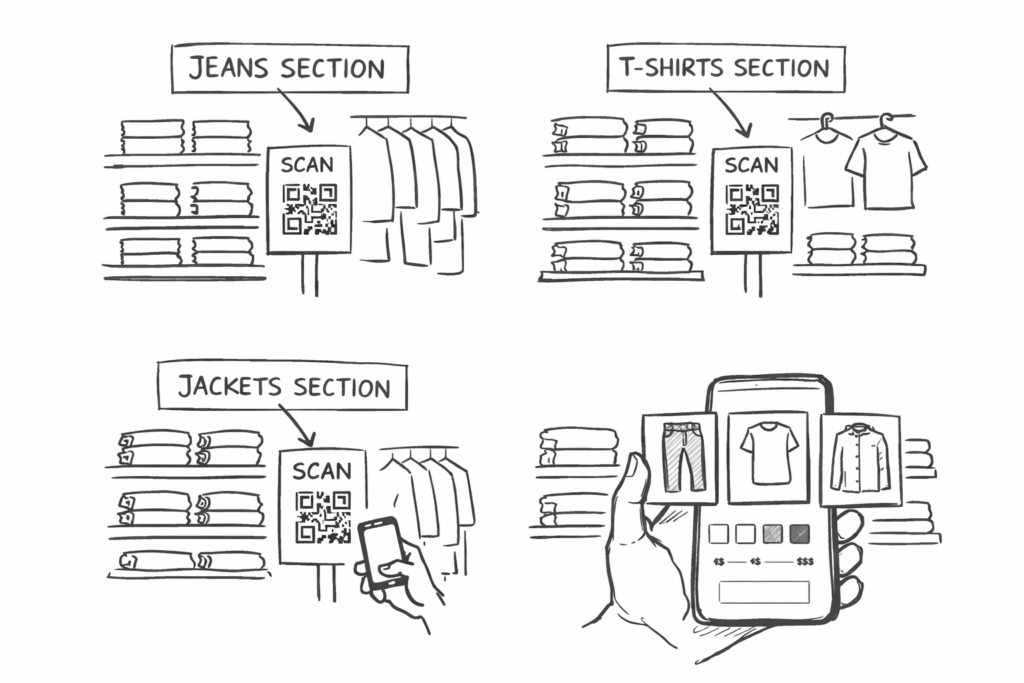
Instead of attaching QR codes to every single product, QR code stickers are placed by store sections, for example:

  • one QR code for the jeans section
  • one QR code for the T-shirt section
  • one QR code for the jacket section

This design choice encourages customers to walk through the store, browse physically, and stay engaged with the space.

After scanning the QR code, the customer would see:

  • images of all available items in that section
  • simple filters (size, color, cut, price range)
  • visual previews instead of long text

This keeps the store experience active while adding a calm digital support layer.

Beyond QR Codes: Adaptive AR Using Image Recognition

Importantly, this system does not need to rely only on QR codes.

Based on older blogpost we realized that computer vision and image recognition, modern applications are already able to:

  • recognize images or objects through the camera
  • match them with stored visual databases
  • “remember” or identify visual patterns

This means that instead of scanning a QR code, a customer could:

  • point the camera at a section sign, poster, or product image
  • let the system recognize the image
  • automatically open the related digital content

Research presented in Computer Vision shows that image recognition systems can reliably identify visual features and link them to stored information. These methods are already used in retail apps, museums, and navigation systems.

From a design perspective, this makes the system adaptive:

  • QR codes can be used as a clear entry point
  • image recognition can work as a more seamless alternative
  • both systems can coexist

This flexibility allows designers to choose the level of visibility and interaction that best fits the store atmosphere.

Reducing Cognitive Load with Structured Visual Information

Cognitive load means the amount of mental effort required to process information and make decisions. Presenting information only when it is needed helps reduce extraneous cognitive load and prevents users from feeling overwhelmed.

Retail environments can easily overwhelm customers through:

  • visual clutter
  • too many options
  • unclear organization

Research summarized in The Cambridge Handbook of Multimedia Learning shows that users process information better when it is:

  • structured
  • optional
  • visually supported

Section-based AR helps reduce cognitive load by:

  • grouping items logically
  • showing only relevant products
  • allowing filtering instead of searching

This supports clearer and calmer decision-making.

Why This Approach Matters for Retail Design

This QR- and image-based AR concept is effective because it is:

  • low-cost – no special hardware required
  • adaptive – QR codes and image recognition can be combined
  • inclusive – supports different user personalities
  • emotionally supportive – reduces pressure and overstimulation

As discussed in Digital Consumer Management, modern retail success depends on understanding how digital tools affect emotions, comfort, and consumer confidence, not only efficiency.

Conclusion

QR codes and image recognition show that meaningful AR in retail does not require complex systems. By placing digital entry points at the section level and allowing customers to filter and explore visually, retailers can support autonomy while preserving the physical shopping experience.

According to multimedia learning theory, users process information more effectively when content is presented in a structured and segmented manner rather than all at once.

In this approach, AR becomes a quiet, adaptive assistant that respects emotional comfort, cognitive limits, and personal space.

Sources

  • Norman, D. A. (2004). Emotional Design: Why We Love (or Hate) Everyday Things. Basic Books.
  • Mayer, R. E. (Ed.). (2005). The Cambridge Handbook of Multimedia Learning. Cambridge University Press.
  • Mogaji, E. (2024). Digital Consumer Management: Understanding and Managing Consumer Engagement in the Digital Environment. Routledge.

Disclosure (as requested):
In the development of this blogpost, AI (ChatGPT) was used as a supportive writing and structuring tool. I provided the conceptual content, research direction, theoretical preferences, and methodological decisions, while the AI assisted in translating it to English, refining the wording, organising the material and generating coherent academic formulations based on my input. The AI did not produce research or arguments but helped transform my ideas into a clear and well-structured text draft.

Impulse: Reducing Cognitive Load Through AR Interfaces

While researching Cognitive Load Theory, I confirmed again how strongly mental overload influences decision-making. I came across this page that explained it pretty well and also got little more information from wikipedia.

wikipedia:

Cognitive load refers to the amount of mental effort a person needs to process information at a given moment. According to Cognitive Load Theory, when too much information is presented simultaneously, people feel overwhelmed, stressed, and less confident in their decisions. Instead of supporting users, the environment becomes exhausting.

In physical retail environments, cognitive load is often unintentionally high. Customers must process multiple layers of information at once:
product details, prices, sizes, spatial layout, lighting, background music, social interaction with staff, and sometimes even time pressure. For many users—especially introverted or socially sensitive individuals—this combination can quickly lead to discomfort and decision fatigue.

AR-based retail interfaces offer a way to reduce this mental overload rather than adding to it. Instead of requiring users to search, compare, and ask questions simultaneously, AR can and should  present information in a structured and gradual way. Users receive only the information they need at a specific moment, such as visualising a product’s size, fit, or placement, without being exposed to unnecessary stimuli.

This approach shifts AR from being a novelty feature to a cognitive support tool. By filtering complexity and guiding attention, AR helps users focus on one decision at a time. This is particularly relevant for users who prefer calm, self-directed exploration and who may feel uncomfortable navigating crowded or socially demanding retail spaces.

From a UX perspective, this means that successful AR design should aim to lower cognitive load, not increase it through excessive animations, pop-ups, or interaction steps. Minimal interfaces, predictable interactions, and clear visual hierarchy become essential design principles.

For my master’s research, this insight reinforces a central idea:
AR in retail should be designed not for maximum stimulation, but for mental clarity, emotional comfort, and confident decision-making. Reducing cognitive load can ultimately lead to a more inclusive and humane shopping experience—one that respects different user needs and emotional thresholds.       

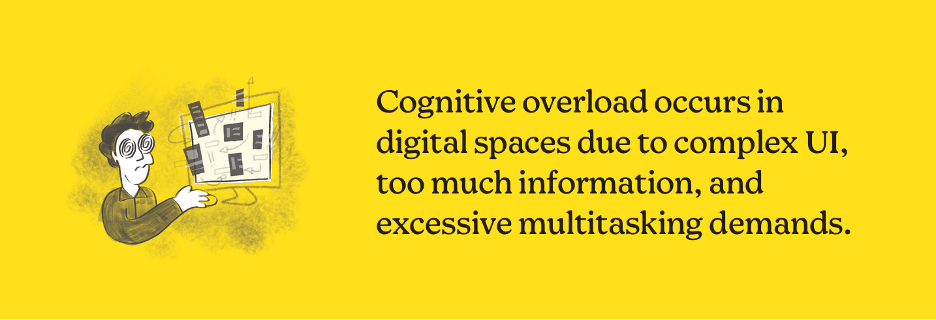
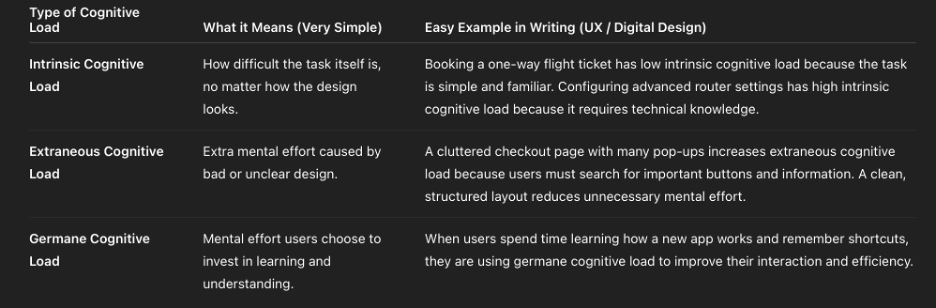
This image is the clear and short explanation of type of Cognitive Load based on wikipedia and Page: ( https://mailchimp.com)


When Design Thinks Too Much for the User

Sometimes digital products don’t fail because they are useless —
they fail because they ask users to think too much.

so as a summary: cognitive overload is when a person receives more information than their brain can comfortably process at one time. Instead of feeling supported, the user feels stressed, confused, or tired.

In digital design, this often looks very familiar:
too many buttons, too many messages, pop-ups everywhere, or long explanations that appear all at once. Even if every element is “useful,” together they can become overwhelming.

The problem is not intelligence.
The problem is mental capacity.

When users feel overloaded, they don’t explore more they just leave.
They stop reading, stop clicking, or postpone decisions.

Good design does not show everything at once.
It guides attention, reduces unnecessary choices, and respects how people actually think and feel.

This is especially important in areas like online shopping or AR-based experiences, where users already need to make decisions. If design adds extra pressure, it breaks trust instead of building it.

Sometimes, the best design decision is not adding a new feature —
but removing one.

So in my case: 

AR Shopping Experience WITH cognitive load

  • Many buttons floating in AR
  • Bright colors and fast movement
  • Too many instructions at once

WITHOUT cognitive load

  • One action at a time
  • Calm colors
  • Short and clear instructions

Source (open & accessible):
Wikipedia – Cognitive Load Theory
https://en.wikipedia.org/wiki/Cognitive_load

(In the development of this blogpost, AI (ChatGPT) was used as a supportive writing and structuring tool. I provided the conceptual content, research direction, theoretical preferences, and methodological decisions, while the AI assisted in translating it to English, refining the wording, organising the material and generating coherent academic formulations based on my input. The AI did not produce research or arguments but helped transform my ideas into a clear and well-structured text draft.)
https://mailchimp.com/resources/cognitive-overload

IMPULSE: How to leverage AR in the new retail revolution

Reflections Inspired by a Zappar Talk

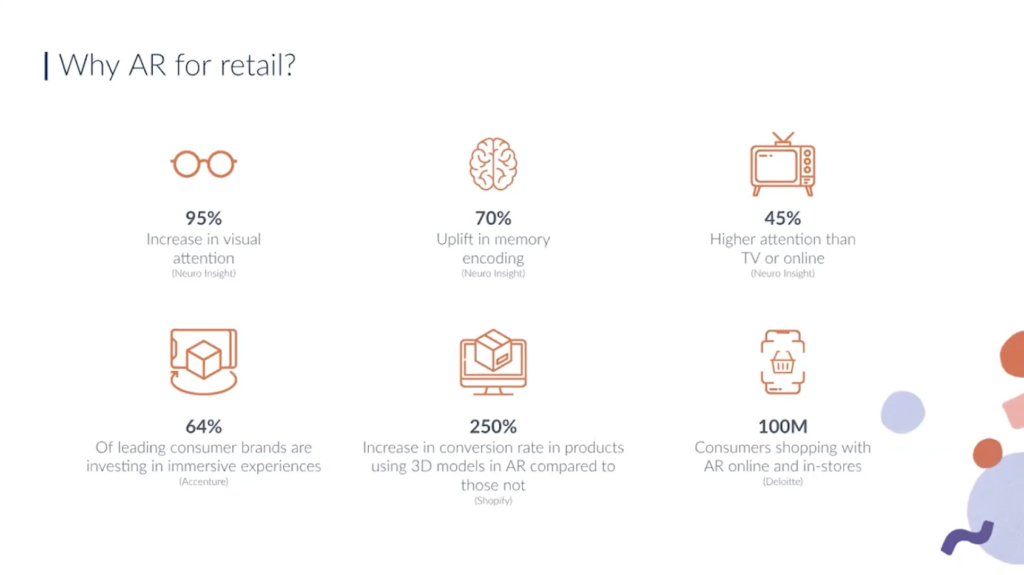
The YouTube video about “How to leverage AR in the new retail revolution” is zoom call based presentation about how augmented reality (AR) can be used in modern retail environments — how it can be applied in stores and customer experiences to influence shopping behavior and engagement. 

applications of AR in retail and how companies can use AR as a tool in the retail revolution.

One example discussed was a retail AR experience developed for Motorola. In this case, AR was used to explain product features and functionality through animated visual content. By scanning the product or its packaging with a smartphone, users could access AR explanations that went beyond static text or printed manuals.

What made this example particularly interesting to me is that the AR experience was not limited to the store. Customers could take the product home and still access the AR content later. This shifts AR from a one-time in-store interaction to a take-home support tool, allowing users to explore information at their own pace, without pressure.

Another point emphasized in the talk was the use of animation as a way to explain information. Instead of relying on long descriptions, AR animations visually demonstrate how a product works. In some cases, these animations are inspired by the brand’s logo or visual identity, which makes the experience feel familiar and playful rather than technical or overwhelming.

This combination of animation, branding, and explanation shows that AR can be both informative and enjoyable, helping users understand products while keeping the experience light.

Smartphone-first AR and everyday usability

All examples presented in the talk were based on smartphone AR, not headsets. This choice felt intentional and realistic. Smartphones are already part of everyday shopping behavior, and using them for AR does not require special preparation, waiting time, or staff assistance.

This reinforced my growing understanding that AR in retail does not need to be deeply immersive to be effective. Instead, it needs to be easy to access, easy to stop, and socially acceptable. In this sense, AR works best when it blends into the shopping process rather than standing out as a spectacle.

Why this talk motivated further research

What motivated me most about this talk is how rare this perspective still is. Despite the growing interest in AR, there are surprisingly few talks and examples that focus on practical AR in retail, explained through real use cases rather than marketing promises.

Seeing examples like the Motorola case made me realize how much potential AR still has as a quiet design intervention—one that reduces uncertainty, supports understanding, and lowers cognitive and emotional load during shopping.

This talk gave me a strong impulse to continue researching AR in retail from a user experience and emotional comfort perspective, especially because there is still limited accessible material that critically reflects on AR as a supportive, human-centered tool rather than a novelty.

Hands-on exploration: testing Zappar’s tools myself

After watching the talk, I decided to explore Zappar’s platform myself to better understand how their approach translates into practice. I visited their website and explored the examples and tools they provide, which led me to an actual working AR build environment. I tested several of their live AR experiences directly on my phone, and the overall performance was noticeably smooth and stable in use.

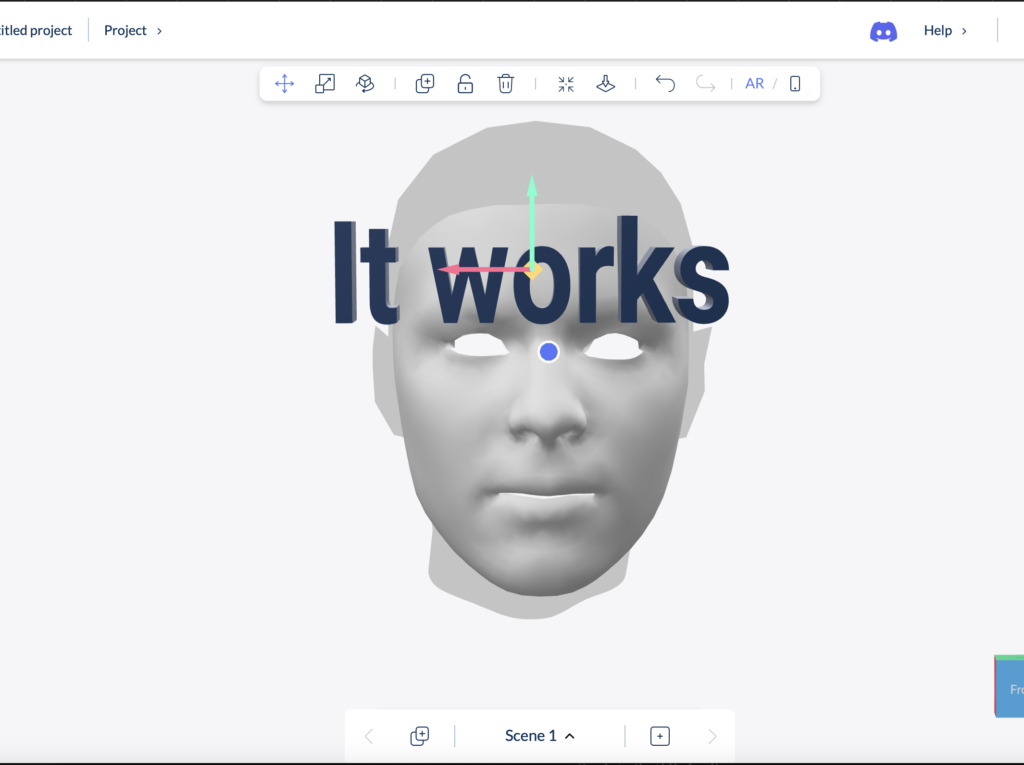
To gain deeper insight, I also tested the platform more extensively through a paid plan. The professional membership is relatively affordable (around 11 EUR per month), which made it accessible for experimentation and research purposes. I deliberately focused on some of the more challenging AR interactions for this type of tool, particularly face recognition–based try-on experiences and text-based AR interactions.

I tested several variations of these features, and the results were surprisingly reliable. Face tracking worked accurately, the try-on interaction felt responsive, and the text interactions were clear and easy to control. What impressed me most was not only the technical performance, but also the quality of the interface. The design felt intuitive, well-structured, and approachable, even when testing more complex AR actions.

This hands-on testing strengthened my impression that Zappar’s tools are not only conceptually interesting, but also practically usable for rapid prototyping and user experience research. Experiencing the platform directly helped me better understand how AR can be implemented in a way that feels smooth, accessible, and user-friendly—qualities that are essential for meaningful AR use in retail contexts.

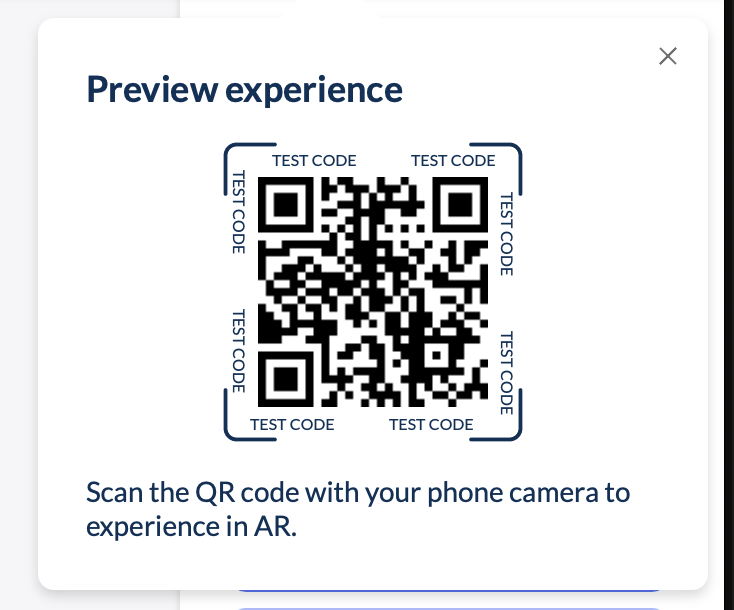
It instantly generates a QR code, and you can test it on your phone quickly and easily. It works perfectly.

Reflection for my thesis

The Zappar examples strengthened my conviction that meaningful AR in retail does not require complex hardware or fully immersive environments. Instead, it requires thoughtful design, clear purpose, and respect for the user’s time, attention, and emotional state.

This impulse directly feeds into my Master’s thesis, where I explore how AR can support more comfortable and inclusive retail experiences—particularly for users who experience shopping as stressful or overwhelming. The talk confirmed that AR’s real value in retail lies not in replacing reality, but in quietly supporting it.

Leveraging Augmented Reality in Retail – Zappar Talk
https://www.youtube.com/watch?v=grnDgOHY9Tc

In the development of this blogpost, AI (ChatGPT) was used as a supportive writing and structuring tool. I provided the conceptual content, research direction, theoretical preferences, and methodological decisions, while the AI assisted in translating it to English, refining the wording, organising the material and generating coherent academic formulations based on my input. The AI did not produce research or arguments but helped transform my ideas into a clear and well-structured text draft.

Using Blippar Builder for AR Prototyping

One of the platforms I tested is Blippar, specifically Blippar Builder, which is promoted as a no-code AR creation tool.

This blogpost clarifies what Blippar Builder can actually do, what it cannot do, and how it fits into my overall prototyping workflow.

What is Blippar Builder?

Blippar Builder is a web-based AR authoring platform that allows users to create AR experiences without programming. Content such as 3D models, images, videos, and text can be placed into an AR scene and triggered through QR codes or image recognition. The experience then runs on smartphones, either via WebAR or the Blippar app.

Official platform information:
https://www.blippar.com/builder

The tool is mainly designed for marketing and branded AR experiences, but it can also be used in design research contexts.

What Blippar Builder is good at

Blippar Builder works well for early-stage AR prototyping. It allows me to quickly visualize ideas and test how AR content appears in real physical environments. This includes checking scale, placement, readability, and overall visual clarity.

For my thesis, this distinction is actually helpful. Blippar Builder can function as an early-stage tool to test visual comfort, scale, clarity, and first emotional reactions to AR content. These are key aspects of my research, which focuses on reducing sensory overload and improving emotional comfort in retail settings.

Because the tool requires no coding, it keeps the focus on design decisions rather than technical implementation.

What Blippar Builder cannot do

Blippar Builder has clear limitations when it comes to interaction depth. It does not support complex user flows, adaptive behavior, or logic that changes based on user state. Interaction options are mostly predefined and linear.

Blippar offers both a visual Builder and a Unity plug-in, but they are used in different ways. Projects made in the Builder cannot be moved into Unity. The Unity plug-in is for building AR experiences directly in Unity, while the Builder is mainly for quick visual prototypes and testing ideas.

Blippar Builder vs Unity: how they connect

Blippar Builder and Unity serve different roles in the design process.

Blippar Builder → early visual / comfort / perception testing

Unity + Blippar SDK → advanced AR development (if needed)

Unity without Blippar SDK → alternative AR pipeline

When a company like Blippar offers an AR SDK, it means: developers can build AR experiences inside their own app or in Unity

SDK- A Software Development Kit (SDK) is a collection of tools and code libraries that allows developers to build and customize applications by directly programming functionality, such as AR tracking or interaction logic.

Why this tool choice makes sense for my thesis

Using Blippar Builder at an early stage allows me to:

  • test visual comfort and clarity quickly
  • observe first user reactions
  • refine design direction before technical development
  • free for the first steps

Later, moving to Unity (with more experience and money) allows for more complex experimentation with interaction, pacing, and user behavior. This separation demonstrates a structured and methodologically sound design process, rather than a limitation.

Scope and Limitations of the Prototype Testing

The prototype was not designed to evaluate long-term usage patterns, complex interaction flows, or adaptive and personalized system behavior. These aspects were intentionally excluded from the testing process. The focus of the research lies on first impressions, visual clarity, sensory comfort, and initial emotional responses to AR-supported retail interactions, rather than on system performance, prolonged engagement, or behavioral optimization over time.

My feedback on the User-experience aspect of it while trying it out a bit.

One issue I noticed early on is that the instant readiness of the tool can be misleading. The previews and renderings inside the Builder often give a more polished impression than the final AR experience after publishing. In practice, this means that what looks good during setup does not always translate exactly the same way in the live AR environment.

As a result, publishing can sometimes lead to disappointment, especially when expectations are set too high by the in-editor preview. This made it clear that multiple rounds of testing, proofreading, and correction are necessary to achieve the desired quality. In that sense, the tool encourages fast creation, but still requires careful refinement to avoid false assumptions about the final outcome.

I also encountered some features that were not immediately intuitive and were harder to understand or apply within my project context. Certain functions require trial and error before their behavior becomes clear, which can slow down the workflow at times.

That said, aside from these limitations, my first interaction with Blippar Builder was mostly smooth. The platform allowed me to create the type of AR content I had in mind without needing coding knowledge, which is a significant advantage. This accessibility is a key reason why such tools attract attention at trade shows and events and can contribute to increased engagement and sales. By lowering the technical barrier, Blippar Builder opens up AR creation to a wider audience and enables brands to differentiate themselves through interactive marketing experiences.

Conclusion

Blippar Builder is capable of producing AR prototypes, but primarily at a conceptual and visual level. It is best suited for early-stage design exploration and communication of ideas. For more complex interaction and behavioral research, it needs to be combined with more flexible development tools such as Unity.

In my thesis workflow, Blippar Builder therefore functions as a valuable early-stage prototyping tool, supporting design exploration before moving into deeper technical development.


Source links you can include in your blogpost:


In the development of this blogpost, AI (ChatGPT) was used as a supportive writing and structuring tool. I provided the conceptual content, research direction, theoretical preferences, and methodological decisions, while the AI assisted in translating it to English, refining the wording, organising the material and generating coherent academic formulations based on my input. The AI did not produce research or arguments but helped transform my ideas into a clear and well-structured text draft

Meta Quest Headsets vs Smartphones in Retail AR:

When comparing AR on smartphones with VR headsets such as Meta Quest, the discussion should not only focus on immersion, but also on practical use in real retail environments.

Defining the technologies briefly

  • Smartphone-based AR (Augmented Reality) means digital elements are added to the real world through a phone screen. The user stays fully aware of their surroundings.
  • VR (Virtual Reality) uses head-mounted displays that fully replace the real environment with a virtual one.

While VR offers stronger immersion, this strength also creates operational challenges in retail.

Hardware management and constant care in stores

One major difference between smartphones and VR headsets is device ownership and responsibility.

Smartphones are personal devices. Customers bring their own phones, meaning:

  • no shared hardware
  • no setup by staff
  • no maintenance by the store
  • no hygiene management

VR headsets, on the other hand, are shared devices in retail settings. This means they require:

  • staff supervision
  • setup assistance
  • regular cleaning and sanitization
  • technical troubleshooting

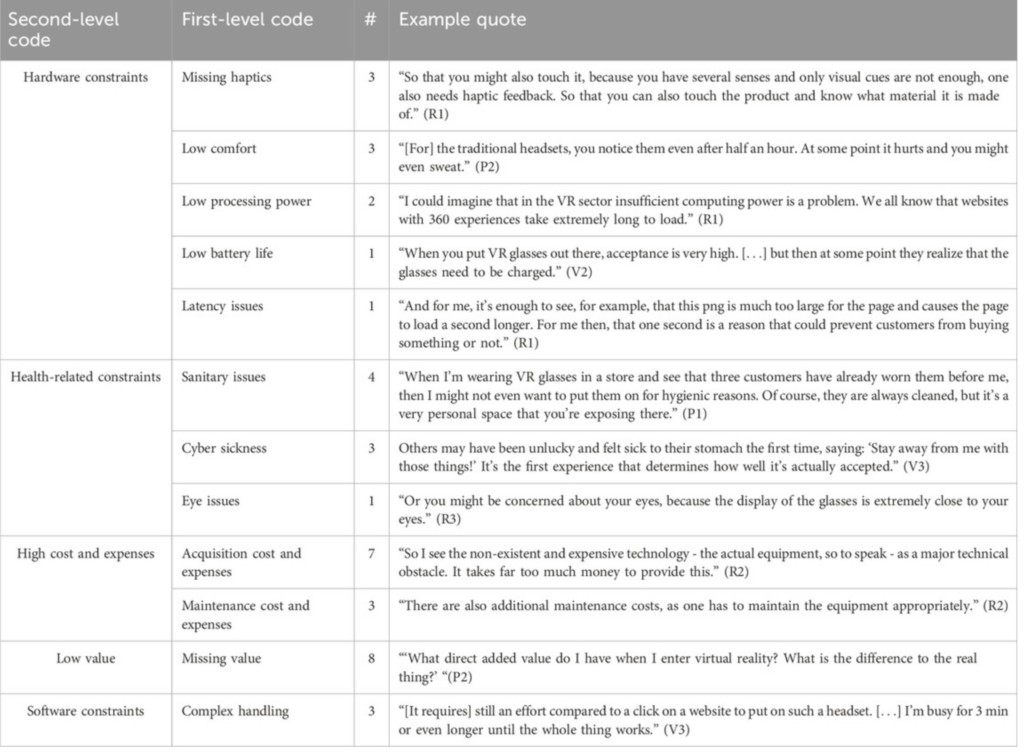
Retail research on VR adoption highlights operational complexity and maintenance effort as key barriers to implementing VR experiences in stores. Studies reviewing VR use in retail environments point out that head-mounted displays require additional resources and management, which makes them harder to integrate into everyday shopping situations.
(Source: Frontiers in Virtual Reality, 2025 – VR adoption barriers)
 https://www.frontiersin.org/journals/virtual-reality/articles/10.3389/frvir.2025.1721321/full

Throughput and waiting time: one user vs many users

Another critical issue is throughput, meaning how many people can use a system at the same time.

  • Smartphone AR allows many users simultaneously, because everyone uses their own device.
  • VR headsets allow only one user at a time per headset.

In busy retail environments, this creates waiting times, which research in consumer behavior shows can reduce satisfaction and willingness to engage. Even highly engaging experiences lose value if customers have to wait, ask for assistance, or interrupt their shopping flow.

low-effort, fast-access solutions are more likely to be adopted than complex systems that slow down the shopping process.

Security and loss prevention as a realistic concern

Another practical issue is security.

VR headsets are:

  • expensive
  • portable
  • visually attractive

In open retail environments, this means they often need:

  • constant supervision
  • fixed stations
  • anti-theft measures

This adds another layer of operational effort. Smartphones avoid this issue entirely because the store does not provide the hardware. From a retail management perspective, this significantly lowers risk and responsibility.

Why smartphones fit everyday retail better

Research on mobile AR in retail shows that smartphones work well because they:

  • integrate into existing shopping behavior
  • require no additional learning or equipment
  • allow users to start and stop instantly
  • support short, spontaneous interactions

 ease of use and familiarity strongly influence acceptance and engagement in retail contexts.

Conclusion: immersion vs reality

VR headsets like Meta Quest are powerful tools for guided experiences, events, or brand storytelling. However, in everyday retail environments, they introduce challenges related to:

  • hardware care
  • waiting times
  • staff involvement
  • security and maintenance

Smartphone-based AR avoids these issues by using devices people already own. This makes it more scalable, safer, and better aligned with real shopping behavior.

For these reasons, smartphone AR currently represents a more realistic and responsible solution for retail experiences focused on comfort, accessibility, and smooth user flow.

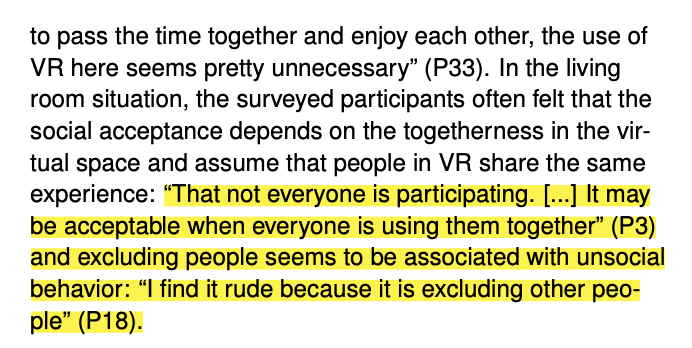
In public store environments, VR users must often remain in fixed positions for safety, while wearing highly visible head-mounted displays. Studies show that this increases self-consciousness and feelings of being observed or judged by others, making VR less suitable for casual, everyday shopping experiences. As a result, VR is often better suited to private or controlled environments than open retail spaces.

I particularly appreciate the approach taken by Schwind et al. (2018), as the authors do not only theorize about social acceptance, but empirically investigate how people actually feel when using VR glasses in public spaces—and how the surrounding public reacts to this use. By testing VR glasses in different everyday contexts, the study shows that while VR use is more accepted in private or socially isolated situations (such as at home or on a train), acceptance decreases significantly in public environments where social interaction is expected. This finding is especially relevant for retail contexts, as the high level of immersion provided by VR glasses also makes the user more visible and socially exposed, which can increase self-consciousness and discomfort.

Virtual Reality on the Go? A Study on Social Acceptance of VR Glasseshttps://www.researchgate.net/publication/327256690_Virtual_reality_on_the_go_a_study_on_social_acceptance_of_VR_glasses

(In the development of this blogpost, AI (ChatGPT) was used as a supportive writing and structuring tool. I provided the conceptual content, research direction, theoretical preferences, and methodological decisions, while the AI assisted in translating it to English, refining the wording, organising the material and generating coherent academic formulations based on my input. The AI did not produce research or arguments but helped transform my ideas into a clear and well-structured text draft.)
Interviewing an AKH Psychiatrist for My Master’s Thesis:

The interview was conducted on January 17, 2026

Medical Perspectives on Sensory Overload, AR, and Emotional Comfort in Retail

My focus in this case lies particularly on people who experience shopping as stressful or overwhelming, such as introverted individuals, people with social anxiety, and users on the autism spectrum.

To support my design research with a medical perspective, I conducted a qualitative expert interview with Dr. Sofia Kuhn, a psychiatrist working in the clinical context of AKH Wien.

About her:

Dr. Sofia Kuhn is a medical doctor working in the field of psychiatry, with clinical experience in the context of child and adolescent mental health. She is affiliated with AKH Wien, one of Austria’s largest university hospitals, which is closely connected to the Medical University of Vienna.

Her professional work focuses on the diagnosis and treatment of psychiatric and developmental conditions, including autism spectrum conditions, anxiety-related disorders, and social difficulties in children and adolescents. Through her clinical practice, she works closely with patients and families who face challenges related to sensory sensitivity, emotional regulation, and social interaction.

Due to her medical background and daily clinical experience, Dr. Kuhn brings a psychiatric and therapeutic perspective to questions of environmental stress, sensory overload, and behavioral responses. This makes her expertise particularly relevant for research at the intersection of mental health, user experience, and design, especially when exploring how digital or immersive tools may influence comfort, stress, and participation in everyday environments.

The aim of this interview was to gain insight into how sensory environments are experienced from a psychiatric point of view—and how design decisions may support, but also potentially challenge, mental wellbeing.

Reaching the interview: more complex than expected

Arranging this interview was already part of the research process. I initially contacted AKH Vienna via email, explaining my academic background and research topic. Due to institutional structures, several emails were required before an appropriate specialist could be assigned. I also went there personally to support the process.

After Dr. Kuhn was assigned, I sent a short written presentation of my thesis topic together with several versions of interview questions. She asked to see the questions in advance and selected the ones she felt were most relevant and realistic to answer within the given time. I agreed to this approach, as it respects both clinical workload and qualitative research ethics.

Interview setting, consent, and technical limitations

The interview was conducted via Zoom and recorded as audio and screen video, with explicit consent given at the beginning of the conversation. I clearly stated that the interview was being documented for academic purposes.

Originally, the interview was planned for 10 minutes only. Despite this strict limitation, we managed to slightly extend the conversation beyond the original 10-minute limit, especially toward the end, when the discussion became more reflective.

For transcription, I used AmberScript. Due to the limitations of the free version, only 10 minutes of audio could be transcribed. The transcript therefore contains minor grammatical inaccuracies and repetitions. However, for qualitative thematic analysis, this is acceptable, as the focus lies on meaning and content rather than linguistic perfection. I asked for permission to record it and use it in the future.


Selected interview questions (original wording)

Dr. Kuhn selected and answered the following questions during the interview. The wording below is documented in its original form, as prepared and shared with the interviewee in advance:

  1. Before we start, could you briefly tell us about your medical background and your current position?
  2. It is well known that visual sensitivity is common in children on the autism spectrum. In your opinion, can autistic children benefit from predictable and visually simple screen interfaces rather than complex or highly animated ones?
  3. In your experience, can controlling brightness, color intensity, and visual clutter on screens help reduce stress or anxiety in autistic children?
  4. What aspects of shopping environments—such as visual stimuli, unpredictability, mirrors, or fitting rooms—you think can be especially overwhelming for autistic, introverted and people with social anxiety?
  5. Could screen-based AR guidance, such as step-by-step instructions or visual navigation, help people feel more in control during shopping experiences?
  6. Does this mean that digital or AR-based try-ons on phones or tablets could reduce sensory overload compared to physical try-ons in stores?
  7. From a psychiatric perspective, what visual design principles should designers consider when developing screen-based tools or AR applications for autistic children?
  8. What main problems or challenges do you see with this concept in practice and how accessible do you think this concept is for different groups of people?
  9. In Austria, do you see a growing need for sensory-friendly digital solutions in everyday environments such as retail, public services, or education?

These questions structured the entire conversation

key moments from the interview (quoted)

One of the most valuable outcomes of this interview was the unexpected depth of medical reflection, especially given the strict 10-minute time limit. Several statements by Dr. Sofia Kuhn stood out.

1. Shopping environments as cumulative sensory stressors

When asked which aspects of shopping environments can be overwhelming, Dr. Kuhn clearly described shopping as a multi-layered sensory challenge, especially for autistic children and their families:

“Shopping can be particularly difficult for autistic children and their parents. Retail environments are often overwhelming and tiring, as children are required to process multiple sensory stimuli at the same time, including bright lights, loud sounds, crowded spaces, and visually intense product displays.” 

She further emphasized that overload is not limited to one space, but builds up through constant transitions:

“Frequent transitions, for example moving from one store to another, being exposed to street noise and entering new environments, can further heighten sensory overload and make the experience especially challenging.”…

Why this is important:
This confirms that sensory overload in retail is cumulative, not isolated. From a design perspective, this means AR should aim to reduce overall mental effort, not just improve one single interaction.


2. AR guidance as a tool for stress reduction and focus

When discussing screen-based AR guidance, Dr. Kuhn highlighted its potential to improve concentration and reduce stress—if designed carefully:

“I think it could be helpful by reducing stress and increasing concentration. Such tools may help children focus better on their actions.” 

She directly linked this to visual design choices:

“The use of soft colors and gentle animations could make the experience more comfortable and enjoyable for such children.” 

Why this is important:
This statement validates key design principles for my AR prototype from a psychiatric perspective, not just a UX one.


3. Simplicity and visual restraint in design

When asked which visual design principles should guide AR tools for autistic children, Dr. Kuhn gave a very clear answer:

“Visual design should remain uncluttered and include only the elements and symbols that are essential for the given context. Color should be selected very thoughtfully and kept at a moderate intensity.” 

She also stressed the importance of motion control:

“Animations, if used, should be subtle and smooth, avoiding sharp or sudden movements. Overall, the design should be intuitive and easy for children to understand.” 

When I asked directly whether simpler design is better, her response was unambiguous:

“Yes. Of course.” 

Why this is important:
This supports the idea that “less is better” is not a stylistic trend, but a mental health requirement for certain user groups.


4. Digital try-ons as a way to avoid stressful physical experiences

Regarding AR-based try-ons, Dr. Kuhn confirmed their potential benefit:

“Yes, they certainly could. Digital trials may help avoid some of the stressful sensory experiences associated with physical fitting rooms.” 

Why this is important:
This quote directly supports the relevance of AR try-ons as a stress-reducing alternative, not merely as a technological novelty.

5. The most critical insight: when innovation can become harmful

The most unexpected and influential part of the interview emerged when discussing limitations and risks. Dr. Kuhn emphasized that innovation is never universally positive:

“Every innovation has both positive and negative aspects. Not everyone will benefit from such innovations.” 

She explained that for certain psychiatric conditions, reduced interaction can conflict with therapeutic goals:

“For a person with social phobia, Asperger’s syndrome, depression, or other disorders, avoiding social interactions is part of the condition. Such innovative technologies may even reduce direct contact with anxiety, which is especially necessary in exposure-based psychotherapy.”

She stated this very clearly:

“This is not the goal of therapy. The goal is for the person to be able to communicate.” inteview 10 min at end verion t…

Why this is important:
This insight fundamentally changed my thinking. It introduced an ethical boundary for AR design: reducing stress must not mean reinforcing avoidance.


6. AR as encouragement, not replacement

Toward the end of the interview, Dr. Kuhn clarified how such technologies can still be useful when applied responsibly:

“An easier form of communication may help people decide to go to a shop, knowing that they will only need minimal interaction. This can be beneficial at a certain stage, as a form of encouragement.” 

However, she immediately added a clear limitation:

“This is beneficial only up to a certain stage. At later stages, we would expect a stronger therapeutic effect.” 

She concluded with a statement that strongly frames my design responsibility:

“It’s essential that such innovative approaches are introduced with great care. These advancements should not reduce real-world communication or lead to social isolation. Sensory-friendly technology should support interaction with the outside world, not replace it.” inteview 10 min at end verion t…

Summary: Key insights from the interview

Understand AR not as a tool to remove social interaction, but as a supportive layer that reduces stress while still allowing real-world engagement.

From a psychiatric perspective, shopping environments were described as highly demanding sensory spaces, especially for autistic and sensitive individuals. Sensory overload results from the combination of bright lights, noise, crowds, visual clutter, and frequent transitions between environments, making shopping exhausting rather than neutral.

Dr. Kuhn emphasized that predictable, visually simple, and uncluttered interfaces—using moderate colors and gentle animations—can help reduce stress and improve concentration. This confirms that visual simplicity is a psychological necessity, not just an aesthetic choice.

She also confirmed that digital or AR-based try-ons can reduce sensory overload compared to physical fitting rooms by avoiding confined spaces, mirrors, and time pressure.

At the same time, the interview highlighted a critical limitation: for certain psychiatric conditions, reducing social interaction too much can reinforce avoidance behavior. Therefore, sensory-friendly technologies should support gradual participation, not eliminate communication entirely.

Overall, the interview strengthened the medical and ethical foundation of my thesis and directly informed the design principles of my AR prototype, reinforcing the idea that AR should support interaction with the outside world rather than replace it.

(In the development of this blogpost, AI (ChatGPT) was used as a supportive writing and structuring tool. I provided the conceptual content, research direction, theoretical preferences, and methodological decisions, while the AI assisted in translating it to English, refining the wording, organising the material and generating coherent academic formulations based on my input. The AI did not produce research or arguments but helped transform my ideas into a clear and well-structured text draft.)
Preparing a Qualitative Interview:

Learning How to Ask the Right Questions and Document it

Rather than relying solely on secondary sources, I wanted to gain expert insight through a qualitative interview. With this in mind, I prepared and sent a formal interview request to AKH Vienna, hoping to have the opportunity to speak with a specialist. I am not aiming for a long or demanding interview session; even 10–15 minutes would already provide valuable perspectives that could meaningfully inform my research. I drafted a formal interview request to AKH Vienna, in which I briefly introduce myself as a master’s student at FH JOANNEUM and outline the research motivation behind my project. The email explains my interest in gaining psychological insights.

Using Academic Input from FH Joanneum: Design & Research

A major influence on my preparation process was the Design & Research course at FH Joanneum, taught by U. Lagger. One of the key takeaways from the course was that interviewing is not just about asking questions, but about creating a structured, respectful, and open conversational space.

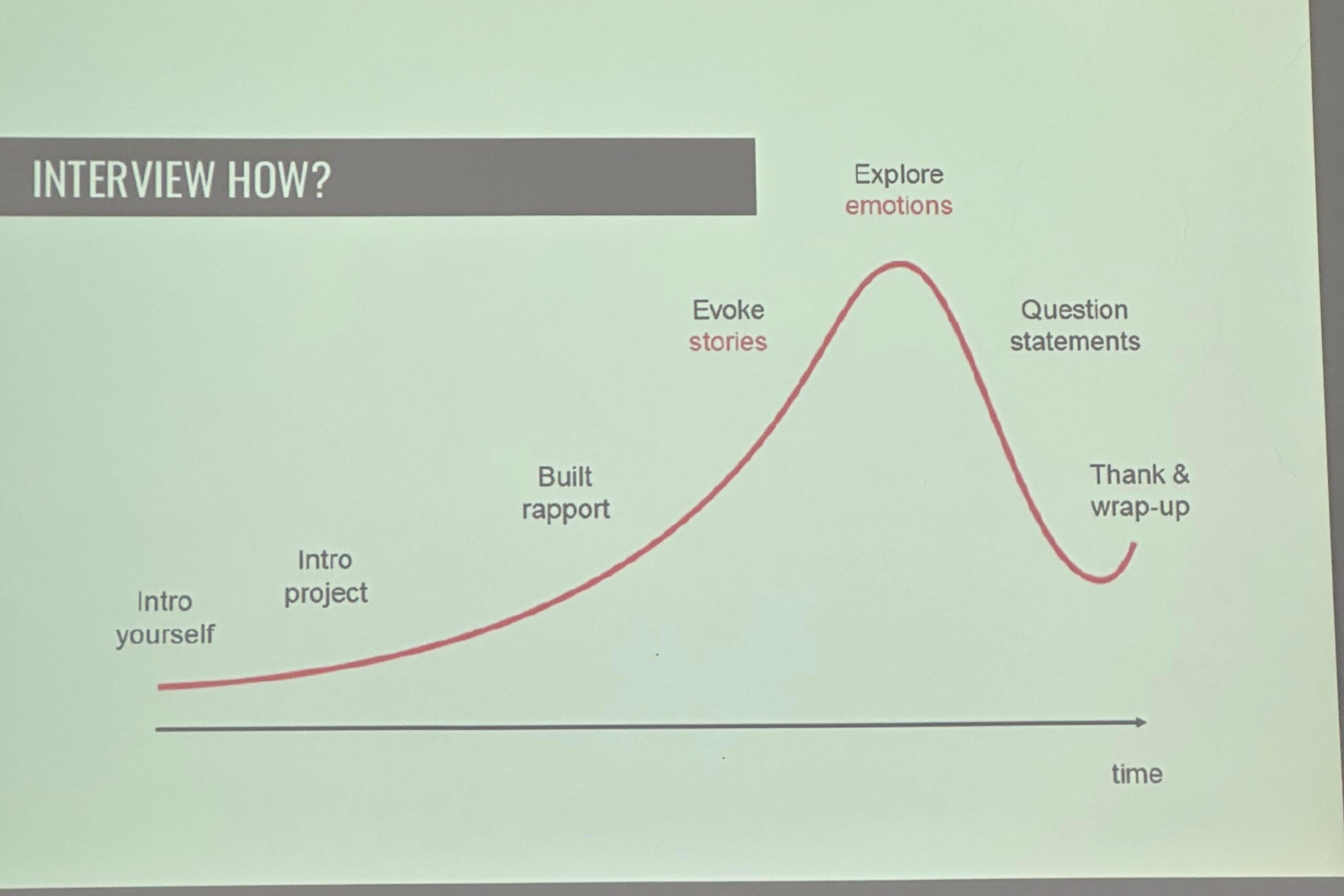
From the lecture input (see Image 1: “Interview How?”), the interview process was presented as a timeline rather than a rigid script. It begins with introducing oneself and the project, followed by building rapport, encouraging storytelling, exploring emotions and experiences, and only then moving into more focused questions. The interview should end with a clear wrap-up and expression of gratitude. This visual structure helped me understand that a good interview has an emotional rhythm and that trust and openness develop over time, not instantly.

Practical Interview Conduct: What to Keep in Mind

In addition to the course material, I researched general best practices for qualitative interviews and identified several key principles that I plan to follow during the interview:

  • Do not interrupt the interviewee
  • Accept pauses, as they give space for reflection and thought
  • Convey neutral attention through body language and tone
  • Avoid suggestive or leading questions
  • Ask follow-up (probing) questions to better understand meanings

These points align closely with the recommendations from qualitative research literature and reinforce the importance of listening rather than directing the conversation.

Documentation and Transcription Strategy

If the interview takes place, I plan to record it (with explicit consent) and transcribe it afterwards. For transcription support, I intend to use AmberScript, a tool that assists with speech-to-text transcription and can significantly reduce the technical workload.

However, I am aware that automatic transcription tools are not perfect and always require careful review and correction. The final transcript will therefore be manually checked and refined to ensure accuracy and clarity.


Insights from the PDF: Interview, Transkription & Analyse

Based on the article Interview, Transkription & Analyse by Dresing and Pehl, several important methodological points stand out Praxisbuch_Transkription-2:

  • Interviews should be planned according to the research question, not convenience
  • Transcription rules must be defined before starting the transcription
  • A transcript is not neutral; it is always a reduction and interpretation of spoken language
  • Simple, content-focused transcription systems are often sufficient for design and media research
  • Time planning is crucial: transcription can take 5–10 times longer than the interview itself

Format and Structure: How the Interview Should Be Written

Based on the examples shown in class and materials, the interview documentation should follow a clear and transparent structure:

  1. Participant Information (age, profession, location, anonymised)
  2. Consent Confirmation and recording notice
  3. Dialogue Format (Interviewer: / Participant:)
  4. Clear chronological flow
  5. Postscript, describing how, when, and under which conditions the interview was conducted

This format not only improves readability but also ensures academic traceability and ethical clarity.

Even if the interview does not take place immediately, this preparation process has already deepened my understanding of qualitative research and strengthened my ability to approach complex human-centered topics with care and structure. Lets hope for the best.

Course & Class Literature

  • Dresing, T., & Pehl, T. (2018). Praxisbuch Interview, Transkription & Analyse (8th ed., PDF). Course material, FH JOANNEUM, Graz.
  • Lagger, U. (2024). Design & Research: Interview Methods [Lecture slides]. FH JOANNEUM – University of Applied Sciences, Graz.
  • Institution / Interview Context
    Allgemeines Krankenhaus der Stadt Wien (AKH Wien). (n.d.). Universitätskliniken & Fachbereiche. Retrieved from
    https://www.akhwien.at

    Tools I may use
    AmberScript. (n.d.). Audio- und Video-Transkription. Retrieved from
    https://www.amberscript.com/de/transkription/

    Supplementary Learning Resources
    YouTube. (n.d.). Qualitative research interview tutorials. Various creators. Used for general understanding of interview preparation, conduct, and documentation.

Disclosure

In the development of this blogpost, AI (ChatGPT) was used as a supportive writing and structuring tool. I provided the conceptual content, research direction, theoretical preferences, and methodological decisions, while the AI assisted in translating it to English, refining the wording, organising the material and generating coherent academic formulations based on my input. The AI did not produce research or arguments but helped transform my ideas into a clear and well-structured text draft.

IMPULSE: Suddenly, AR feels less challenging.

I came across a YouTube channel called Immersive Insiders, I stumbled upon a YouTube channel called Immersive Insiders, and I had no idea it would give me even more hope that AR is not that challenging. He’s not one of those huge, widely known tech YouTubers, and maybe that’s exactly why I found his content so interesting. It feels focused, on point, and honest — less about advertisements or useless information and more about actually understanding immersive technology. I’ve been interested in AR and VR for a while, mostly from a design and experience perspective, but there has always been one thought in the back of my mind: I’m not a programmer. Because of that, immersive technology often felt exciting, but also slightly out of reach.

Watching Immersive Insiders gave me hope.

The channel focuses mainly on augmented reality, virtual reality, and immersive technologies, but without the pressure of sounding overly technical or exclusive. Instead of making things feel complicated, the creator explains ideas step by step, in a way that feels realistic and human. It feels less like a polished tech show and more like someone genuinely sharing what they’ve learned.

For me, this was important. Many AR and VR resources online assume that you already code or that you’re comfortable in complex development environments. Immersive Insiders feels different. It communicates the idea that you don’t need to know everything from the beginning —curiosity and willingness to experiment are enough to start.

One video from Immersive Insiders that I may genuinely use and test is about  “AR Indoor Navigation Using MultiSet Quest SDK.” In this tutorial, he walks through the whole process of building an indoor AR navigation application — from scanning the environment to mapping it and finally deploying it on a Meta Quest 3 device.

What struck me about this video wasn’t just the topic — indoor navigation — but how he explained it. The video breaks the process down into clear, approachable steps:

  • building the final app for testing.
  • setting up a developer account
  • mapping the physical environment
  • creating a Unity project for the AR scene
  • adding navigation points and logic

What I appreciate most about this channel is that it doesn’t pretend AR and VR are effortless. There is still learning involved, still problem-solving, still mistakes. But the fear of “not being technical enough” slowly fades away. The content shows that immersive technologies are not only for programmers or engineers, but also for designers, artists, storytellers, and people who think visually and conceptually.

This really resonated with me. I don’t see AR as a technical achievement alone, but as a tool for shaping perception, interaction, and experience. Seeing someone approach it in a grounded and accessible way made me feel more confident about my own direction. It reminded me that it’s okay to learn slowly and to grow into a tool rather than mastering it instantly.

This Impulse post is mainly dedicated to how important it is to find the source that works for you. It all about how presentation and tone can change the way we approach learning.

I still don’t consider myself a programmer, and that hasn’t changed. What has changed is the feeling that immersive technology is something I can explore, step by step, without needing to hire someone. And sometimes, that quiet encouragement is exactly what makes a difference.

Links

In the development of this impulse post, AI (ChatGPT) was used as a supportive writing and structuring tool. I provided the conceptual content, research direction, theoretical preferences, and methodological decisions, while the AI assisted in translating it to English, refining the wording, organising the material, and generating a coherent text draft based on my input. The AI did not produce research or arguments but helped transform my ideas into a clear and well-structured text draft.

Exploring AR in Art: The AN ART App

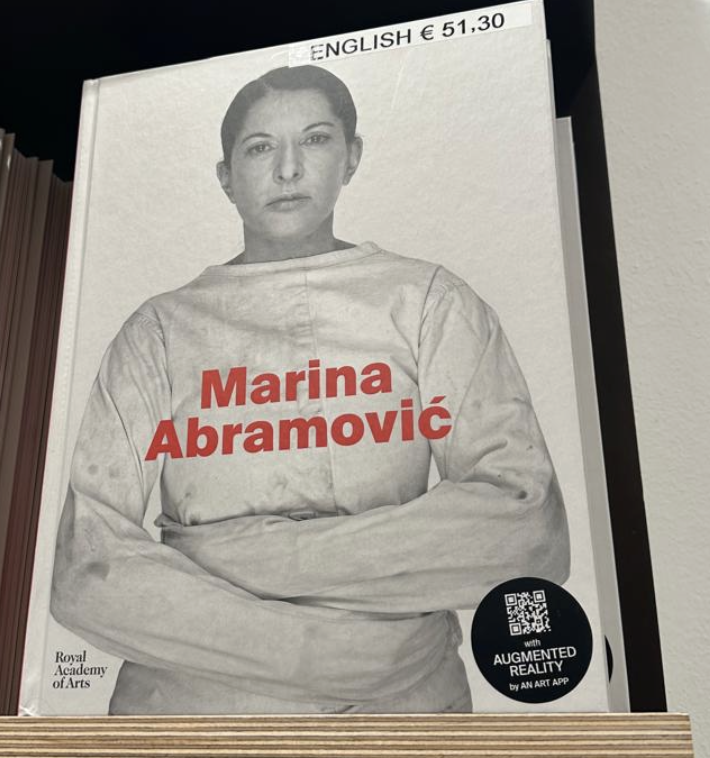
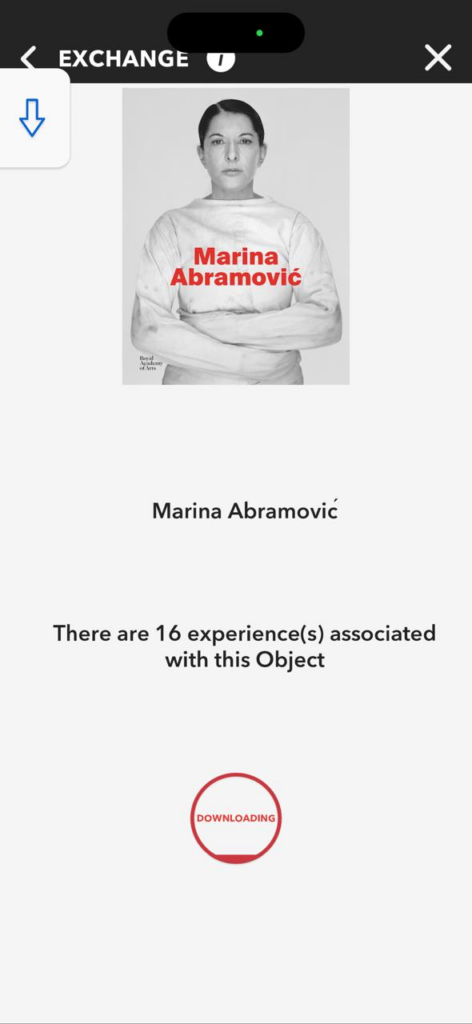
During my recent visit to the Albertina, I discovered a sticker on a Marina Abramović exhibition book pointing to an AR app called AN ART.  I was immediately intrigued by the app because I assumed it would be a high-quality app and wanted to compare it to one I had previously seen. I thought it might have more interesting features and details. 

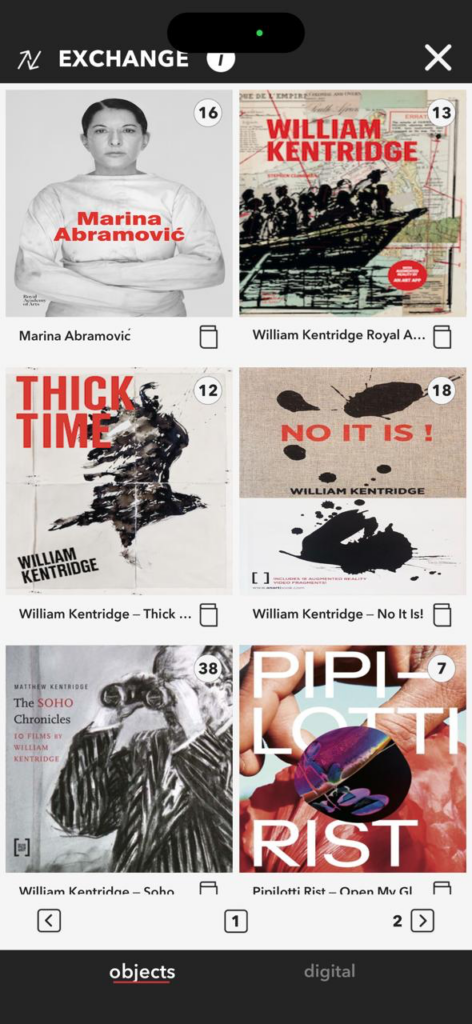
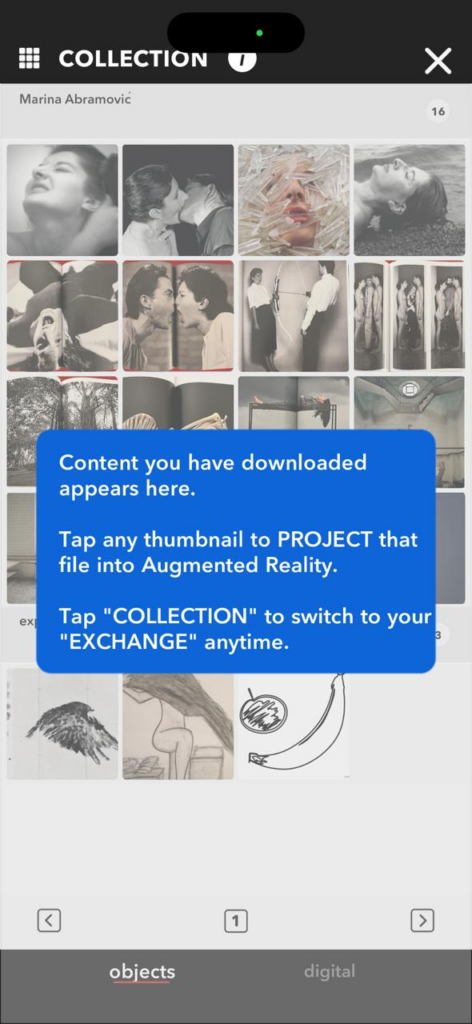
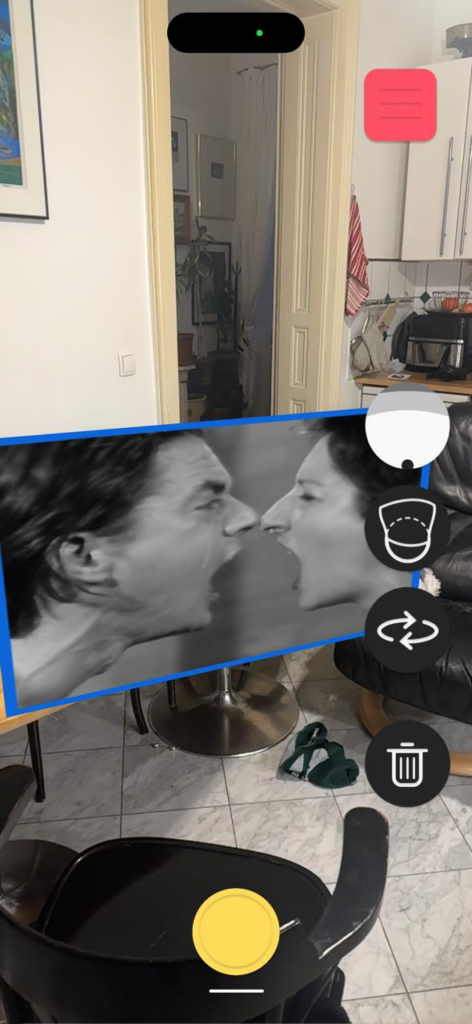
The AN ART App is part of a broader AR platform developed by the art technology initiative An Art Company. The app’s purpose is to allow audiences to activate and experience augmented reality content connected to artworks, exhibitions, and artistic projects directly through their mobile devices. It is available for download on both iOS and Android, and once installed, users can scan marked objects or images — like the sticker I saw on the Abramović book — to unlock digital layers of content. One thing to point out is even without a QR code or the image, the user can see the design at home and place it accordingly. all the designs can be dowloaded and saved in your device for free.

As I understood it is primarily designed as a tool for artists, publishers, galleries, and museums to attach AR content to physical objectssuch as books, posters, artworks, or exhibition materials.

USER EXPERIENCE REVIEW:

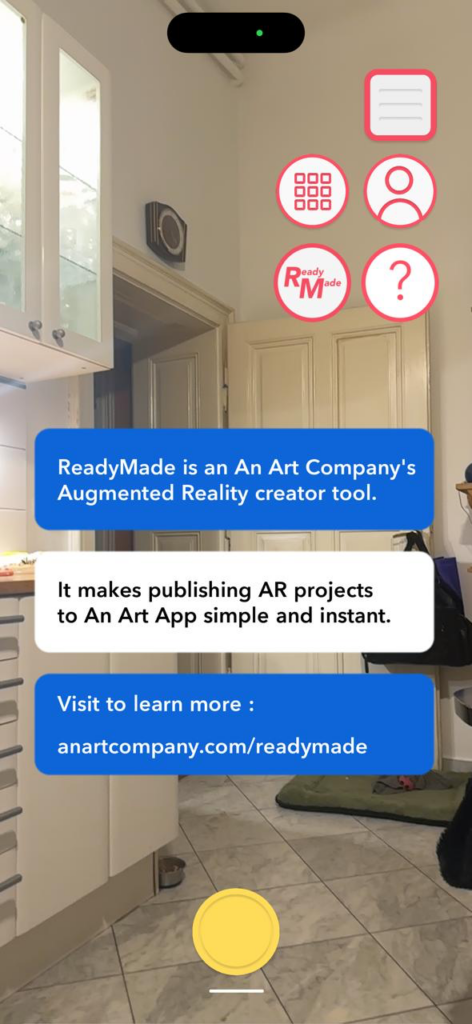
The application is experiencing significant glitches. I tested the application on my friends’ Android phone, and I believe that only higher-performance devices are fully supported. Older or less powerful phones or tablets may only function in an experimental mode or may perform poorly. This can result in poor AR tracking or crashes on lower-end devices. The interface is confusing and frequently redirects me to the main page. I have already downloaded an object, but I need to download it again within an hour. Some buttons are not even functional at times. Currently, the application is not opening. 

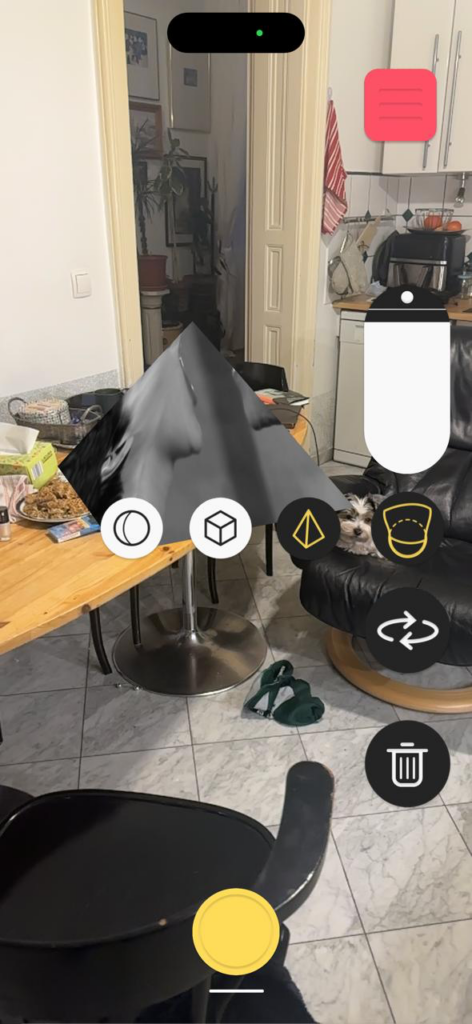
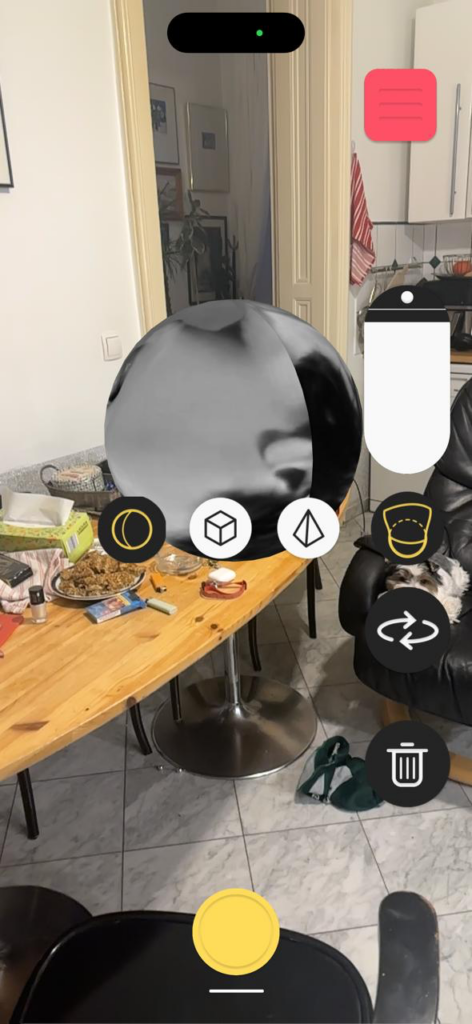
Here we can see that the original cone shape can be changed and adjusted directly in the AR environment. Both the form and its position are flexible, which makes it possible to adapt the object to the space. The sound linked to the cone was initially too loud, so finding the right placement was important to make the audio feel balanced. After adjusting the position, the sound worked as intended. However, the experience later became glitchy, and the object can no longer be accessed or edited in the same way as before, which shows some technical instability in the system. We also have the option of recording it with this app.

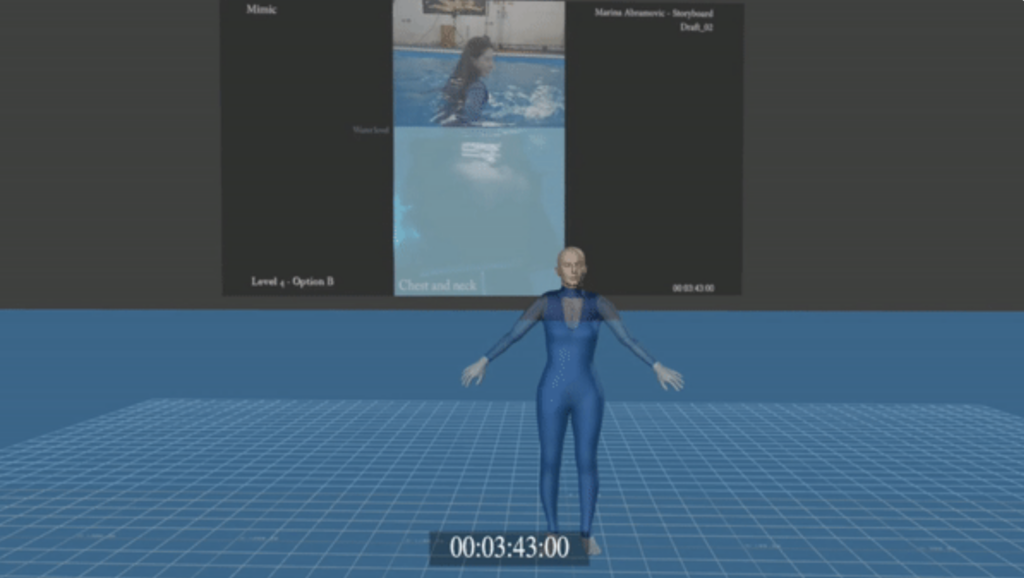
Meanwhile while I did more research about In the meantime, while I delved deeper into researching the tools likely used to create the acute art experience (Marina Abramović AR/VR project).Acute Art does not publicly list a detailed development stack, we can see in some of the previews and behind the scene footage some hints. As far as we currently understand, the types of tools and platforms that are used in creating such AR/VR artworks are.

most likely used:

Unity or Unreal Engine

Blender (open-source 3D modeling)

Maya / 3ds Max (industry modeling and animation tools)

Marina Abramović – Acute Art AR/VR Project:
https://www.acuteart.com/discover/marina-abramovic?itemId=dwexa8zkulmp1xtuckspzebzexz7w0

AN ART App – AR Experience Platform:
https://www.anartcompany.com/app

AN ART ReadyMade Creator Platform:
https://www.anartcompany.com/readymade

In the development of this post, AI (ChatGPT) was used as a supportive writing and structuring tool. I provided the conceptual content, research direction, theoretical preferences, and methodological decisions, while the AI assisted in translating it to English, refining the wording, organising the material and generating a coherent text draft based on my input. The AI did not produce research or arguments but helped transform my ideas into a clear and well-structured text draft.

Impulse: A Video That Made Me think

Understanding Autism

I recently came across a YouTube video about how autistic children can be triggered in shopping malls. I didn’t plan to watch it fully, but I ended up staying. There was one line that really stayed with me: “Understand autism and what you can do to help.”
It sounds simple, but it made me really think.

The video showed how everyday places — loud, crowded, visually busy malls — can feel overwhelming or even unbearable for autistic kids. Things most people don’t think twice about, like background noise, bright lights, or constant movement, can quickly turn into stress or panic. Watching this made me realize how little attention we often pay to how environments actually feel to different people.

It immediately connected to my own thoughts about design and technology. I started asking myself: what if help doesn’t only come from people, but also from the way spaces are designed? What if support could be built into the environment itself?

This is where my thinking shifted toward Augmented Reality and sensory support. AR is usually talked about as something exciting or innovative, but what if it could also be calming? What if, alongside AR guidance on a phone, there were noise-cancelling headphones available in certain areas of a shopping mall — spaces designed to feel quieter, slower, and less overwhelming?

The more I thought about it, the clearer it became that this wouldn’t only help autistic individuals. It could also support shy, introverted, or easily overwhelmed people. Not everyone enjoys crowded, noisy places. Sometimes you just want to get what you need without feeling exposed, rushed, or overstimulated. A calm AR experience — predictable, guided, and visually simple — could make shopping feel safer and more comfortable for many people.

What this video really did was shift my perspective. It reminded me that technology alone isn’t the solution. Before designing anything, there’s a need to listen, to understand real experiences.

It made me think that my next step should be talking to professionals who work with autistic children — therapists, psychologists, educators — could be essential. Not to validate an idea, but to shape it responsibly and realistically.

This impulse wasn’t about finding an answer. It was about becoming more aware. . And sometimes, all it takes is to imagine urself in there shoes. This video make you see familiar spaces in a completely different way.


Link that inspired this impulse:
https://www.youtube.com/watch?v=aPknwW8mPAM

Understanding Autism and How You Can Help
https://youtu.be/DgDR_gYk_a8

In the development of this impulse post, AI (ChatGPT) was used as a supportive writing and structuring tool. I provided the conceptual content, research direction, theoretical preferences, and methodological decisions, while the AI assisted in translating my ideas into English, refining wording, organising the material, and generating a coherent text draft based on my input. The AI did not generate original research or arguments but supported the transformation of my ideas into a clear and well-structured written form.