02.08: Statistik 101

Nach der (sagen wir dreiviertel)erfolgreichen Lernphase möchte ich in den nächsten beiden Blogposts jetzt in die theoretische Welt der Daten und Statistiken eintauchen. Basis dafür ist das Buch “Show Me the Numbers”, das mir graziöserweise vom besten Majorleiter des Instituts (bitte Roman lass mich durch) zur Verfügung gestellt wurde. In diesem Blogpost soll es um die ersten drei Kapitel des Buches geben, in dem ein gewisses Basiswissen über Statistik vermittelt wird. Als jemand der seit Jahren mit Mathematiknachhilfe (und dort ganz zufälligerweise vor allem in Statistik) sein Geld verdient, waren die Basics für mich natürlich eher auffrischend gedacht. Gerade im zweiten Teil, der sich darum dreht, wann es überhaupt eigentlich Sinn mach Daten zu visualisieren statt sie einfach banal in einer Tabelle darzustellen, konnte ich aber noch gute Tipps mitnehmen. Hier eine kleine Zusammenfassung des gelernten.

Statistik für Dummies

Grundsätzlich sind Statistiken nichts anderes als quantitative Daten (also Zahlen), die irgendeinen Sinn machen, also irgendwie gedeutet werden können. Zum Beispiel können die Verkaufszahlen eines gewissen Produkts als dessen Erfolg oder Misserfolg gedeutet werden. Erhebt man Daten, egal ob wie ich in meiner Bachelorarbeit durch Umfrage, oder durch Recherche, so erhält man verschiedene Arten von Daten. Daten mit nominalem Bezug sind Wörter (daher der Name), also klassische Antworten wie Ja/Nein, oder das Geschlecht, oft aber auch Dinge wie Länder. Daten mit ordinalem Bezug sind Zahlen und können in einer logischen Abfolge geordnet werden, also zum Beispiel Einkommensdaten oder das Alter. Gruppiert man ordinale Daten erhält man Intervalle, so etwa beim Einkommen gang und gäbe.

Welche Art von Daten man vorliegen hat ist dabei wichtiger als man denkt. Ich zum Beispiel habe bei meiner Bachelorarbeit mit PSPP, einer Gratisversion von SPSS gearbeitet und alle meine statistischen Berechnungen wie Korrelationen und Signifikanzen dort berechnet. Weiss man nicht welchen Bezug die erhobenen Daten haben, kann man auch nicht mit ihnen rechnen.

Die wichtigsten statistischen Maße für den Durchschnitt sind der Mittelwert und der Median, für die Streuung vor allem die Standardabweichung, wobei die Standardabweichung eigentlich kaum ersetzbar ist und gerade mit Mittelwert und Median oft getrickst werden kann. Stichwort: Traue keiner Statistik die du nicht selbst gefälscht hast. Im Grunde gilt: Gibt es starke Ausreisser, nimm den Median, andernfalls den Mittelwert.

Wann nehme ich überhaupt eine Grafik

Während für mich eigentlich fast immer klar war, dass Daten visualisiert werden müssen, um sie (in meinem Fall dem Leser) leichter verständlich zu machen, muss ich sagen, dass mich Stephen Few hier ein bisschen in meiner Denke beeinflusst hat und es tatsächlich total Sinn machen kann Daten nicht zu visualisieren und einfach als Text, oder als Tabelle darzustellen. Hier sind dazu seine Grundsätze.

Habe ich aus all meiner Recherche nur einen einzigen Fakt, eine einzige Zahl oder einen einzigen Vergleichswert, den ich ausdrücken möchte, so mache ich das einfach als Fließtext, denn im Endeffekt wäre alles andere, das noch in einer Tabelle stünde, oder in einer Grafik eingezeichnet wäre Beiwerk.

Wenn die Darstellung dazu genutzt werden soll, um einzelne Werte genau nachzusehen oder zu vergleichen, oder mehrere Maßeinheiten in einer Darstellung vorkommen, so nehme ich eine Tabelle. Denn nur in der kann der Leser Werte genau ablesen und nur in der kann ich in mehreren Spalten verschiedene Maßeinheiten verwenden, ohne, dass es unübersichtlich wird.

Ist die Message die ich verbreiten will durch ein Muster oder einen Trend gegeben, oder möchte ich Beziehungen zwischen den Daten zeigen, dann nehme ich eine Grafik zur Hilfe, denn genau dafür ist sie da.

Fazit

Nicht immer macht eine Grafik Sinn. Statt stur alles in einen Pie-Chart zu klopfen und zu hoffen, dass man das schon checkt, sollte man sich genau diese Fragen am Anfang jeder Darstellung immer stellen um überhaupt herauszufinden was man machen soll. Und das ist auch für mich eine echt coole Erweiterung des Horizonts. Mein Lieblingszitat aus den Kapiteln ist übrigens “there is eloquence in simplicity” und ich glaub den lass ich mir tätowieren.

Quelle: Few, Stephen: Show me the numbers. Designing Tables and Graphs to Enlighten. Second Edition. Burlingame 2012.
Opera meets code: Philippe Manoury’s Die letzten Tage der Menschheit

At our visit at the IRCAM-institute during our Paris-excursion I visited a panel talk, that described the workflow in creating a multi-media opera, that lies at the intersection of traditional opera and contemporary music technology and that struck me: Die letzten Tage der Menschheit (The Last Days of Mankind) by French composer Philippe Manoury. Based on the extensive anti-war drama by Austrian writer Karl Kraus, the work premiered at the Cologne Opera in June 2025 and reflects on themes of conflict, media, and societal collapse.

The Material

Karl Kraus wrote Die letzten Tage der Menschheit during and after World War I. The text consists of over 220 short scenes, depicting fragments of daily life, political rhetoric, and journalistic distortion that led to the chaos of the war. Due to its scale and structure, Kraus himself considered the piece impossible to stage in its entirety.

Manoury’s adaptation condenses the material into a three-hour opera. Rather than present a straightforward narrative, the production offers a layered and often disjointed sequence of impressions and reflections. Manoury and director Nicolas Stemann refer to the result as a “Thinkspiel”, a hybrid of the German Spiel (play) and the English “think”, suggesting a theatre of ideas rather than linear storytelling.

Blending Acoustic and (digital)Electronic Practice

Manoury, known for his work with live electronics, collaborated closely with IRCAM (Institut de Recherche et Coordination Acoustique/Musique) in developing this opera. He used tools such as Antescofo, a real-time score-following system that syncs live instrumental input with preprogrammed electronic components, and PureData, a visual programming environment designed for audio synthesis and spatial control.

The system enables audio to follow performers in real time, allowing electronics to respond to spoken text, instrumental timing, and stage movement. Manoury worked with Miller Puckette, the creator of PureData, to develop new modules tailored to the opera’s needs, including a granular speech-processing system that tracks vocal input spatially on stage.

This setup allowed for integration of a full orchestra, live electronics, spoken word, and multimedia, with a focus on flexibility and performer interaction during rehearsals and live performance.

Structure and Staging

The opera is divided into two distinct parts. The first presents loosely chronological scenes from the First World War, focusing on figures such as politicians, journalists, and ordinary citizens. The second part is meant to be a reflection and takes a more abstract and philosophical tone, exploring themes such as violence, historical memory, and self-destruction.

A newly introduced character, Angelus Novus acts as an observer throughout the piece. Performed by mezzo-soprano Anne Sofie von Otter, the character provides continuity and commentary across the fragmented scenes.

The staging involves video projections, live camera feeds, war imagery, and a modular stage design. The visual components are used not for spectacle but to support the opera’s shifting focus and tonal contrasts.

A Contemporary Approach to Historical Events

Die letzten Tage der Menschheit does not aim for easy accessibility. Its structure, sound design, and subject matter are complex and at times demanding. However, the production reflects current interests in combining artistic disciplines and using digital tools to reinterpret historical works.

Rather than retell World War I history, the opera focuses on atmosphere and fragmentation, using both musical and technological language to examine how war, media, and misinformation interact, which in my opinion is as relevant as ever in the face of current events.

Sources:

https://antescofo-doc.ircam.fr

https://www.oper.koeln/de/produktionen/die-letzten-tage-der-menschheit/1018

https://www.philippemanoury.org/8584-2/

https://de.wikipedia.org/wiki/Die_letzten_Tage_der_Menschheit

https://www.youtube.com/watch?v=yG9OFe2IE7A

#10 Creative Thinking

Creativity doesn’t always come from hours of research, long deadlines, or perfectly written briefs. Sometimes, all it takes is a silly idea, a strange prompt and a timer. In a field where creative work is often associated with efficiency, target groups, and polished outcomes, it can be incredibly refreshing to intentionally do something pointless for a change. Not in spite of the silliness but because of it.

A Real-Life Example: Silly Design Sprint

At a recent event called the Silly Design Sprint (organized by a freinds of Communication Designer  Christina Lamprecht), I experienced this firsthand. Each participant received an absurd prompt  and weh ad the evening to create something creative. I created illustrations. No goal, no pressure just following the idea. And surprisingly, some of the results were genuinely good. But more importantly, it felt creatively refreshing.

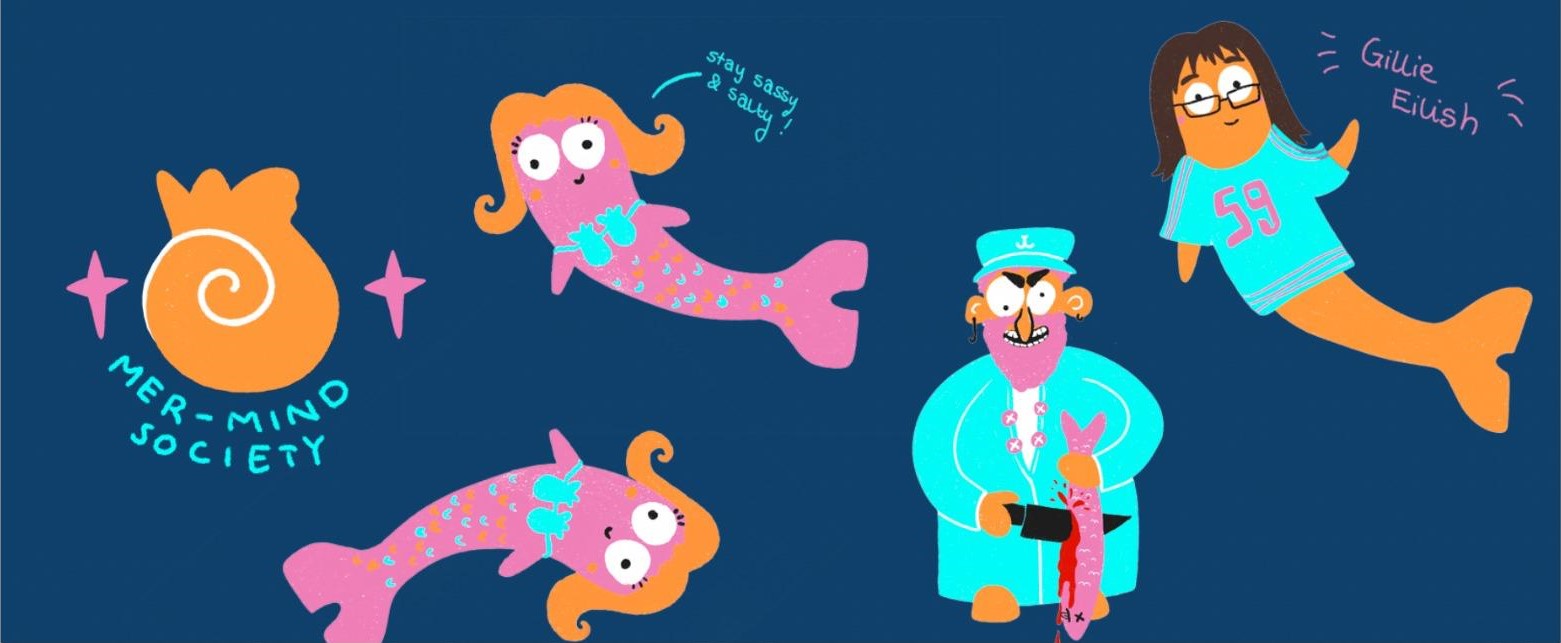
That event inspired me for this blogpost and to deal more with this topic. You can see me outcomes here.

Why Absurd Tasks Unlock Creative Thinking

When we allow ourselves to dive into deliberately nonsensical or humorous challenges, we bypass one of the biggest blockers in creative work: the inner critic. That voice asking, „Does this make sense? Is this professional enough? Can I show this to someone?” goes quiet once it’s clear that this isn’t about results.

And that brings real benefits:

  • Less pressure, more curiosity:

Without expectations, we open up to playful exploration and unexpected directions.

  • Time limits spark momentum:

When you only have 30 to 90 minutes, there’s no room for overthinking. You just create.

  • Absurdity disrupts pattern:

 A weird prompt like „design the packaging for a pizza brand aimed at penguins” breaks mental routines. That’s where fresh ideas live.

Like any skill, creativity improves with training. And small, silly, time-boxed exercises are the perfect workout. They help you:

  • generate ideas faster
  •  think in concepts, not just details
  • rediscover the joy of creating (outside of pressure or purpose)

This isn’t about abandoning structure entirely. It’s about regularly creating space for creative freedom.

Conclusion: Less Sense, More Ideas

Being silly isn’t the opposite of being creative,  it’s often the shortcut to getting there. Short, absurd exercises train the creative brain and bring lightness into the process. In a world that often takes design too seriously, a little nonsense can lead to surprisingly meaningful ideas. This project really inspired me to make more stuff like this.

My plans for the next semesters

I have done and learned quite a bit these past two semesters and in this blog post I want to give a brief summary of what has happened so far and what the next two semesters might look like for me in Design and Research.

So far I have mostly focused on the production side of things, reading up on how to film, edit and fund a documentary as well as how to properly conduct interviews. I have also done some research on the different forms of tourism and how they can positively or negatively impact locals and the environment. The different types I treated so far were mostly overtourism and responsible tourism as two very contrasting examples.

Going from there I have also started a bit to connect different types of media with the effect they have on travel behaviour. For the next semester I want to dive deeper into this topic, figuring out which types of media have the strongest influence and why. I also want to figure out whether this influence always has negative effects on the specific areas or if media influence can also be used for good. Therefore I want to explore different examples of times when the media has had negative impacts as well as maybe positive ones. I also want to create a collection of documentary films I deem valuable and fitting for the topic and explore what it is about them that appeals to me.
I want to research which connections have been drawn before and how researchers came to their conclusion in order to maybe do some research myself on the topic. I want to contact different organisations working on the issue of overtourism and how to improve it, in order to see how they approach the problem.

Furthermore, I want to get into concrete planning for my practical work in the end, figuring out where and what I want to film exactly and how to do it in the most efficient way. But not only should my practical work slowly take shape, I also need to figure out how to integrate the theoretical part in a fitting way and what I want to explore there specifically.

All in all, my mission for next semester and maybe even already summer break, is to specify my research further and narrow down what I have done so far to a workable topic for my Master Thesis. I feel like the more I research, the better my insight will be into what makes a good topic and what will be interesting to write and read about as well as how to collect the data and information I will need.
Another issue I want to focus on during the summer is planning the project with my project partner at the travel agency, talking about which journey I might join and what could be interesting and valuable to document.

So all in all, my blogs so far have been pretty interesting to write and research for, as well as my semester project where I got a first idea of what it can look like to film interview, but all of my effort has been fairly unfocused and a bit all over the place. So for the next semester I think I also want to make a plan beforehand of what I want to explore in each blog posts in order to have more of a structure and concrete plan behind it. I believe this will help me see results better and also steer my efforts into a more productive and targeted direction and lead up to the start of my Master Thesis.

I am looking forward to narrowing down my topic and diving deeper into what I want to do, but I am also a bit overwhelmed still because there are so many different ways I could go with the topic and deciding which one is the most suitable for my thesis. But I believe that researching further and also talking to my peers, friends, relatives and experts about the topic will help me see what is the most promising path to take.
So to conclude this semester, I have learned a lot about the topic as well as about the practical aspect of my thesis, and now it is time to narrow down the broad basis I have so far in order to get more specific the next semesters.

KI trifft Realität // Video-Experiment mit Sora und Hailou

In meinem Video-Projekt habe ich mich auf das spannende Experiment eingelassen, Künstliche Intelligenz und echte Aufnahmen miteinander zu kombinieren. Konkret habe ich diesmal eine Mischung aus KI-generiertem Footage und realem Drohnenmaterial kombiniert. Ziel war es herauszufinden, wie gut diese beiden Welten inzwischen miteinander verschmelzen können und wie sehr sie sich visuell und atmosphärisch noch voneinander unterscheiden.

Im Gegensatz zu meinen früheren Projekten (Blogpost 5), bei denen ich mit Bild-zu-Video-Tools gearbeitet habe, kam diesmal eine reine „Text zu Video“-Herangehensweise zum Einsatz. Verwendet habe ich dabei die KI-Tools Sora und Hailou.

Der Ansatz: KI-Text zu Video trifft echte Drohne

Die Idee war simpel, die Umsetzung jedoch – wie so oft – alles andere als einfach: Ich wollte ein Video erschaffen, das nahtlos zwischen echten Drohnenaufnahmen und KI-generierten Sequenzen wechselt. Dabei war es mir wichtig, das KI-Footage nicht als bloßes Füllmaterial zu verwenden, sondern bewusst Szenen zu kreieren, die thematisch und optisch zur echten Drohnenaufnahme passen.

Während ich beim letzten Mal noch auf eine Kombination aus Bildern und Prompts gesetzt habe, um die KI-Footage zu erzeugen, bestand die Herausforderung diesmal darin, ausschließlich mit Text-Prompts zu arbeiten. Das bedeutet, dass ich der KI sehr präzise Beschreibungen liefern musste, um die gewünschten Szenen zu erzeugen – ein Aspekt, der sich im Prozess als eine der größten Hürden herausstellen sollte.

Der steinige Weg zum finalen Video

Wie bei vielen KI-Projekten war auch hier der Weg zum finalen Ergebnis gepflastert mit unzähligen Fehlversuchen, Frustrationen und überraschenden Erkenntnissen. Die wohl größte Herausforderung lag darin, die richtige Balance zwischen Präzision und Offenheit in den Prompts zu finden.

Ein zu vager Prompt führte oft zu unbrauchbaren Ergebnissen, die nichts mit meiner Vorstellung zu tun hatten. Umgekehrt lieferte ein zu detaillierter Prompt zwar manchmal visuell beeindruckende Resultate, allerdings wirkte das Video dann oft künstlich und zu „glatt“, sodass es nicht mehr zum realen Drohnenmaterial passte.

Wo KI an ihre Grenzen stößt

Trotz der enormen Fortschritte in der KI-Videoerstellung bleiben gewisse Grenzen unübersehbar – gerade, wenn man echtes Footage danebenstellt. Besonders problematisch war in meinem Projekt der Bewegungsfluss:
Echte Drohnenaufnahmen haben eine organische, gleichmäßige Kameraführung, während KI-generierte Videos häufig zu ruckartigen oder „unrealistisch glatten“ Bewegungen tendieren.

Auch die Beleuchtung stellte sich als große Herausforderung heraus. Während Drohnenaufnahmen mit natürlichem Licht spielen, wirken KI-Videos oft „zu perfekt“ ausgeleuchtet oder haben unrealistische Lichtreflexe. Diese Unterschiede sorgen gerade beim direkten Schnitt zwischen den beiden Quellen für Brüche, die nur schwer zu kaschieren sind.

Hier die Best of Fails

KI-Video: Kunst, Experiment oder Täuschung?

Was mich an diesem Projekt besonders fasziniert hat: Die Übergänge zwischen KI und Realität sind mittlerweile stellenweise so subtil, dass selbst ich im Schnitt manchmal noch zweimal hinschauen musste. Dennoch bleibt ein kritischer Blick wichtig – und genau hier möchte ich im nächsten Schritt anknüpfen.

Geplant ist eine Umfrage, in der ich meinen Zuschauer:innen einzelne das Video zeige und sie raten lasse: „Ist das KI oder echt?“ Ziel dabei ist es, herauszufinden, wie gut Menschen solche Mischungen inzwischen erkennen können und gleichzeitig ein Bewusstsein für den Einfluss von KI auf Bewegtbild zu schaffen.

Fazit

Das Experiment hat mir erneut gezeigt, wie mächtig und faszinierend KI-Tools heute bereits sind aber auch, wie viel Feingefühl und Geduld notwendig sind, um wirklich überzeugende Ergebnisse zu erzielen. Ich habe unzählige Fehlversuche produziert, bevor ich am Ende ein Video in den Händen hielt, das ich guten Gewissens für dieses Projekt verwenden kann.  Der spannendste Teil kommt allerdings jetzt: Die Reaktionen meiner Zuschauer:innen. Mehr dazu im nächsten Blogpost!

HIER DAS FINALE PROJEKT!

03. Shaping the body

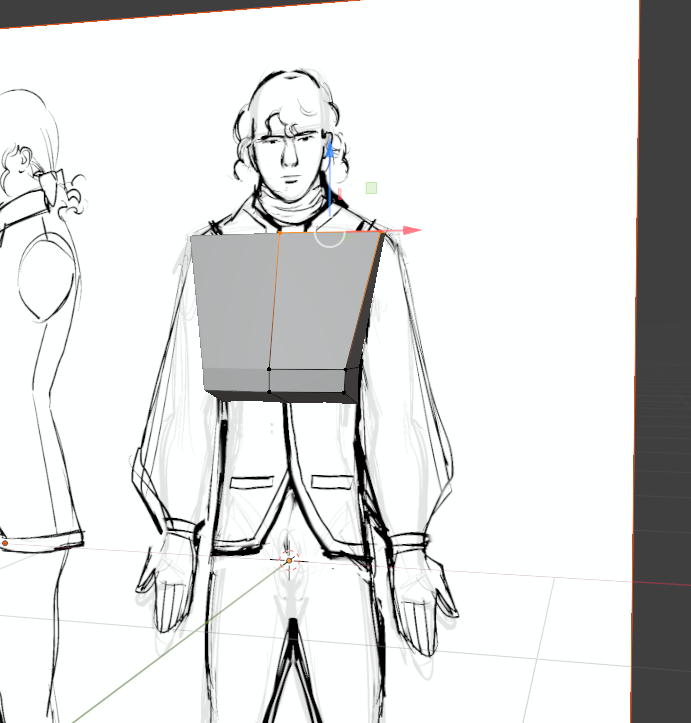
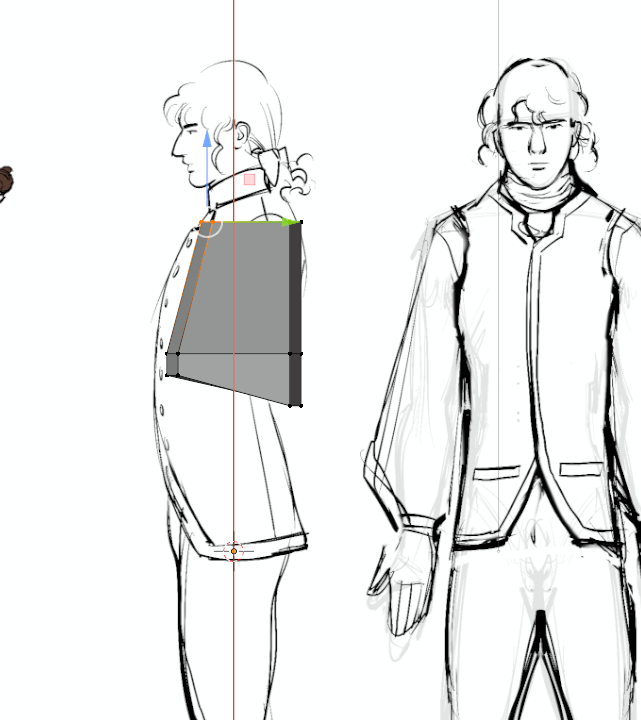
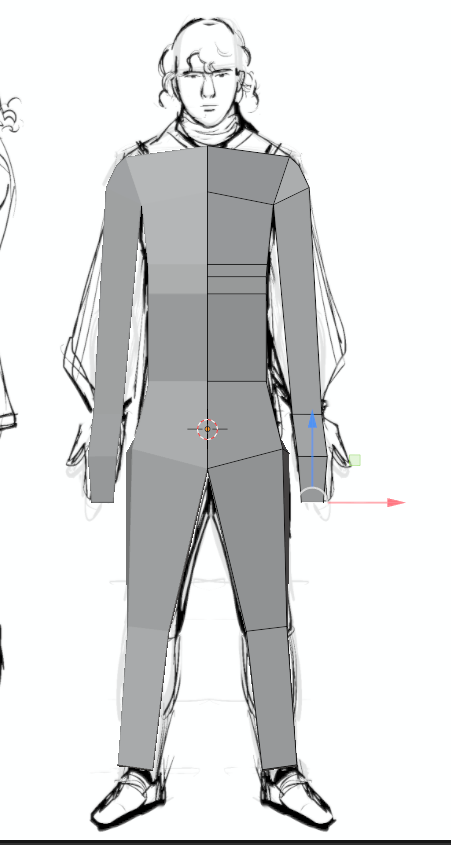
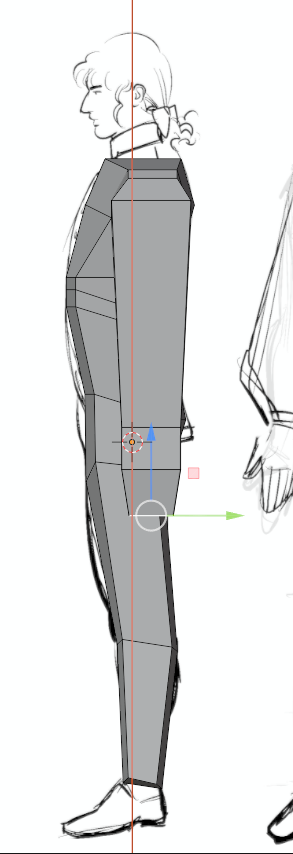
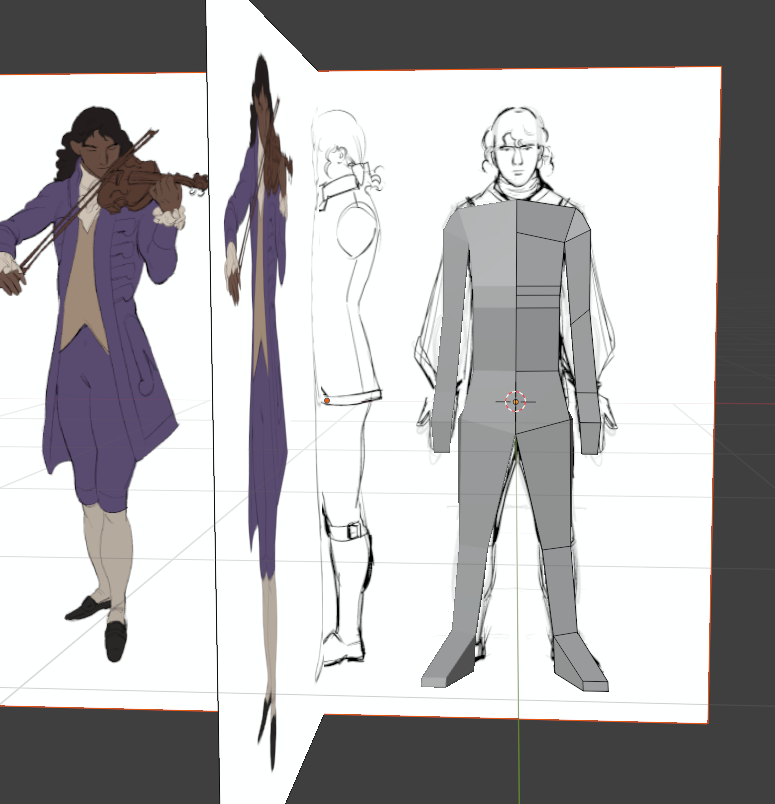
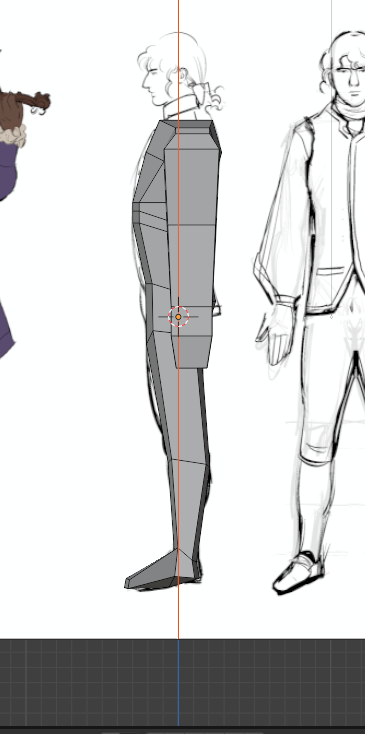
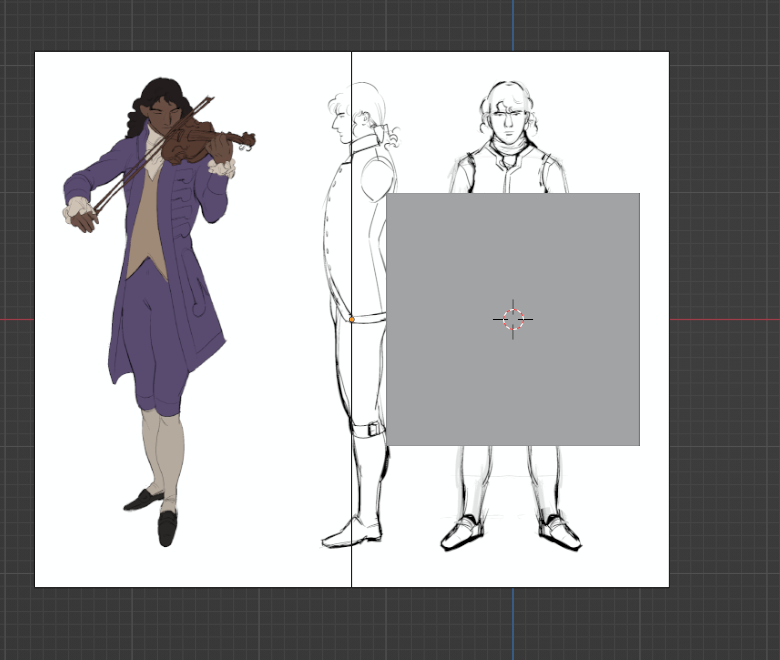
Starting off with a reference for the 3D model was great to assuage my general unease about modeling a character, but starting with a simple cube was daunting. That’s why I sought out a helpful YouTube tutorial to hold my hand and walk me step by step through the process of using the shortcut tools, extruding, rotating and pushing this way and that the vertices, edges and faces. It walked me through the basics of blocking out a human figure, starting with simple primitives and gradually refining them into something more lifelike.

I began by mirroring the cube, hollowing out a basic cube, which would serve as the foundation for the torso. Following the tutorial’s advice, I applied the mirror modifier to ensure symmetry, a crucial step when modeling organic forms. With the clipping option enabled, I could freely move vertices without worrying about accidentally breaking the model’s center line.
At this stage, the process felt intuitive. I pulled and pushed vertices, extruded faces to form the rough silhouette of the chest and waist, and even started defining the curvature of the spine. It was satisfying to see the basic shape emerge so quickly. I found myself growing optimistic—maybe this wouldn’t be as difficult as I had feared.

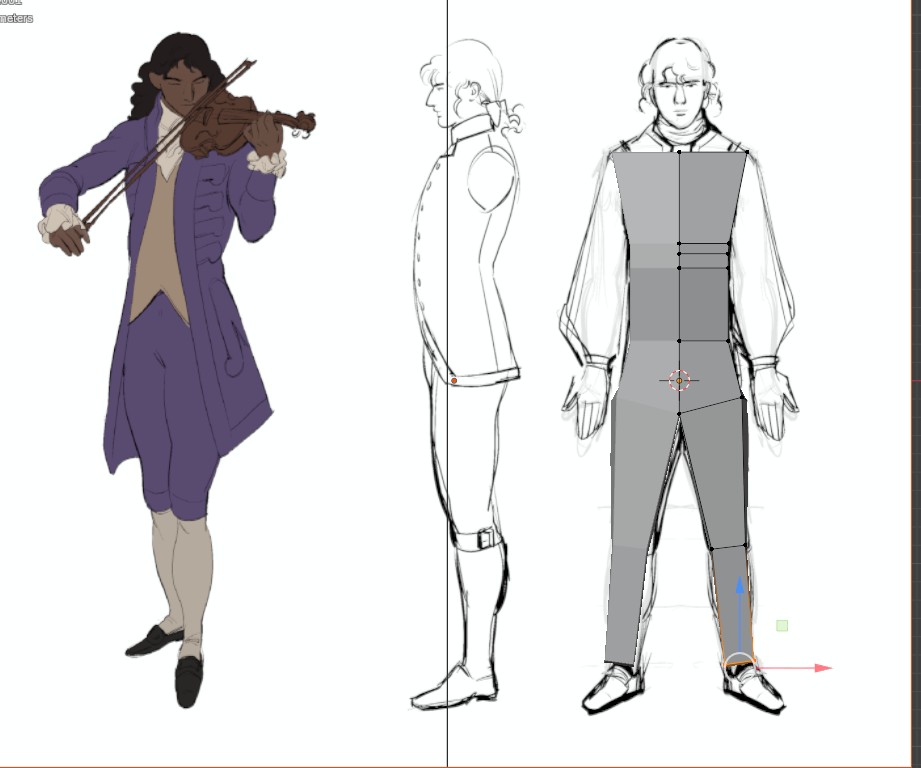
That optimism, however, was short-lived. The real challenge began when I moved on to blocking out the extremities—the arms and legs. I had decided early on that this initial pass would be a rough draft, meaning I wouldn’t dive into intricate details like fingers or toes just yet. My goal was to establish the overall proportions and posture before refining smaller features.

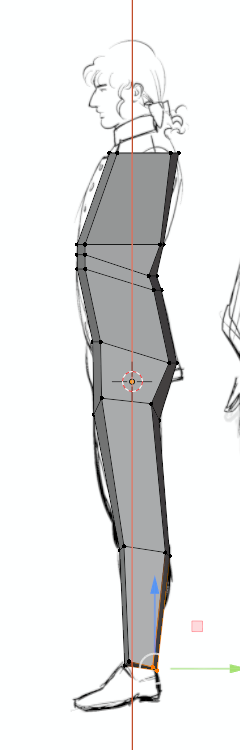
But as soon as I started shaping the arms, I hit my first major snag. In the front view, things looked acceptable—the arms protruded naturally from the sleeves, and their positioning seemed correct relative to the torso. However, when I rotated the model to check the side profile, I realized I had made a critical oversight: I hadn’t considered the actual thickness of the arms. I had to resort to guesstimating. Another oversight? Not considering the rotation of the arms. In times of need both in drawing and now in 3D modeling, I turned to Gottfried Bammes’ anatomical studies and cross-referenced them. His detailed breakdowns of muscle structure and proportion gave me a rough mental blueprint of how the arm should look in space.

I began adjusting the vertices, ensuring that the arms had proper volume. The upper arm needed to be thicker near the shoulder, tapering slightly toward the elbow, while the forearm required a subtle curve to suggest muscle definition. It wasn’t perfect—after all, this was still a rough pass—but it was a significant improvement over the flat, rubbery limbs I had initially created.

While working on the arms, I also took the opportunity to refine the torso in greater detail. The initial block-out had given me a vague sense of the body’s shape, but now it was time to introduce more nuanced forms.


I focused on the rib-cage first, carefully curving the vertices inward to suggest the natural dip beneath the pectorals. This helped break up the otherwise boxy silhouette. Next, I turned my attention to the stomach; instead of leaving it as a flat plane, I sculpted a gentle outward curve near the abdomen, followed by a subtle inward taper toward the waist.


The hip bones proved to be another interesting challenge. In real anatomy, the pelvis creates distinct protrusions at the sides, and I wanted to capture that in my model. I carefully pushed and pulled vertices, ensuring the hips weren’t too exaggerated but still noticeable enough to suggest underlying bone structure. I might’ve gone a bit too far with my careful push and pull, however, which created a couple of problems for me down the line.

The wise words of my painting teacher from high school came back to me: “Don’t do it badly now and expect to fix it later, but do it right now, so it wouldn’t need fixing.” Indeed, I did very much so do it badly and then expected to fix it later. Maybe future me would provide the solution for those pokey love-handles.

My next step on the road to modeling, though? The head.

02.07: Mein letztes Tutorial! Aber nicht für immer?

Ungefähr sechs Tutorialstunden später (jeder weiß wie viele echte Stunden das sind, ist irgendwie so wie mit Hundejahren…) bin ich irgendwie erleichtert, andererseits aber auch echt unbefriedigt. Erleichtert deshalb, weil all die Methoden, die er verwendet hat um Bar Charts, Pie Charts usw zu bauen, eigentlich nichts Neues für mich waren (also heyy, ich kann was). Leider hätte ich mir aber gerade in Sachen Excel-Integration noch mehr gewünscht, weshalb sich meine Reise wohl irgendwann nochmal verlängern wird, aber dazu später mehr. Zuerst möchte ich kurz die gezeigten Grundprinzipien auflisten.

Bar Charts

Um Balkendiagramme zu erstellen hat er das Rad wirklich nicht neu erfunden. Mithilfe von “Show Grids” hat er einfach genaue Rechtecke gezeichnet und diese dann einfach mit scale auf der y-Achse wachsen lassen. Statt seinen ewigen overshoot und undershoot keyframes, die das ganze etwas dynamischer aussehen lassen sollen, habe ich beim Nachbauen einfach den Kleaner von Duik Angela verwendet. Im Grunde hat das alles super funktioniert und schaut auch echt cool aus, genau ist aber etwas anderes. Klar kann man mithilfe des scales, der ja in Prozent angegeben ist, Prozentzahlen genau abbilden, hat man aber z.B. totale Zahlen, muss man die anhand der Skala in Prozentwerte umrechnen, was jetzt nicht unfassbar schwer ist, aber halt einfach extrem aufwändig und unnötig. Klar kann man sich mit der Zeit einfach gewisse Presets bauen und diese dann etwa für die Achsen immer wieder verwenden, man kommt aber eigentlich kaum drum rum jeden Balken einzeln zu konfigurieren. Seine Lösung um mit Excel-Sheets zu arbeiten, war in Illustrator mit der Diagrammfunktion ein genau solches zu erstellen, und das dann in After Effects zu transferieren. Mal ganz abgesehen davon, dass auch das ein immenser Aufwand ist, weil man dann jedes einzelne Objekt ungruppieren und für den Export auf eine eigene Layer legen muss, damit man es in AE dann einzeln animieren kann, befriedigt mich auch dieser Workflow in der Schnelligkeit und Praktikabilität irgendwo zwischen kaum und gar nicht. Und diese Erkenntnis ist es eigentlich auch die sich durch alle weiteren Arten von Diagrammen zieht.

Line Graphs

Für Linien Diagramme hat er einfach die altbekannte trim paths Funktion genutzt.

Pie Charts

Und für Pie Charts einfach kreisförmige Shape-Layer mit dem “Clock-Wipe”-Effekt.

Fazit

Wie auf die Bar Charts trifft aber auf alle Arten zu, dass der Workflow nicht direkt mit dem Excel-Sheet oder CSV funktioniert sondern bei Hand. Für kleine nette Kreise, die sich in Youtube-Videos einmal schnell überschlagen mag das genug sein, für echte Datenvisualisierungen, die man im Qualitätsjournalismus verwenden möchte, ist das aber zu wenig. Deshalb werde ich wohl nicht drum herum kommen mich im 3. Semester noch einmal genauer damit auseinander zu setzen. Für diese Blog-Post-Serie bin ich aber erst einmal zufrieden mit den erworbenen Fähigkeiten, weil auch damit glaube ich schon viel geht. Deshalb konzentriere ich mich in den nächsten beiden Blogposts noch einmal kurz auf die Theorie und teile dann im letzten mein Abschlussprojekt mit euch, bei dem ich eine ehemalige Geschichte von mir im Nachhinein visualisieren werde.

#9 Creating My Own Procreate Brushes

As an illustrator working digitally on my iPad, I quickly realized that the brushes you use can make or break your workflow and final style. While there are countless amazing brushes available, I wanted tools that felt truly personal and matched exactly how I like to work. So I took the plunge and started creating my own Procreate brushes from scratch, including all the textures, brush shapes, and settings.

Why Create Custom Brushes?

Using ready-made brushes is great, but sometimes they don’t capture the unique look or feel you’re aiming for. By making my own brushes, I can control every detail and develop tools that fit my drawing style perfectly. For me, the focus was on three main brush types:

Watercolor Brushes: To mimic the organic flow, blending, and subtle textures of real watercolor paints.

Colored Pencil Brushes: For soft, grainy strokes that vary with pressure and capture the tactile feeling of traditional colored pencils.

Ink Brushes: Crisp, fluid lines with just the right amount of texture and sharpness, sometimes mimicking a real ink pen or brush.

The Creation Process

I started traditionally by working with real media: painting with watercolors, drawing with pencils, and inking on paper. Then I scanned these textures and brush marks to create the texture maps and brush shapes needed in Procreate. This base made the brushes feel much more authentic and lively.

In Procreate’s brush studio, I experimented extensively with:

  • Texture behavior: Balancing randomness and stability so the brush strokes don’t feel repetitive or “stamped.”
  •  Pressure and tilt sensitivity: To allow natural variation in stroke weight and texture.
  • Blending and wetness: Especially important for watercolor brushes to simulate how paint bleeds and mixes.
  •  Spacing and jitter: To add organic feel and irregularity to strokes.

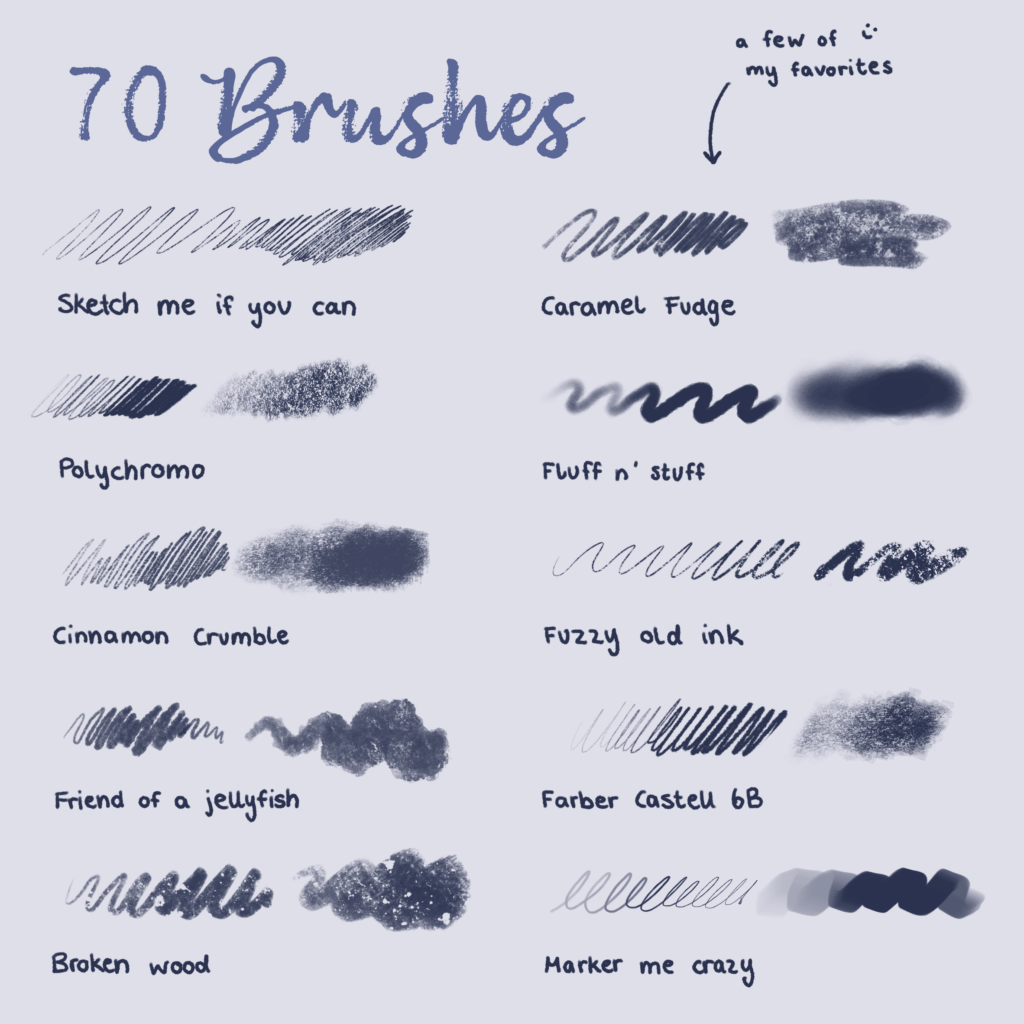
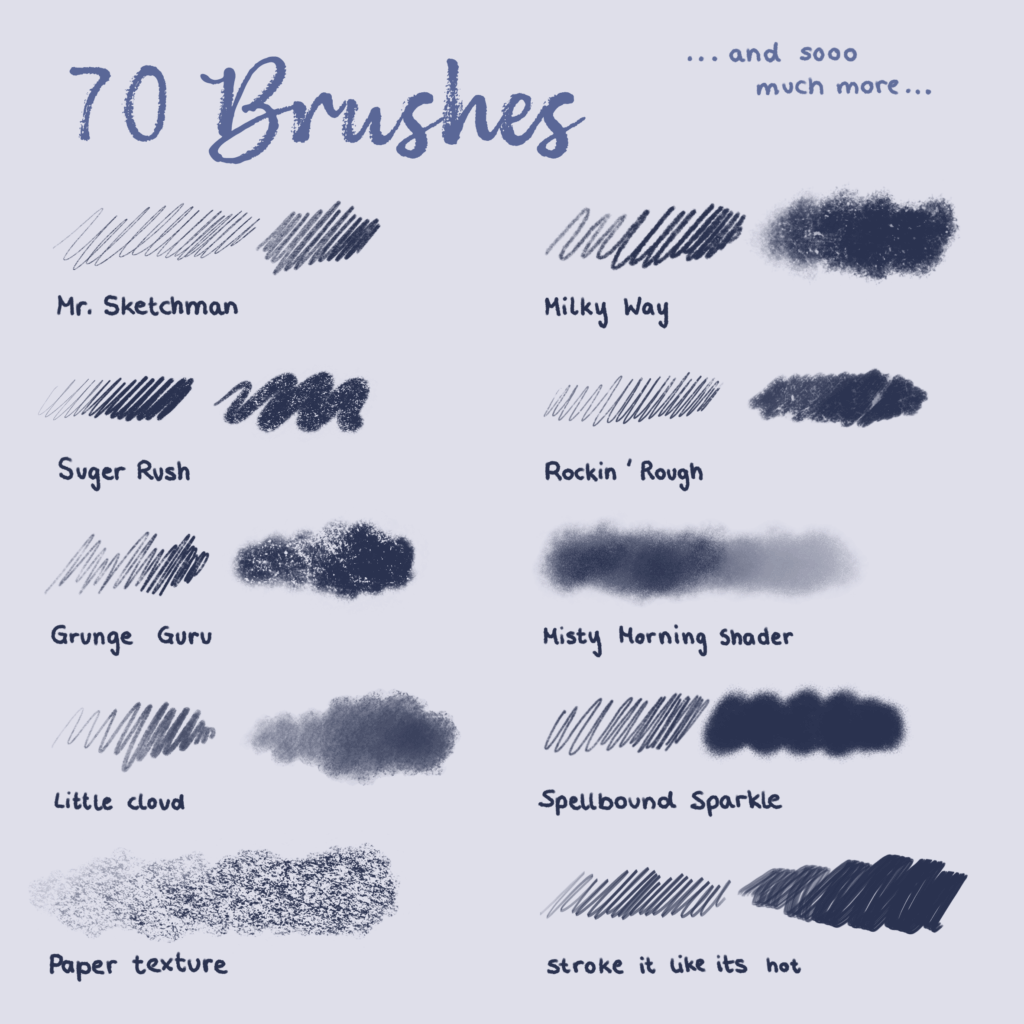
(here you can see a few examples from the pencils I created)

Putting Them Into Practice

Once my brushes were ready, I began using them exclusively in my illustrations. It’s incredibly satisfying to paint soft watercolor washes that flow naturally, add textured colored pencil details, or draw sharp ink lines that still feel hand-drawn.

This level of control lets me explore my style more deeply and brings my artwork closer to my vision.

Final Thoughts

Creating your own Procreate brushes is a rewarding journey that helps you understand the nuances of digital painting tools and develop a personal artistic voice. It can be a bit time-consuming, but the payoff is huge, both creatively and technically.

I’m happy to share my experience and use my brushes in my illustration (as you can see here).

SURFBOARD PROTOTYPE CONSTRUCTION

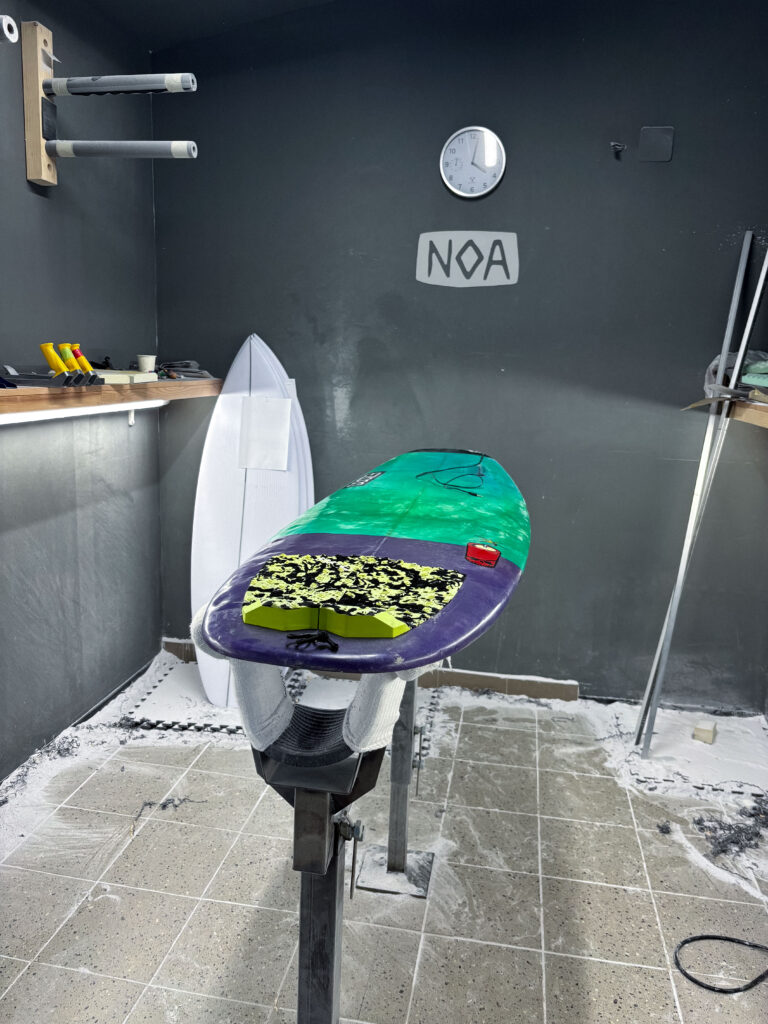
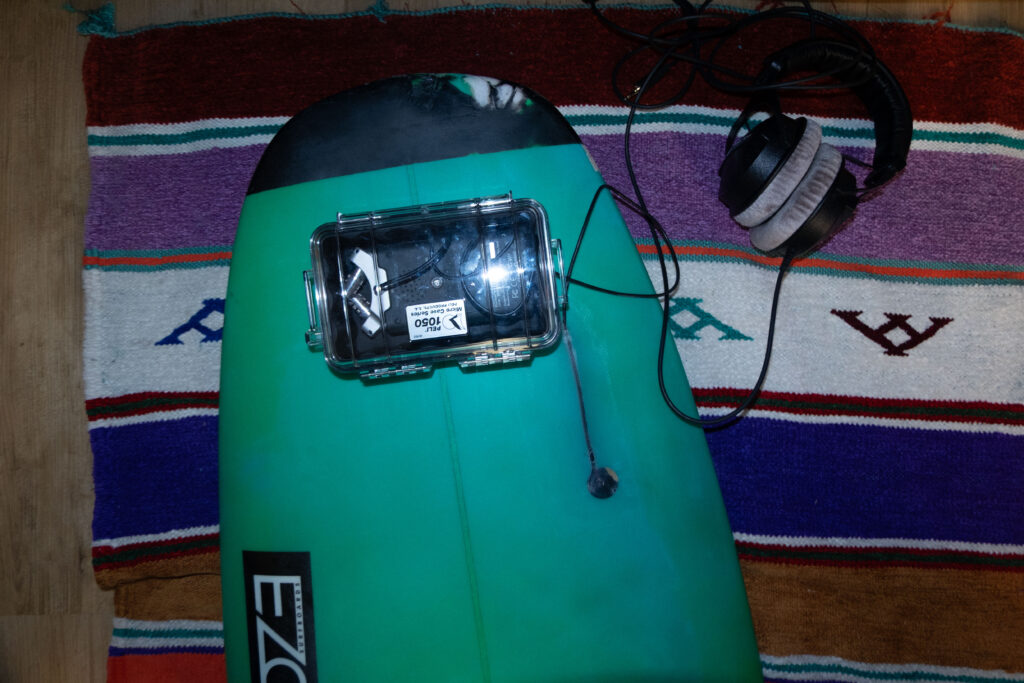
The base model and final prototype selected for this project is built on top of my own personal shortboard. It is measuring 5 feet 9 inches in length and is made for faster maneuvers like the cutback because of its short length and small volume. Considering these factors the board was selected due to its size and shape, which offer a wider range of motion and faster changes of speed and rotation in comparison to a longboard. Also, the dynamical movement and the internal board vibrations will be different than the one of a longboard or a board with a higher volume. Before the construction, a planning session was conducted with the Noa team to identify the ideal locations for sensor placement, cable routing, mounting of the housing, and material usage considering the exposure to saltwater.

Noa surfboards is a small factory for shaping mostly shortboards and riverboards. With their own shaping studio, they represent one of the few professional shapers in the region of Austria and Germany. This studio was chosen for the professional knowledge and experience of shaping to develop a well-functioning and safe protype.  

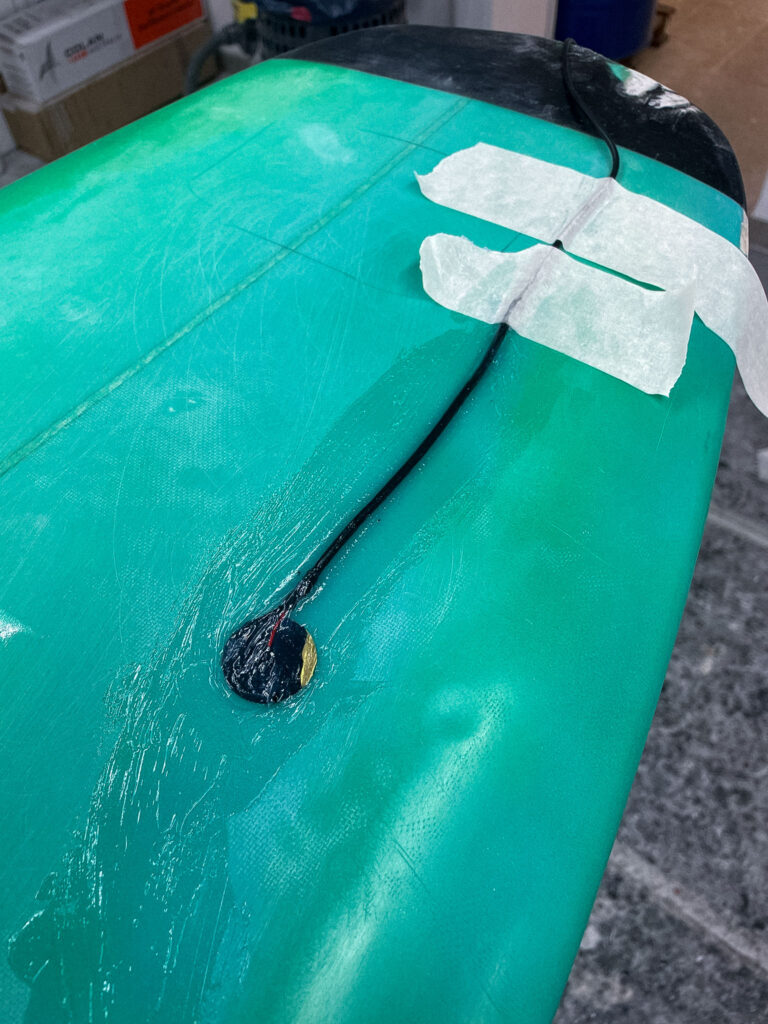
Looking at the building phase of the protype, Noa Surfboards proposed embedding the piezo disc underneath the front-foot zone of the deck. This area is perfect to capture the movement of the surfer, while not being under strong impact of the bodyweight of the surfer. In order to integrate the microphone in the body of the board a rectangular section of the fiberglass top layer was carefully removed. In the next step the piezo disc was mounted directly to the raw material. To protect the microphone from external impacts and the saltwater multiple layers of fiberglass cloth were laid over the sensor and encapsulate the mic completely. 

Another critical technical step was to route the cable from the embedded mic to the waterproof electronics box. Therefore, a narrow channel was drilled on the side of the box for the cable to enter. 

Inside the case, the Zoom H4n recorder and x-IMU3 sensor were suspended in a foam block designed to isolate the electronics from board vibrations and strong impacts. 

  1. Evaluation of the prototype

SURF SKATE SIMULATION AND TEST RECORDINGS

Purpose of the Simulation

Before deploying the system in ocean conditions, a controlled test was performed using a surf skate on land in order to structure the synchronization part of the different media in advance. Therefore, the simulation served multiple purposes:

  • First, to test the stability and functionality of the hardware setup under strong movements
  • To collect and analyze motion data from surfing-like movements like the cutback using the ximu3 sensor
  • To test and evaluate the contact microphone’s responsiveness to board interaction and different movement patterns
  • To practice audiovisual synchronization between footage an external camera setup, the Zoom H4n recorder, the contact microphone and the x-IMU3 motion data.

Therefore, the surf skate was chosen because of its closely representation of  the body movement and board rotation then surfing. Especially the cutback movement can be imitated by using a skate ramp.  

This testing setup consists of the following tools:

  • A Carver-style surf skateboard
  • The x-IMU3 sensor mounted on the bottom of the board to capture movement dynamics
  • The Piezo contact microphone taped next to the motion sensor on the bottom of the board. After testing the microphone was placed in the middle of the skateboard deck in order to capture the movement of both axes of the board at the same amount of loudness. Placing the microphone closer to the wheels of the board would result in much more noise in the recording due to the internal rotation of the axes. 
  • The Zoom H4n recorder was help in the hand of the skater and was connected to closed over ear headphones. 
  • Using the external film camera Sony Alpha 7iii the whole test was captured. This additional recording was helpful later in the synchronization part. 

The board was ridden in a skate ramp simulating the composition of the wave. ON the top of the ramp the cutback movement can be executed. 

A skateboard with headphones and a remote

AI-generated content may be incorrect.

At the start of the recording session, all devices were synchronized through a short impulse sound (hitting on the board) recorded on all three devices: Zoom, GoPro, and x-IMU3. The single surf skate tackes lasted approximately 2 minutes of recording and were repeated multiple times. 
The data recorded consists of:

  • accelerometer, gyroscope, orientation from the x-IMU3
  • Mono WAV audio from the contact mic
  • 1080p video footage from the external camera

The files were transferred and loaded into the respective analysis environments:

The x-IMU3 data was decoded using the official GUI and exported as CSV files;

The WAV audio was imported into REAPER and cross-referenced with the GoPro’s audio to align the sync impulse;

Motion data was plotted using Python and matched frame-by-frame to movement events in the video.

The result was a perfectly aligned audio-motion-video composite, usable both for analysis and composition.

  1.  Observations and Results

The contact mic successfully captured vibrational data including surface noise, carving intensity, and road texture;

The x-IMU3 data revealed clear peaks in angular velocity during simulated cutbacks and sharp turns;

The GoPro footage confirmed that movement gestures correlated well with sonic and motion data markers;

The Pelican case and foam provided sufficient shock insulation and no overheating or component failure occurred;

The synchronization method using a single impulse sound proved highly reliable.

The surf skate test validated the concept and highlighted important considerations:

Movement-based sonic gestures are highly expressive and usable for composition;

Vibration sensitivity of the contact mic is sufficient for detailed sound capture;

The sync strategy will work equally well in ocean sessions with minor adjustments;

Battery and storage life are adequate for short-to-medium-length surf sessions;

Cable insulation and structural mounting are durable under stress.

This test confirmed the system’s readiness for its full application in Morocco, where ocean sessions will build upon the structure and learnings of this simulation.