#a NIME-Paper Review – Listening to Swarms – Thoughts on “Interactive Sonification of 3D Swarmalators”

The NIME 2024 paper Interactive Sonification of 3D Swarmalators by Pedro Lucas et al.—a project that merges swarm intelligence with sound and music systems in an unusual and intriguing way. Their work explores what happens when coupled oscillators (called “Swarmalators”) move in 3D space and interact through both spatial and phase dynamics, resulting in emergent sonic behavior.


What I Found Fascinating

First, the concept of “sound swarming” is compelling. Each swarmalator acts as a tiny sound generator (an oscillator), and together they form a swarm that evolves over time. As the swarm grows or changes state, the collective sonic output transforms, producing emergent, ambient textures. It’s like a synthetic ecology where sonic patterns ripple through space and time.

I really appreciated the balance between individual control (through the interactive swarmalator) and system-level complexity. The way one agent—controlled by a user—can gently nudge the entire swarm toward a new sound state (syncing phases or shifting spatial positions) reminds me of soft systems thinking, or how small disturbances in dynamic environments can guide large-scale changes. It’s a musical metaphor for influence and emergence.

Also interesting: the decision to use 3D space—not just as visual flair, but as a functional parameter in the sound synthesis. The angle between an agent’s position and the swarm center is mapped to modulation (LFO phase), which adds spatial logic to the sonic texture. This connection between location, rhythm, and pitch expands the expressive range of the system without overwhelming the user with complexity.


Critique or Question…

While I found the system architecture well thought out (especially the modular design between Unity and Max), I do wonder how accessible the musical outcomes really are for performers or audiences who aren’t already embedded in experimental sound practices.

  • What does “sound swarming” feel like to someone who isn’t reading the underlying equations?There’s an assumption that emergent sonic behavior is interesting in itself—which is often true—but I’d be curious about perceived musicality or narrative structure. How does the user know when something meaningful is happening?
  • How intuitive is the control? The interactive swarmalator is a smart concept, but its influence seems subtle and potentially slow. In a live performance context, would that control feel satisfying? Or would it feel like poking a beehive and waiting to see what happens?
  • Sonification or Composition? I’m torn between seeing this as a sonification project (data → sound) or a compositional tool. It seems to sit between both, but I’d love to see clearer articulation on whether the goal is to represent something through sound, or to compose emergent music through interaction.

What I Would Like to Explore Further

This system opens a door to interesting possibilities for multisensory representation, especially when combined with haptics or extended reality (which the authors mention as future work). Imagine if you could feel vibrations from nearby swarmalators, or use your hand in an AR space to guide sound clusters around you.

It also made me think about accessibility: how could this system be made tangible for someone who doesn’t rely on visual interfaces? Could you “hear” the swarm’s shape or “feel” its convergence? Maybe adding another sensory layer could help bridge that gap.

Finally, I’d love to see this concept applied to non-musical data—for example, using environmental or physiological data as inputs to control the swarm behavior. That could transform this into an ambient, perceptual feedback tool rather than just a sound art piece.


This paper definitely broadened how I think about interactive systems, sonic feedback, and emergence. While the sonic aesthetics may lean toward experimental music, the design principles offer insight into how complex systems can be explored through sound—not just explained, but felt.


Reference:

P. Lucas, S. Fasciani, A. Szorkovszky, and K. Glette, “Interactive Sonification of 3D Swarmalators,” in Proc. Int. Conf. New Interfaces for Musical Expression (NIME), Utrecht, The Netherlands, Sep. 2024. [Online]. Available: https://doi.org/10.5281/zenodo.10948289

https://artsengine.engin.umich.edu/previous_projects/unnatural-nature-eco-art/

How Musical Is Dog?🐾

When scrolling through the NIME 2024 proceedings, one title stopped me mid-scroll: “How Musical Is Dog?” by Alon Ilsar. The reason was simple — I have a dog, Camillo. Like many dog people, I often find myself deeply engaged in shared physical play with him, and reading that this paper wasn’t about dogs reacting to music, but about playing music with a dog, immediately made it feel more real, more grounded. Not just an abstract research experiment, but something relatable, playful, and very much part of my everyday life.

Playtime as Improvisation

One of the things I loved most about Ilsar’s project with Razzly was that it wasn’t about teaching a dog to “perform” but embracing the spontaneity of real play.

To all of you reading this, I thought you might like these two clips of Camillo doing what he does best—being fully in the moment:

The Joy of Shared Play

Ilsar’s approach—embedding a gestural digital musical instrument, the AirSticks, into a fetch ball—transforms something familiar and beloved to a dog into a shared musical experience. That’s what I loved most. It’s not about training a dog to be a musician or teaching them to press buttons on a keyboard. It’s about recognizing the shared rhythm, the back-and-forth, the improvisational quality of fetch as a kind of duet.

As someone working at the intersection of interaction design and everyday life, this resonated with me deeply. Design doesn’t always have to be about solving problems or optimizing performance—it can be about expanding joy, exploring alternative agencies, and finding meaning in the playful.

Camillo and the What-Ifs

Reading this made me reflect on the moments I share with my dog Camillo—how we communicate without words, how we improvise and adapt. What if our daily play could be turned into music? Would it sound like anything I’d recognize as “musical”? Does that even matter? The beauty of the project is that it lets go of human-centric definitions and opens up a new, more inclusive space for musicking.

At the same time, the article made me question the limits of interpretation. Ilsar acknowledges the difficulty of defining the dog’s role: is Razzly making music, or is she just playing fetch while her human maps the resulting motion into sound? It’s a subtle line between shared authorship and creative framing. And while the paper does a great job opening up that discussion, I think it could have gone even deeper into the ethical implications of projecting meaning onto another species’ behavior.

Musicality vs. Meaning

Here lies the tension: who decides what counts as music? The title itself—How Musical Is Dog?—invites critique. It implies a scale, a measure, and yet the content of the paper pushes against those rigid definitions. Razzly isn’t playing a melody, but she is engaging in a rhythmic, expressive act. For us as designers and researchers, the takeaway isn’t about turning animals into performers—it’s about being attuned to the rhythms of non-human lives and translating those into forms of expression with, not for them.

Still, I found myself wishing for a deeper dive into the dog’s perspective—not just how the human interprets the interaction, but how the dog’s sensory and perceptual world is being altered by the musical mapping. Are there sounds the dog finds unpleasant? Does the sound reinforce the play, or distract from it? These questions feel crucial in a project that so beautifully centers interspecies collaboration.

Implications for Design

For my own practice, this article sparked a chain of thoughts. Could more of our interfaces be designed with multispecies collaboration in mind? Could inclusive design extend beyond human users? What does “user experience” mean when your user can’t read or speak your language, but can wag their tail, tug a rope, or bounce around with glee?

There’s something liberating in designing for joy instead of productivity, for response rather than control. This paper reminded me that interaction design can be messy, playful, speculative—and still deeply meaningful.


“How Musical Is Dog?” doesn’t offer all the answers, and it doesn’t try to. It opens a door. For me, it’s a reminder that research doesn’t need to be cold and distant to be valuable—it can be warm, fuzzy, and a little chaotic, like Camillo chasing a ball through the park.

And maybe that’s what we need more of—not only in musical interface design, but in our broader thinking about technology, play, and connection.


https://nime.org/proceedings/2024/nime2024_29.pdf

NIME Paper review: How musical is a dog?

This paper discusses the interspecies musical collaboration between Alon Ilsar and his dog Razzly, exploring creativity, play, agency, and social interaction through improvised performances utilizing a gestural instrument.

Razzy the Koolpoodle

Key points of the paper

  1. Razzy is a Koolpoodle (quarter Australian Kelpie, quarter Koolie and half Poodle) <3
  2. The author of performances with Razzly showcasing interspecies collaboration and improvised music dynamics.
  3. Analysis of dog-human play parallels with collaborative musical improvisation and social bonding.
  4. Exploration of agency and consent in musical interactions between humans and Razzly the dog.

The gestural Digital Musical Instrument (DMI) used in the performances with Razzly the dog was the AirSticks. This device was integrated into a fetch ball, allowing for an interactive experience where both the dog and the musician could participate in improvisation, merging play with music-making.

Demonstration of the AirSticks: https://www.youtube.com/watch?v=vWNQA4D_tm0

The ethical considerations in the collaboration between the author and Razzly the dog were taken seriously, ensuring the dog’s well-being throughout the process. The project adhered to best practices for involving animals, promoting consent, and allowing Razzly to express spontaneous behavior. The performances aimed to enhance the quality of life for Razzly while avoiding any distress.

The paper explores themes of creativity, agency, and consent in dog-human interactions during music performances. It highlights the importance of spontaneous play and trust in fostering collaborative musical experiences. Additionally, it reflects on how these interactions can enhance understanding between species and reshape traditional notions of musicality.

Alon Ilsar collaborated with his dog, Razzly, in three distinct performances that evolved over a year and took place in different cities. These gigs served as an exploration of interspecies interaction and musicking, highlighting the dog’s agency and emotional response throughout the process.

The interactions between Razzly the dog and the author enhance understanding between species by emphasizing the importance of play and trust in collaborative endeavors. This reshapes traditional notions of musicality by illustrating how non-human animals can embody creative agency, turning spontaneous interactions into meaningful musical experiences. Such collaborations challenge the anthropocentric view of music, highlighting the richness of interspecies communication.

Razzly expressed himself during the improvised musical performances through his natural behaviors, such as vocalizing during play, engaging in catching and fetching activities, and choosing where to drop the ball, which communicated various emotions like joy and fatigue. His playful energy and interactions with the audience highlighted his agency within the musical process.

https://nime.org/proceedings/2024/nime2024_29.pdf

🦖 Dinosaur Choir: Designing for Scientific Exploration, Outreach, and Experimental Music 🎶

Today, I dove into the quirky and ambitious world of Dinosaur Choir, a NIME 2023 paper by Brown, Dudgeon, and Gajewski. Yes – you read that right. It’s about playing music with dinosaur skulls. Well, replicas, but still! The idea? Reconstruct hadrosaur skulls (those duck-billed dinosaurs with dramatic nasal crests) to recreate their vocalizations through breath-powered instruments. It’s part speculative science, part interactive sound art, and part paleo-fan dream.

First impressions? It’s wild – in a good way. The concept of turning ancient anatomy into playable sound interfaces is not just fascinating but also incredibly poetic. You’re literally breathing life into extinct creatures. The goal isn’t only musical performance – it’s also science communication and education. As someone interested in design for mental well-being, I’m always drawn to tactile, embodied experiences. This feels like an emotional connection to the distant past, which is unexpectedly calming and awe-inducing.

Some things I really appreciated:

  • The use of CT scan data and iterative digital modelling (with tools like Blender and 3D Slicer) shows a commitment to scientific integrity.
  • They address accessibility and hygiene, especially post-COVID, by swapping out direct breath tubes for breath-activated microphones – smart move!
  • The project is also intentionally speculative, acknowledging that no one can truly know how a hadrosaur sounded, but instead allowing users to explore different hypotheses through interactive sound.

But here’s where my inner critic perks up. While the project is undeniably cool, it feels like it’s trying to be everything at once: a scientific model, an artistic instrument, a museum exhibit, and an educational tool. That multiplicity is exciting, but also a bit scattered. I wonder if it might benefit from more intentional “mode-switching” -like, a toggle between “science mode” (where only plausible vocalizations are allowed) and “experimental mode” (go wild with dino-DJing). Right now, the boundaries seem a bit blurry.

Also, one half of my brain (the one I made up for this blog post 😄) was thinking about how this might connect with more emotional, inner experiences. What if, instead of performing music, someone used this as a way to reflect on loss? Extinction isn’t just scientific – it’s emotional. Could the dinosaur choir be part of a meditative installation about disappearance, transformation, and the long arc of time?

All in all, I love it. It’s weird, fun, surprisingly moving, and technically impressive. The Dinosaur Choir might not be the most conventional music interface, but it’s got soul. Or at least… breath.

You can find the whole article here.

NIME Paper Review – Sensattice: An emerging collaborative and modular sound sculpture

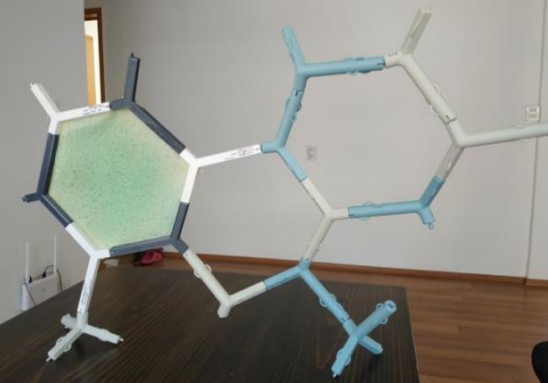
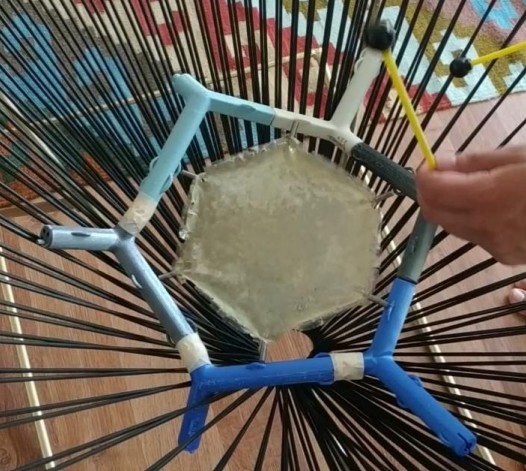
Sensattice is a modular sound sculpture made from organic waste and 3D-printed parts like orange peels, fish scales, and bioplastics shaped into stretchy “skins” and interlocking “bones.” These pieces can be assembled in different ways to form a lattice structure that people can play with by rubbing, tapping, drumming, or even blowing into some flute-like components.

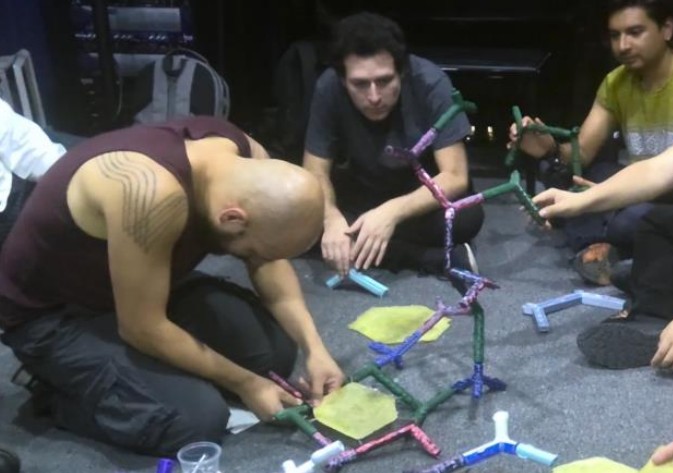
But beyond the materials and shapes, what makes Sensattice truly special is how interactive and collaborative it is. Anyone can participate in building and playing it. There is no right or wrong way to engage with it. It invites people to explore sound not just with their ears, but with their whole body.

What I really appreciate about this instrument is how it reconnects us with our basic senses. It doesn’t rely on technology or screens to interact with it. You just need your hands, your curiosity, and your willingness to play. That simplicity is beautiful to me.

I also love how tangible it is. There’s something grounding about working with physical materials. Feeling textures, hearing natural sounds, even smelling the skins made from food waste. Sensattice reminds me that art and music don’t need to be high-tech to be innovative. They just need to be honest and intentional.

Another thing I admire is how it’s been made. Not only from a mix of materials, but also through the collaboration of many different fields like music, engineering, biology, and design. It’s similar to how different instruments come together to create music. Each discipline contributes its unique voice, and together, they produce something harmonious. The balance between form and function, structure and play, as well as materials and meaning all come together to enhance the goal of producing beautiful sound.

It also makes me think about how rare it is today to encounter something that invites touch and play without asking for instructions first. I think that openness is part of what makes Sensattice so powerful. It welcomes people in, just as they are.

Lo-Fi Prototyping & Speed-Dating Reflections: Leveraging AR and IoT Technologies to Revolutionize the Retail Shopping Experience

Welcome back to my blog with a new semester and new adventures. I hope you all enjoy it. I decided to continue with my research topic to further view it in this semester (I am not sure if I will continue or switch so let’s see). I will present my quick 20 min prototype. Today, I’ll also share insights from a recent prototyping exercise and a fun ‘speed dating’ session we had in class.


Prototyping


This project explores how AR and IoT technologies can reshape the physical retail shopping experience by guiding users through stores, helping them make smarter, faster decisions.


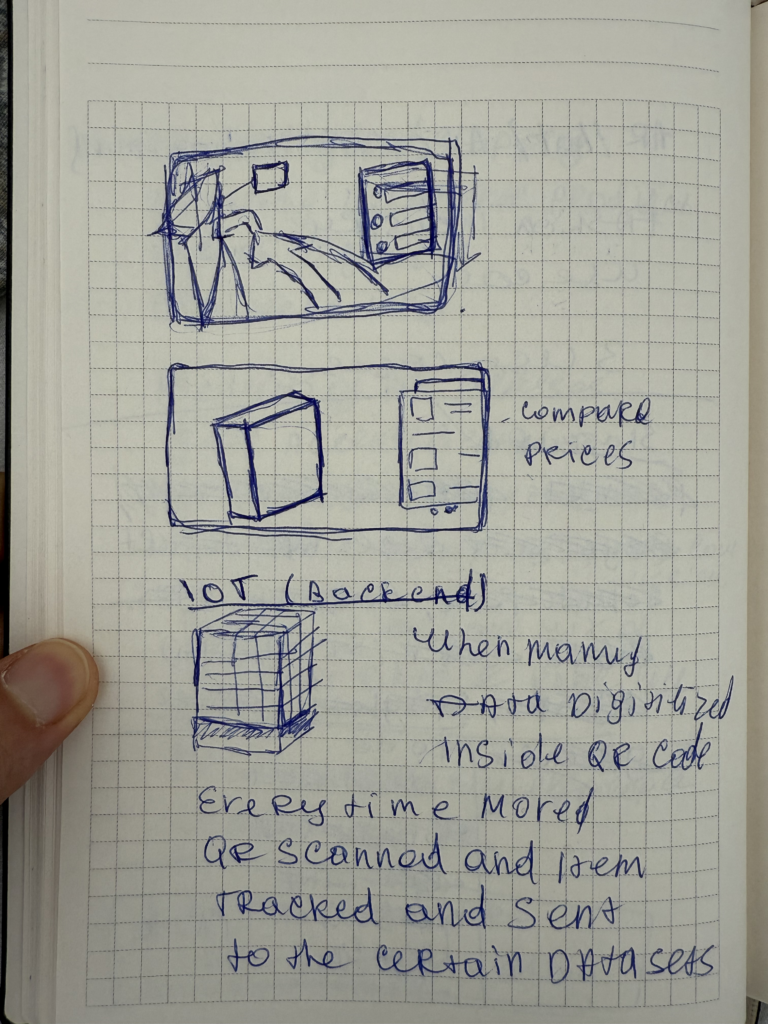
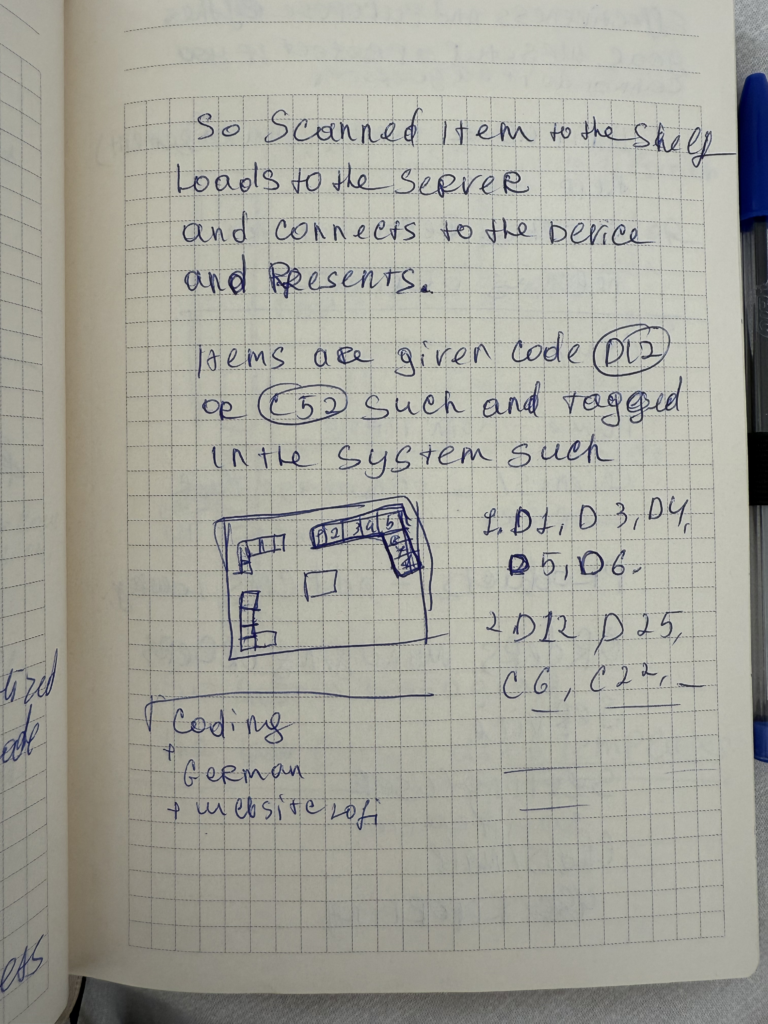
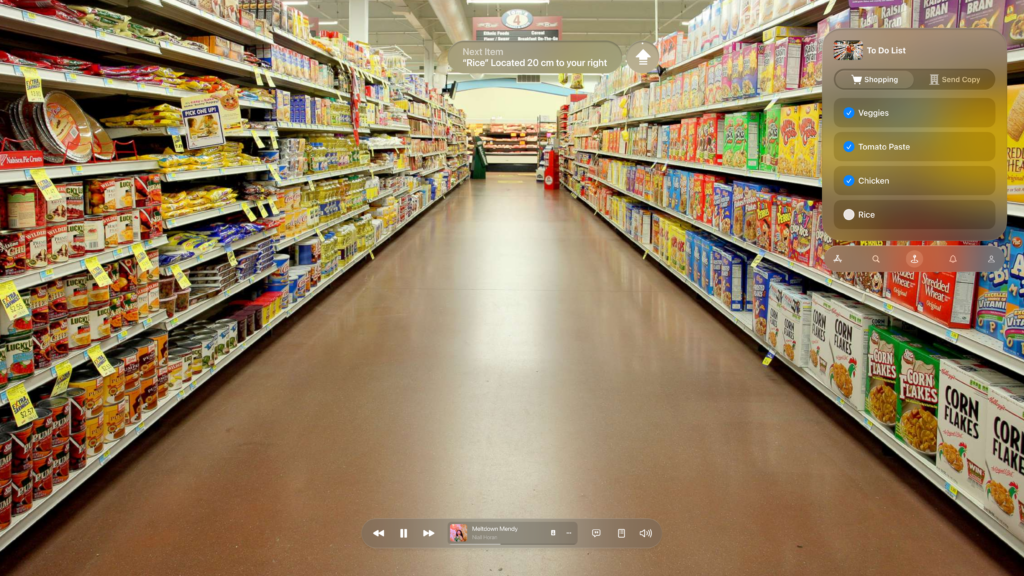
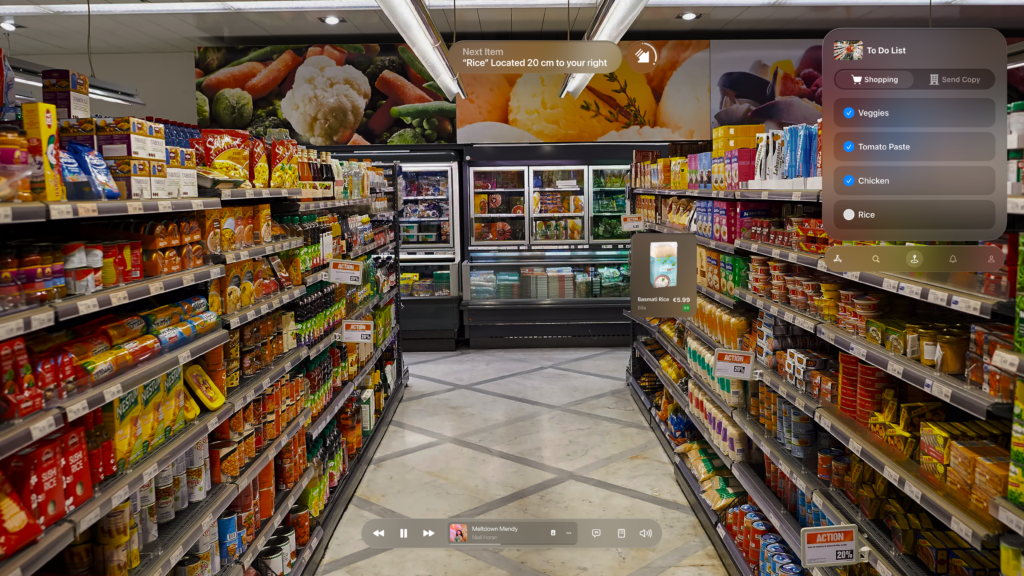
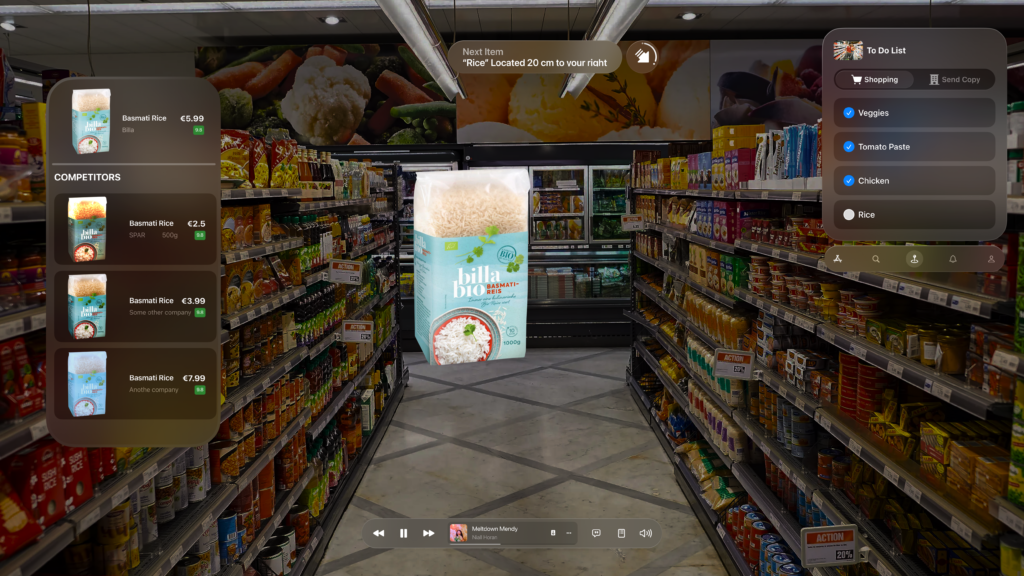
 I gathered insights from my previous research and translated them into a lo-fi prototype. I focused on the core functionality: how AR glasses guide users through a store. I created wireframes depicting the user journey—from syncing their shopping list upon entering the store to guiding them to specific products like rice. The AR interface displayed essential information such as pricing, alternatives, and competitor comparisons, enhancing decision-making on the go.

Imagine walking into your local supermarket. The moment you step in, your AR glasses detect the store’s internal network and sync with your digital shopping list. The interface opens up seamlessly, offering not just a checklist, but a smart, dynamic assistant for your entire trip.

At the top of your view, a floating navigation cue gently guides you toward the next item—say, rice—telling you it’s just 20 cm to your right. No more wandering through aisles, trying to decode vague signs or search endlessly. The glasses locate the exact position of the product for you.

Once you’re in front of the item, a visually anchored card pops up, displaying detailed product information—brand, price, user rating, and more. But what really transforms the experience is the competitor analysis feature. It compares prices across brands and even other stores within the network. You instantly see that while Billa Bio’s Basmati Rice costs €5.99, a similar product from SPAR is just €2.50 for 500g. The AR interface gives you the context to make smarter decisions, without needing to open separate apps or websites.


The interface also adapts based on the meals you’re planning. If your recipe includes chicken, tomato paste, and certain veggies, the system clusters those items together and guides you through them logically, minimizing backtracking or unnecessary detours. Once you physically pick up an item and place it in your cart, it automatically checks off from your digital list, maintaining a smooth flow throughout your journey.


Speed Dating Exercise


To test the prototype’s usability, we participated in a ‘speed dating’ exercise where we exchanged prototypes with classmates. For three minutes, I presented my prototype, then spent three minutes exploring theirs. My peers found the AR navigation intuitive and easy to grasp, appreciating how it seamlessly integrated previous phone and AR experiences into a hands-free, guided shopping journey. The feedback was overwhelmingly positive, highlighting that the software’s ability to gently guide users through the store made the entire experience feel effortless.

NIME: Exploring the Potential of Hardware-Free Musical Interaction

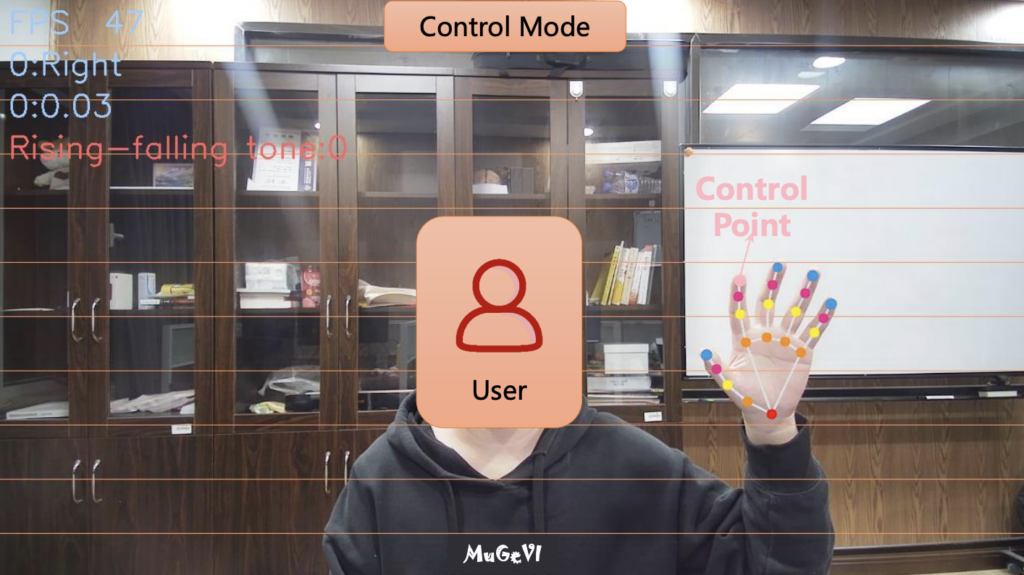
My choice of the research paper would be a fascinating project called MuGeVI, which stands for Multi-Functional Gesture-Controlled Virtual Instrument. What really caught my attention is its core idea: letting you make music using just your hand gestures, captured by a standard computer webcam. No special gloves, sensors, or expensive extra hardware needed.

To me, this is incredibly exciting. Think about it – most of us have a computer and a webcam. This project explores using that basic setup to create a musical instrument. It feels like a big step towards making experimental music technology more accessible to everyone. Instead of needing specialized gear that can be costly or hard to find, MuGeVI uses software to watch your hands and turn those movements into music. This could be fantastic for schools, hobbyists just wanting to try gesture control, or even potentially for people with physical limitations who find traditional instruments difficult to play. Lowering the barrier to entry like this is always a good thing in my book.
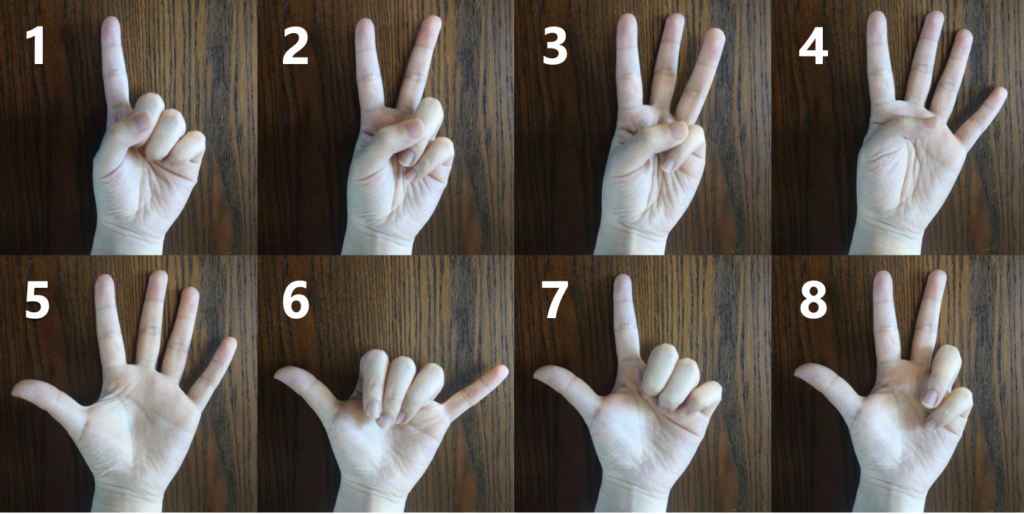
Here are Gestures recognized by the software.

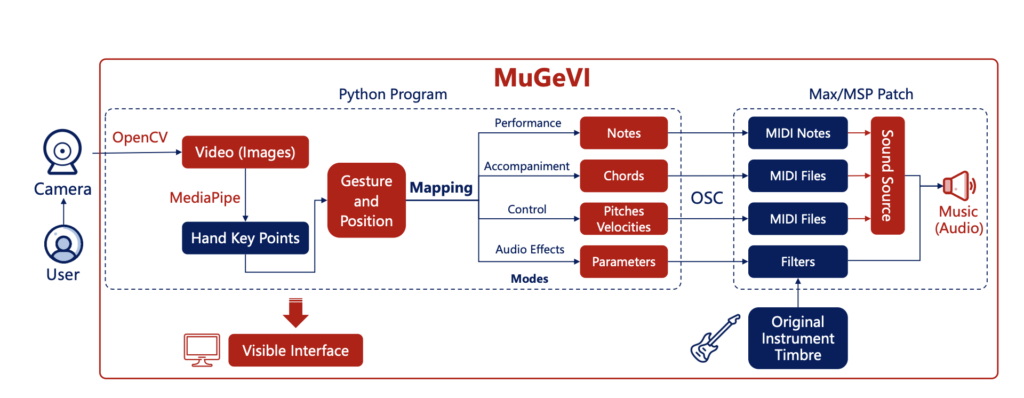
The system seems quite versatile, too. It’s not just a one-trick pony. The creators designed different modes for different musical tasks:

  • You can essentially play notes in the air, like an “Air Piano,” triggering sounds based on where your hand is and a simple finger-touch gesture.
  • You can use specific hand shapes to control background music, like chords and accompaniment patterns.
  • You can use the position of your finger to adjust things like the pitch or volume of music already playing.
  • You can even control audio effects in real-time – the example given was using your finger height to control a “wah-wah” effect on an incoming sound signal.

This variety shows a lot of thought went into making it a potentially useful tool for different kinds of musical expression.

However, after analyzing the architecture of the software, as cool as the concept is, I can see some practical challenges based on the review. Relying purely on a webcam means things like lighting conditions or even just a messy background might affect how well it tracks your hands. Getting glitches or inaccurate responses would definitely be frustrating when trying to make music.

There’s also the physical side. Holding your hands up and making gestures for a long time could get tiring. And, importantly, you don’t get any physical feedback – that feeling of touch, resistance, or vibration you get from a real instrument. That lack of tactile feel might make it harder to achieve really fine control or feel truly connected to the instrument. I also noted that the mode for playing backing tracks seemed a bit rigid, locked to one speed, which might limit creativity in some situations.

Despite these potential hurdles, the creators seem aware of them and have plans to improve and expand MuGeVI, like adding more controls and making it more expressive.

Overall, my impression is really positive. MuGeVI feels like a genuinely innovative project that tackles the important issue of accessibility in music technology head-on. It shows the power of using readily available tools in creative ways. While it might still need refinement to be perfectly robust and expressive for demanding performances, the direction it’s heading in – making gesture-based music creation open to more people – is something I find truly inspiring. It’s exciting to see technology being used not just to create complex new hardware, but also to make powerful creative tools available using the tech we already have.

NIME: Design and Exhibition of Loudspeaker-Based, Environmentally-Reactive, Soundscape Augmentation Artifacts in Outdoor Natural Environments

Legatus is a soundscape augmentation artifact designed for outdoor environments, providing a way of engaging with and enhancing isonic environments. It is a lightweight, self-powered device that can listen to and interact with its environment using sensors, and then generate audio responses based on the captured sounds. It leverages audio playback, synthesis, and real-time effects, creating a interaction between the natural world and its sonic representation. The device has been tested in various outdoor installations, with the goal of encouraging environmental listening and fostering a deeper connection between visitors and their surroundings.

The hardware design of Legatus includes several key components: a microcontroller, environmental sensors, an audio codec, a digital signal processor, and an amplifier, all housed within an acrylic body. The device is powered by rechargeable batteries and is designed for easy transport and setup, with modular feet and simple controls.

Legatus operates through a series of interactive installation scenarios, where it listens to its surroundings, records sounds, and either replays or synthesizes new sounds in response to environmental conditions. These scenarios include spatially relocated soundscapes, temporally relocated soundscapes, pitch-based synthesis, and feedback chamber modes.

WHAT ARE IT’S STRENGHTS?

Legatus is a promising tool for sound installations and environmental art projects. Its key strength lies in its ability to engage the natural environment through audio responses. The integration of sensors that detect ambient light, temperature, humidity, and sound levels makes it highly reactive to its surroundings. This reactivity allows for real-time interaction between the artifact and its environment.

Another strength is its portability. Legatus is lightweight and compact, making it easy to transport and set up in various outdoor locations.

Moreover, Legatus’s durability in outdoor conditions is not to take for granted. The device is resistant to water splashes and dust, making sure that it can work proprrly in various weather conditions without significant risk of damage.

Additionally, Legatus promotes non-cochlear visual feedback through the use of RGB LEDs, directing attention away from the artifact’s vocalizations and towards the ambient soundscape. This feedback loop helps maintain the visitor’s engagement with the surrounding environment.

WHAT ARE IT’S WEAKNESSES?

While Legatus is without any doubt a promising product it does have several weaknesses that limit its scope, particularly in larger or more complex installations.

One of the primary issues is the volume and audio clarity. The current speaker design, while functional, is limited in terms of sound output. In larger spaces or environments with high background noise, the audio may not be loud or clear enough to be heard effectively.

Another significant weakness is the lack of networking capabilities. In installations with multiple Legatus units, there is no communication between the devices, meaning they cannot work together to create a more cohesive or immersive soundscape.

Additionally, the environmental mappings that drive Legatus’s behavior can sometimes feel too abstract for visitors to understand. The relationship between sensor readings and the artifact’s responses is not always intuitive, making it difficult for audiences to connect the device’s actions with the environmental conditions they represent, and making necessary a prior explanation or guidance.

The interaction between the artifact and the audience is also quite passive, they have no direct control over it’s actions. This lack of interactivity may reduce engagement and limit the potential for more personalized experiences.

IMPROVEMENTS

Audio Output and Durability: Upgrading the speaker to a more robust, weatherproof model could prevent damage and improve sound quality.

Networking Capabilities: Integrating Wi-Fi or Bluetooth networking would enable Legatus units to communicate with each other. This would allow for synchronized sound playback and the creation of multi-channel audio experiences in installations with multiple devices.

Environmental Mappings: To make the mappings between environmental conditions and artifact behavior more intuitive, clearer visual cues, such as a simple mobile app interface, could be introduced. Visitors could see and hear more directly how environmental changes influence the device’s behavior, improving understanding.

Interactivity: Adding user-controlled elements, such as touch sensors, proximity sensors, or a mobile app for controlling sound parameters, could make the experience more engaging. By allowing visitors to influence the artifact’s behavior there would be space to create a more personalized and immersive installation.

CONCLUSION

Legatus offers an innovative approach to blending audio, sensors, and real-time interaction, encouraging visitors to engage with and reflect on the sonic environment around them. While there are notable weaknesses, such as limited audio output, lack of networking, and passive interaction, the device’s strengths, including its portability, adaptability, and environmental responsiveness, make it a powerful tool for artistic expression. With some improvements, particularly in terms of interactivity, audio capabilities, and networking, Legatus could become an even more versatile and engaging platform for sound art installations.

NIME Paper Review – spinCycle: a Color-Tracking Turntable Sequencer

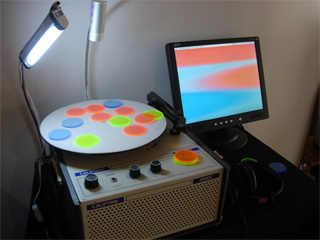
The paper introduces spinCycle, an interactive music performance system by Spencer Kiser. It uses a turntable and colored plexiglass disks which are placed on the spinning turntable. A camera tracks their color and position and transforms those visual patterns into sound in real time. This System creates a unique mix of visual design, sound and interactivity.

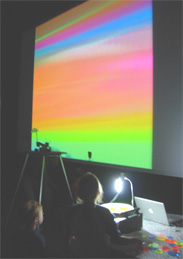
On the technical side, spinCycle uses a webcam to capture the rotating disks, and a patch built in Max/MSP/Jitter processes the video feed. The system applies edge detection to identify when and where each color appears, triggering the corresponding sound connected to the color. A live visual feed is projected during the performance, so the audience can directly see how the visual patterns control the music and therefore the connection between color and sound.

The system can function as a drum machine or sine wave generator. In the drum machine version, each color triggers a different sound (kick, snare, hi-hat). In the sine wave version, each color is hard coded to a sine wave. In this option it is also possible to overlap disks to form secondary colors and harmonies.

I found it fascinating that the idea of connecting color and sound goes back to ancient cultures, including the Chinese and Persians.
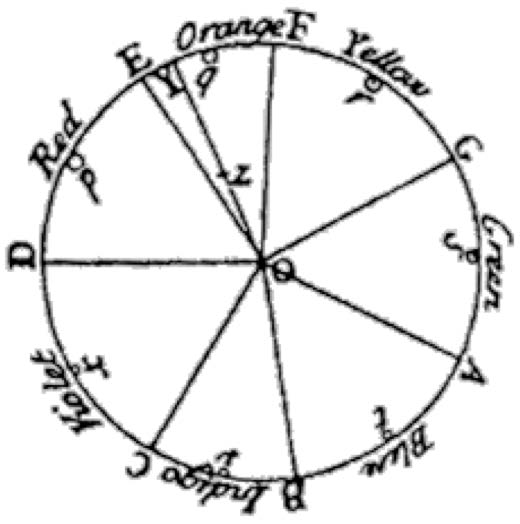
In the west, Sir Isaac Newton tried to map colors to musical tones with his “Opticks” in 1704. He made a connection between their mathematical relationship to each other and the relationship
between the notes of the musical scale.

My thoughts on spinCycle

I think spinCycle is a fun concept that nicely blends visual art, physical interaction, and sound design. Coming from a visual design background, I sometimes find it challenging to fully grasp the logic behind sound design. That’s why I like this approach of using visual patterns to generate sound which creates a direct and intuitive connection between what you see and what you hear.

What I especially like is that the interface seems very playful and intuitive. It invites you to experiment with colors and spatial arrangements, making sound creation feel more like visual composition. For me, this is a fun and experimental way to make sound design more approachable for visual designers. I also find it fascinating to consider how each color can take on a mood or character through its associated sound. Many people naturally associate colors with certain emotions, and by layering sound onto color, it adds a new emotional dimension. For instance, a soft sine wave could enhance the calmness often associated with blue, while a sharp snare might amplify the energy or urgency linked to red. This creates an opportunity to explore how visual and auditory elements can work together to express emotion in a multisensory way.

However, after reading the paper, I still have some technical questions. While the concept is clear, I feel the technical implementation — especially the way video input is converted into sound — isn’t described in much detail. Since I’ve worked with Max/MSP before, I’m really curious to see how the patch is built. It would be helpful to see how the video tracking, color detection, and sound triggering are structured within the patch.

Overall I think spinCycle is a very fun and creative tool, which I would love to try it myself.

03_First Projection Mapping Test

This week I finally started with the technical side of my projection mapping project. First, I borrowed a beamer from a friend, but that didn’t go too well. The quality wasn’t that great and I forgot to take the remote with me. Then I got one from our media center at uni, which was made for short distances, so it fit my setup way better. Still, getting it to work wasn’t as easy as I thought. I guess I made things more complicated for myself by just plugging it in and hoping it would just work instead of reading the manual first. Once I got the beamer working and connected it to my Mac, I watched a short introduction tutorial about how to use MadMapper. That really helped me get started. It’s important to make sure it’s not mirroring the laptop screen, but instead working as an extended display. In MadMapper, you also have to make sure to select the correct screen (the projector) and activate fullscreen mode for the output. This way, it’s still possible to control things on the laptop while projecting. Three key technical steps I learned for setting it up properly: 

  • Set the projector as an extended display, not mirrored
  • Match the resolution between MadMapper and the projector for the sharpest image
  • Use the correct shapes in MadMapper (like Ellipse, Quad, or Masks), depending on what object you’re projecting on

After that was done, I moved on to experimenting with the software. At first, I didn’t upload any of my own files. I just played around with the materials that are already available in MadMapper. I projected some of the basic visuals directly onto my wall to get a feeling for how the software works. I spent some time trying out different shapes, effects, and settings to understand what everything does. To support that, I also watched a tutorial. It gave me a better overview of the platform and helped me understand how to create different scenes and manage the workflow. Later, I started getting a bit more creative. I projected some of the visuals onto my analog film photos that I had hanging on my wall. It was interesting to see how the light interacted with the pictures. I chose visuals that would highlight the details of the photos and kind of bring them to life. It actually looked really cool and added a new layer of depth to the images.

After that, I wanted to try something more organic, so I used my Monstera plant as a surface. It has these big, leaves with lots of holes in them – not exactly the easiest shape to work with. First, I projected a still image onto it. I realized that starting with a static image made it much easier to get the mapping right. Once the shape was aligned, I switched to moving visuals. Because the surface was so irregular, the animation sometimes looked a bit distorted, but in a nice way. It felt more alive and playful than just projecting onto a flat surface.

Some of the main takeaways from the tutorial and my own tests were that I now understand how to set up scenes and cues in MadMapper, which will be really helpful when I want to switch between projections during a show or installation. I also learned how to import and organize media like videos and images, which made my workflow feel more structured and less chaotic. And I got a better idea of how to align projections to real-life objects, even tricky ones like plants, curved shapes, or detailed textures.

All in all, I’m happy with my progress this week. I’m still figuring things out, but I’m slowly getting more comfortable with both the technical and creative sides of projection mapping.