02.09: Masterclass Statistik

Nach dieser Einführung möchte ich in diesem Blogpost richtig ins Detail gehen. Im Grunde soll dieser Blogpost so etwas wie ein Cheatsheet sein, an den ich mich in der Folge für mein Praxisprojekt wenden kann. Mein ganz persönlicher Spickzettel also. Im ersten Blog wurde ja schon geklärt, unter welchen Umständen man nun eigentlich eine Grafik wählt und wann man die ausgearbeiteten Daten besser einfach als Tabelle darstellt. Hier soll nun erörtert werden, wann und für welchen Zweck denn eigentlich welche Visualisierung am besten geeignet ist und zweitens auch worauf man bei der Arbeit dann achten muss. Als Goodie möchte ich mir noch ein paar worst practise cases ansehen um Fehler zu vermeiden.

Wann nehme ich welche Grafik

Um zu klären in welchen Fällen man welche Grafik benutzt muss zuerst einmal geklärt werden welche Grafiken es überhaupt gibt. Few unterscheidet grundsätzlich nur vier Arten sinnvoll Daten darzustellen, nämlich als Punkte, Balken, Linien und Boxen. Von allen weiteren Arten rät er ab (damit auch vom allseits beliebten Kuchendiagramm). Ich werde später noch etwas genauer darauf eingehen was ich von dieser Vorgehensweise halte, vor allem deshalb weil ich durch diverse Visualisierungskurse im Bachelor dahingehend etwas anders erzogen wurde. Im Grunde ist die Auflistung aber sehr praktisch. Zur Erklärung: Few verwendet deshalb nur diese vier Arten der Visualisierung, da sie eines gemeinsam haben: die zugrunde liegenden Daten lassen sich jeweils entweder als Länge/Höhe oder Position des Graphen ablesen, laut Few die intuitivste und sicherste Variante. Alle weiteren Arten, wie Kuchen- und andere 2D-Diagramme vertrauen dabei auf ihre Fläche, um die Daten darzustellen, eine sehr irreführende und oft täuschende Methode. So kann man im Kuchendiagramm bei ähnlich großen Feldern nur sehr schwer feststellen welches größer ist, während das bei Balkendiagrammen recht einfach machbar ist.

Aus diesen vier Arten ergeben sich nun also sechs verschiedene Diagrammtypen die einem bei jeder Visualisierung zur Auswahl stehen – sechs deshalb, weil Balken und Boxen sowohl horizontal als auch vertikal verwendbar sind.

Um herauszufinden welches dieser sechs Diagramme nun auf welchen Anwendungsfall passt unterscheide Few insgesamt acht verschiedene Datendesigns:

  • Zeitbasierte Darstellungen: Dabei wird ein bestimmter Wert über einen Zeitverlauf betrachtet.
  • Ordnende Darstellungen: Dabei werden verschiedene Werte ihrer Größe nach geordnet.
  • Aufteilungsdarstellungen: Dabei wird gezeigt aus welchen Teilen ein großes Ganzes besteht.
  • Abweichungsdarstellungen: Dabei wird gezeigt wie sich Werte von anderen unterscheiden.
  • Verteilungsdarstellungen: Dabei wird gezeigt wie sich eine Anzahl von Werten in Kategorien verteilt.
  • Korrelationsdarstellungen: Dabei wird gezeigt wie zwei verschiedene Werte korrelieren.
  • Geografische Darstellungen: Dabei werden geografische Unterschiede in den Werten gezeigt.
  • Nominale Darstellungen: Dabei werden einfache Auflistungen ohne Ordnung gezeigt.

Für jede dieser Darstellungen bieten sich nun manche Grafen besser an als andere, während einige sogar komplett vermieden werden sollten. Hat man also seinen Datensatz parat, muss man zuerst herausfinden was die Aussage ist, die man damit darstellen möchte. Dann kann man sich an untenstehende Tabelle wenden, die jedem dieser acht Darstellungsarten seinen am besten geeignet Grafen zuordnet. Zusätzlich habe ich zu jedem Grafen noch eine Erklärung angefügt, wann und warum sich dieser am besten eignet.

Nominale Darstellungen:Im Grunde machen hier nur Balken (vertikal und horizontal) Sinn. Sind die Unterschiede zwischen den einzelnen Kategorien ganz gering und kaum zu erkennen, kann man sich mit Punkten (einem dot plot) behelfen, da dessen Achse nicht bei null beginnen muss und somit Unterschiede besser darstellbar sind.
Zeitbasierte Darstellungen: Will man einzelne Werte herausheben ( zum Beispiel den tollen Umsatz im März) kann man auch hier Balken verwenden, jedoch nur vertikale, da die x-Achse die Zeit sein muss. Will man aber klassisch einen Verlauf oder Trend zeigen, machen nur Linien Sinn und sind fast immer die beste Variante. Einzige Ausnahme: es fehlen für viele Zeitpunkte die Daten, dann stellt man jene die man hat als Punkte dar. Linien würden hier Werte implizieren die man nicht hat.
Ordnende Darstellungen: Funktionieren eigentlich nur über Balken. Wichtig: Bei vertikalen Balken wird von links nach rechts geordnet, bei horizontalen von oben nach unten.
Aufteilungsdarstellungen:Laut Few machen auch hier Balken am meisten Sinn. Um zu signalisieren, dass die Werte jedoch zusammengehören und Teil eines Ganzen sind, lässt er zwischen den Balken keinen Platz. Alternativ kommen hier natürlich klassische Kuchendiagramme ins Spiel. Meiner Meinung nach sind diese vollkommen in Ordnung, solange nicht mehr als drei verschiedene Werte dargestellt werden.
Abweichungsdarstellungen:Auch hier eignen sich Balken, diesmal gruppiert mit einem Soll und einem Ist-Wert. Alternativ funktioniert auch ein Linien-Diagramm, mit einer Einzeichnung für den Soll-Wert.
Verteilungsdarstellung:Funktionieren am schönsten über Punkte auf einer Achse (strip plot), wenn man jeden Wert klar erkennbar machen will. Für eine kumulative Verteilung eignet sie die Linie. Will man mehrere Verteilungen in einem Grafen zeigen so geht das nur über Linien.
Geografische Darstellungen:Funktionieren immer über Karten. In diesen Karten kann ich die Werte entweder über verschieden große Punkte einzeichnen. Oder direkt die Regionen der Karte verwenden. Für Routen eignen sich aber natürlich auch Linien.
Korrelationsdarstellungen:Funktionieren am besten über Punkte in einem Scatter Plot. Nur wenn dem Leser aufgrund von Dummheit ein Scatter Plot nicht zumutbar ist, können auch Balken verwendet werden.

Tipp: Möchte man innerhalb des Diagramms verschiedene Werte sichtbar machen, zum Beispiel dieser Balken stellt Frauen dar, dieser Männer, so hat man verschiedene Möglichkeiten. Die laut Few drei besten sind: Zusammengehörende Grafen lokal beieinander zu positionieren (gruppieren), zusammengehörende farblich zu markieren (einzufärben), oder im Falle von Punkten und Linien, eigene Formen wählen, zum Beispiel einmal Punkte und einmal Dreiecke bzw einmal eine durchgehende Linie und einmal eine punktierte. Von verschiedenen Füllmustern rät er aufgrund von optischen Illusionen und schwerer Zuordnung ab.

Do´s und Dont´s bei Grafen

Im Grunde kann man nun eigentlich schon fast nichts mehr falsch machen. Hat man erst einmal elaboriert ob man einen Grafen braucht, dann noch festgestellt welchen, gehts eigentlich direkt ans eingemachte. Doch drei kleine aber feine Dinge sind noch zu beachten.

Erstens: Vergiss 3D. In so gut wie allen Fällen ist es visuell leichter verständlich einen dritten Wert einfach über einen weiteren Balken, eine weitere Linie oder am besten sogar ein zweites Diagramm darzustellen, statt dafür die Z-Achse aufzumachen.

Zweitens: Skalen müssen immer genormt sein. Heißt: Gleicher Abstand auf der Skala ist gleich, gleicher Unterschied im Wert. Selbst wenn man Sprünge in der Skala etwa mit einem Z einzeichnet, und somit vielleicht technisch aus dem Schneider ist, der Graph bleibt irreführend.

Drittens: Jede Skala beginnt bei 0, vor allem bei Balkendiagrammen! Bei Linien und Punktdiagrammen kann man in manchen Fällen noch argumentieren, dass bei sehr geringen und kaum sichtbaren Unterschieden ein Start der Skala bei einem höheren Wert als 0 möglich sind. Dies jedoch nur, wenn es auch mit dem einhergehenden Text so kommuniziert wird. Bei Balken ist dies immer verboten.

Was kann schon schiefgehen? Worst practice und Alternativen

  • Pie- und Donutcharts: Laut Few nur sinnvoll wenn alle einzelnen Segmente auch mit ihren Werten beschriftet werden. Und wenn ich in einem Graphen aller Werte erst wieder beschriften muss, wofür dann überhaupt der Graph… Meiner Meinung nach visuell schön, aber – und da stimme ich zu – faktisch nur gut, wenn nicht zu viele Werte dargestellt werden. Kommt zusätzlich nur für Aufteilungsfunktionen in Frage. Alternative: Balken.
  • Radar-Charts: Obwohl gerade im Sport oft genutzt, laut Few einfach zu umständlich. I get the point, muss aber sagen, dass das für mich kein Grund ist. Radar-Charts sind technisch einwandfrei und sorgen für Abwechslung. Sollte man aber natürlich mit Bedacht auf die Leserschaft einsetzen.
  • Stacked Graphs: Selbes Problem wie beim Kuchendiagramm, die Daten werden durch Flächen repräsentiert und sind eigentlich schon ab dem zweiten Wert nicht mehr nachvollziehbar. Alternative sind hier mehrere Linien in einem Diagramm.
  • und viele mehr

Fazit

Eigentlich steht meinem Praxisprojekt jetzt nichts mehr im Weg (außer vielleicht der verbleibenden Zeit bis zur Deadline). Das Buch ist wirklich unglaublich umfassend und hat alle meine noch offenen Fragen super erklärt. Ich glaube dieser Cheatsheet wird es auch aus diesem Blog raus und auf meinen Schreibtisch schaffen!

Übrigens: Dass ich das Wort Graph während der letzten zwei Blogposts einfach beinhart jedes mal anders geschrieben habe und nicht einfach einheitlich, wie es sich gehört, ist reine künstlerische Freiheit! Ich bin ja jetzt Designer, also darf ich das!
02.08: Statistik 101

Nach der (sagen wir dreiviertel)erfolgreichen Lernphase möchte ich in den nächsten beiden Blogposts jetzt in die theoretische Welt der Daten und Statistiken eintauchen. Basis dafür ist das Buch “Show Me the Numbers”, das mir graziöserweise vom besten Majorleiter des Instituts (bitte Roman lass mich durch) zur Verfügung gestellt wurde. In diesem Blogpost soll es um die ersten drei Kapitel des Buches geben, in dem ein gewisses Basiswissen über Statistik vermittelt wird. Als jemand der seit Jahren mit Mathematiknachhilfe (und dort ganz zufälligerweise vor allem in Statistik) sein Geld verdient, waren die Basics für mich natürlich eher auffrischend gedacht. Gerade im zweiten Teil, der sich darum dreht, wann es überhaupt eigentlich Sinn mach Daten zu visualisieren statt sie einfach banal in einer Tabelle darzustellen, konnte ich aber noch gute Tipps mitnehmen. Hier eine kleine Zusammenfassung des gelernten.

Statistik für Dummies

Grundsätzlich sind Statistiken nichts anderes als quantitative Daten (also Zahlen), die irgendeinen Sinn machen, also irgendwie gedeutet werden können. Zum Beispiel können die Verkaufszahlen eines gewissen Produkts als dessen Erfolg oder Misserfolg gedeutet werden. Erhebt man Daten, egal ob wie ich in meiner Bachelorarbeit durch Umfrage, oder durch Recherche, so erhält man verschiedene Arten von Daten. Daten mit nominalem Bezug sind Wörter (daher der Name), also klassische Antworten wie Ja/Nein, oder das Geschlecht, oft aber auch Dinge wie Länder. Daten mit ordinalem Bezug sind Zahlen und können in einer logischen Abfolge geordnet werden, also zum Beispiel Einkommensdaten oder das Alter. Gruppiert man ordinale Daten erhält man Intervalle, so etwa beim Einkommen gang und gäbe.

Welche Art von Daten man vorliegen hat ist dabei wichtiger als man denkt. Ich zum Beispiel habe bei meiner Bachelorarbeit mit PSPP, einer Gratisversion von SPSS gearbeitet und alle meine statistischen Berechnungen wie Korrelationen und Signifikanzen dort berechnet. Weiss man nicht welchen Bezug die erhobenen Daten haben, kann man auch nicht mit ihnen rechnen.

Die wichtigsten statistischen Maße für den Durchschnitt sind der Mittelwert und der Median, für die Streuung vor allem die Standardabweichung, wobei die Standardabweichung eigentlich kaum ersetzbar ist und gerade mit Mittelwert und Median oft getrickst werden kann. Stichwort: Traue keiner Statistik die du nicht selbst gefälscht hast. Im Grunde gilt: Gibt es starke Ausreisser, nimm den Median, andernfalls den Mittelwert.

Wann nehme ich überhaupt eine Grafik

Während für mich eigentlich fast immer klar war, dass Daten visualisiert werden müssen, um sie (in meinem Fall dem Leser) leichter verständlich zu machen, muss ich sagen, dass mich Stephen Few hier ein bisschen in meiner Denke beeinflusst hat und es tatsächlich total Sinn machen kann Daten nicht zu visualisieren und einfach als Text, oder als Tabelle darzustellen. Hier sind dazu seine Grundsätze.

Habe ich aus all meiner Recherche nur einen einzigen Fakt, eine einzige Zahl oder einen einzigen Vergleichswert, den ich ausdrücken möchte, so mache ich das einfach als Fließtext, denn im Endeffekt wäre alles andere, das noch in einer Tabelle stünde, oder in einer Grafik eingezeichnet wäre Beiwerk.

Wenn die Darstellung dazu genutzt werden soll, um einzelne Werte genau nachzusehen oder zu vergleichen, oder mehrere Maßeinheiten in einer Darstellung vorkommen, so nehme ich eine Tabelle. Denn nur in der kann der Leser Werte genau ablesen und nur in der kann ich in mehreren Spalten verschiedene Maßeinheiten verwenden, ohne, dass es unübersichtlich wird.

Ist die Message die ich verbreiten will durch ein Muster oder einen Trend gegeben, oder möchte ich Beziehungen zwischen den Daten zeigen, dann nehme ich eine Grafik zur Hilfe, denn genau dafür ist sie da.

Fazit

Nicht immer macht eine Grafik Sinn. Statt stur alles in einen Pie-Chart zu klopfen und zu hoffen, dass man das schon checkt, sollte man sich genau diese Fragen am Anfang jeder Darstellung immer stellen um überhaupt herauszufinden was man machen soll. Und das ist auch für mich eine echt coole Erweiterung des Horizonts. Mein Lieblingszitat aus den Kapiteln ist übrigens “there is eloquence in simplicity” und ich glaub den lass ich mir tätowieren.

Quelle: Few, Stephen: Show me the numbers. Designing Tables and Graphs to Enlighten. Second Edition. Burlingame 2012.

Opera meets code: Philippe Manoury’s Die letzten Tage der Menschheit

At our visit at the IRCAM-institute during our Paris-excursion I visited a panel talk, that described the workflow in creating a multi-media opera, that lies at the intersection of traditional opera and contemporary music technology and that struck me: Die letzten Tage der Menschheit (The Last Days of Mankind) by French composer Philippe Manoury. Based on the extensive anti-war drama by Austrian writer Karl Kraus, the work premiered at the Cologne Opera in June 2025 and reflects on themes of conflict, media, and societal collapse.

The Material

Karl Kraus wrote Die letzten Tage der Menschheit during and after World War I. The text consists of over 220 short scenes, depicting fragments of daily life, political rhetoric, and journalistic distortion that led to the chaos of the war. Due to its scale and structure, Kraus himself considered the piece impossible to stage in its entirety.

Manoury’s adaptation condenses the material into a three-hour opera. Rather than present a straightforward narrative, the production offers a layered and often disjointed sequence of impressions and reflections. Manoury and director Nicolas Stemann refer to the result as a “Thinkspiel”, a hybrid of the German Spiel (play) and the English “think”, suggesting a theatre of ideas rather than linear storytelling.

Blending Acoustic and (digital)Electronic Practice

Manoury, known for his work with live electronics, collaborated closely with IRCAM (Institut de Recherche et Coordination Acoustique/Musique) in developing this opera. He used tools such as Antescofo, a real-time score-following system that syncs live instrumental input with preprogrammed electronic components, and PureData, a visual programming environment designed for audio synthesis and spatial control.

The system enables audio to follow performers in real time, allowing electronics to respond to spoken text, instrumental timing, and stage movement. Manoury worked with Miller Puckette, the creator of PureData, to develop new modules tailored to the opera’s needs, including a granular speech-processing system that tracks vocal input spatially on stage.

This setup allowed for integration of a full orchestra, live electronics, spoken word, and multimedia, with a focus on flexibility and performer interaction during rehearsals and live performance.

Structure and Staging

The opera is divided into two distinct parts. The first presents loosely chronological scenes from the First World War, focusing on figures such as politicians, journalists, and ordinary citizens. The second part is meant to be a reflection and takes a more abstract and philosophical tone, exploring themes such as violence, historical memory, and self-destruction.

A newly introduced character, Angelus Novus acts as an observer throughout the piece. Performed by mezzo-soprano Anne Sofie von Otter, the character provides continuity and commentary across the fragmented scenes.

The staging involves video projections, live camera feeds, war imagery, and a modular stage design. The visual components are used not for spectacle but to support the opera’s shifting focus and tonal contrasts.

A Contemporary Approach to Historical Events

Die letzten Tage der Menschheit does not aim for easy accessibility. Its structure, sound design, and subject matter are complex and at times demanding. However, the production reflects current interests in combining artistic disciplines and using digital tools to reinterpret historical works.

Rather than retell World War I history, the opera focuses on atmosphere and fragmentation, using both musical and technological language to examine how war, media, and misinformation interact, which in my opinion is as relevant as ever in the face of current events.

Sources:

https://antescofo-doc.ircam.fr

https://www.oper.koeln/de/produktionen/die-letzten-tage-der-menschheit/1018

https://www.philippemanoury.org/8584-2/

https://de.wikipedia.org/wiki/Die_letzten_Tage_der_Menschheit

https://www.youtube.com/watch?v=yG9OFe2IE7A

KI trifft Realität // Video-Experiment mit Sora und Hailou

In meinem Video-Projekt habe ich mich auf das spannende Experiment eingelassen, Künstliche Intelligenz und echte Aufnahmen miteinander zu kombinieren. Konkret habe ich diesmal eine Mischung aus KI-generiertem Footage und realem Drohnenmaterial kombiniert. Ziel war es herauszufinden, wie gut diese beiden Welten inzwischen miteinander verschmelzen können und wie sehr sie sich visuell und atmosphärisch noch voneinander unterscheiden.

Im Gegensatz zu meinen früheren Projekten (Blogpost 5), bei denen ich mit Bild-zu-Video-Tools gearbeitet habe, kam diesmal eine reine „Text zu Video“-Herangehensweise zum Einsatz. Verwendet habe ich dabei die KI-Tools Sora und Hailou.

Der Ansatz: KI-Text zu Video trifft echte Drohne

Die Idee war simpel, die Umsetzung jedoch – wie so oft – alles andere als einfach: Ich wollte ein Video erschaffen, das nahtlos zwischen echten Drohnenaufnahmen und KI-generierten Sequenzen wechselt. Dabei war es mir wichtig, das KI-Footage nicht als bloßes Füllmaterial zu verwenden, sondern bewusst Szenen zu kreieren, die thematisch und optisch zur echten Drohnenaufnahme passen.

Während ich beim letzten Mal noch auf eine Kombination aus Bildern und Prompts gesetzt habe, um die KI-Footage zu erzeugen, bestand die Herausforderung diesmal darin, ausschließlich mit Text-Prompts zu arbeiten. Das bedeutet, dass ich der KI sehr präzise Beschreibungen liefern musste, um die gewünschten Szenen zu erzeugen – ein Aspekt, der sich im Prozess als eine der größten Hürden herausstellen sollte.

Der steinige Weg zum finalen Video

Wie bei vielen KI-Projekten war auch hier der Weg zum finalen Ergebnis gepflastert mit unzähligen Fehlversuchen, Frustrationen und überraschenden Erkenntnissen. Die wohl größte Herausforderung lag darin, die richtige Balance zwischen Präzision und Offenheit in den Prompts zu finden.

Ein zu vager Prompt führte oft zu unbrauchbaren Ergebnissen, die nichts mit meiner Vorstellung zu tun hatten. Umgekehrt lieferte ein zu detaillierter Prompt zwar manchmal visuell beeindruckende Resultate, allerdings wirkte das Video dann oft künstlich und zu „glatt“, sodass es nicht mehr zum realen Drohnenmaterial passte.

Wo KI an ihre Grenzen stößt

Trotz der enormen Fortschritte in der KI-Videoerstellung bleiben gewisse Grenzen unübersehbar – gerade, wenn man echtes Footage danebenstellt. Besonders problematisch war in meinem Projekt der Bewegungsfluss:
Echte Drohnenaufnahmen haben eine organische, gleichmäßige Kameraführung, während KI-generierte Videos häufig zu ruckartigen oder „unrealistisch glatten“ Bewegungen tendieren.

Auch die Beleuchtung stellte sich als große Herausforderung heraus. Während Drohnenaufnahmen mit natürlichem Licht spielen, wirken KI-Videos oft „zu perfekt“ ausgeleuchtet oder haben unrealistische Lichtreflexe. Diese Unterschiede sorgen gerade beim direkten Schnitt zwischen den beiden Quellen für Brüche, die nur schwer zu kaschieren sind.

Hier die Best of Fails

KI-Video: Kunst, Experiment oder Täuschung?

Was mich an diesem Projekt besonders fasziniert hat: Die Übergänge zwischen KI und Realität sind mittlerweile stellenweise so subtil, dass selbst ich im Schnitt manchmal noch zweimal hinschauen musste. Dennoch bleibt ein kritischer Blick wichtig – und genau hier möchte ich im nächsten Schritt anknüpfen.

Geplant ist eine Umfrage, in der ich meinen Zuschauer:innen einzelne das Video zeige und sie raten lasse: „Ist das KI oder echt?“ Ziel dabei ist es, herauszufinden, wie gut Menschen solche Mischungen inzwischen erkennen können und gleichzeitig ein Bewusstsein für den Einfluss von KI auf Bewegtbild zu schaffen.

Fazit

Das Experiment hat mir erneut gezeigt, wie mächtig und faszinierend KI-Tools heute bereits sind aber auch, wie viel Feingefühl und Geduld notwendig sind, um wirklich überzeugende Ergebnisse zu erzielen. Ich habe unzählige Fehlversuche produziert, bevor ich am Ende ein Video in den Händen hielt, das ich guten Gewissens für dieses Projekt verwenden kann.  Der spannendste Teil kommt allerdings jetzt: Die Reaktionen meiner Zuschauer:innen. Mehr dazu im nächsten Blogpost!

HIER DAS FINALE PROJEKT!

02.07: Mein letztes Tutorial! Aber nicht für immer?

Ungefähr sechs Tutorialstunden später (jeder weiß wie viele echte Stunden das sind, ist irgendwie so wie mit Hundejahren…) bin ich irgendwie erleichtert, andererseits aber auch echt unbefriedigt. Erleichtert deshalb, weil all die Methoden, die er verwendet hat um Bar Charts, Pie Charts usw zu bauen, eigentlich nichts Neues für mich waren (also heyy, ich kann was). Leider hätte ich mir aber gerade in Sachen Excel-Integration noch mehr gewünscht, weshalb sich meine Reise wohl irgendwann nochmal verlängern wird, aber dazu später mehr. Zuerst möchte ich kurz die gezeigten Grundprinzipien auflisten.

Bar Charts

Um Balkendiagramme zu erstellen hat er das Rad wirklich nicht neu erfunden. Mithilfe von “Show Grids” hat er einfach genaue Rechtecke gezeichnet und diese dann einfach mit scale auf der y-Achse wachsen lassen. Statt seinen ewigen overshoot und undershoot keyframes, die das ganze etwas dynamischer aussehen lassen sollen, habe ich beim Nachbauen einfach den Kleaner von Duik Angela verwendet. Im Grunde hat das alles super funktioniert und schaut auch echt cool aus, genau ist aber etwas anderes. Klar kann man mithilfe des scales, der ja in Prozent angegeben ist, Prozentzahlen genau abbilden, hat man aber z.B. totale Zahlen, muss man die anhand der Skala in Prozentwerte umrechnen, was jetzt nicht unfassbar schwer ist, aber halt einfach extrem aufwändig und unnötig. Klar kann man sich mit der Zeit einfach gewisse Presets bauen und diese dann etwa für die Achsen immer wieder verwenden, man kommt aber eigentlich kaum drum rum jeden Balken einzeln zu konfigurieren. Seine Lösung um mit Excel-Sheets zu arbeiten, war in Illustrator mit der Diagrammfunktion ein genau solches zu erstellen, und das dann in After Effects zu transferieren. Mal ganz abgesehen davon, dass auch das ein immenser Aufwand ist, weil man dann jedes einzelne Objekt ungruppieren und für den Export auf eine eigene Layer legen muss, damit man es in AE dann einzeln animieren kann, befriedigt mich auch dieser Workflow in der Schnelligkeit und Praktikabilität irgendwo zwischen kaum und gar nicht. Und diese Erkenntnis ist es eigentlich auch die sich durch alle weiteren Arten von Diagrammen zieht.

Line Graphs

Für Linien Diagramme hat er einfach die altbekannte trim paths Funktion genutzt.

Pie Charts

Und für Pie Charts einfach kreisförmige Shape-Layer mit dem “Clock-Wipe”-Effekt.

Fazit

Wie auf die Bar Charts trifft aber auf alle Arten zu, dass der Workflow nicht direkt mit dem Excel-Sheet oder CSV funktioniert sondern bei Hand. Für kleine nette Kreise, die sich in Youtube-Videos einmal schnell überschlagen mag das genug sein, für echte Datenvisualisierungen, die man im Qualitätsjournalismus verwenden möchte, ist das aber zu wenig. Deshalb werde ich wohl nicht drum herum kommen mich im 3. Semester noch einmal genauer damit auseinander zu setzen. Für diese Blog-Post-Serie bin ich aber erst einmal zufrieden mit den erworbenen Fähigkeiten, weil auch damit glaube ich schon viel geht. Deshalb konzentriere ich mich in den nächsten beiden Blogposts noch einmal kurz auf die Theorie und teile dann im letzten mein Abschlussprojekt mit euch, bei dem ich eine ehemalige Geschichte von mir im Nachhinein visualisieren werde.

SURFBOARD PROTOTYPE CONSTRUCTION

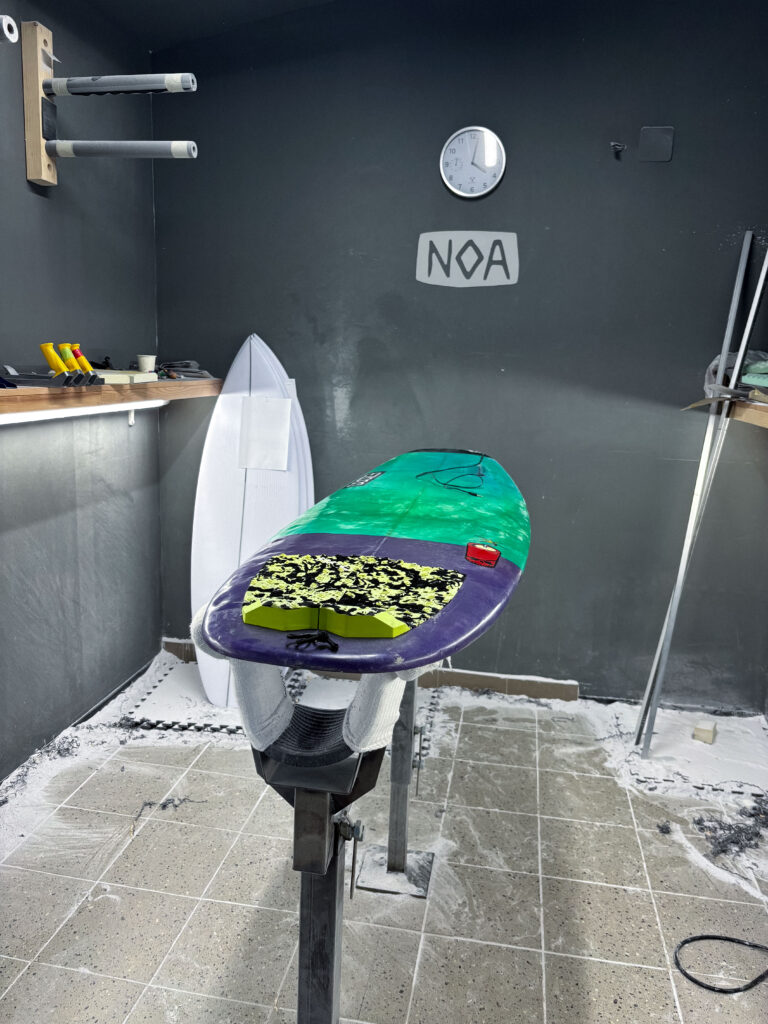
The base model and final prototype selected for this project is built on top of my own personal shortboard. It is measuring 5 feet 9 inches in length and is made for faster maneuvers like the cutback because of its short length and small volume. Considering these factors the board was selected due to its size and shape, which offer a wider range of motion and faster changes of speed and rotation in comparison to a longboard. Also, the dynamical movement and the internal board vibrations will be different than the one of a longboard or a board with a higher volume. Before the construction, a planning session was conducted with the Noa team to identify the ideal locations for sensor placement, cable routing, mounting of the housing, and material usage considering the exposure to saltwater.

Noa surfboards is a small factory for shaping mostly shortboards and riverboards. With their own shaping studio, they represent one of the few professional shapers in the region of Austria and Germany. This studio was chosen for the professional knowledge and experience of shaping to develop a well-functioning and safe protype.  

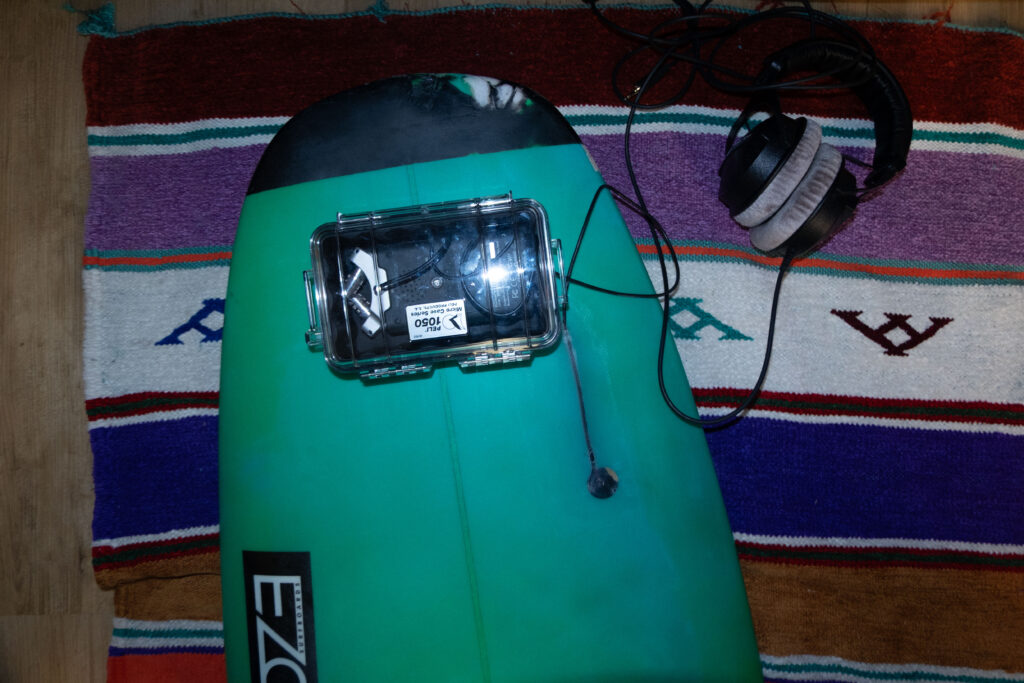
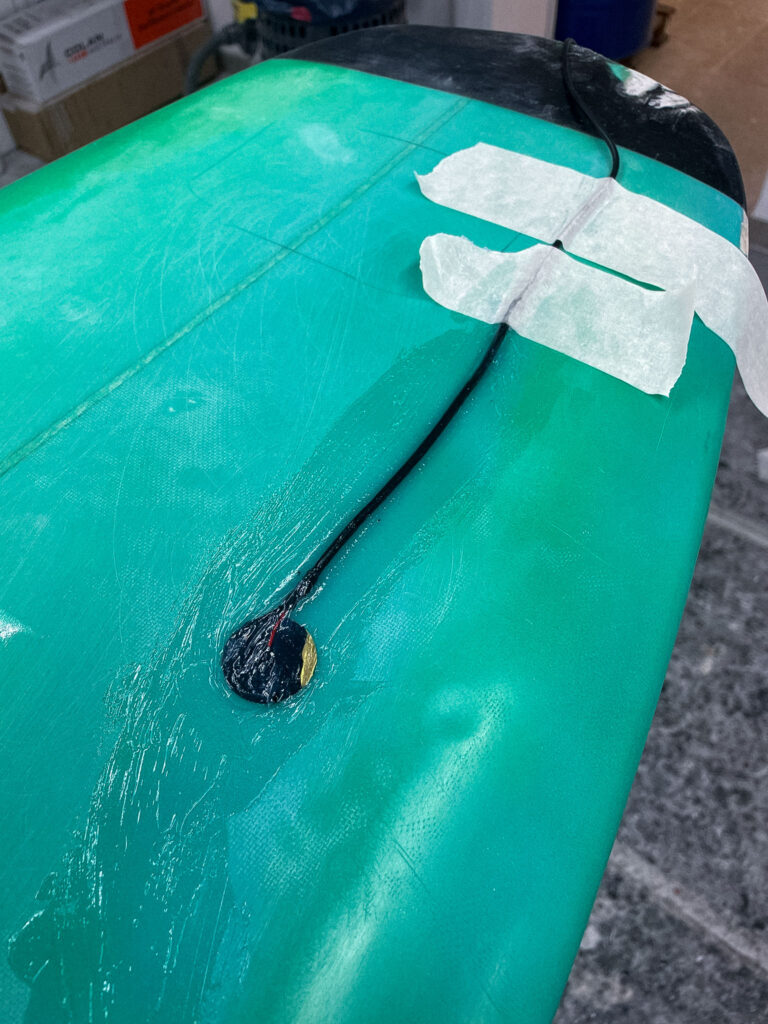
Looking at the building phase of the protype, Noa Surfboards proposed embedding the piezo disc underneath the front-foot zone of the deck. This area is perfect to capture the movement of the surfer, while not being under strong impact of the bodyweight of the surfer. In order to integrate the microphone in the body of the board a rectangular section of the fiberglass top layer was carefully removed. In the next step the piezo disc was mounted directly to the raw material. To protect the microphone from external impacts and the saltwater multiple layers of fiberglass cloth were laid over the sensor and encapsulate the mic completely. 

Another critical technical step was to route the cable from the embedded mic to the waterproof electronics box. Therefore, a narrow channel was drilled on the side of the box for the cable to enter. 

Inside the case, the Zoom H4n recorder and x-IMU3 sensor were suspended in a foam block designed to isolate the electronics from board vibrations and strong impacts. 

  1. Evaluation of the prototype

SURF SKATE SIMULATION AND TEST RECORDINGS

Purpose of the Simulation

Before deploying the system in ocean conditions, a controlled test was performed using a surf skate on land in order to structure the synchronization part of the different media in advance. Therefore, the simulation served multiple purposes:

  • First, to test the stability and functionality of the hardware setup under strong movements
  • To collect and analyze motion data from surfing-like movements like the cutback using the ximu3 sensor
  • To test and evaluate the contact microphone’s responsiveness to board interaction and different movement patterns
  • To practice audiovisual synchronization between footage an external camera setup, the Zoom H4n recorder, the contact microphone and the x-IMU3 motion data.

Therefore, the surf skate was chosen because of its closely representation of  the body movement and board rotation then surfing. Especially the cutback movement can be imitated by using a skate ramp.  

This testing setup consists of the following tools:

  • A Carver-style surf skateboard
  • The x-IMU3 sensor mounted on the bottom of the board to capture movement dynamics
  • The Piezo contact microphone taped next to the motion sensor on the bottom of the board. After testing the microphone was placed in the middle of the skateboard deck in order to capture the movement of both axes of the board at the same amount of loudness. Placing the microphone closer to the wheels of the board would result in much more noise in the recording due to the internal rotation of the axes. 
  • The Zoom H4n recorder was help in the hand of the skater and was connected to closed over ear headphones. 
  • Using the external film camera Sony Alpha 7iii the whole test was captured. This additional recording was helpful later in the synchronization part. 

The board was ridden in a skate ramp simulating the composition of the wave. ON the top of the ramp the cutback movement can be executed. 

A skateboard with headphones and a remote

AI-generated content may be incorrect.

At the start of the recording session, all devices were synchronized through a short impulse sound (hitting on the board) recorded on all three devices: Zoom, GoPro, and x-IMU3. The single surf skate tackes lasted approximately 2 minutes of recording and were repeated multiple times. 
The data recorded consists of:

  • accelerometer, gyroscope, orientation from the x-IMU3
  • Mono WAV audio from the contact mic
  • 1080p video footage from the external camera

The files were transferred and loaded into the respective analysis environments:

The x-IMU3 data was decoded using the official GUI and exported as CSV files;

The WAV audio was imported into REAPER and cross-referenced with the GoPro’s audio to align the sync impulse;

Motion data was plotted using Python and matched frame-by-frame to movement events in the video.

The result was a perfectly aligned audio-motion-video composite, usable both for analysis and composition.

  1.  Observations and Results

The contact mic successfully captured vibrational data including surface noise, carving intensity, and road texture;

The x-IMU3 data revealed clear peaks in angular velocity during simulated cutbacks and sharp turns;

The GoPro footage confirmed that movement gestures correlated well with sonic and motion data markers;

The Pelican case and foam provided sufficient shock insulation and no overheating or component failure occurred;

The synchronization method using a single impulse sound proved highly reliable.

The surf skate test validated the concept and highlighted important considerations:

Movement-based sonic gestures are highly expressive and usable for composition;

Vibration sensitivity of the contact mic is sufficient for detailed sound capture;

The sync strategy will work equally well in ocean sessions with minor adjustments;

Battery and storage life are adequate for short-to-medium-length surf sessions;

Cable insulation and structural mounting are durable under stress.

This test confirmed the system’s readiness for its full application in Morocco, where ocean sessions will build upon the structure and learnings of this simulation.

SOUND DESIGN METHODOLOGY

The motivation of using different methodes to do the sound design for this surf movie comes from a lack of surf movies and documentaries that use sound design based on field recordings in this area. With this project I want to showcase how many layers of realness can be added to a surf documentary by using on set field recordings paired with sensor data to convey this experience of surfing on a much deeper level. 
Therefore, the Sound design of this project is not seen as a post-processing effect but as an integral part of how motion and environmental interaction are perceived. The core idea and mission is to treat the surfer’s movement as a gestural performance and dance that modulates audio based on what is actually happening in the image. With the help of Pure Data, a modular synthesis environment, the motion data is mapped on audio processing parameters to underline this immersive and expressive sonic storyline.

Starting with the different sound design inputs that will be used in the Surf film, the primary audio material comes from a contact microphone imbedded in the surfboard. These are real, physical vibrations, bumps, hits, and subtle board resonances create the basic sonic texture of the piece. These raw recordings are used as:

  • Input for audio modulation
  • Triggers or modulating sources for effects like pitch shifting, filtering, and delay

Second core sound source is the Zoom H4n recorder mounted on the nose of the board. Here the focus lies strongly on field recordings in order to capture the raw sonic experience of the surf session. 
Furthermore, the data of the sensor will be adjusting the soundscape, translating raw data into modulation for sound design. 
Also, the internal audio of the GoPro Hero3 will be used to synchronize data in post processing and the recorded video will be a visual representation of the full experience.  

Looking at the mapping part of the project, the x-IMU3 sensor provides multiple streams of data like acceleration, gyroscopic rotation, and orientation, that are mapped to sound parameters. Each data of movement is used differently:

Acceleration (X, Y, Z) modulates filter cutoff, grain density, or reverb size. Here the exact usage of modulation parameters will be discussed in the postproduction phase of the project. 

Angular velocity controls pitch shift, stereo panning, or feedback loops. 

Orientation (Euler angles or quaternion) is used to gate effects or trigger events based on the recorded movement thresholds.

The mappings will be adjusted in the following process and are designed to reflect the physical sensation of surfing in the most accurate way possible. Looking at the movement that is most important, the Cutback move, here a sharp move will translate in a spike in angular velocity. This spike can be translated in a big glitch sound effect. Here more research and test will be needed in order to find the best parameter settings for this modulation. 

One possibility of audio modulation in Pure Data will be the granular synthesis. It allows to create evolving textures from short segments, like grain noise of the recorded contact mic sounds. 
Further examples of possible modulations: 

  • Grain size – (short = more textural, long = more tonal)
  • Playback speed and pitch
  • Density and overlap of grains

Looking at the storyline of the surf documentary one can pinpoint the following narrative structure of the sound design: 

Before the surf / coastline of Morocco

To catch the stressful coastal live of Morocco field recordings will be used to translate this feeling of stress, being overwhelmed (red mind).  Here the recordings will be done by the Zoom H4n recorder. 

Entering the water/ Paddling Phase

As the surfer enters the water the stressful coastal sounds fade, and the listener will be surrounded by the sound of the ocean. Here it is important to translate the soundscape, which the surfer actually perceives. No further sound modulation is added here. The theory of the blue mind points out how much the noise of the ocean can regulate the nervous system. This will be translated to the sound design of this section of the movie, giving the listener the feeling of being in the present. 

Catching the wave

As soon as the surfer catches the wave and manages to stand up on the wave the dramaturgical main part of the composition begins. This will be initialized by a strong impact on the contact microphone, triggered by the jump of the person. This will also be measurable on the motion sensor with increase of speed. At this point of the composition the sound modulation starts. 

Riding the wave / Cutbacks: At this stage of the movie the person feels a sensation of absolute presence and high focus. This natural high state gives a feeling that is hardly describable in words or images. Here the Sound Desing carries the listener through. Granular synthesis, stereo modulation and filtered resonance reflecting the physical and spiritual intensity in this moment. Here the tool of sound modulation is chosen intentionally to also create a contrast between the paddling stage of the movie.

End of the riding / Hit of the wave

In the end of the movie the surfer will fall in the water creating a strong and impactful ending of the whole experience. This sudden cut will be auditory through a big amount of noise of the underwater recording. Nothing more than muffled wave sounds will be heard to empathize the feeling of being underwater. Sonic textures will decay leaving with a feeling of stillness after this intense movement. 

With the help of this sonic structure both the physical and emotional journey of a surf session is captured and represented.

Considering the final sound piece a stereo format is the first output. Also including spatial depth will be achieved through modulation and stereo imaging based on the recorded motion data. Volume normalization and dynamic range control are applied in Davinci Resolve, however by respecting the intention of the sound piece to add less additional audio modulation by a software and only using techniques of audio manipulation using the sensory data. 

The final audio and movie is intended for headphone or multichannel playback in an installations or possible surf exhibitions.

Playback and Visualization of x-IMU3 Sensor Data Using Python and Pure Data

Moving forward, in this section the documentation of the workflow used to playback recorded x-IMU3 motion sensor data and visualize it as a dynamic graph in Pure Data, is shown. The goal here was to analyze the movement of two specific flips along the X-axis. Therefore a few seconds of this rotation were recorded and then read through the python script, send to PureData and here printed in a visual graph. The confirmation of the accuracy was done through multiple validation layers.

First, data was captured using the x-IMU3 inertial measurement unit. During the recorded session, the sensor was physically maneuvered to do two flips along its X-axis. Then, this data was saved internally by the sensor into a binary format with the extension. ximu3. In order to later find this file again, it was named XIMUA_0005.ximu3 and was stored on an external drive.

Second step was to decode and transmit the recorded motion data. Therefore, I used a Python script named ximu2osc.py. This script was written to read both live and recorded data and transmit it via the Open Sound Control (OSC) protocol. This python script uses the official ximu3 Python library to do file decoding, and the python-osc library for sending OSC messages.

The python script was executed using the following command in the terminal:

Using this script the playback of the sensor recording get initialized by naming the .ximu3 file as input. Looking at the command, the -p argument sets the OSC port to 9000. The -H argument points out the destination IP address, which in this case is 127.0.0.1. The Python script, in the next step, reads and decodes the binary sensor data in real time. Next step, the formatted OSC messages gets send using a clearly defined path.

Focusing on the receiving end, a Pure Data (Pd) patch was created to receive and interpret the data. This patch was configured to listen on port 9000 and processes the incoming OSC messages with the [netreceive -u -b 9000] object. It is capable of receiving UDP packets in binary format. The output from netreceive was then connected into [oscparse] object. OSCPARSE is responsible for decoding incoming OSC messages into usable Pd lists.

[list trim] was introduced in the patch to remove any resisting selectors. As the next step, a set of [route] objects were implemented. There were placed to filter out the gyroscope data, specifically the values from the X, Y, and Z axes. In this process a hierarchical routing structure was used. The first one: [route intertial], followed by [route gyroscope] and finally [route xyz]. The final values were then unpacked using [unpack f f f] to split them into three float values (X, Y, Z). For this test, only the X-axis values were needed.

To have a visual representation of the X-axis values in real time, an array named array1 was created. It functions as a scrolling plot reading the incoming rotation data. This was executed by assigning each X value to a new index in the array [tabwrite array1]. A simple counter system was built using [metro] to write the position in the array. [+ 1], [mod 500]. The [metro] object gets triggered at a 500ms interval, which, in this case served as the sampling rate of the graph. This counter also loops over a fixed range of 500 steps. This is how the circular buffer was build. Now, each new value is being stored in a float object [f] and sent via [s x-index] to its matching [r x-index].

A screenshot of a computer

AI-generated content may be incorrect.

With using this setup, it is possible to visually plot the continuous stream of X-axis values into the array. The result is a dynamic visualization of the sensor’s movement over time. Looking at the playback of the recorded. ximu3 file, the two flips performed on the X-axis are strongly stown as spikes in the plotted graph. This provides a real representation of the motion of the flip along the X-axis. In addition, all values were also printed to the Pd console in order to verify and debugging purposes.

Next step, to ensure the accuracy of the visualization, I compared the received values in three different ways. First, I monitored the terminal output of the Python script. Here every OSC message that was being sent was printed out, including its path and its matching values. Secondly, I checked the values listed inside Pure Data. Here the numbers were compared with the one from the terminal. Thirdly, I opened the. ximu3 file in the official x-IMU3 GUI and therefore exported the data as a CSV file. Analyzing the resulting file Inertial.csv, the “Gyroscope X (deg/s)” column was detected and housing the same values then printed in the terminal, in Pure Data and visually on the graph. This lets me confirm, that the sensor data was transmitted consistently across all three layers: the original file, the terminal stream, and in the end, the Pd visualization.

In conclusion, this test showcasts a successful connection between recorded sensor movement and its visual representation using an OSC streaming data pipeline. A clearly structured, repeatable method was used to analyze a specific gestures or physical event, recorded by the sensor. Furthermore, the system is adaptive and can be easily adjusted to visualize different values. It also sets the ground stone for other possibilities in sound design and audio adjustment in the further process.

Using x-IMU3 Python API for Live USB Data

In addition to decoding files using the x-IMU3 GUI, this project also focuses on utilized the Python library provided by x-io Technologies. Here sensor data can be streamed directly from the device via an USB connection. After successfully installing the ximu3 package with pip3 install ximu3, the provided example scripts of the GitHub repository’s Examples/Python were being used. In particular the usb_connection.py. (https://github.com/xioTechnologies/x-IMU3-Software) In the next step, after installing the ximu3 Python package via pip3 install ximu3, the script usb_connection.py was located and run from the external SSD directory /Volumes/Extreme SSD/surfboard/usbConnection.

To execute the script, the following terminal command was used:
   python3 /Volumes/Extreme\ SSD/surfboard/usbConnection/usb_connection.py

The next step is successfully executed once the x-IMU3 is detected. Here the user is prompted whether to print data messages or not. After enabling this, the terminal now displays live sensor data. This data set includes quaternions, Euler angles, gyroscope, and accelerometer data. It is noticeable, that this method bypasses the GUI and provides a direct access to sensor streams. This step enables a more flexible integration and a more advanced data mapping setup.

The full Python architecture includes modular scripts like connection.py, usb_connection.py, and helpers.py. These are handling low-level serial communication and parsing. This additional access pathway expands the projects versatility and opens doors for a more experimental workflow (x-io Technologies, 2024).

  1.  OSC Data Interpretation in Pure Data

The received OSC data is interpreted using a custom Pure Data patch (imu3neuerversuch22.04..pd), which serves as a bridge between sensor data and visual representation of the data. This patch listens for incoming OSC messages via the [udpreceive] and [unpackOSC] objects, parsing them into sub-addresses like /imu3/euler, /imu3/acceleration, and /imu3/gyroscope.

Each of these OSC paths carries a list of float values, which are unpacked using [unpack f f f] objects. The resulting individual sensor dimensions (e.g., x, y, z) are then routed to various subpatches or modules. Inside these subpatches, the values are scaled and normalized to fit the intended modulation range. For example:

  • Euler angles are converted into degrees and used to modulate stereo panning or spatial delay.
  • Z-axis acceleration is used as a trigger threshold to initiate playback or synthesis grains.
  • Gyroscope rotation values modulate parameters like filter cutoff or reverb depth.

Additionally, [select] and [expr] objects are used to create logic conditions, such as identifying sudden peaks or transitions. This setup allows the system to treat physical gestures on the surfboard—like standing, carving, or jumping—as expressive control inputs for audio transformation.

The modular structure of the patch enables quick expansion. New OSC paths can be added, and new sound modules can be integrated without rewriting the core logic. By structuring the patch in this way, it remains both maintainable and flexible, supporting future extensions such as machine learning-based gesture classification or live improvisation scenarios.

This technical design reflects a broader trend in contemporary media art, where real-world data is used not just for visualization but as a means to dynamically sculpt immersive audio experiences (Puckette, 2007).