Building the Panner: Creating an interface for Sound, Space, and Interaction

After thinking about the concept for my sound toolkit, the next step in my development focused on the implementation of a central feature: the panner interface. This module allows both creators and audiences to explore and interact with sound in space, directly connecting objects within a room to specific sonic materials.

Mapped Space and Sculpted Sound

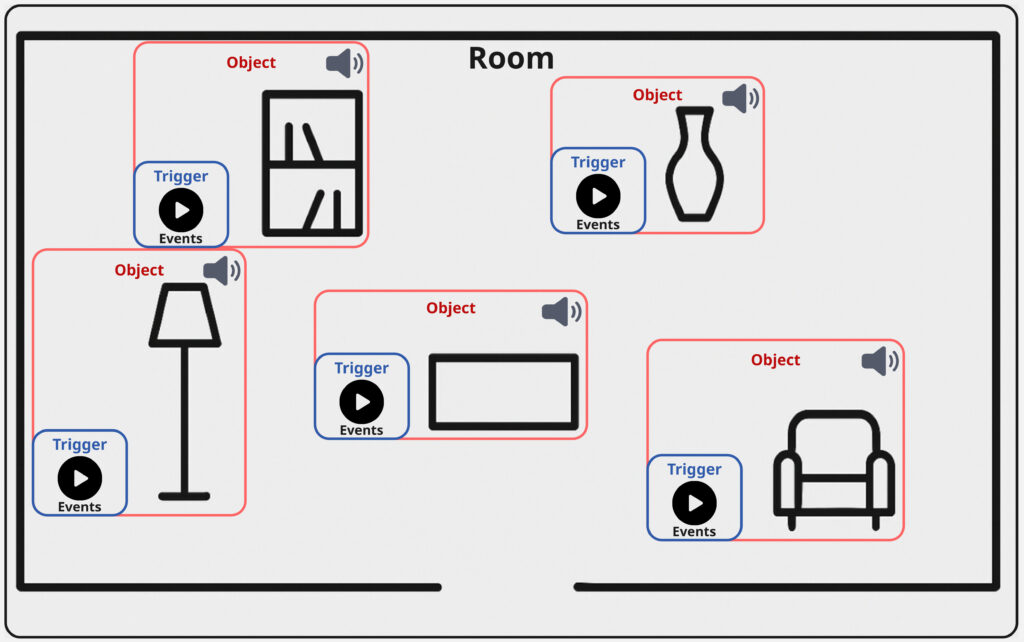
The basic functionality of the panner is simple in concept but provides an intuitive experience: it lets users navigate a mapped room and “find” interesting objects through their sonic feature. These objects are linked to compositional materials; for instance, looping ambient pads that are distributed over all of the objects. As you move across the interface, you transition between these materials, and with that inherently between the acoustic properties of each object, they begin to transform what you hear.

This movement isn’t just technical; it’s compositional. Further the potential is there, that the listener becomes part of the performance, shaping the sonic outcome through their interaction with the panning-position; references for similar ideas and use-cases can be found in spatial audio, game sound, and interactive installation art.

Introducing Triggers

To deepen the interaction, I added another layer to the interface: object-based triggers. These can be placed on top of objects in the room and are activated through user interaction. Each trigger is connected to a collection of sound events; sonic gestures that may be specific to certain objects.

What makes these events interesting is that they can be tailored to the object’s qualities. A metallic object, for instance, might trigger sharp industrial sounds, while a soft, fabric-covered object could respond with warm filtered tones. But of course the creative potential is broad. So for example the compositional logic could be based also on affordances; a concept introduced by psychologist James J. Gibson.

Affordance refers to the perceived and actual properties of an object that determine how it could be used. In this context, a desk might afford work or stress, and thus be linked to fast-paced or “busy” sounds.
(Source: Gibson, James J. “The Theory of Affordances” The Ecological Approach to Visual Perception. Boston: Houghton Mifflin, 1979)


Triggers play back events using randomized selection, similar to round-robin techniques used in video games. This ensures variation and prevents the experience from becoming predictable or repetitive; especially useful in exhibition settings, where visitors move at their own pace and may stay for different durations. With just six triggers each holding eight events, you already have 48 sonic elements that can be recombined into an evolving aleatoric composition.
Between Creator Tool and Public Interface

Importantly, this panner isn’t only meant for audiences; it’s also built to serve creators as a composition tool. Implemented as a Max for Live plug-in, I further provide an Ableton Live session template that simplifies the setup, which now consists of the following steps:

  • Load a map of the room.
  • Place objects using the provided visual grid.
  • Begin composing within the sessions structure without worrying about the technical backend.

The final panning interface itself can also serve as a user interface for an audience. The most simple solution for this would be the use of Max/MSP’s presentation mode, which of course already works. This dual-purpose design supports both easy prototyping for composers and a potential for more public oriented contexts like e.g. exhibitions, offering flexibility to musicians, designers, and curators alike.

What’s Next: Integration and Testing

The next planned development steps for this specific elemnt of my toolbox include:

  • Adding OSC integration, so creators can use external XY controller apps (e.g., on smartphones or tablets) to interact with the panner in real-time.
  • User testing with other creators, to gain feedback on interface design, usability, and creative workflows.

As someone used to designing tools mainly for my own use, this phase marks an important shift. Building something for others has pushed me to rethink how I structure code, name parameters, and guide the user. This process has also begun to improve my own workflow, making it easier for me to revisit and repurpose tools in the future.

Closing Thoughts

This latest phase of development has brought together many of the themes I’ve been exploring; from spatial sound and interaction to composition, psychology, and usability. The panner is not just a technical feature; it’s a conceptual lens for thinking about how space, sound, and interface design come together to shape musical experience and my workflow as musician.

Experiment X: Embodied Resonance – Sound Design and Implementation in the DAW Environment

The final stage of the project focused on the integration of HRV-derived MIDI files into a digital audio workstation (Ableton Live) in order to create expressive and physiologically grounded sound textures. This process was divided into two main domains: rhythmic (drum) and melodic (spectral) layers, each mapped to specific HRV parameters.

The rhythmic component was implemented first. MIDI files generated from heart rate data were imported into dedicated drum tracks. A drum sampler loaded with the Boom Kit preset was used as the primary sound generator. This particular preset was selected based on aesthetic considerations and its extended control capabilities, which provided greater flexibility for parameter mapping.

Figure 1. Drum sampler setup with Boom Kit preset in Ableton Live.

To facilitate real-time modulation, Ableton’s stock Echo device was inserted after the drum sampler. Before the drum kit, a MIDI expression control device was placed to route MIDI CC data from the HRV-derived files to specific parameters within the effects chain. 

Figure 2. Full instrument rack configuration for the rhythm layer.

Among the tested mappings, a particularly compelling result was achieved by linking SDNN values to multiple targets simultaneously—namely, the feedback amount, reverb level, and transposition of the drum sounds. RMSSD was mapped to delay time, introducing irregularities and a sense of fragmentation that enriched the rhythmic texture and highlighted moments of local instability in cardiac variability.

The second major component of the sound design involved the melodic layer, constructed using frequency-domain metrics (VLF, LF, HF). MIDI files generated from these bands were distributed across three separate tracks in Ableton Live. 

The VLF data was used to control a bassline, realized through the free software synthesizer Vital. Two basic sine-wave oscillators were used, one of which was tuned an octave above the other to enhance tonal richness.

LF and HF bands were each assigned to their own melodic track, both using identical synthesis architecture. In each case, two Vital instances were grouped within an instrument rack. One synthesizer generated a sinusoidal waveform, while the other used a sawtooth. 

Figure 3. Oscillator configuration in Vital synthesizer using a sine waveform.

Figure 4. Oscillator configuration in Vital synthesizer using a sawtooth waveform.

This grouping enabled the use of Ableton’s chain selector feature to blend between the two timbres. The LF and HF values were routed to dynamically modulate the balance between the oscillators, producing smooth or aggressive harmonic profiles depending on the underlying autonomic activity.

Figure 5. Instrument rack in Ableton Live with activated chain selector.

To integrate the overall sympathovagal balance, the LF/HF ratio was mapped to the chain selector controlling the morphing between the two oscillators.

Figure 6. Full instrument rack setup with MIDI expression control mapped to chain selector.

This approach allowed real-time transformation of the harmonic character in response to physiological state—ranging from calm, sine-dominated tones to sharp, sawtooth-driven textures.

EP #12: Toward a Sonic Ecology – The Ethics and Aesthetics of Acoustic Documentation

As the system becomes more capable, so do the questions. What does it mean to preserve the sound of a space?
Is it documentation, art, or something in between?

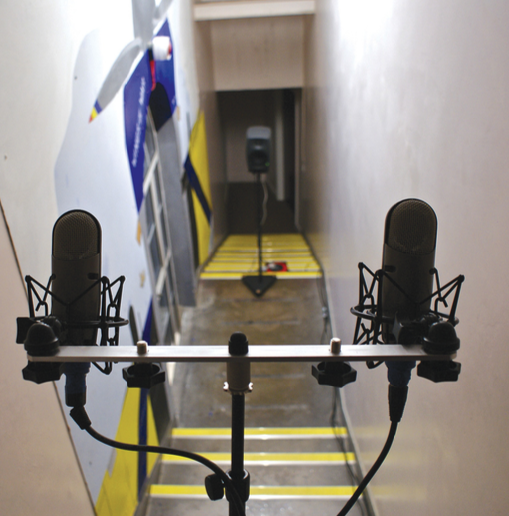
Acoustic photography offers a poetic and perceptual lens: it asks us to listen with care. A recorded impulse response is not just a technical artefact — it’s an invitation to reimagine space through sound. A stairwell becomes a resonator, a forest a filter, a cathedral a delay line for memory.

In this way, the project intersects with acoustic ecology, preservation, and sonic activism. Who gets to decide which spaces are worth hearing? What stories can be told through reverberation?

These are not only technical questions, but artistic and ethical ones — and they shape how I see the work ahead.

EP #11: Learning by Doing – From SwiftUI to Spatial Systems

One of the most rewarding parts of this phase was the technical deep dive into the Apple ecosystem. From Swift and AVAudioEngine to sensor fusion and FFT algorithms, I learned how to architect complex audio apps natively.

Challenges included:

  • Managing multichannel audio in real time
  • Implementing head tracking across threads
  • Creating reactive user interfaces with SwiftUI
  • Performing spectral deconvolution on mobile hardware

These skills are transferable to other platforms — Unity, Unreal, WebXR — but more importantly, they changed my understanding of how sound design tools are built. Not just for artists, but by artists who code.

EP #10: Mapping the Invisible – Building a Global Soundmap

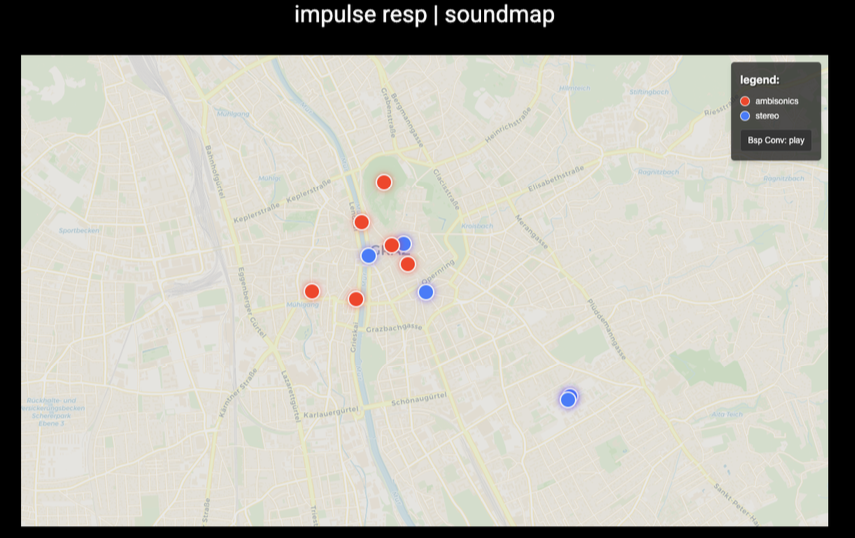
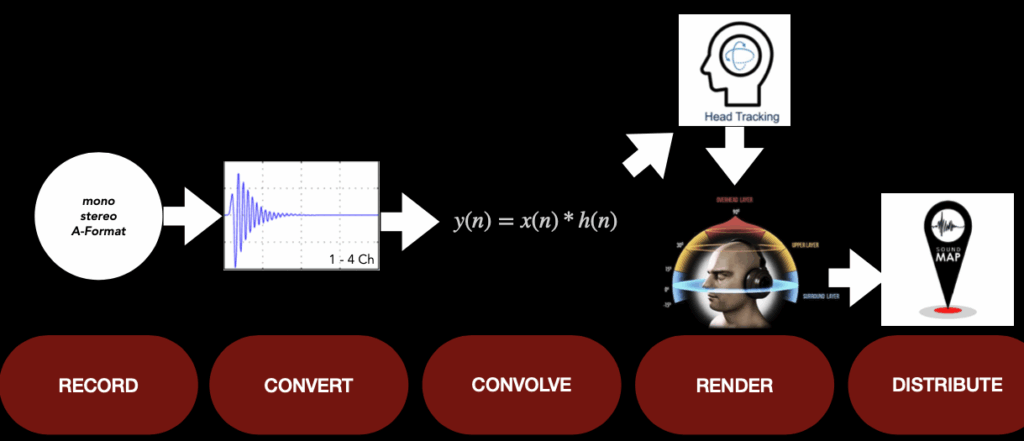
Alongside the app, I prototyped a web-based soundmap that displays recorded locations and lets users hear the acoustics of real-world spaces. Built with Leaflet.js, the soundmap shows markers where impulse responses were captured. Clicking them reveals:

  • Metadata (location, date, mic type)
  • A photo of the space
  • Audio preview of a dry sound convolved with that space’s IR

In the future, this could evolve into a public archive: a platform where users all over the world can contribute and explore acoustic identities. Think of it as Google Street View for sound — an acoustic memory atlas, built one snapshot at a time.

EP #9: Headtracking and Spatial Playback with AirPods Pro

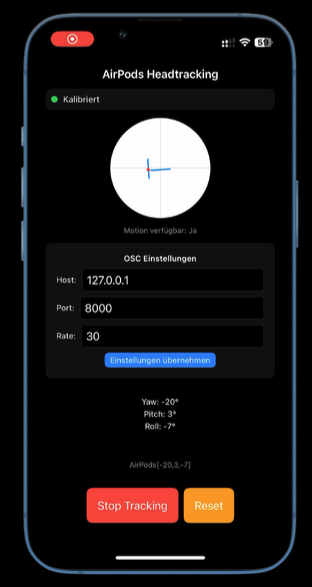
Spatial sound isn’t just about how rooms behave — it’s about how listeners move. To simulate this in real time, I integrated Apple’s CMHeadphoneMotionManager into the app. This allows the orientation data (yaw, pitch, roll) from AirPods Pro to be sent via OSC (Open Sound Control) to spatial audio engines like Reaper with the IEM Plugin Suite.

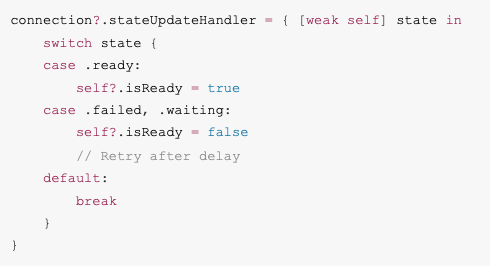
With this data, users can rotate their head and hear the soundfield respond — just like in real acoustic environments. A calibration feature lets users define their “neutral” forward direction, while rate-limiting and reconnection logic ensure stable use in real setups.

This is more than a feature. It’s a step toward interactive listening, where movement, sound, and space become part of one fluid experience.

EP #8: Real-Time Sound Shaping – Convolution and the Lambert-W Sweep

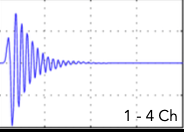
At the core of the app’s audio processing lies a precise method: convolution. By recording an impulse response of a space, we can digitally place any dry signal within it. But this only works if the IR is accurate.

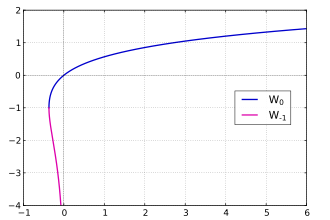
To achieve this, I implemented an exponential sine sweep generator with Lambert-W phase correction, ensuring high signal-to-noise ratio and spectral clarity. Deconvolution is then performed using regularized FFT division — a mathematically stable way to reverse-engineer the system response.

This combination allows fast, portable IR measurement without sacrificing detail. The result? Any sound — a whisper, a field recording, a voiceover — can be spatialized with the unique acoustic fingerprint of a room.

EP #7: MEMS Microphones – Miniaturizing the Soundfield

Traditional Ambisonics arrays are bulky and expensive. In contrast, MEMS (Micro-Electro-Mechanical Systems) microphones offer a promising alternative: they are tiny, digital, and energy-efficient.

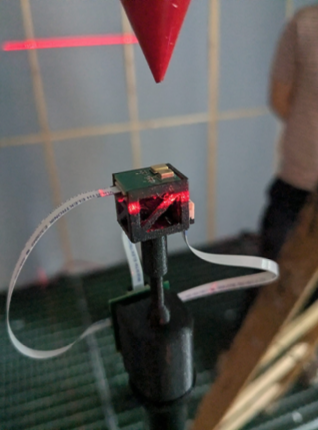
This semester, I investigated how a tetrahedral MEMS array could be integrated into a mobile system. Calibrated for gain and phase alignment, and paired with head orientation data, such a rig could offer a portable first-order Ambisonics input for spatial field recording.

The challenge lies in the signal integrity: capsule mismatch, noise floors, and synchronization need to be addressed. But the vision is clear — a pocket-sized array that records the world in full 3D sound, for music, XR, and soundscape preservation.

EP #6: Building the Tools – A Mobile App to Record and Experience Space

The heart of the project is a custom Swift-based iOS application I developed: a tool to record impulse responses, estimate acoustic parameters like RT60, and apply spatial convolution in real time. The app consists of several modular components:

  1. A mic selector that supports mono, stereo, and (planned) Ambisonics input.
  2. A recording module that captures signals from sweep tones or balloon pops.
  3. A deconvolution processor that transforms recorded responses into usable IRs.
  4. A convolution engine that allows users to load external sounds and place them in the captured space.
  5. A visual interface that shows waveforms, energy decay, and export options.

Built using AVAudioEngine and SwiftUI, the app runs entirely on-device, making spatial recording accessible to artists, researchers, and designers

EP #5: Listening Like a Camera – Redefining Field Recording through Acoustic Photography

This semester, my research expands on a deceptively simple question: What if we could photograph sound?
In the age of mobile spatial computing, we no longer need heavy microphones or studio rigs to capture acoustic character. Instead, we can begin to treat spaces as sonic images — snapshots not of light, but of reflection, decay, and depth.

Through the combination of impulse response recording, real-time convolution, and MEMS microphone arrays, I’m developing a system that captures and reconstructs spatial audio impressions in real-world environments. Using mobile tools and 3D sound formats like Ambisonics, the project proposes a new workflow: lightweight, precise, and perceptually informed.

But more importantly, this shift is artistic. Just like a photographer frames a scene, we as sound designers can frame how a space sounds — and how it feels. This opens up new territory between documentation, storytelling, and sonic composition.