Voluntary Service & Open Source- Impulse #3

Continuing from the last blogposts, where I talked about what got me interested in open source as a master’s thesis topic: homelabbing. In this post, I want to talk about an intrinsic motivation, that kept me moving towards this.

Voluntary work is part of my day to day life. Since 2014, I have been part of the scouts, first as a child now as a guide. Once a week I run meet-ups for children form 7 to 10 years old, where we go out into the forest, play and teach them to be come a valuable part of society. Doing work like this takes much more time, than one would think, there is planning those 2 hour sessions, preparing before the kids come and cleaning up after they leave. There are weekend camps and a big summer camp to organise, the groups home needs to be tidy and there even is a course a scout leader must take, learning about communication and pedagogy. I give a huge part of my free time to the scout movement, and all for no pay.

In addition to big voluntary movements like the scouts, there are small communities like the “UX Graz” Community, which organise a meet up for people interested in UX design, every third Tuesday of the month. Everything is organised and run by volunteers. Every meet up is held at a different company, which provides the location, food and drinks, and there are two parts in every meet up, first there are some talks and second networking. For people attending it is completely free. Free food, free drinks, free knowledge transfer and free new contacts. (I have recently joined the organising team swell, so this is my second voluntary work.)

In my mind, there are a lot of parallels between voluntary work and open source. A small amount of people does work or creates something, that benefits a lot of others. And the work these people do is often overlooked. They act in the background often earning nothing more than respect and thanks from others. Especially in these times, it is hard t have a job, that doesn’t pay you money, next to your regular day job. Due to different reasons most people cant’t afford to work for free, still there are a bunch of people who do.

I hope to find a reason for people to work for free. In my opinion voluntary work provides a lot to society. Although sometimes I feel like the work volunteers do is under appreciated, especially youth organisations. Although to be fair, open source doesn’t mean free and open source projects aren’t always maintained by volunteers who aren’t getting paid. What drives people to give away their product for free? How can the value of voluntary work be communicated? Looking into the psychological and social aspect of people doing work just for the benefit of others, is something I would want to get into more.

Accompanying Links

A link to the UX Graz Meetup: https://www.meetup.com/uxgraz/

A link to the website of the Austrian scout movement: https://ppoe.at
Impulse No1: Take-away: WUC Vortrag zu „Political Design“

Der Talk über „Political Design“ beim World Usability Congress war für mich ein sehr spannender, weil er etwas angesprochen hat, das im UX/UI und Design Business immer zu beachten ist und zwar, dass Design nie in einem luftleeren Raum, sondern immer in einem Netz aus Unternehmenskultur, Menschen, Egos und politischen Dynamiken entsteht. Obwohl man immer versucht sich im Studium oder in Projekten auf „best practices“ und Designprinzipien zu konzentrieren, merkt man irgendwann unumgänglich, dass die Realität viel komplexer ist.

Im Vortrag wurde Political Design als ein Prozess beschrieben, in dem UX Professionals nicht nur Interfaces gestalten, sondern auch lernen müssen, mit organisationalen Spannungen umzugehen. Nicht, weil sie wollen, sondern weil sie müssen!! Die Grundidee befasst sich damit, dass Design immer mit Neugier, Spieltrieb und Leidenschaft beginnt. Aber je weiter wir in echten Projekten vorstoßen, desto mehr stoßen wir an Grenzen, die nichts mehr mit Figma oder heuristischen Evaluationen zu tun haben, sondern mit Menschen, Macht und Kommunikation.

Ein Satz, der besonders betont wurde ist:

„No tension. No extension.“

Ohne Reibung und Konflikt keine Weiterentwicklung. Ohne Konflikte keine Innovation. Das klingt im ersten Moment sehr intuitiv und sinnvoll für mich und das ist es im Endeffekt auch. Viele der spannendsten Projekte, wurde erzählt, entstehen genau da, wo unterschiedliche Perspektiven aufeinanderprallen. Marketing will X, Engineering will Y, das Management will alles gleichzeitig und Nutzer*innen wollen etwas ganz anderes. In dieser Spannung entsteht oft der Raum für kreative Lösungen.

Was ich besonders gut fand war, dass der Vortrag klar gemacht hat, dass Political Design nicht bedeutet, sich „politisch”, im Sinne von manipulativ oder strategisch zu verhalten. Vielmehr geht es um Soft Skills wie: klar zu kommunizieren, zuzuhören und das Gefühl zu geben gehört zu werden. Es geht darum zu verstehen wie und warum die Menschen um uns herum ihre Entscheidugnen treffen.

Im Grunde wurde betont, dass UX nicht nur ein sehr technischer, sondern ein zutiefst zwischenmenschlicher Beruf ist. Wir designen nicht nur für Menschen, sondern auch mit Menschen und diese Menschen haben ihre eigenen Prioritäten, Ängste, Ziele und Blind Spots. Ein Design Prozess der das mitbedenkt ist weitaus effektiver und liefert bessere Ergebnisse.

Als Impuls nehme ich für mich mit, dass ich in meiner eigenen Arbeit noch stärker darauf achten möchte WIE ich kommuniziere und woran Ideen wirklich scheitern. Political Design nehme ich für mich weniger als ein Framework, sondern mehr als eine Haltung auf. Eine die neugierig auf Menschen zugeht und sich nicht nur auf das perfekte Interface beschränkt.

IMPULSE.04 // Designing for Safety in Healthcare

In this talk Dr. Avi Mehra an IBM associate partner shared valuable insights on the critical intersection of design and clinical safety in digital health. Avi and his college Flora, a design director at IBM discuss how to create safer healthcare solutions through thoughtful collaboration and user-centered design principles.

The presentation begins with a personal story from the speaker’s early days in an intensive care unit, highlighting a serious patient safety incident caused by miscommunication and outdated information. This story set the stage for the central theme: safety must always be at the forefront of healthcare design. The speakers emphasized that digital health technologies hold immense potential to improve patient experiences but can also introduce significant risks if not carefully managed.

Flora then introduced four key principles for designing with safety in mind:

  1. Design for the edges of the population: Focus on users with complex needs, not just the average user.
  2. Recognize the risks: Understand the serious consequences of missteps in healthcare delivery.
  3. Account for various care settings: Design for the entire patient journey, including home care and telemedicine.
  4. Support adoption from the start: Ensure that new solutions seamlessly integrate into existing workflows and do not overwhelm users.
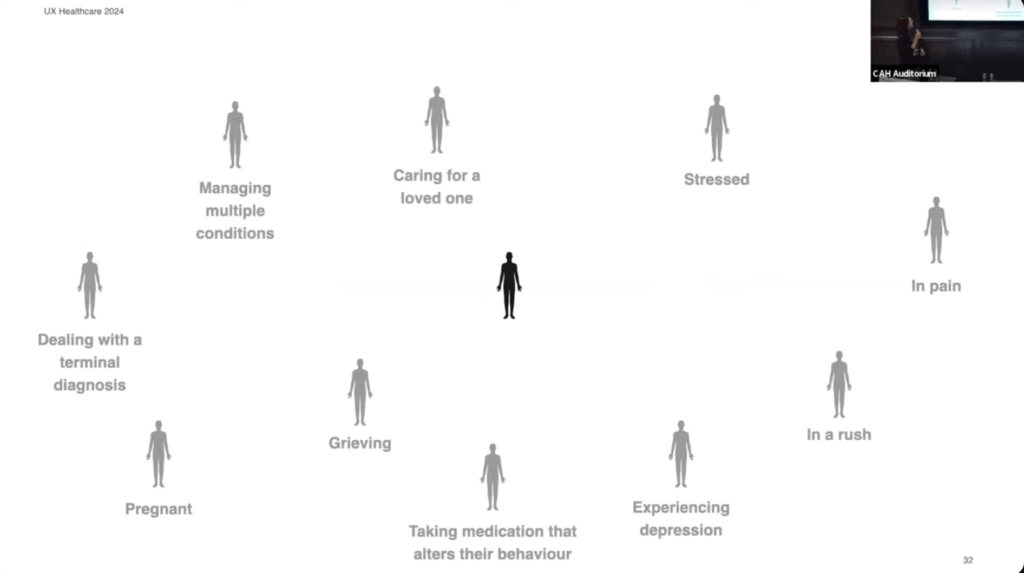
Screenshot from the presentation

I really appreciate Flora’s perspective on designing for the edges of the population. She highlights that individuals often face multiple challenges simultaneously, rather than just one. This is something I was not considering yet and is something I want to keep in mind as I develop my personas.

Link to video: https://www.youtube.com/watch?v=g9ku7Xane6w

AI was used to rephrase my thoughts.

IMPULSE №4

AI and coding

If I got one euro every time someone said AI in the last two years, I could probably pay my rent for a year. Jokes aside, AI really did change everything. It gives regular people access to tools that used to require a full team. For designers, this is huge. We can finally bring weird ideas to life without begging a developer to “just help a tiny bit.”

I’ve worked with developers for years and always admired how they manage to build complicated systems from scratch. Now we can do a chunk of that work ourselves. You still need to know basic logic, but the heavy lifting can be handled by AI. So why not experiment a little, build something fun, and keep the creative spark alive?

For the last months I’ve been watching designers and devs use different AI coding tools. I’m inspired, but also a bit lost, because these tools aren’t perfect yet. You have to juggle between them. So I wrote down simple notes based on talks, videos, and tests. Here’s the short version.

1. v0 by Vercel – the most capable, but very generic.

Pros
• Builds complex logic fast.
• Follows instructions well.
• Code and previews load quickly.

Cons
• First drafts look chaotic with strange animations.
• Designs often feel bland when you ask for something subtle.
• Struggles with basic layout alignment.
• Preview wasn’t mirrored like a real camera app.

2. Lovable – the best visuals and overall experience, but misses logic sometimes.

Pros
• Cleanest and most modern UI.
• Shows a plan before coding, which feels reassuring.
• Adds creative touches on its own.
• Sound effects were nice once fixed.

Cons
• Ignored some specific instructions at first.
• Needed reminders to add live filter previews.

3. Bolt.new -friendly interface, but broke completely in the test.

Pros
• Shows every step it’s doing.
• Chat feels natural and clear.

Cons
• Tried to use the phone camera, which caused flashing screens and overheating.
• Couldn’t fix the bug through prompts. Prototype failed.

4. Google AI Studio (Gemini) – the weakest tool in both design and function.

Pros
• Eventually used a clean grid.
• Basic photo strip feature worked after a full restart.

Cons
• Ugly old-school Material Design look.
• First attempt failed with an error.
• Interface feels overwhelming.
• Didn’t generate real filters, only simple color changes.

5. Figma Make Designs (Beta)– the most creative, but still too buggy.

Pros
• Fun and expressive design style.
• Added extra features like frames and cute filters.
• Sounds worked immediately.

Cons
• Images didn’t load at first.
• Camera only worked after “publishing.”
• Buttons were placed randomly.
• No preview of filters until asked

AI still isn’t perfect for coding, but it’s already strong enough to help designers build real prototypes with logic, visuals, and sound. It feels like a new creative playground. I’ll definitely try to vibe-code some mini project in the next months

IMPULSE №3

As an international student, and someone who’s constantly watching friends juggle life across countries, I keep coming back to one question: Why is it so hard to stay connected?

There isn’t just one reason. We’re all busy: classes, work, deadlines, life. It’s normal that it gets harder to keep up. Most families can still talk over dinner and stay in sync.
But what about people who live thousands of kilometers apart?
That’s where it gets complicated. Schedules rarely match, time zones pull people even further apart, and honestly, it’s no surprise that so many long-distance relationships fade after a few months.

Trying to understand this better, I went back to the basics: What actually makes a human connection strong?
Maybe if I answered that, the “how do we keep it?” part would make more sense.

While wandering through YouTube, I found a talk called “The hidden truth about human connection” by Dan Foxx. He basically put into words something most of us already feel deep down but rarely say out loud.

His main message was that we struggle to connect because our ego gets in the way.
We’re stuck in our own perspective instead of actually caring about the other person. Real connection comes when we shift from “What do I get out of this?” to “How can I care for this person?” That’s when relationships deepen.

Listening to him helped me see why connection feels harder today, especially across distance:

1. We treat connection like something we can postpone.
When life gets intense, it’s easy to think, “We’ll catch up later.” But relationships don’t maintain themselves. Without intention, they slowly fade.

2. Technology simulates connection but doesn’t fully deliver it.
Sending reels, emojis, or brief texts feels like staying in touch, but it doesn’t provide the presence or emotional depth we actually crave. Digital contact is convenient… but often shallow.

So how do we preserve connection even from far away?

1.Lead with empathy.
Ask real questions. Listen with care. Make space for someone else’s feelings, not just your own.

2. Be consistent, even in small ways.
Things like a voice message, a short video call, a thoughtful note matter when done with full attention. Presence beats frequency.

3. Choose depth over constant chatter.
One meaningful conversation will strengthen a connection more than a month of random memes and “how was your day?” messages.

Takeaways
Human connection is essential. It’s one of the things that makes life feel meaningful. Dan Foxx’s talk reminded me that distance isn’t the real enemy, disconnection is. And disconnection happens when we stop showing up with honesty, empathy, and intention. This talk felt like the starting point of a bigger exploration for me. I’ll might go deeper into the topic of human connection in my next posts.

I used ChatGPT to check the spelling and grammar of this text

IMPULSE #4 – TED Talks

For my last blogpost in November, and with the deadline suddenly very close, I decided not to overthink what activity to choose. Instead, I made myself a TED Talk evening, letting myself wander, research, and explore until I found talks that could spark something meaningful. And surprisingly, I found a lot. Five talks, all circling around creativity, identity, and what it means to navigate the design world with many interests at once.

The art of being yourself by Caroline McHugh

McHugh talks about identity as something you grow into, not something you force. Her reminder that we spend too much time comparing ourselves to others felt painfully accurate. Comparison is constant in design. This talk made me reflect on how designers form their identities in a field that almost encourages fragmentation. It helped me see that having many interests doesn’t weaken identity, it shapes it. Identity in a multidisciplinary industry isn’t about choosing one path, it’s about understanding your own mix.

The power of creative constraints by Brandon Rodriguez

Rodriguez argues that constraints aren’t the boundaries of creativity, but the foundation of it. Drawing from engineering and scientific history, he shows how many major discoveries were made by accident and how those “mistakes” revealed new constraints that pushed innovation even further. In science, limits don’t shut creativity down, they activate it. And the same is true in design. As someone who often feels overwhelmed by endless possibilities, this talk reminded me that constraints, whether tools, time, or even my own abilities, can actually guide ideas instead of restricting them.

Embrace the Shake by Phil Hansen

In art school, Phil Hansen developed a hand tremor that made his signature pointillist drawings impossible. He felt lost, like his entire creative identity had collapsed, until a neurologist told him something simple: embrace the limitation. That shift changed everything. Instead of fighting the shake, Hansen used it, exploring new materials, motions, and techniques. His story shows that creativity doesn’t vanish when a skill becomes shaky; it evolves. And for generalist designers pressured to “excel” at everything, this is a powerful reminder: working with our limitations, not against them, can open up completely new creative paths.

Where good ideas come from by Steven Johnson

People often credit their ideas to individual “Eureka!” moments. But Johnson shows that history tells a different story. He takes us on a fascinating tour, from the “liquid networks” of London’s coffee houses to Charles Darwin’s long, slow hunch, all the way to today’s high-velocity web. Creativity, he explains, emerges from the slow collision of many influences rather than sudden inspiration. Again, an impulse connected to exploring multiple interests, showing that a broad mix of experiences can be the fertile ground where ideas grow and intersect.

How to build your creative confidence by David Kelley

Is your school or workplace divided into creatives versus practical people? Kelley challenges this notion, emphasizing that creativity isn’t reserved for a chosen few. Drawing from his legendary design career and personal experiences, he shares how confidence to create comes from taking small risks repeatedly. Throughout my life, my biggest obstacle has been people discouraging my ideas, but I am learning that I have to ignore them to succeed. Kelley’s message resonates deeply for anyone navigating multiple roles or interests: creativity grows when you trust yourself and keep experimenting, even in the face of doubt.

In the past, watching TED Talks often felt like a task (assigned by teachers or professors), something to check off a list. This evening, however, it was entirely different. I watched out of genuine curiosity, letting myself be inspired, challenged, and surprised. Sometimes, the most valuable insights come when we follow our own impulses and let ideas find us.

Disclaimer: This blog post was written with the help of AI for better grammar and correct spelling.

IMPULSE №2

Designing for complex UI with Vitaly Friedman

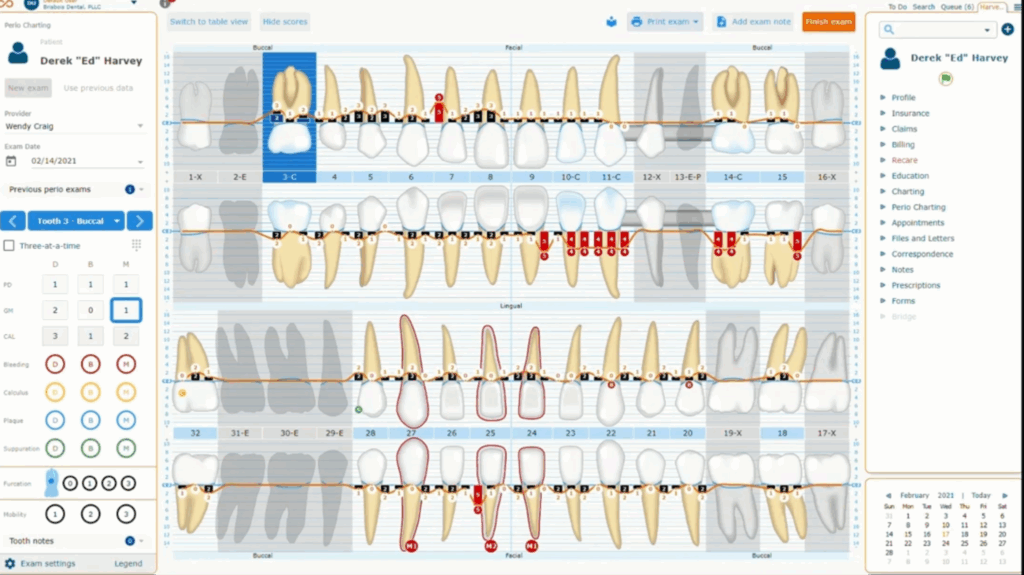
A while ago I worked on a CMS system for an online shop. It was a dense platform with many connections between features. Our Lead Designer created the main structure and I took care of the Design System and new components. The work was very analytical. No banners. No decorative visuals. Every color and spacing value followed strict rules. I handled hundreds of input fields, tables, filters and other parts that needed to stay consistent.

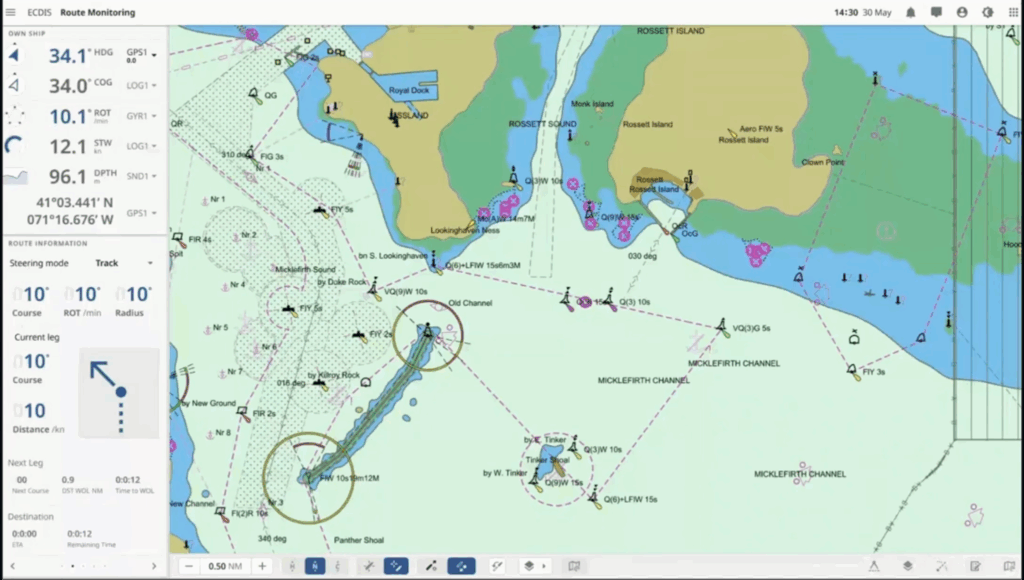
When I started thinking about my master’s thesis last year, one idea was a gamified platform for patients and doctors. Healthcare is known for high complexity and heavy cognitive load. Even though I had worked with CMS systems and dashboards, enterprise UX was still new to me. This is why I became interested in the work of Vitaly Friedman. He speaks often about complex interfaces. I watched his talk for the UX Healthcare community called Designing the complex UI. It helped me understand how to plan such projects and how to measure if a design works.

In the talk he explained common problems in healthcare and enterprise systems. They often hold too much data. They contain many layers. They have strict dependencies between features. These systems overwhelm users fast if design is not careful.

His first point was about deciding what matters most inside the product and for it he uses Task Performance Indicators. These metrics show how fast and how successfully users finish important tasks. They help designers move away from guessing.

His second point was about choosing the right user groups. He suggests three user segments. Then he suggests finding 30-40 to participants for testing, cause half of them will likely drop out so a larger pool matters.

Then he talked about creating tasks for each segment. Each user gets ten to twelve short tasks. Every task needs one clear correct answer. Descriptions should stay under thirty words so users understand them without stress.

And when the design is on the production, track these metrics regularly – every 6 to 12 months depending on the speed of the team. This shows if design choices are helping or making things worse. He also suggests bringing the same eighteen participants back when possible. This keeps the comparison fair.

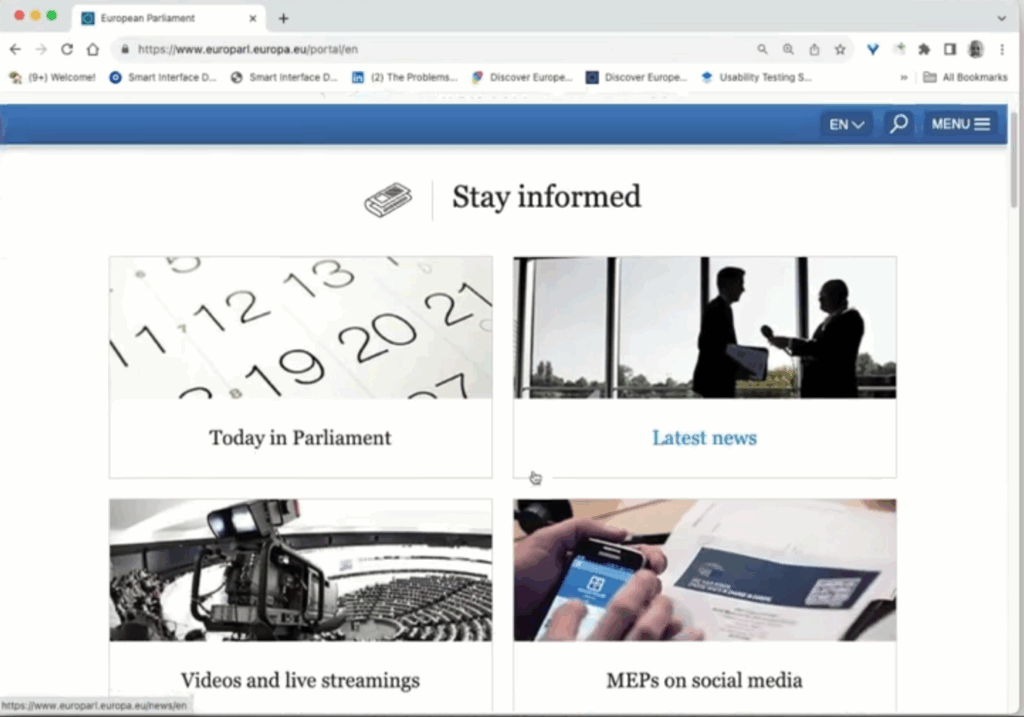
He showed the EU Parliament website as an example of a heavy and well structured system. It supports twenty languages and multiple search engines and several CMS platforms, still it feels simple for the user.

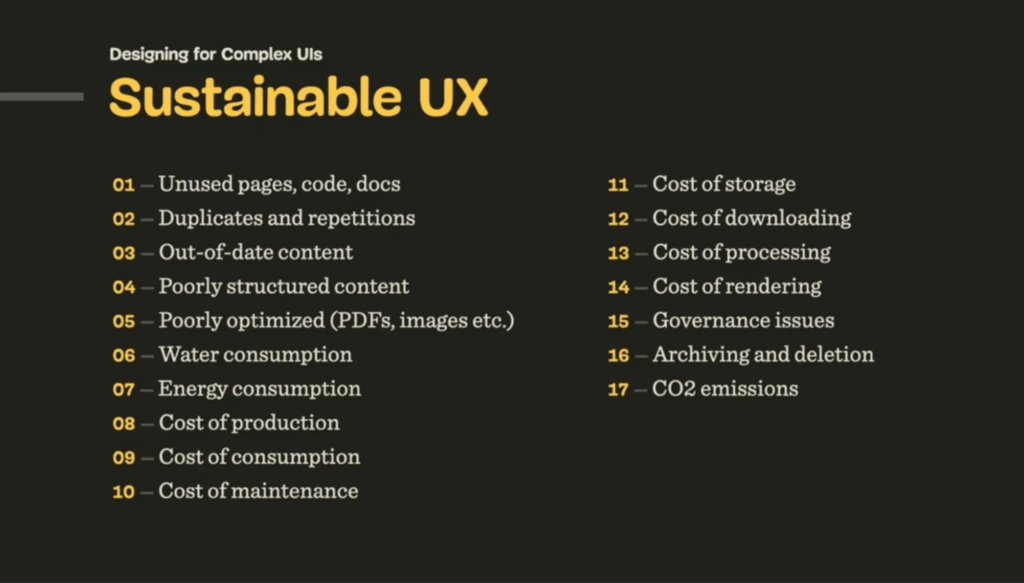
At the end he mentioned sustainable design. It is often viewed as a topic for developers and project managers. Designers still need to stay aware of it. Sustainable UX keeps systems efficient and reduces waste. It is easy to forget about it when we focus only on usability.

This talk helped me understand how large systems work and what to pay attention to when planning my thesis topic.

I used ChatGPT to check the spelling and grammar of this text

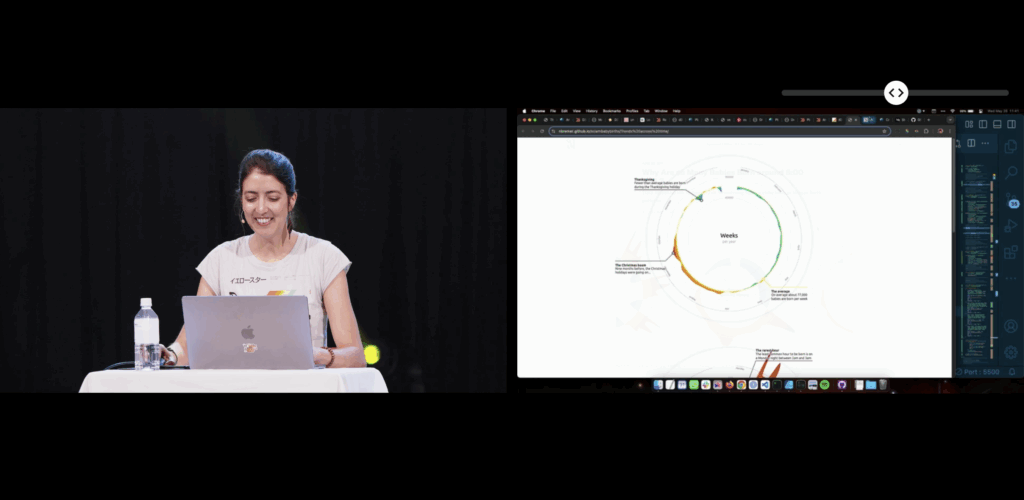
Impulse #3: Nadieh Bremer, WebExpo 2025

This blogpost will be a reflection inspired by Nadieh Bremers’ WebExpo 2025 talk Creating an effective & beautiful data visualisation from scratch with d3.js. Bremer demonstrates how visual interfaces can be designed to convey information clearly and emotionally. She outlines a design process that begins with understanding the data’s story and ends with polishing details such as visual hierarchy, color, and interaction. Her approach emphasizes that visuals should not only communicate facts but also evoke engagement and a sense of discovery. I rewatched the digital documentation of her talk to recap the content of her presentation.

Bremer presents visualization as a communication medium, where design choices directly impact user comprehension and emotional experience. Clarity reduces frustration, while appealing design increases motivation to explore. This perspective positions data visualization as a critical component of user experience, not merely a decorative or aesthetic layer.

Learning about new technologies for data visualization

When I encountered Nadieh Bremers work, I was already familiar with data visualization, but mostly through print media and a little experience with Processing. Designing layouts for magazines or static posters taught me how much data visuals can influence perception and guide a narrative. Around that time we went to WebExpo, I got into JS coding but wasn’t aware of the posibilities to use it for data visualization. Her projects demonstrated what I had been missing in print -> interactivity and adaptivity.

Why adaptive data visualization matters for a good user experience

During my deeper dive into adaptive data visualization literature, I explored a research paper focusing on real-time decision support in complex systems. It argues that static dashboards are no longer enough to support organizations facing rapidly changing data environments. Instead, visualizations must adapt to:

  • Incoming data streams
  • User interactions
  • Context shifts
  • Multivariate complexity

Adaptive systems combine machine learning, real-time processing, and flexible visualization layers to support faster and more informed decision-making. This means that the visualization is not just displaying data, it is interpreting and reacting to it. The paper specifically highlights D3.js as one of the technologies capable of creating these highly flexible and dynamic interfaces. Unlike pre-built dashboards, D3 allows developers to adapt interactions, transitions, and representations directly to user needs and situational changes.

In my earlier blog posts I wrote about affective computing. Combining the gained knowled I came to a conclusion: If a system can visually adapt based not only on the dataset, but also on the emotional state of the user, could generate a better user experience?

Sources:

https://slideslive.com/39043157/creating-an-effective-beautiful-data-visualisation-from-scratch

https://www.researchgate.net/publication/387471439_ADAPTIVE_DATA_VISUALIZATION_TECHNIQUES_FOR_REAL-TIME_DECISION_SUPPORT_IN_COMPLEX_SYSTEMS

IMPULSE.03 // Innovations in healthcare

Yesterday I listend to the episode Innovating healthcare by the Service Design Podcast. It features Brian Desplinter and Jurgen De Klerck who are collaborating at AZ Groningen, a hospital in Belgium, about healthcare innovation, with a focus on the use of 5G technology for advancements.

They mention that co-creation of solutions for challenges across hospitals and industries are vital for innovations. In health care the potential of messing something up is extremely risky. Especially in highly stressful environments like the hospital.

Something that was super interesting to me was that Brian was asked to shadow medical departments. Over the course of a year he watched the daily activities of the doctors and nurses in different departments to see where there were problems and to come up with new ideas. I’m curious to find out if this innovation center of the hospital in Belgium is comparable to anything here in Austria.

The challenges in healthcare are evident worldwide due to the eldering society which leads to the shortage of staff. This calls for innovative ideas to make processes in health care more efficient. The guests on the podcast mention that innovation is not only about technology. Its how you integrate the technology into the system.

Nowadays the demands and standards from patients are much higher than 10 years ago. People want to have seamless experiences but innovation is slower in healthcare because the bureaucracy that is tied to healthcare is always a problem.

The podcast touches on the use of VR in healthcare, such as in speech and aggresion therapy, highlighting the potential for creating optimal, controlled environments. The future of healthcare, they suggest, will likely be heavily influenced by wearable and on-demand technology.

Looking at the current state and future of healthcare, the speakers articulate the need for a more preventative approach, maintaining health rather than treating disease. They believe the way forward lies in closer collaboration between service designers, healthcare professionals, and patients.

The episode ends with Jurgen stating that people interested should send him a message and he can give them insights of their work of the hospital over a coffee. I’m kind of intrigued to see if he can stand up to this offer. Maybe I will travel to Belgium soon…

Link to the episode: https://open.spotify.com/episode/6Te3pgrvYndt1KEr0l7BlV?si=c55b231243e94747

No AI was used to create this blog post.

IMPULSE.02 // How to design services that work

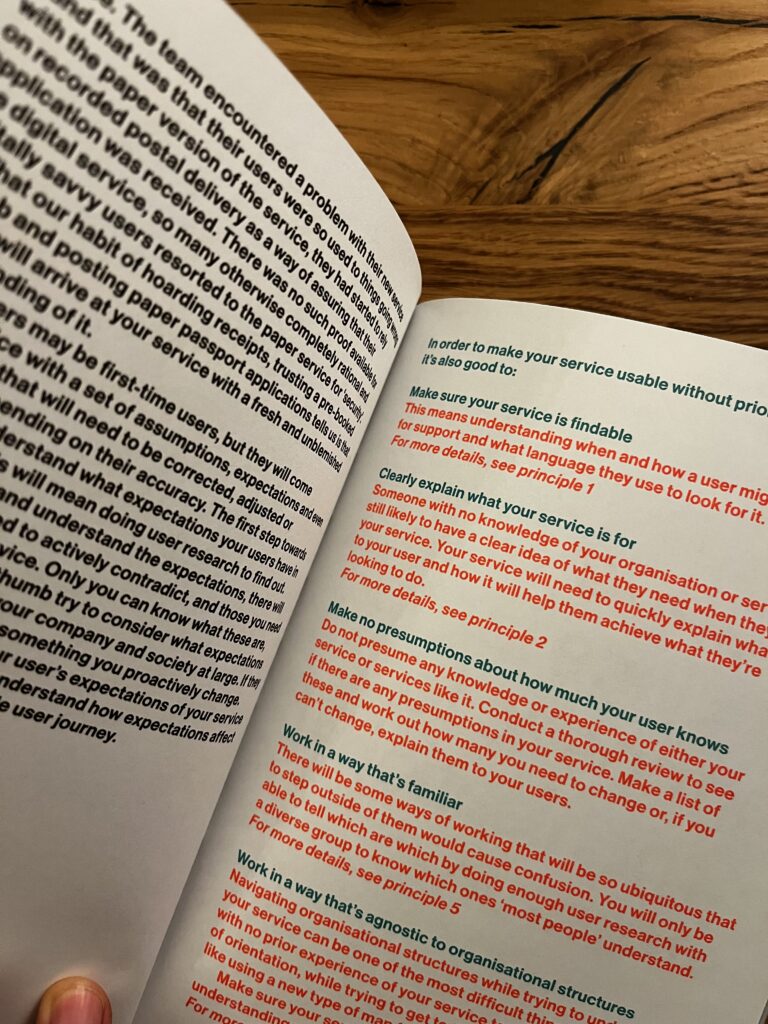
When think about how often we interact with services it really is shocking how poorly designed a lot of them are. Good service design, a book by Lou Downe, the former Director of Design for the UK Government. She was involved with the design https://www.gov.uk/. In her book, Downe gives a guideline of 15 points of what to look out for when designing a service.

What is a service?

Short answer: A service helps us do something we want to do

A service can range from something as tiny as buying a bottle of water to something huge like registering to get married. What makes a service a service is that it combines multiple organizations into one (hopefully) seamless experience for the user to get to their desired goal.

The 15 principles for good service design

  1. They have to be easy to find
  2. Clearly explain its purpose
  3. Set a user’s expectations of the service
  4. Enable each user to complete the outcome they set out to do
  5. Work in a way thats familiar
  6. Require no prior knowledge to use
  7. Be agnostic of organizational structures
  8. Require the minimum possible steps to complete
  9. Be consistent throughout
  10. Have no dead ends
  11. Be usable by everyone, equally
  12. Encourage the right behaviours from users and service providers
  13. Quickly respond to chage
  14. Clearly explain why a descision is made
  15. Make it easy to get human assistance

I haven’t read the entire book yet but I would like to point out what really stuck with me and that I want to focus on in my thesis.

In chapter 7 Be agnostic of organizational structures, Downe mentions that it is vital to a service must not show the hidden structures of the organizations it’s combining. She uses the term “siloed” a lot, which basically means that parts of organistations are isolated so much and don’t share data efficiently between each other. It’s less collaboration and more work for the user. I think this is extremely true for health care in Austria because the transfer of data and knowledge relies on so many different tools that it’s confusing and overwhelming to deal with.

Downe believes that the sub-organizations need to agree on a common goal in order to work together seamlessly. Once this foundation is set it can help to create a permissive environment for collaboration.

I really enjoy how effectively this book conveys the most important aspects of service design and I’m sure it will provide lots of guidance when writing my thesis.

Random side note: Even though the overall design of this book is really pleasing I was extremely irritated by the bold font they used for the body text. This is not relevant to the content but it’s something that bothered and reminded me of the importance of visual hierarchy once again.

Link to the book: https://good.services/home

No AI was used to write this blog post