Impulse #8: Architecture of an Idea

After a few weeks of intensive learning and a complete rethink of my project direction, I realized that having a good idea is only half the battle. The real challenge lies in the execution, specifically, how to structure a complex project so it doesn’t collapse under its own weight. To get my head around this, I’ve spent the last few days diving into The System Design Primer, an open-source repository that has become an essential resource for anyone trying to build something a working system.

Thinking in Trade-offs

The most striking thing about the System Design Primer is its objectivity. It doesn’t tell you there is one right way to build a system. Instead, it teaches you that every technical decision is a trade-off. This was a very interesting perspective for me.

The documentation introduces the CAP Theorem (Consistency, Availability, and Partition Tolerance), which forces you to realize that you can’t have everything. You have to choose what matters most for your specific use case. Applying this logic to my own work has been a game-changer. It’s moved me away from trying to build a perfect project and toward building a logical one based on specific constraints.

The Power of High-Level Mapping

One of the most helpful sections of the Primer is the focus on requirement clarification. Before diving into code or hardware, the documentation insists on defining the scope:

  • User Personas: Who is this for?
  • Scale: How much data are we moving?
  • Performance: How fast does it need to be?

Mapping these out feels like a relief. It turns an abstract, overwhelming goal into a series of technical requirements. The Primer provides visual templates for high-level designs—showing how load balancers, web servers, and databases interact—which has helped me visualize my thesis as a functional architecture rather than just a collection of ideas.

From Confusion to Structure

There’s a quiet satisfaction in seeing a complex problem broken down into its component parts. The past few weeks have been fairly high-pressure, and the fog of choosing a new direction was real. But spending time with the System Design Primer has provided a much-needed sense of order. It’s one thing to have an interest in a global problem, but it’s another thing entirely to understand how to build a system that can actually address it. This documentation doesn’t just provide a technical library, it provides a way of thinking. It has taught me to look for the bottlenecks in my logic and to design my project with a focus on reliability and scalability.

I’m still refining the specifics of my research, but I feel much better equipped now. This systematic approach ensures that the final direction is not just an area of interest, but a calculated contribution to a complex, real-world environment.

Source: https://systemdesignschool.io/primer

Impulse #7: The Manual for My Hörtner-Inspired Pivot

It’s funny how things come full circle. After my transformative talk with Horst Hörtner about strategically tackling my Master’s thesis, I immediately went looking for resources to solidify that new way of thinking. Lo and behold, a book I’d previously added to my maybe later-list suddenly shot to the top: Strategic Thinking in Complex Problem Solving by Arnaud Chevallier. Diving into it now, it feels less like a new read and more like a detailed instruction manual for the approach Horst outlined.

From Vague Notion to Strategic Framework

My biggest takeaway from Horst was the concept of moving beyond just liking a topic or disliking a problem, and instead using those intuitions as strategic starting points. Chevallier’s book is essentially the blueprint for that process. It doesn’t just tell you to think strategically, it shows you how.

The core connection lies in how Chevallier tackles problem framing. Before I spoke with Horst, my approach was probably typical: identify a broad area, then try to force a research question into it. Now, with Horst’s guidance and Chevallier’s detailed steps, I’m learning to:

  1. Deconstruct: Break down the big, messy problem (like ocean plastic) into its fundamental components.
  2. Analyze: Identify the specific lever points where my current knowledge can actually make an impact.
  3. Synthesize: Reassemble these components into a clear, actionable research question.

It’s a methodical process that directly addresses the collect and form strategy Horst talked about, helping me organize those scattered thoughts into a logical attack plan.

The Power of Issue Mapping

One of the most impactful tools in Chevallier’s book for me has been Issue Mapping. This technique directly mirrors Horst’s advice to look at both what fascinates me and what I want to change. Instead of just holding these ideas in my head, Issue Mapping forces me to visually lay out:

  • The main question/problem: What exactly am I trying to solve?
  • The sub-questions: What smaller questions need to be answered to address the main one?
  • The hypotheses: What are my initial educated guesses or potential solutions?

This is exactly what I needed after those stressful weeks. It transforms the overwhelming feeling of a complex problem into a structured, navigable diagram. It’s like building a custom roadmap, where each turn represents a sub-problem, and each destination is a potential research outcome.

Aligning Knowledge with Leverage

The most practical part of Chevallier’s book is the focus on leverage. Horst challenged me to use my current knowledge. The framework helps me map my skills (like web development, prototyping, or systems design) against the sub-questions in my logic tree.

If I find a sub-question that is both a high-impact friction point and perfectly aligns with my technical portfolio, that’s the sweet spot for my thesis. It takes the guesswork out of the pivot. I’m no longer choosing a topic because it sounds cool. I’m choosing it because the logic tree proves it’s the most effective use of my skills to solve a problem I actually care about.

Impulse #6: A Conversation with Horst Hörtner

Finding a master’s thesis topic is often framed as a linear process, but in practice, it’s rarely that simple. I recently had a conversation with Horst Hörtner to discuss my current academic trajectory. I came to the meeting prepared with my previous projects and a defined topic, but I had to be direct: the current direction wasn’t working. Over the past few weeks, my interests have shifted significantly due to new input, leaving my original proposal feeling disconnected from my current goals. The talk centered on moving away from a random search for ideas and toward a strategic approach to problem-solving.

The Strategic Framework

Hörtner suggested a specific method for filtering thoughts into a viable research project. In a typical work environment, we don’t always get the chance to align our technical skills with our personal observations of the world. He proposed a dual-axis approach to bridge this gap:

  • Positive Indicators: What is currently fascinating or working well in the world?
  • Negative Indicators: What is broken, inefficient, or fundamentally frustrating?

By looking at the world through this lens, the goal is to identify a problem that isn’t just an academic exercise, but a “pain point” that requires a solution. The challenge is to use my existing knowledge base to address these frustrations in a systematic way.

Organizing the Thought Process

We used the example of ocean plastic pollution to test this logic. It’s a massive, complex issue, but the conversation focused on how to break it down. Instead of just thinking about the problem, the goal is to collect and form those thoughts into a technical solution.

This involves:

  1. Observation: Identifying the specific aspect of the problem.
  2. Analysis: Assessing if my current skill set can realistically impact that area.
  3. Synthesis: Structuring those observations into a formal research goal.

Key Takeaways

The most valuable part of the discussion was learning how to organize a high volume of new information and interests, especially after a particularly stressful few weeks of intensive learning. It wasn’t about finding an “eureka” moment, but about applying a more experienced, strategic filter to my ideas.

While I haven’t officially committed to the ocean plastic topic yet, the meeting provided a clear method for organizing my thoughts. I now have a framework to evaluate my new interests objectively and decide which one can be transformed into a solid, defensible thesis.

Impulse #5: Overlays Exhibition

We recently finished the Overlays Exhibition. I am writing this blog post because I learned so many new things and discovered new fields of interest. Completing the projects for the exhibition opened up a new way of systematic thinking. Creating working systems is now a core interest of mine. The experience at the exhibition also made me rethink my master’s thesis topic. Let me explain why.

My part in the exhibition

I was part of two very different projects, each of which, of course, had its own challenges. Looking back, the biggest hurdle wasn’t the coding itself, but the process of creating the Portfolio Machine Website. We spent a lot of time going back and forth on which technologies to use. However, once we finally agreed on the stack, everything shifted into high gear. We developed the entire system incredibly fast. It taught me that while picking the right tools matters, getting the whole team on the same page is what truly gets the job done. Also learning about different sensors and getting them to work together into a symbiotic system was absolutely fascinating.

The Deep Breath installation was a stressful part of the past few weeks. We were working with servos and electronics, and for some reason, we just couldn’t get it right. For weeks, we were stuck in a cycle of testing and failing. We managed to find the problem just a few hours before the exhibition started, which was a huge relief because the project was successful in the end. It’s fascinating, and a bit exhausting, how deep you sometimes have to research just to find a single solution. Seeing it finally work perfectly for the audience was such a rewarding experience, especially after so much uncertainty.

Rethinking my master’s thesis

Perhaps the most important thing I gained from Overlays was a fresh start for my Master’s Thesis. To be honest, I wasn’t happy with my previous thesis project at all; it felt stagnant, and I was losing interest in its direction. Being able to successfully integrate web development with electronics, using motors and sensors, gave me a new perspective on what’s possible. I’ve now pivoted my thesis to incorporate these new skills. I am not yet sure where this path will lead me, but I am sure it will be a good time.

Reasearch Matrix Post: Computer Vision-Assisted UI Validation Framework

Validating a User Interface (UI) has traditionally been a bottleneck. While we can easily automate functional tests to see if a button works, determining if that button is aesthetically correct or follows established design principles has always required a human expert. My current research aims to enhance the speed of human expertise by developing a Computer Vision-Assisted UI Validation Framework.

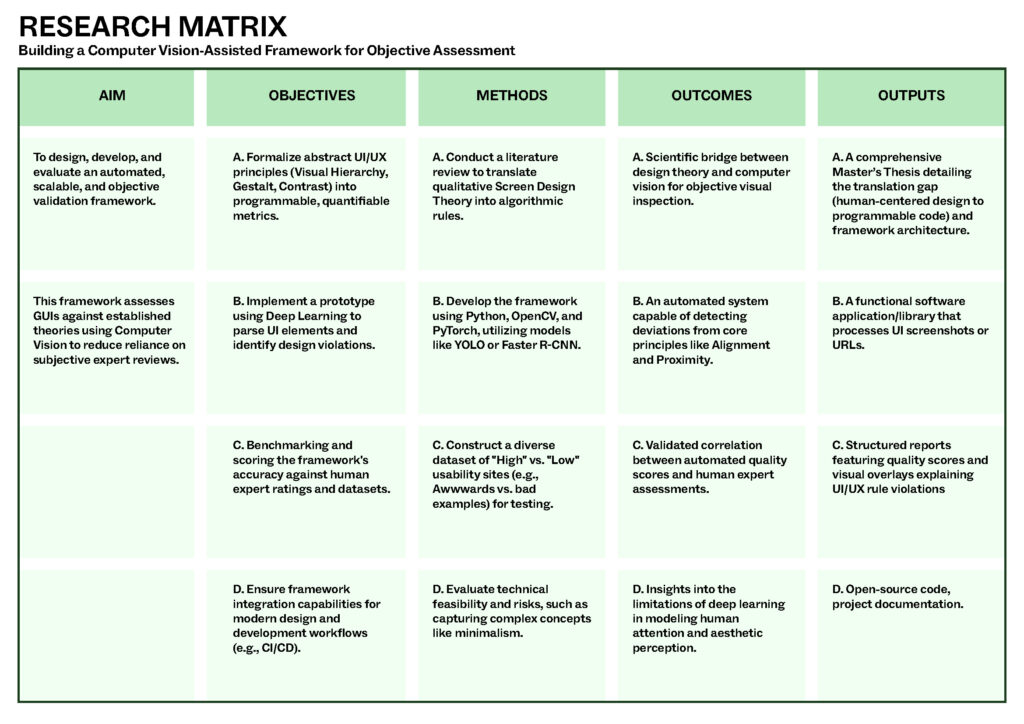
AIM

The primary goal is to design, develop, and evaluate a framework that uses Computer Vision (CV) to objectively assess User Interfaces based on established UI/UX theories. It specifically targets the current problem where UI validation is too resource-intensive and subjective.

OBJECTIVES

Translate Theory: Convert abstract principles like Visual Hierarchy, Gestalt Principles (Proximity/Similarity), and Color Theory into quantifiable metrics.

Build Prototype: Create a tool that can Parse elements (buttons, text), Evaluate them against rules, and Score the results.

Integration: Ensure the framework can be used within existing development workflows, such as CI/CD tools.

METHODS

Research through Design: A four-phase approach involving literature review, dataset construction, implementation, and evaluation.

Technical Stack: Utilizing Python with libraries like OpenCV and PyTorch, specifically employing deep learning models like YOLO for object detection.

Data Sourcing: Building a dataset from award-winning sites (e.g., Awwwards) to compare against “bad” design examples.

OUTCOMES

Objective Validation: An enhancement for subjective human observation to a scalable, automated visual inspection mechanism.

Correlation Findings: Determining the extent to which automated scores can successfully mirror human expert assessments.

Technical Insights: Identifying risks regarding whether high-level concepts like “minimalism” can be truly captured by algorithms.

OUTPUTS

The Workpiece: A software application or library that takes a URL or screenshot and generates a structured report.

Visual Overlays: Heatmaps or overlays on the UI that point out exactly where rules (like alignment or contrast) are violated.

Master’s Thesis: A formal document covering the translation gap between UX and Computer Vision.

Impulse #4: The Role of Playtesting in Game Development

Understanding Users before Building a Game

Game development today involves more than programming and visual design. The process has expanded to prioritize player experience, usability, and comfort. As a result, user research and structured game testing have become established parts of development rather than optional additions. Developers collect information about potential players’ expectations, preferred interaction styles, and prior gaming experience. These findings help define the core direction of the project, informing mechanics, interface design, and accessibility considerations.

The Role of Continuous Playtesting

Playtesting follows throughout production. During testing, participants play the game while developers evaluate how easy it is to understand controls, complete objectives, and maintain engagement. Feedback may take the form of performance metrics, interviews, or surveys. Insights gathered from testing lead to adjustments in difficulty, interface structure, pacing, and overall design. By repeating this cycle of testing and refinement, developers aim to reduce friction and improve player satisfaction prior to release.

VR as a Special Design Challenge

Virtual reality development highlights the importance of this approach. In VR environments, issues such as motion sickness, spatial confusion, and physical fatigue can occur if design choices are not aligned with human perception and comfort. Prototypes are therefore tested early, often using basic shapes or limited interaction, to observe how players move, react, and navigate. These observations allow developers to refine interactions before expanding the experience. The overall purpose of these processes is to ensure that the final product functions as intended when experienced by diverse players. Testing with real users helps identify challenges that may not be visible to designers or engineers working closely with the system.

Source: https://www.interaction-design.org/literature/article/how-to-understand-user-needs-in-virtual-reality?srsltid=AfmBOopOKeH_8sjLighvBVX2mjNCNtP7S0dj0D1mwOKBO1bDZp9lVcOC

UX Quality in Video Games

As I learned more about UX design and testing, I began to view video games very differently. Instead of only enjoying them as a player, I now pay close attention to how mechanics are introduced, how controls feel, and how smoothly the experience guides me from one action to the next. I’ve noticed how a well-designed game teaches its systems without overwhelming the player, while a poorly designed one creates confusion or frustration through unclear feedback or awkward navigation. My own play experiences have become a source of learning — I can sense when a game’s UX supports my immersion, and equally when it breaks it. Understanding the development behind these decisions has made me appreciate how much careful thought goes into balancing challenge, flow, and usability. Games have essentially become case studies, helping me recognize what makes an interaction feel right, and inspiring ideas for how those same UX principles can be applied in design work beyond gaming.

Source: https://uxplanet.org/how-video-games-can-develop-your-ux-design-skills-e209368330ac

Impulse #3: Nadieh Bremer, WebExpo 2025

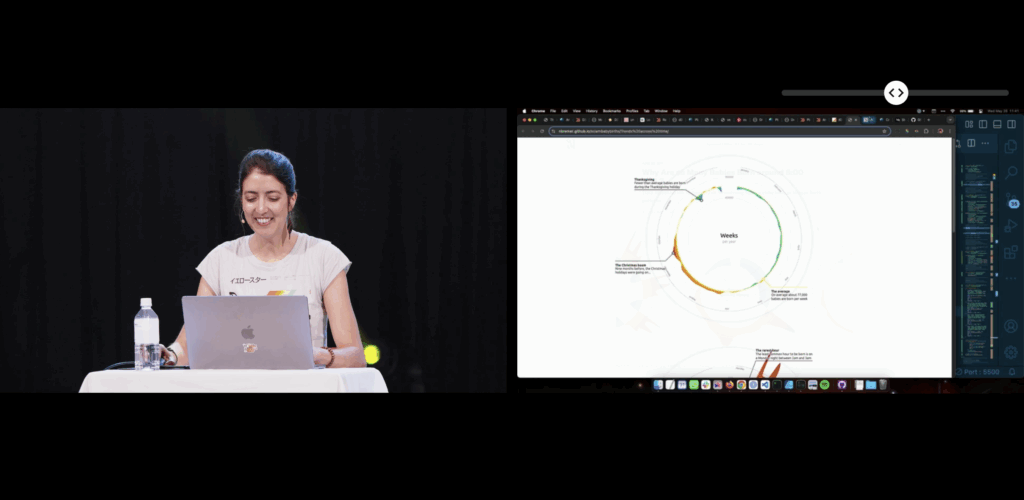
This blogpost will be a reflection inspired by Nadieh Bremers’ WebExpo 2025 talk Creating an effective & beautiful data visualisation from scratch with d3.js. Bremer demonstrates how visual interfaces can be designed to convey information clearly and emotionally. She outlines a design process that begins with understanding the data’s story and ends with polishing details such as visual hierarchy, color, and interaction. Her approach emphasizes that visuals should not only communicate facts but also evoke engagement and a sense of discovery. I rewatched the digital documentation of her talk to recap the content of her presentation.

Bremer presents visualization as a communication medium, where design choices directly impact user comprehension and emotional experience. Clarity reduces frustration, while appealing design increases motivation to explore. This perspective positions data visualization as a critical component of user experience, not merely a decorative or aesthetic layer.

Learning about new technologies for data visualization

When I encountered Nadieh Bremers work, I was already familiar with data visualization, but mostly through print media and a little experience with Processing. Designing layouts for magazines or static posters taught me how much data visuals can influence perception and guide a narrative. Around that time we went to WebExpo, I got into JS coding but wasn’t aware of the posibilities to use it for data visualization. Her projects demonstrated what I had been missing in print -> interactivity and adaptivity.

Why adaptive data visualization matters for a good user experience

During my deeper dive into adaptive data visualization literature, I explored a research paper focusing on real-time decision support in complex systems. It argues that static dashboards are no longer enough to support organizations facing rapidly changing data environments. Instead, visualizations must adapt to:

  • Incoming data streams
  • User interactions
  • Context shifts
  • Multivariate complexity

Adaptive systems combine machine learning, real-time processing, and flexible visualization layers to support faster and more informed decision-making. This means that the visualization is not just displaying data, it is interpreting and reacting to it. The paper specifically highlights D3.js as one of the technologies capable of creating these highly flexible and dynamic interfaces. Unlike pre-built dashboards, D3 allows developers to adapt interactions, transitions, and representations directly to user needs and situational changes.

In my earlier blog posts I wrote about affective computing. Combining the gained knowled I came to a conclusion: If a system can visually adapt based not only on the dataset, but also on the emotional state of the user, could generate a better user experience?

Sources:

https://slideslive.com/39043157/creating-an-effective-beautiful-data-visualisation-from-scratch

https://www.researchgate.net/publication/387471439_ADAPTIVE_DATA_VISUALIZATION_TECHNIQUES_FOR_REAL-TIME_DECISION_SUPPORT_IN_COMPLEX_SYSTEMS

Impulse #2: Computer Vision in UI/UX

After diving into Picard’s vision of emotionally intelligent systems, I now found a more technical and practical perspective on how computer vision is already reshaping UI testing. The research paper Computer Vision for UI Testing: Leveraging Image Recognition and AI to Validate Elements and Layouts explores automated detection of UI problems using image recognition techniques, something highly relevant for improving UX/UI workflows today.

Img: Unveiling the Impat of Computer Vision on UI Testing. Pathak, Kapoor

Using Computer Vision to validate Visual UI Quality

The authors explain that traditional UI testing still relies heavily on manual inspection or DOM-based element identification, which can be slow, brittle and prone to human error. In contrast, computer vision can directly analyze rendered screens: detecting missing buttons, misaligned text, broken layouts, or unwanted shifts across different devices and screen sizes. This makes visual testing more reliable and scalable, especially for modern responsive interfaces where designs constantly change during development.

One key contribution from the paper is the use of deep learning models such as YOLO, Faster R-CNN, and MobileNet SSD for object detection of UI elements. These models not only recognize what is displayed on the screen but verify whether the UI looks as intended, something code-based tools often miss when designs shift or UI elements become temporarily hidden under overlays. By incorporating techniques like OCR for text validation and structural similarity (SSIM) for layout comparison, the testing process becomes more precise in catching subtle visual inconsistencies that affect the user experience.

Conclusion

This opens a potential master thesis direction where computer vision not only checks whether UI elements are visually correct but also evaluates user affect during interaction, identifying frustration, confusion, or cognitive overload as measurable usability friction. Such a thesis could bridge technical UI defect detection with affective UX evaluation, moving beyond “does the UI render correctly?” toward “does the UI emotionally support its users?”. By combining emotion recognition models with CV-based layout analysis, you could develop an adaptive UX testing system that highlights not only where usability issues occur but also why they matter to the user.

Source: https://www.techrxiv.org/users/898550/articles/1282199-computer-vision-for-ui-testing-leveraging-image-recognition-and-ai-to-validate-elements-and-layouts

Impulse #1: Affective Computing, Rosalind W. Picard

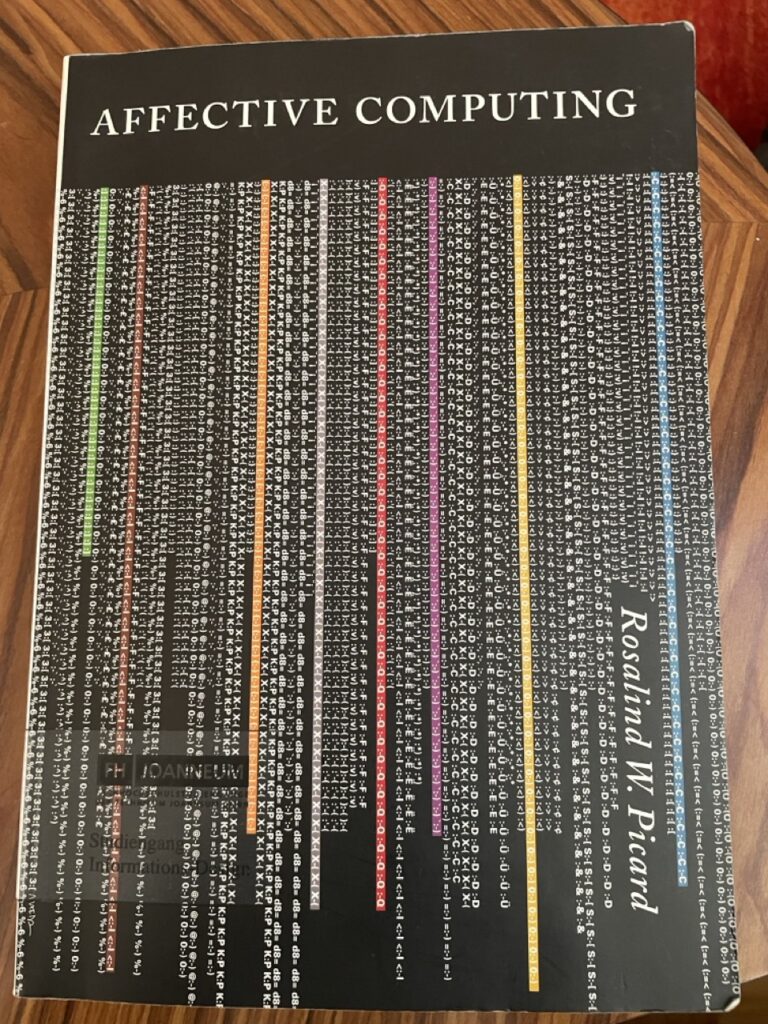
The work Affective Computing by Rosalind W. Picard from the year 2000 proposes a fundamental paradigm shift in computer science, challenging the traditional view that intelligent machines must operate only on logic and rationality. Picard’s work provides a comprehensive framework for the design of computational systems that relate to, arise from, or influence human emotions.

In Interaction Design we want interfaces that are easy to use and look good. We spend our time while working on projects thinking about usability, efficiency and aesthetics. For us in design, this means a functional interface isn’t enough anymore. If a system doesn’t register that a user is confused or frustrated, it’s not truly successful. Picard essentially launched a new field dedicated to building technology that can sense, interpret, and respond to human emotional states.

Adaptive Interfaces enhanced by Computer Vision Systems

A central connection between affective computing and my work in emotion detection for computer vision lies in the development of adaptive user interfaces. Picard emphasizes that computers often ignore users’ frustration or confusion, continuing to operate rigidly without awareness of emotional signals. By equipping systems with the ability to recognize facial expressions, stress indicators, or declining engagement, interfaces can dynamically adjust elements such as difficulty level, information density, feedback style, or interaction pacing. This emotional awareness transforms an interface from a static tool into an intelligent communication partner that responds supportively to users’ needs. In learning environments, for example, a tutor system could detect when a student becomes overwhelmed and automatically provide hints or slow down the content. In safety-critical settings, such as driver monitoring, emotion recognition can alert systems when attention or alertness drops. Thus, integrating affect recognition directly contributes to more human-centered, flexible, and effective interfaces, aligning with Picard’s vision of computers that interact with intelligence and sensitivity toward humans.

Computer Vision in UX-Testing

Computer vision–based emotion recognition can significantly enhance UX testing by providing objective insights into users’ emotional responses during interaction. Rather than relying solely on post-task questionnaires or self-reporting, facial expression analysis and behavioral monitoring enable systems to detect in real time when a user experiences frustration, confusion, satisfaction, or engagement. Picard highlights that current computers are affect-blind, unable to notice when users express negative emotions toward the system, and therefore cannot adjust their behavior accordingly. Integrating affective sensing into UX evaluation allows designers to pinpoint problematic interface moments, identify cognitive overload, and validate usability improvements based on measurable affective reactions.

In summary, the intersection of affective computing, computer vision, and adaptive interfaces offers a protential research path for my master thesis. By enabling systems to detect emotional reactions through facial expressions and behavioral cues, UX testing can become more insightful and responsive, leading to interface designs that better support the users needs. Building on Picard’s foundational ideas of emotional intelligence in computing, my research could contribute to developing affect-aware evaluation tools that automatically identify usability breakdowns and adapt interactions in real time.

Evaluating a Master Thesis: Ender Özerdem

Ender Özerdem’s 2012 master’s thesis, Evaluating the Suitability of Web 2.0 Technologies for Online Atlas Access Interfaces, explores how participatory web features such as recommendations, user comments, and blogs can enhance online atlas usability. Through a prototype simulating an Austrian online atlas and usability testing with 30 participants, the study empirically assesses user reactions to these interactive elements. The results show that Web 2.0 functions can meaningfully improve user engagement and navigation, demonstrating both practical innovation and sound methodological execution.

Overview

Author: Ender Özerdem
Title: Evaluating the Suitability of Web 2.0 Technologies for Online Atlas Access Interfaces
Institution: Vienna University of Technology, Institute of Geoinformation and Cartography
Supervisors: Univ.-Prof. Dr. Georg Gartner; Dipl.-Ing. Felix Ortag
Year: 2012
Length: ~80 pages + appendices
Artifact: an interactive prototype of an online atlas of Austria (implemented as a clickable PDF simulating web interfaces) used for usability testing with 30 participants.

Structure:

  1. Introduction
  2. Basics
  3. Map access methods
  4. Web 2.0
  5. Empirical evaluation
  6. Results
  7. Conclusions

Evaluation

Overall Presentation Quality

The thesis is well-formatted and consistently structured, following scientific conventions. Figures, tables, and lists are clear and properly captioned. The bilingual abstract (English + German) is concise and accurately summarizes the aims, methods, and findings. Minor typographical inconsistencies exist but do not impede comprehension. Overall presentation quality is very good.

Degree of Innovation

The work tackles the novel (for 2012) question of how Web 2.0 interactivity—recommendations, comments, tag clouds, blogs, RSS—might enrich online atlases. This was a forward-looking intersection between cartography and web usability. The idea of combining usability testing with interactive atlas prototypes represents a meaningful contribution, though not groundbreaking at a theoretical level. The innovation lies primarily in applied integration of Web 2.0 principles into geographic interfaces.

Independence

Özerdem designed and executed the empirical evaluation, built the prototype interface, and conducted the usability tests autonomously. The methodological and implementation details indicate independent planning and execution under supervision. The inclusion of custom interface variants and a participant survey supports this.

Organization and Structure

The work is logically organized. Each chapter builds upon the previous: theoretical groundwork → analysis of existing systems → introduction of new technologies → empirical test → interpretation. The flow from problem statement to results is coherent. However, minor redundancies appear in the literature review (e.g., extended quotations from definitions).

Communication

The writing style is formal, clear, and mostly fluent. Definitions and literature are carefully integrated, though sentence structure occasionally reflects non-native phrasing. Visual materials (figures and screenshots) effectively support comprehension. Technical terminology is correctly used throughout.

Scope

The chosen topic, evaluating Web 2.0 features within online atlas interfaces, is handled with appropriate breadth and depth for a master’s level. The work balances theoretical exposition and empirical application effectively. The 70+ page length is proportional to the scope.

Accuracy and Attention to Detail

The text demonstrates careful referencing and accurate terminology in cartography and web technology. Tables and figures are labeled consistently. Only minor formatting inconsistencies (e.g., spacing, capitalization) occur. The methodology is described in enough detail to be replicable.

Literature

The literature review is broad and relevant, covering both classic cartographic sources (Bollmann & Koch; Kraak & Ormeling) and Web 2.0 theory (O’Reilly, 2005; Gartner, 2009). While comprehensive for its time, it lacks more recent (post-2010) empirical studies on user-generated mapping—an understandable limitation given the publication date. Citation style is consistent.

The Prototype

The prototype developed by Ender Özerdem effectively demonstrates the integration of Web 2.0 features, such as recommendations, user comments, and tag clouds, into an online atlas interface. Although implemented as a clickable PDF rather than a live web application, it is clearly structured, visually coherent, and sufficiently interactive for usability testing. The documentation provides detailed explanations of interface variants, user tasks, and testing procedures, ensuring transparency and reproducibility. Overall, the prototype successfully translates the thesis’s theoretical ideas into a practical, testable form and meets the expected standards of a master’s-level artifact.

Conclusion

In conclusion, Ender Özerdem’s Evaluating the Suitability of Web 2.0 Technologies for Online Atlas Access Interfaces (2012) is a well-structured and methodically robust thesis that effectively combines theoretical research with empirical testing. Despite the prototype’s limited technical scope and a modest sample size, the work shows strong independence, clear documentation, and valuable insights into enhancing online atlas interfaces through participatory web features. Overall, it demonstrates solid academic competence and practical innovation, meriting a ~2, 2+ evaluation.

Powered by ChatGPT