Prototyping IX: Image Extender – Image sonification tool for immersive perception of sounds from images and new creation possibilities

Advanced Automated Sound Mixing with Hierarchical Tag Handling and Spectral Awareness

The Image Extender project continues to evolve in scope and sophistication. What began as a relatively straightforward pipeline connecting object recognition to the Freesound.org API has now grown into a rich, semi-intelligent audio mixing system. This recent development phase focused on enhancing both the semantic accuracy and the acoustic quality of generated soundscapes, tackling two significant challenges: how to gracefully handle missing tag-to-sound matches, and how to intelligently mix overlapping sounds to avoid auditory clutter.
Sound Retrieval Meets Semantic Depth

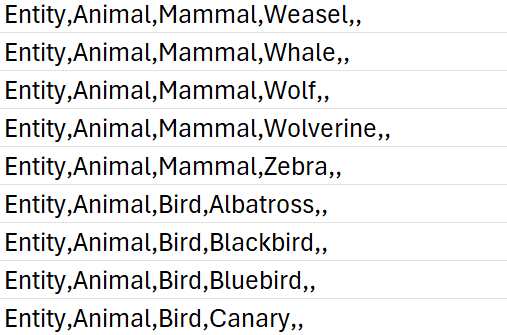
One of the core limitations of the original approach was its dependence on exact tag matches. If no sound was found for a detected object, that tag simply went silent. To address this, I introduced a multi-level fallback system based on a custom-built CSV ontology inspired by Google’s AudioSet.

This ontology now contains hundreds of entries, organized into logical hierarchies that progress from broad categories like “Entity” or “Animal” to highly specific leaf nodes like “White-tailed Deer,” “Pickup Truck,” or “Golden Eagle.” When a tag fails, the system automatically climbs upward through this tree, selecting a more general fallback—moving from “Tiger” to “Carnivore” to “Mammal,” and finally to “Animal” if necessary.

Implementation of temporal composition

Initial versions of Image Extender merely stacked sounds on top of each other by only using the spatial composition in the form of panning. Now, the mixing system behaves more like a simplified DAW (Digital Audio Workstation). Key improvements introduced in this iteration include:

  • Random temporal placement: Shorter sound files are distributed at randomized time positions across the duration of the mix, reducing sonic overcrowding and creating a more natural flow.
  • Automatic fade-ins and fade-outs: Each sound is treated with short fades to eliminate abrupt onsets and offsets, improving auditory smoothness.
  • Mix length based on longest sound: Instead of enforcing a fixed duration, the mix now adapts to the length of the longest inserted file, which is always placed at the beginning to anchor the composition.

These changes give each generated audio scene a sense of temporal structure and stereo space, making them more immersive and cinematic.

Frequency-Aware Mixing: Avoiding Spectral Masking

A standout feature developed during this phase was automatic spectral masking avoidance. When multiple sounds overlap in time and occupy similar frequency bands, they can mask each other, causing a loss of clarity. To mitigate this, the system performs the following steps:

  1. Before placing a sound, the system extracts the portion of the mix it will overlap with.
  2. Both the new sound and the overlapping mix segment are analyzed via FFT (Fast Fourier Transform) to determine their dominant frequency bands.
  3. If the analysis detects significant overlap in frequency content, the system takes one of two corrective actions:
    • Attenuation: The new sound is reduced in volume (e.g., -6 dB).
    • EQ filtering: Depending on the nature of the conflict, a high-pass or low-pass filter is applied to the new sound to move it out of the way spectrally.

This spectral awareness doesn’t reach the complexity of advanced mixing, but it significantly reduces the most obvious masking effects in real-time-generated content—without user input.

Spectrogram Visualization of the Final Mix

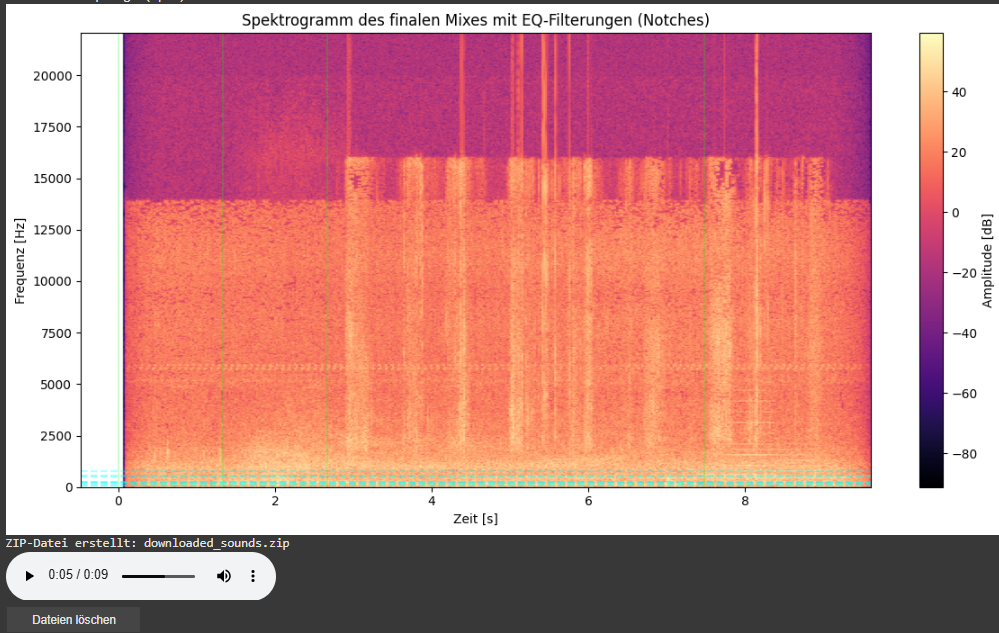
As part of this iteration, I also added a spectrogram visualization of the final mix. This visual feedback provides a frequency-time representation of the soundscape and highlights which parts of the spectrum have been affected by EQ filtering.

  • Vertical dashed lines indicate the insertion time of each new sound.
  • Horizontal lines mark the dominant frequencies of the added sound segments. These often coincide with spectral areas where notch filters have been applied to avoid collisions with the existing mix.

This visualization allows for easier debugging, improved understanding of frequency interactions, and serves as a useful tool when tuning mixing parameters or filter behaviors.
Looking Ahead

As the architecture matures, future milestones are already on the horizon. We aim to implement:

  • Visual feedback: A real-time timeline that shows audio placement, duration, and spectral content.
  • Advanced loudness control: Integration of dynamic range compression and LUFS-based normalization for output consistency.
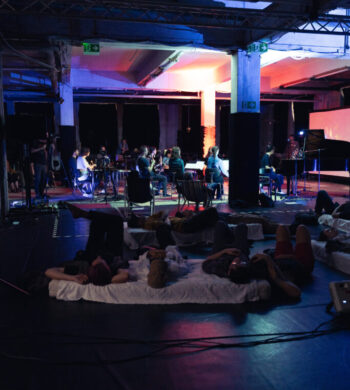

Exploring the Edges of Concert Design: Between Practice and Research

Title image: Luis Miehlich, “Cartographies – Ein Halbschlafkonzert (2023) – Pieces for Ensemble, Electronics & Video,” luismiehlich, accessed May 25, 2025, https://luismiehlich.com/.

In addition to developing the idea of a technical tool-set, I’ve started to dig a little bit deeper into the research part of my project, trying to better understand the evolving field the creative and technical work inhabits. What started as an effort to clarify the conceptual underpinnings of my practical project turned into a broader exploration of a field that is, in many ways, still defining itself: concert design.

This term may sound straightforward, but its scope is definitively not. Concert design is not just about programming a setlist or choosing a venue; it’s about crafting the entire experiential and spatial context of a performance. It treats every element of the concert, starting from basic things like the seating arrangements (or why not just laying down for example?) to interactivity, from sonic spatialization to the architecture of the space. Everything is understood as part of the creative material designers can work with.

A Field Still Taking Shape

What struck me early on is how fragmented this field still is, even though there are of course some technical resources in more specific aspects like e.g. stage lighting. But there are only a handful of academic sources that explicitly use the term concert design, understanding it as a more holistic view and even fewer that attempt to define it systematically. Among them, people like Martin Tröndle stand out for their efforts to create a structured framework through the emerging field of Concert Studies. Another name, more in the field of practical work, is Folkert Uhde.

Yet, when looking beyond academic texts, I found countless artistic projects that embody the principles of concert design even if their creators never labeled them as such. Here I want to point out the ambient scene with early experiments and even non-scientific reflections from Brian Eno up until very recent formats from Luis Miehlich for example. This suggests a noticeable gap: while practice is vibrant and evolving, theoretical reflection and shared language are still catching up.

Research Process

To navigate this space, I tried out different keywords relating disciplinary intersections; terms like “immersive performance,” “audience interaction,” “spatial dramaturgy”.

With that I found other fields that may offer interesting works, that are worth getting into:

Theater studies turned out to be a goldmine offering both practical and theoretical insights into spatial and participatory performance. There seems to be a howl tradition featuring big names like Berthold Brecht.

But what really surprised me, even though it might seem obvious, was the relevance of game design. The inherent interactive nature impacts of course the work with sound and music. The spaces were players interact with it might be of virtual nature, still the interaction of recipients with there surrounding has to be thought of during the design process. I think there might be a huge potential to examine as well, though it opens the frame to an extend that exceeds this project.

Future Steps: From Reflection to Contribution

The more I researched, the clearer it became that it is hard to just rely on existing research. A way to deal with that can be to contribute to the field as both a designer and researcher. This could be in the following ways:

  • Provide an overview of the evolving field, both as a practical discipline and as an academic field. This may be a starting point.
  • Reach out to leading voices in the field (e.g., Martin Tröndle, Experimental Concert Research) for interviews. This may lead to the following observations.
  • Identify needs and gaps, from the perspective of practitioners and researchers: What do they lack? What could help them frame, evaluate, or communicate their work?

Ultimately, this could lead to the development of a manual or evaluation guid; something that can serve as a conceptual and practical tool for artists and designers, help them providing to the exploration performative spatial sound and the field of concert design.

From Sound Design to Concert Design

This research journey runs in parallel to my technical development of a spatial sound toolkit (→ previous blog entry), but it also stands on its own. It’s an interesting experience for me, locating my work within a broader context and trying to build some kind of bridge between my individual artistic practice and shared disciplinary structures. This might not be my future field of work, still I have the feeling, I can take this locating approach as a strategy with me and implement in future projects, to elevate them and for better communication towards outsiders.

Sources:

Martin Tröndle, ed., Das Konzert II: Beiträge zum Forschungsfeld der Concert Studies (Bielefeld: transcript Verlag, 2018), https://doi.org/10.1515/9783839443156.

“Folkert Uhde Konzertdesign,” accessed May 25, 2025, https://www.folkertuhdekonzertdesign.de/.

Brian Eno, “Ambient Music,” in Audio Culture: Readings in Modern Music, ed. Christoph Cox and Daniel Warner (New York: Continuum, 2004).

Luis Miehlich, “Cartographies – Ein Halbschlafkonzert (2023) – Pieces for Ensemble, Electronics & Video,” luismiehlich, accessed May 25, 2025, https://luismiehlich.com/.

“Re-Cartographies, by Luis Miehlich,” Bandcamp, accessed May 25, 2025, https://woolookologie.bandcamp.com/album/re-cartographies.

From Public Piazza to Private Practice: Re-thinking Site-Specific Sound Design

When I first planned my project “Sounds of the Joanneum Quarter”, the goal was ambitious: a site-specific ambient music installation, deeply integrated into the architectural and acoustic landscape of the Joanneum Quarter in Graz. Inspired by these unique sounding conical glass funnels and spatial openness of the site, I imagined turning the piazza into a dynamic concert space; one where the audience’s movement and the physical structures would shape the sonic experience.

However, during this semester a certain “reality check” demanded a shift in direction. Logistical constraints, timing and access issues meant that the Joanneum setting wouldn’t be possible for this phase of the project. Still, this place holds a special place in my heart, because it gave me a lot of inspiration to dig deeper into this topic. Together with my supervisor I brainstormed about re-approaching the topic: how could I scale the core ideas of spatial interaction, site-responsiveness, and ambient composition down to a format that’s more flexible, portable, and even testable at home?


A Scaled-Down Version with Broader Potential

The new direction retains the essence of the original project – interaction, spatial sound, resonance, and ambience – but re-frames it within a more universally accessible framework. Instead of relying on a single, monumental site, the project now aims to create a tool-set for composers and installation-makers, enabling them to transform any room or environment into a site-specific sound installation.

This smaller-scale approach not only makes the concept more versatile regarding the adaptability for different locations, but also supports a hands-on, iterative development process. I can now begin building, testing, and refining the tools at home and FH, implementing a workflow that builds a bridge between research and practice.


Building the Infrastructure: Tools for Room-Scale Sound Art

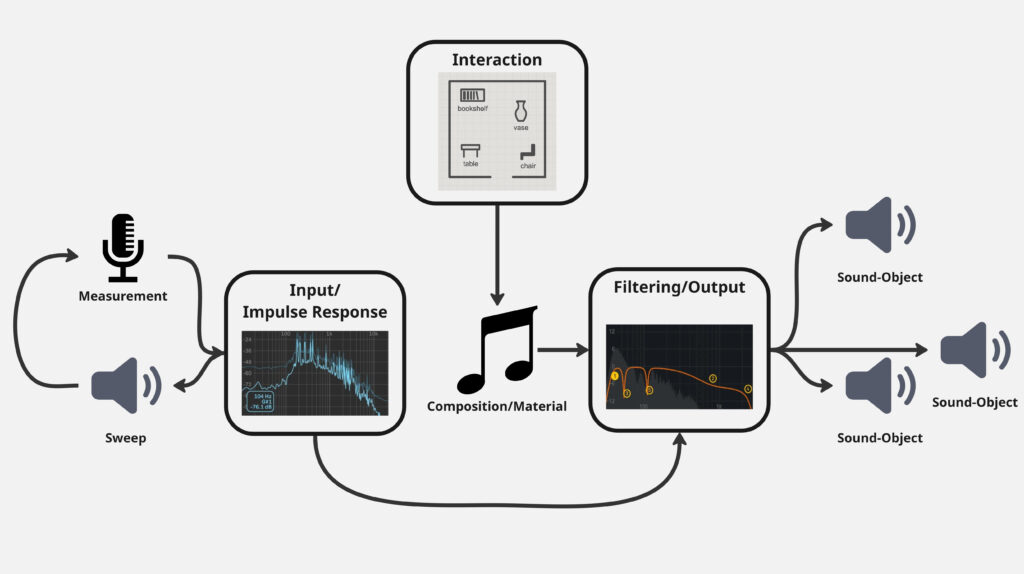
At the heart of this shift is a technical infrastructure that turns any kind everyday objects within a room into potential sound objects. The toolkit consists of both hardware and software components:

  • Hardware: Contact microphones or measuring microphones as input, and transducers as output
  • Software: A modular environment built in Max/MSP within the Max4Live framework, tailored to site-specific sound creation.

One of the tool-kit’s key features is its ability to identify an object’s natural resonances via impulse response measurements (input). These measurements inform the creation of custom filter curves that can be used to excite those resonances musically (output). In this way, a bookshelf, table, a metal lamp or even a trash-can becomes a playable, resonant sound object.


Interactive Soundscapes in Everyday Spaces

A third component of the tool-set introduces basic interaction mechanics, allowing potential users or audiences to engage with the sound installation. These control objects can be mapped to a digital version of the room (upload of a literal map) and may include for examples:

  • Panners that move sound from object to object.
  • One-shot triggers that activate specific objects.

With these tools, rooms become navigable soundscapes, where UI interaction can influence sonic outcomes, echoing the spatial interactivity originally imagined for the Joanneum Quarter, but within reach of smaller spaces.

schematic view of the framework


From Site to System

While the grand setting of the original concept served as a powerful starting point, the shift toward a modular, adaptable toolkit has opened up new creative and technical possibilities. What began as a site-specific composition approach can now be framed maybe as a site-adaptive system; one that gives myself or others the opportunity to explore the relation between sound, space, and interaction in their own settings.

The essence remains: redefining how music and sound inhabit space. But now, instead of building for one site, I’m building a foundation that others can use in many.

Prototyping VIII: Image Extender – Image sonification tool for immersive perception of sounds from images and new creation possibilities

Sound-Image Matching via Semantic Tag Comparison

Continuing development on the Image Extender project, I’ve been exploring how to improve the connection between recognized visual elements and the sounds selected to represent them. A key question in this phase has been: How do we determine if a sound actually fits an image, not just technically but meaningfully?

Testing the Possibilities

I initially looked into using large language models to evaluate the fit between sound descriptions and the visual content of an image. Various API-based models showed potential in theory, particularly for generating a numerical score representing how well a sound matched the image content. However, many of these options required paid access or more complex setup than suited this early prototyping phase. I also explored frameworks like LangChain to help with integration, but these too proved a bit unstable for the lightweight, quick feedback loops I was aiming for.

A More Practical Approach: Semantic Comparison

To keep things moving forward, I’ve shifted toward a simpler method using semantic comparison between the image content and the sound description. In this system, the objects recognized in an image are merged into a combined tag string, which is then compared against the sound’s description using a classifier that evaluates their semantic relatedness.

Rather than returning a simple yes or no, this method provides a score that reflects how well the description aligns with the image’s content. If the score falls below a certain threshold, the sound is skipped — keeping the results focused and relevant without needing manual curation.

Why It Works (for Now)

This tag-based comparison system is easy to implement, doesn’t rely on external APIs, and integrates cleanly into the current audio selection pipeline. It allows for quick iteration, which is key during the early design and testing stages. While it doesn’t offer the nuanced understanding of a full-scale LLM, it provides a surprisingly effective filter to catch mismatches between sounds and images.

In the future, I may revisit the idea of using larger models once a more stable or affordable setup is in place. But for this phase, the focus is on building a clear and functional base — and semantic tag matching gives just enough structure to support that.

IRCAM Forum 2025 – Turning Pixels into Sound: Sonifying The Powder Toy

During our visit to IRCAM Forum 2025, one of the most unexpected and inspiring presentations came from Kieran McAuliffe, who introduced us to a unique way of experiencing a video game — not just visually, but sonically. His project, Sonifying The Powder Toy, brought an old genre of games to life in a way that made both sound designers and game designers lean forward.

If you’ve never heard of it, The Powder Toy is part of a quirky, cult genre called “falling sand games.”

https://powdertoy.co.uk/

These are open-ended, sandbox-style simulations where players interact with hundreds of different particles — fire, water, electricity, explosives, gases, and even fictional materials — all rendered with surprising physical detail. It’s chaotic, visual, and highly addictive. But one thing it never had was sound.

Kieran, with his background as a composer, guitarist, and researcher, decided to change that. His project wasn’t just about adding booms and fizzles. He approached the challenge like a musical instrument designer: how can you play this game with your ears?

The problem was obvious. The game’s physics engine tracks up to 100,000 particles updating 60 times per second — trying to create sounds for every interaction would melt your CPU. So instead, Kieran developed a method of analytic sonification: instead of responding to every pixel, his system tracks the overall distribution of particles and generates sound textures accordingly.

That’s where it gets beautifully nerdy. He uses something called stochastic frequency-modulated granular synthesis. In simpler terms, think of it like matching grains of sand with grains of sound — short, tiny bursts of tones that collectively create textures. Each type of material in The Powder Toy — be it lava, fire, or metal — gets its own “grain stream,” with parameters like pitch, modulation, duration, and spatial position derived from the game’s internal data.

To make all of this work, Kieran built a custom Max/MSP external called LuaGran~. This clever little tool lets him embed Lua scripts directly inside Max, giving him the power to generate and manipulate thousands of grains per second. It allows for both tight control and high performance — a critical balance when your “instrument” is a particle system going haywire in real time.

Some mappings were linear — like more fire equals higher pitch — while others used neural networks or probabilistic logic to shape more complex sonic behaviors. It was a blend of art and science, intuition and math.

During the presentation, I had the chance to join Kieran live by downloading his forked version of The Powder Toy, which sends Open Sound Control (OSC) data to his Max patch. Within minutes, a room full of laptops was sonically simulating plasma storms and chemical reactions. It was fun, chaotic, and surprisingly musical.

One thing that stood out was how Kieran resisted the temptation to make the sound effects too “realistic.” Instead, he embraced abstraction. A massive explosion might not sound like a movie boom — it might produce a textured whoosh or a burst of granular noise. His goal was not to recreate reality, but to enhance the game’s emergent unpredictability with equally surprising sounds.

He described the system more like a musical instrument than a tool, and that’s how he uses it — for laptop ensemble pieces, sound installations, and live improvisation. Still, he hinted at the potential for this to evolve into a standalone app or even a browser-based instrument. The code is open source, and the LuaGran~ tool is already on his GitHub (though it still needs some polish before wider distribution).

https://github.com/trian-gles

As sound designers and creatives, this project reminds us that sound can emerge from the most unexpected places — and that play, chaos, and curiosity are powerful creative engines. The Powder Toy might look like a simple retro game, but under Kieran’s hands, it becomes a dense sonic playground, a platform for experimentation, and a surprisingly poetic meeting of code and composition.

If you’re curious, I encourage you to try it out, explore the sounds it makes, and maybe even mod it yourself. Because as Kieran showed us, sometimes the most interesting instruments are the ones hiding inside games.

Here you can find manual how to instal game and sonification:

https://tinyurl.com/powder-ircam

It’s more fun to do it with friends)

IRCAM Forum 2025 – RIOT v3: A Real-Time Embedded System for Interactive Sound and Music

When you think of motion tracking, you might imagine a dancer in a suit covered with reflective dots, or a game controller measuring hand gestures. But at this year’s IRCAM Forum in Paris, Emmanuel Fléty and Marc Sirguy introduced R-IoT v3, the latest evolution of a platform developed at IRCAM for real-time interactive audio applications. For students and professionals working in sound design, physical computing, or musical interaction, RIOT represents a refreshing alternative to more mainstream tools like Arduino, Raspberry Pi, or Bela—especially when tight timing, stability, and integration with software environments like Max/MSP or Pure Data are key.

What is it, exactly?

RIOT v3 is a tiny device—about the size of a USB stick—that can be attached to your hand, your foot, a drumstick, a dancer’s back, or even a shoe. Once it’s in place, it starts capturing your movements: tilts, spins, jumps, shakes. All of that motion is sent wirelessly to your computer in real time.

What you do with that data is up to you. You could trigger a sound sample every time you raise your arm, filter a sound based on how fast you’re turning, or control lights based on the intensity of your movements. It’s like turning your body into a musical instrument or a controller for your sound environment.

What’s special about version 3?

Unlike Raspberry Pi, which runs a full operating system, or Arduino, which can have unpredictable latency depending on how it’s programmed, RIOT runs bare metal. This means there’s no operating system, no background tasks, no scheduler—nothing between your code and the hardware. The result: extremely low latency, deterministic timing, and stable performance—ideal for live scenarios where glitches aren’t an option.

In other words, RIOT acts like a musical instrument: when you trigger something, it responds immediately and predictably.

The third generation of RIOT introduces some important updates:

  • Single-board design: The previous versions required two boards—the main board and an extension board—but v3 integrates everything into a single PCB, making it more compact and easier to work with.
  • RP2040 support: This version is based on the RP2040 chip, the same microcontroller used in the Raspberry Pi Pico. It’s powerful, fast, and has a growing ecosystem.
  • Modular expansion: For more complex setups, add-ons are coming soon—including boards for audio I/O and Bluetooth/WiFi connectivity.
  • USB programming via riot-builder: The new software tool lets you write C++ code, compile it, and upload it to the RIOT board via USB—no need for external programmers. You can even keep your Max or Pure Data patch running while uploading new code.

Why this matters for sound designers

We often talk about interactivity in sound design—whether for installations, theatre, or music—but many tools still assume that the computer is the main performer. RIOT flips that. It gives you a way to move, breathe, and act—and have the sound respond naturally. It’s especially exciting if you’re working in spatial sound, live performance, or experimental formats.

And even if you’ve never touched an Arduino or built your own electronics, RIOT v3 is approachable. Everything happens over WiFi or USB, and it speaks OSC, a protocol used in many creative platforms like Max/MSP, Pure Data, Unity, and SuperCollider. It also works with tools some of you might already know, like CataRT or Comote.

Under the hood, it’s fast. Like really fast. It can sense, process, and send your movement data in under 2 milliseconds, which means you won’t notice any lag between your action and the response. It can also timestamp data precisely, which is great if you’re recording or syncing with other systems.

The device is rechargeable via USB-C, works with or without a battery, and includes onboard storage. You can edit configuration files just like text. There’s even a little LED you can customize to give visual feedback. All of this fits into a board the size of a chewing gum pack.

And yes—it’s open source. That means if you want to tinker later on, or work with developers, you can.

https://github.com/Ircam-R-IoT

A tool made for experimentation

Whether you’re interested in gesture-controlled sound, building interactive costumes, or mapping motion to filters and samples in real time, RIOT v3 is designed to help you get there faster and more reliably. It’s flexible enough for advanced setups but friendly enough for students or artists trying this for the first time.

At FH Joanneum, where design and sound design meet across disciplines, a tool like this opens up new ways of thinking about interaction, performance, and embodiment. You don’t need to master sensors to start exploring your own body as a controller. RIOT v3 gives you just enough access to be dangerous—in the best possible way.

Experiment I: Embodied Resonance – Heart rate variability (HRV) as mental health indicator

Heart rate is a fundamental indicator of mental health, with heart rate variability (HRV) playing a particularly significant role. HRV refers to the variation in time intervals between heartbeats, reflecting autonomic nervous system function and overall physiological resilience. It is measured using time-domain, frequency-domain, or non-linear methods. Higher HRV is associated with greater adaptability and lower stress levels, while lower HRV is linked to conditions such as PTSD, depression, and anxiety disorders.

Studies have shown that HRV differs between healthy individuals and those with PTSD. In a resting state, people with PTSD typically exhibit lower HRV compared to healthy controls. When exposed to emotional triggers, their HRV may decrease even further, indicating heightened sympathetic nervous system activation and reduced parasympathetic regulation. Bessel van der Kolk’s work in “The Body Keeps the Score” highlights how trauma affects autonomic regulation, leading to dysregulated physiological responses under stress.

There are two primary methods for measuring heart rate: electrocardiography (ECG) and photoplethysmography (PPG). 

FeatureECGPPG
Measurement PrincipleUses electrical signals produced by heart activityUses light reflection to detect blood flow changes
AccuracyGold standard for medical HR monitoringUses ECG as reference for HR comparison
Heart Rate (HR) MeasurementHighly accurateSuitable for average or moving average HR
Heart Rate Variability (HRV)Can extract R-peak intervals with millisecond accuracyLimited by sampling rate, better for long-duration measurements (>5 min)
Time to Obtain ReadingQuick, no long settling time requiredRequires settling time for ambient light compensation, motion artifact correction
picsensor namelinkpricewhat it measuresspecificationfeaturesusage case
Gravity: Analog Heart Rate Monitor Sensor (ECG) for Arduinobuy$19.90electrical activity of the heartInput Voltage: 3.3-6V (5V recommended)Output Voltage: 0-3.3VInterface: AnalogOperating current: <10mAHeart Rate Monitor Sensor x1Sensor cable – Electrode Pads (3 connector) x1Biomedical Sensor Pad x6https://emersonkeenan.net/arduino-hrv/
Gravity:Analog/Digital PPG Heart Rate Sensorbuy$16.00blood volume changingInput Voltage (Vin): 3.3 – 6V (5V recommended) Output Voltage: 0 – Vin (Analog), 0/ Vin (Digital) Operating current: <10mAAnalog (pulse wave) & Digital(heart rate), configurable outputhttps://www.dfrobot.com/blog-767.html
MAX30102 PPG Heart Rate and Oximeter Sensorbuy$21.90blood volume changing + blood oxygen saturationPower Supply Voltage: 3.3V/5VWorking Current: <15mACommunication Method: I2C/UARTI2C Address: 0x57https://community.dfrobot.com/makelog-313158.html
Fermion: MAX30102 PPG Heart Rate and Oximeter Sensorbuy$15.90blood volume changing + blood oxygen saturationPower Supply: 3.3VWorking Current: <15mACommunication: I2C/UARTI2C Address: 0x57https://community.dfrobot.com/makelog-311968.html
SparkFun Single Lead Heart Rate Monitorbuy$21.50electrical activity of the heartOperating Voltage – 3.3VAnalog OutputLeads-Off DetectionShutdown PinLED Indicatorno electrodes
extra cables cost $5.50 extra electrodes $8.95
https://anilmaharjan.com.np/blog/diy-ecg-ekg-electrocardiogram 
Sparkfun: Pulse Sensorbuy$26.95blood volume changingInput Voltage (VCC) – 3V to 5.5VOutput Voltage – 0.3V to VCCSupply Current – 3mA to 4mAhttps://microcontrollerslab.com/pulse-sensor-esp32-tutorial/
SparkFun Pulse Oximeter and Heart Rate Sensorbuy$42.95blood volume changing + blood oxygen saturationI2C interface I2C Address: 0x55https://github.com/sparkfun/SparkFun_Bio_Sensor_Hub_Library
Keyestudio AD8232 ECG Measurement Heart Monitor Sensor Module buy9,25€electrical activity of the heartPower voltage:DC 3.3VOutput:analog outputInterface(connect RA, LA, RL): 3PIN, 2.54PIN or earphone jackhttps://wiki.keyestudio.com/Ks0261_keyestudio_AD8232_ECG_Measurement_Heart_Monitor_Sensor_Module

ECG records the electrical activity of the heart using electrodes placed on the skin, providing high accuracy in detecting R-R intervals, which are critical for HRV analysis. PPG, in contrast, uses optical sensors to detect blood volume changes in peripheral tissues, such as fingertips or earlobes. While PPG is convenient and widely used in consumer devices, it is more susceptible to motion artifacts and may not provide the same precision in HRV measurement as ECG.

Additionally, some PPG sensors include pulse oximetry functionality, measuring both heart rate and blood oxygen saturation (SpO2). One such sensor is the MAX30102, which uses red and infrared LEDs to measure oxygen levels in the blood. The sensor determines SpO2 by comparing light absorption in oxygenated and deoxygenated blood. Since oxygen levels can influence cognitive function and stress responses, these sensors have potential applications in mental health monitoring. However, SpO2 does not provide direct information about autonomic nervous system function or HRV, making ECG a more suitable method for this project.

For this project, ECG is the preferred method due to its superior accuracy in HRV analysis. Among available ECG sensors, the AD8232 module is a suitable choice for integration with microcontrollers such as Arduino. The AD8232 is a single-lead ECG sensor designed for portable applications. It amplifies and filters ECG signals, making it easier to process the data with minimal noise interference. The module includes an output that can be directly read by an analog input pin on an Arduino, allowing real-time heart rate and HRV analysis.

HRV is calculated based on the time intervals between successive R-peaks in the ECG signal. One of the most commonly used HRV metrics is the root mean square of successive differences (RMSSD), which is computed using the formula:

where RRi represents the ith R-R interval, and N is the total number of intervals. Higher RMSSD values indicate greater parasympathetic activity and better autonomic balance. Among ECG sensors available on the market, the Gravity: Analog Heart Rate Monitor Sensor (ECG) is the most suitable for this project. It is relatively inexpensive, includes electrode patches in the package, and has well-documented Arduino integration, making it an optimal choice for HRV measurement in experimental and practical applications.

Prototyping VII: Image Extender – Image sonification tool for immersive perception of sounds from images and new creation possibilities

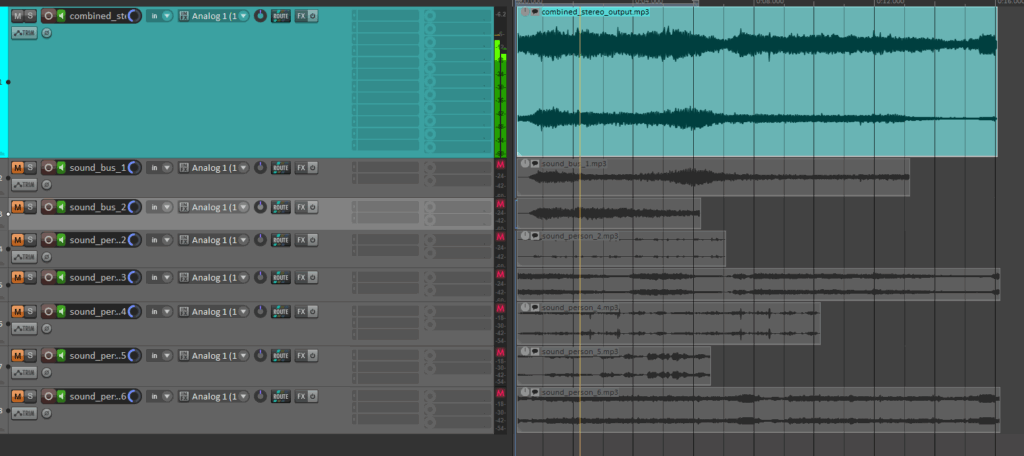
Mixing of the automatically searched audio files into one combined stereo file:

In this latest update, I’ve implemented several new features to create the first layer of an automated sound mixing system for the object recognition tool. The tool now automatically adjusts pan values and applies attenuation to ensure a balanced stereo mix, while seamlessly handling multiple tracks. This helps avoid overload and guarantees smooth audio mixing.

check of the automatically searched and downloaded files + the automatically generated combined audiofile

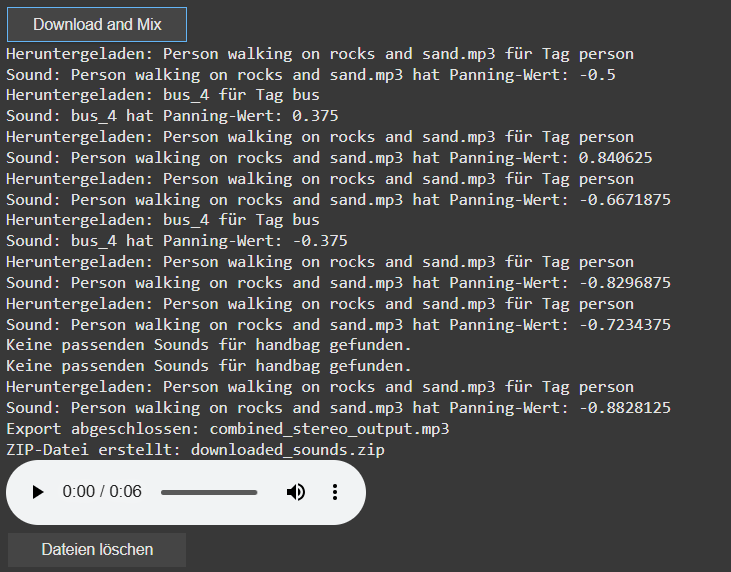
A key new feature is the addition of a sound_pannings array, which holds unique panning values for each sound based on the position of the object’s bounding box within an image. This ensures that each sound associated with a recognized object gets an individualized panning, calculated from its horizontal position within the image, for a more dynamic and immersive experience.

display of the sound panning values [-1 left, 1 right]

I’ve also introduced a system to automatically download sound files directly into Google Colab’s file system. This eliminates the need for managing local folders. Users can now easily preview audio within the notebook, which adds interactivity and helps visualize the results instantly.

The sound downloading process has also been revamped. The filters for the search can now be saved via a buttonclick to apply for the search and download for the audiofile. Currently for each tags there are 10 sounds per tag preloaded, with each sound randomly selected to avoid duplication but ensure the use of multiple times of the same tag. A sound is only downloaded if it hasn’t been used before. If all sound options for a tag are exhausted, no sound will be downloaded for that tag.

Additionally, I’ve added the ability to create a ZIP file that includes all the downloaded sounds as well as the final mixed audio output. This makes it easy to download and share the files. To keep things organized, I’ve also introduced a delete button that removes all downloaded files once they are no longer needed. The interface now includes buttons for controlling the download, file cleanup, and audio playback, simplifying the process for users.

Looking ahead, I plan to continue refining the system by working on better mixing techniques, focusing on aspects like spectrum, frequency, and the overall importance of the sounds. Future updates will also look at integrating volume control and more far in the future an LLM Model that can check the correctness of the found file title.

Prototyping VI: Image Extender – Image sonification tool for immersive perception of sounds from images and new creation possibilities

New features in the object recognition and test run for images:

Since the initial freesound.org and GeminAI setup, I have added several improvements.
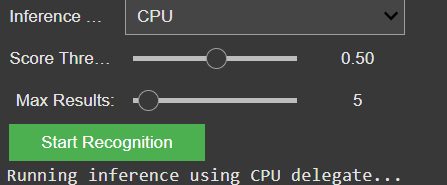
You can now choose between different object recognition models and adjust settings like the number of detected objects and the minimum confidence threshold.

GUI for the settings of the model

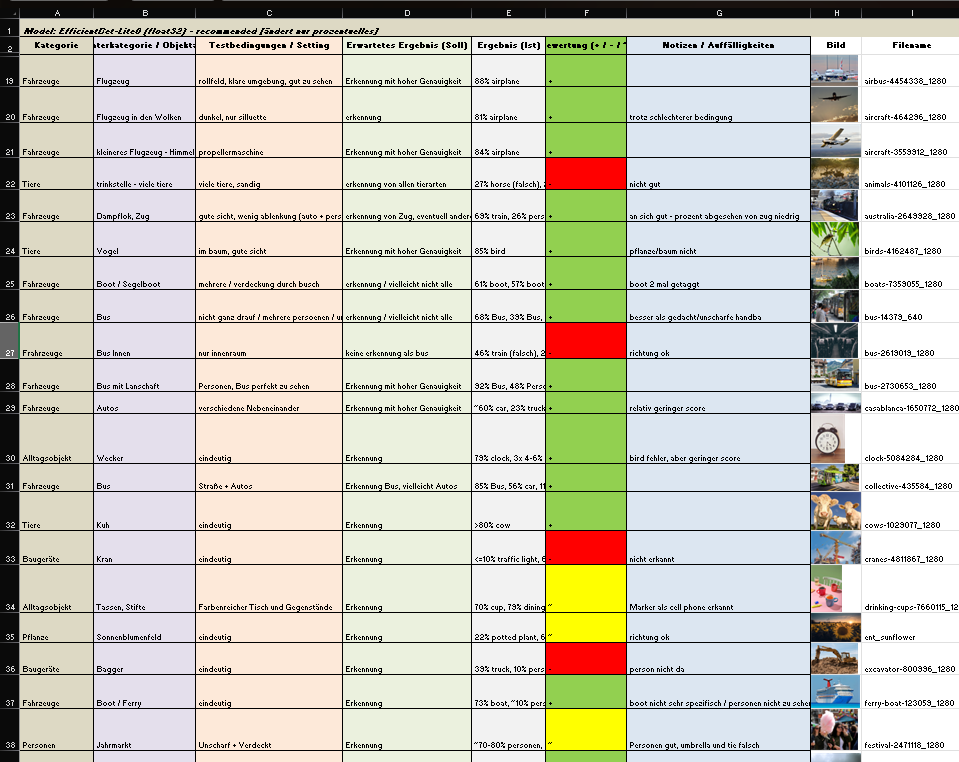
I also created a detailed testing matrix, using a wide range of images to evaluate detection accuracy. Due to that there might be the change of the model later on, because it seems the gemini api only has a very basic pool of tags and is also not a good training in every category.

Test of images for the object recognition

It is still reliable for these basic tags like “bird”, “car”, “tree”, etc. And for these tags it also doesn’t really matter if theres a lot of shadow, you only see half of the object or even if its blurry. But because of the lack of specific tags I will look into models or APIs that offer more fine-grained recognition.

Coming up: I’ll be working on whether to auto-play or download the selected audio files including layering sounds, adjusting volumes, experimenting with EQ and filtering — all to make the playback more natural and immersive. Also, I will think about categorization and moving the tags into a layer system. Beside that I am going to check for other object recognition models, but  I might stick to the gemini api for prototyping a bit more and change the model later.

Prototyping V: Image Extender – Image sonification tool for immersive perception of sounds from images and new creation possibilities

Integration of AI-Object Recognition in the automated audio file search process:

After setting up the initial interface for the freesound.org API and confirming everything works with test tags and basic search filters, the next major milestone is now in motion: AI-based object recognition using the GeminAI API.

The idea is to feed in an image (or a batch of them), let the AI detect what’s in it, and then use those recognized tags to trigger an automated search for corresponding sounds on freesound.org. The integration already loads the detected tags into an array, which is then automatically passed on to the sound search. This allows the system to dynamically react to the content of an image and search for matching audio files — no manual tagging needed anymore.

So far, the detection is working pretty reliably for general categories like “bird”, “car”, “tree”, etc. But I’m looking into models or APIs that offer more fine-grained recognition. For instance, instead of just “bird”, I’d like it to say “sparrow”, “eagle”, or even specific songbird species if possible. This would make the whole sound mapping feel much more tailored and immersive.

A list of test images will be prepared, but there’s already a testing matrix for different objects, situations, scenery and technical differences

On the freesound side, I’ve got the basic query parameters set up: tag search, sample rate, file type, license, and duration filters. There’s room to expand this with additional parameters like rating, bit depth, and maybe even a random selection toggle to avoid repetition when the same tag comes up multiple times.

Coming up: I’ll be working on whether to auto-play or download the selected audio files, and starting to test how the AI-generated tags influence the mood and quality of the soundscape. The long-term plan includes layering sounds, adjusting volumes, experimenting with EQ and filtering — all to make the playback more natural and immersive.