12- Finding Structure

I’ve been reflecting a lot since the speed dating session. The feedback was clear: people grasped the purpose of the prototype almost instantly, which was uber-good. I didn’t have to over-explain, and that felt like a win, though I knew it needed more structure. The project was described as having a “careful” personality, which I really appreciated. It aligns perfectly with the tone I’m aiming for: clear, intentional, and respectful of people’s data.

So I took a step back to think more about how the privacy scrubbing tool should actually work as a whole. Since I’m building this as a mobile app or possibly a mobile-first web app, I needed to start mapping out how the experience would feel from the first moment someone opens it. Rather than focusing only on how the home screen looks, I started thinking about how all the different parts of the app connect and what role each one plays.

The idea was to shape a full user journey, not just a set of screens. I wanted the app to feel like it had a clear rhythm, starting on the Home tab where you get a quick view of your privacy status and can run a scan right away. That screen would offer a calm summary, like “We found this much of your data online,” along with a clear suggestion for what to do next. The one-tap scan button would live here too, ready when needed. From there, I thought about how the app should guide the user. Should the tabs always be visible? How do we help users understand where they are and what to do next? How do we balance helpful information with simplicity?
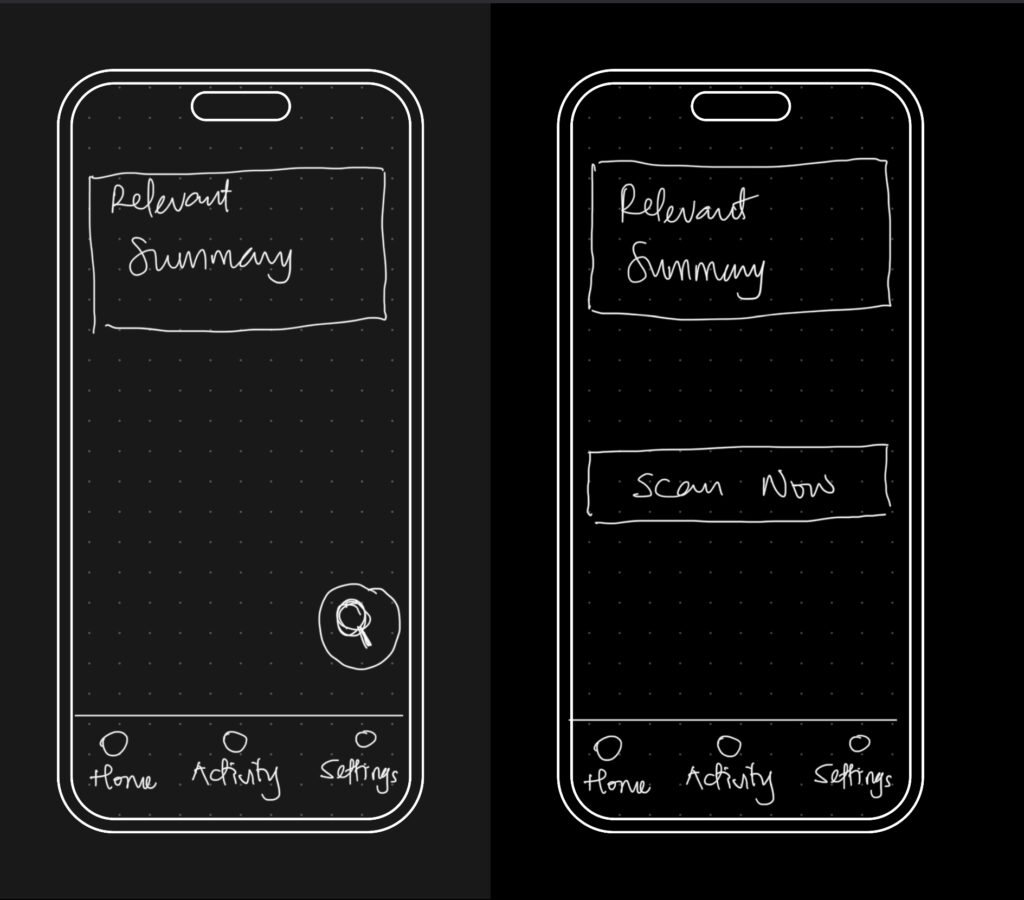
The big realization was that the entire experience could be organized around three core areas: the Home, Activity, and Settings tabs. Each one would represent a different phase of the user’s interaction with the app — starting, reviewing, and customizing. It seems simple now, but this framing helped everything start to click into place.

So I began from scratch, just trying to map out what each section really needed to do.

  • Home would be where everything starts. It’s where the user gets a quick status update and triggers a scan.
  • Activity would give access to deeper insights about past scans and new discoveries.
  • Settings would let the user control everything else, especially what the tool is scanning for in the first place.

This new framing gave me something solid to work with. I was no longer thinking screen by screen or feature by feature. I was thinking system-wide. What kind of flow did I want someone to experience? What should feel immediate? What should feel controllable? What should feel private? I started writing down questions like:

  • What’s the first thing someone wants to know when they open a tool like this?
  • What’s the minimum information they need to feel informed, but not overwhelmed?
  • How do I make it feel helpful, but not invasive?

The answers pointed toward simplicity and calm. Not a flashy dashboard. Not a scary privacy alert system. Just a clear, steady interface that makes you feel like someone’s helping you take care of something that’s long overdue.
Blogpost #3 – tangible science

In this post I want to dive deeper into tangible interfaces and embodied interaction especially in terms of learning and understanding new scientific topics and abstract concepts. The goal here is to gain a better understanding of how and why [inter]active engagement is beneficial in learning and understanding and how this is important in interaction design.

Two key theories I have discovered and make a good base for a project like this are constructivist learning and kinesthetic learning.
In constructivist learning the teacher isn’t the main focus and learning is centered around building new knowledge on past experience and previous learnings. Its important that students actively participate and go through a meaningful process of learning („meaning-making”, rather that learning by heart from a textbook): „The central tenet of constructivism is that human learning is constructed and that learners construct new knowledge on the basis of prior learning“. This active participation with the environment and the experience means that the learners stay engaged all throughout, constantly applying knowledge, having to think critically and adapt and modify their knowledge. [1]
What this active engagement can mean is seen in kinetic learning, where sensory-motor elements have been researched in relation to education and learning. What was found is that learning, retention, application, engagement and focus can be enhanced by such approaches: „By engaging in experiential, hands-on activities, learners are encouraged to explore, experiment, and adapt to the demands of the learning environment.“ There are different concepts and approaches which kinesthetic learning uses. These could be interesting base concepts for future interaction projects, or at least starting points for prototypes:


Hands-On Experiments and Labs
Role-Playing and Simulation
Manipulatives and Tactile Learning Tools
Field Trips and Outdoor Learning
Project-Based and Problem-Based Learning (PBL)
Movement and Active Breaks

Kinesthetic learning can be applied to many different topics and subjects reaching from STEM to languages or arts and music. A nice example of the hands on approach is employing these methods in abstract subjects like math. Numbers, values and metrics can be made a lot more tangible and applicable to real world scenarios in hands on experiments with physical representations. I feel like the value of new learning approaches really becomes very clear here, as math is a very stigmatized (often hated) subject, yet it’s mostly taught in only one (very theoretical) way [2]. A nice example for grasping values more easily was a case study where the carbon footprint of certain foods was actually represented in their weight (Each model’s weight mirrors its carbon footprint, from 50 grams for half a kilo of potatoes to 13 kilograms for half a kilo of beef) [3].


Like I already said, the implications for interaction design are great and learning concepts like these are not only a great foundation for projects but are also becoming increasingly more relevant. There are many interesting sources to be found, especially from psychological research standpoint. It will be interesting to see how these findings can be turned into actual learning concepts and products.


[1] Constructivist learning
Chand, Satish Prakash. “Constructivism in education: Exploring the contributions of Piaget, Vygotsky, and Bruner.” Children 10 (1995).

[2] Kinesthetic Learning
Oladele, Oluwaseyi. “Kinesthetic Learning: Hands-On Learning and Active Engagement.” ResearchGate, 2024. https://www.researchgate.net/publication/385619069_Kinesthetic_Learning_Hands-On_Learning_and_Active_Engagement.

[3] Case Study
Wong, Chia-Hao, Chen Ling, Yuchen Yang, and Masahiko Inami. “Case Study: Leaf+—Supporting Tangible User Interface Prototyping for Soft Materials.” In Extended Abstracts of the 2024 CHI Conference on Human Factors in Computing Systems, 1–7. New York: ACM, 2024. https://dl.acm.org/doi/abs/10.1145/3623509.3635272.

Blogpost #1 – First prototype and speed-dating

Prototype
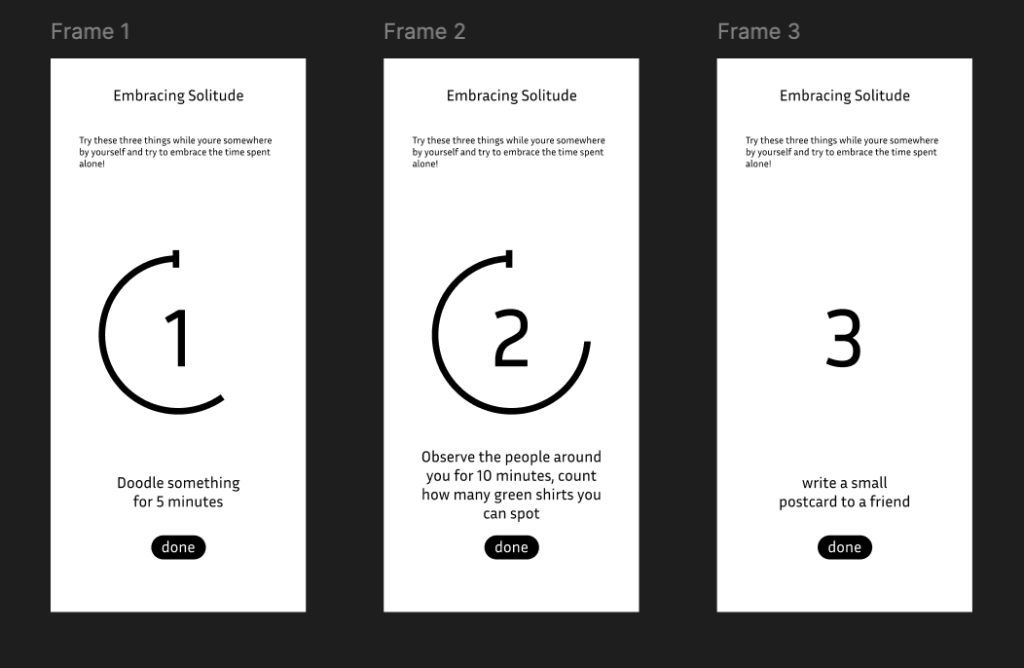
For my first Prototype I picked up my research topic from last semester, where I looked into loneliness from different angles and standpoints. The central question I’ve been researching, was wether interaction design can help combat feelings of loneliness. I added the factor of interaction in public spaces as a research component, because loneliness itself is already such a big and complex topic. What I looked into during my research were installations, interactions with strangers and oneself, building communities and finding out what creates a feeling of community. For my prototype I wanted to try out a slightly different angle, where I was not primarily trying to fix the loneliness part by eliminating it through interaction with several people or creating a community, but rather focus on getting familiar or even comfortable with the feeling itself. The approach was to take away the stigma and fear around being alone somewhere and associating this with negative emotions, but rather reframing it and embracing solitude. The very basic goal here was to find out wether it could be beneficial being mindful and present in a situation and understand that being alone isn’t a bad thing and doesn’t equate to being lonely.

I chose the form of an App as a quick and easy first approach. This wouldn’t be a medium I would want to use for an actual project, since I believe we should shift our focus away from phones and screens ESPECIALLY when it comes to mindfulness and getting more in touch with our selves and other people. However, for the sake of the prototype this medium was fine for now. It’s a simple set of three screens that invite a person to sit with their solitude and focus on different things like their surroundings and their thoughts, instead of overthinking their aloneness (in a public space). The prototype serves as a reminder of how you spend your time alone and maybe even appreciate it.
The people I talked to during the „speed-dating“ process understood my topic pretty well and were able to see where I was going with this. I think it would have needed a bit more quiet time to fully test wether this concept works, but the approach itself was accepted pretty nicely.

Interview
Another thing that confirmed this and validated the approach was my interview with a classmate that I conducted for an exercise. When I asked her about loneliness, she said that she often feels most alone not necessarily when she’s by herself in public, but when she doesn’t feel understood, for example in a past relationship. She admitted that she doesn’t enjoy being out alone and prefers to share experiences with someone else. What was really helpful to hear for me in the context of this prototype was her comment on what helps her feel less alone: “Wenn viele Menschen im selben Raum sind, fühlt man sich automatisch weniger alleine. Das Teilen des Alleinseins kann verbinden.” She described a feeling of shared solitude (not needing to talk, but not feeling invisible either). Another thing she mentioned was also very interesting because this was the approach I had for a second prototype I considered. For this one I had made small cards with conversation starter topics for public spaces. This later aligned with something I talked about with my interview classmate, because she said that in order for her to actually start an interaction with a strange in a public space the context needed to be right. She described needing somewhat of an „invitation“ or in this case maybe just a conversation-starter-promt to initiate an interaction.

Reflection
Especially with social media, constant online connectedness and availability we’re not used to being alone anymore. While the loneliness epidemic is very real (!), maybe sometimes we’re not as lonely as we think we are, we’ve just developed a warped sense of the feeling. Starting to understand that our own company is also worth something can be an important step to a less lonely society.

This prototype helped me shift my own thinking. It showed me that I don’t have to solve loneliness by pushing people toward social connection. Sometimes, it can support connection with oneself by creating small spaces of reflection, comfort, or acceptance. I’m still not sure whether this is the direction I want to continue in, and I’ve since decided to pivot my topic. But this early experiment still valuable and insightful.

#13 Combining Elevation, Floods, and Touch

After experimenting with spaghetti mountains and 1:10,000 land-consumption patches, I’ve found myself drawn toward a new direction – one that combines topography, climate data, and tactile experience into a single, tangible system. This post is about bringing those earlier experiments together under a more urgent, nationally relevant theme: flood risk in Austria.


Where I’m Coming From

So far, my prototypes have had one foot in playful material exploration and the other in physical data storytelling:

  • The Spaghetti Schlossberg turned abstract elevation data into a tactile mountain – wobbly and imperfect, but rich with potential.
  • The Land Use Patch made daily land consumption physically touchable, swapping colors for textures to communicate proportion, pressure, and permanence.

While they felt like separate ideas at first, both were really about the same thing: using touch to interpret spatial data in a more embodied way.


A Shift in Focus: Austria, Climate, and Tactile Maps

After researching climate impacts in Austria, especially the floods in 2024 in Vienna and Lower Austria, I began asking a new question:

What would it feel like to touch the places most vulnerable to climate risk?

This led me to the idea of creating a tactile flood risk map of Austria, combining elevation and flood zones into one cohesive, touchable landscape. The concept builds directly on what I’ve done so far: layering materials, mapping by hand, and treating texture as information.


Inspiration: Harrison Cole and Tactile Environmental Mapping

A major turning point came when I watched Harrison Cole’s video on tactile maps. His research for his phd shows how important carefully designed tactile maps are and how they can communicate both geographic and thematic information – not just where things are, but how they relate, change, and affect us.

Especially relevant were:

These examples helped me see that tactile design isn’t just about accessibility, but also about expanding the way everyone can perceive environmental risk – with their hands, not just their eyes.


What I’m Building Next

For my next prototype, I’m sketching out a physical map of Austria that shows both elevation and flood-prone areas. Here’s the plan:

  • Stacked cardboard or foam to build elevation in simplified contour layers.
  • Flood zones represented using sponge, felt, or soft rubber – anything that feels “wet” or absorbent.
  • Possibly include overlays from my land-use prototype (gravel, concrete, grass) to link impermeable surfaces to higher flood risk.

By combining these, I hope to answer:

  • Can we physically feel the risk tied to elevation and development?
  • How does texture communicate urgency or vulnerability better than visuals alone?
  • Could this be used in climate education or planning contexts?

Why Flood Risk?

Austria isn’t immune to climate impacts. The floods in Vienna and along the Danube aren’t isolated events. They’re part of a broader pattern of intensifying risks tied to both urban development and changing weather patterns.

A tactile map could:

  • Make climate data more accessible to visually impaired users.
  • Create a more memorable experience for general users.
  • Encourage reflection and conversation around geography, infrastructure, and preparedness.

Final Thoughts

What began as two strange lo-fi experiments have merged into something more purposeful. This third prototype will be a test of that synthesis: Can elevation, land use, and flood vulnerability live on the same board? Can they tell a story not just visually, but viscerally?


References & Links

13. Intelligent Decay in Visual and Sonic Environments

We live in a world of infinite loops. Screensavers cycle endlessly. Playlists repeat. But humans aren’t like that, we age, we erode, we carry the marks of memory and emotion. What if our interactive systems did the same?
This is what Intelligent Decay is. A design principle where sound and visuals change over time, not randomly, but in response to emotional intensity, frequency of use, or even neglect.

Visual and Sonic Systems That Learn to Forget

Traditional installations loop. They restart fresh each morning. But in an intelligent-decay system a color palette may fade with overexposure, an image blurs or pixelate based on emotional tension in the space. Textures could disintegrate, mimicking time or even emotional burnout.
The system could “remember” every touch, every sound, every moment of silence. And it reflects that back through both sight and sound.

Biophilia Meets Digital Erosion

The concept finds deep resonance in biophilia the concept we introduced in the previous post. Natural systems evolve, they grow, decay, and change with the seasons. There are no perfect loops in the forest. So in my installation, visual and auditory decay could mirror this. A space that becomes a kind of living organism, responding to presence, absence, intensity, and stillness.

When Art Remembers You

Most digital works track physical time, but few track emotional or cognitive load. What if this interaction wore down the system? If you rush, the visuals become frantic. If you overuse it, parts may “burn out,” leaving visual scars or silent zones and so on.
This makes the piece personal, temporal, and irreproducible so that no one else experiences the exact same artwork.

Emotion-Responsive Decay

While some games and artworks use entropy or erosion as aesthetic motifs, few explore intelligent decay as a behavioral mirror especially in public exhibit contexts.This opens a space for a multi-sensory system that ages with the viewer, a feedback loop between emotion, memory, and environment. And probably most of all a poetic take on how we affect the world, visibly and invisibly
By designing with intelligent decay we reconnect technology with something deeply human: the ability to change, to carry meaning over time, and to never be quite the same again.

12. Our Deep Connection to Nature: The Biophilic Power of Sound

Sound moves us, heals us, and shapes how we think and feel. But what if part of its power lies in something even more primal, our connection to the natural world?

Here lies an intersection of sound, neuroscience, and biophilia our innate tendency to seek harmony with nature.

Music as a Cognitive Enhancer

Let’s start with what we already know: ssound activates multiple areas of the brain. It can help us focus; enhance creativity and Problem-Solving; but also in theprocess of rehabilitation and memory.

Biophilic Soundscapes

Here’s where biophilia enters the conversation.

Coined by biologist E.O. Wilson, biophilia refers to the innate human attraction to nature. We are wired to find comfort in the sound of a forest, the rhythm of waves, or the chirping of birds. Interestingly, music can mimic these elements, creating biophilic soundscapes that soothe the nervous system and enhance mental health. Think of ambient tracks that use rain, wind, or rustling leaves or classical compositions that follow natural cadences or imitate birdsong.
These sounds create a kind of sonic shelter, reconnecting us to environments where we feel most at ease, even when we’re stuck indoors or stressed out.

The Other Side

On the flip side, there’s biophobia, a stress response to environments (or sounds) that feel unnatural, threatening, or chaotic. Harsh alarms, dissonant chords, or industrial noise can trigger anxiety and discomfort. And while some music uses this intentionally it’s important to recognize the psychological impact.

Why This Matters

Understanding music through the lens of biophilic and biophobic systems adds a powerful dimension to how we use it.
Our brains evolved alongside birdsong, rustling trees, and the pulse of the earth. So next time you press play, ask yourself: does this music bring me closer to nature—or push me away from it?

Building the panner: Implementing the Object and Trigger System

After conceptualizing the panner interface as a core feature of my spatial sound toolkit, the next phase of the project shifted into technical territory. This stage involved developing both the XY panner behavior and a trigger system built directly on top of object positions. In this post, I’ll walk through how I translated the idea into code; using MAX/MSP, Max for Live andJavaScript, creating a mix of visual and hidden logic.

Starting with a simple XY Pad

My starting point was a simple XY pad. At first glance, this seemed like a straightforward way to navigate sound across a room and interact with virtual objects. But I quickly found that in its raw form, it lacked the nuance I needed; it was too binary, too linear. There was no sense of proximity, weight, or sonic gravity between the user and the objects.

So I introduced some kind of attractors.

Introducing Attractors

The new implementation allows each object in the panner to become an attractor within a customizable radius. Here’s how it works:

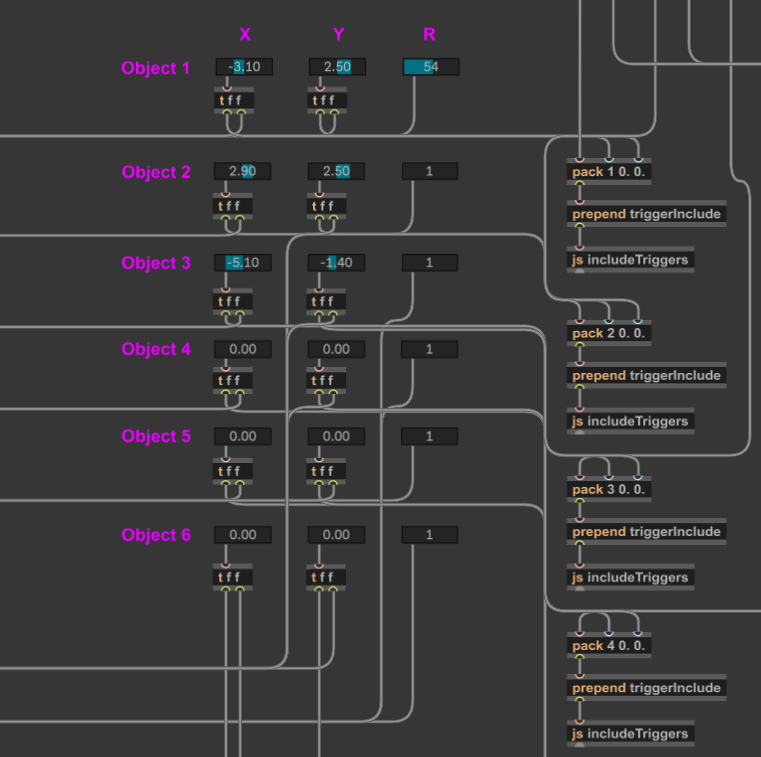
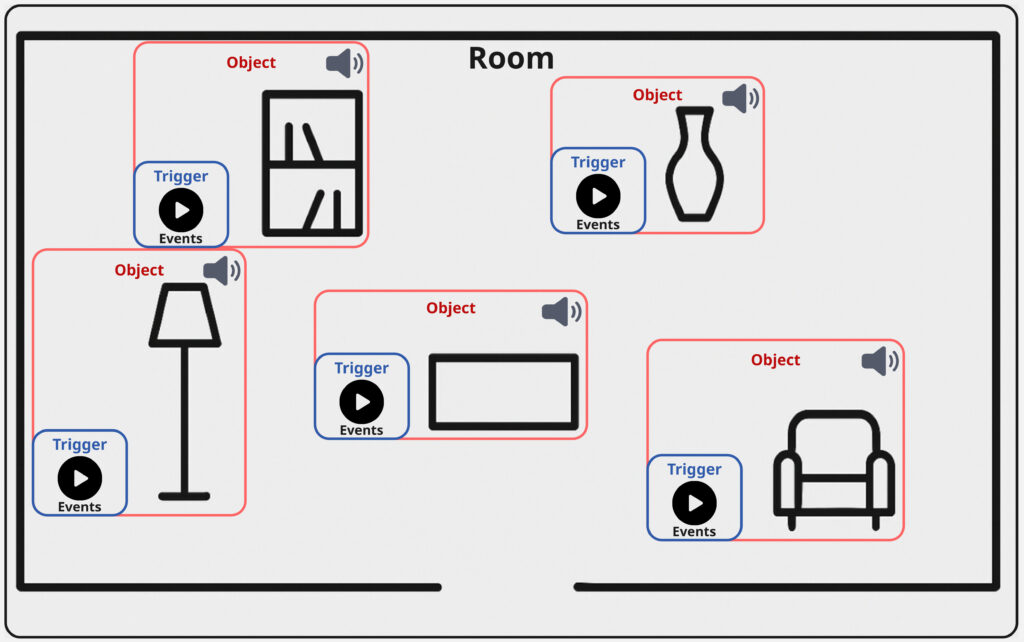
  1. Each object is placed at a fixed position on the grid; The user can set the position within the interface.
  2. A radius value (default: 0.5; range: 0.5–4 [coordinates]) defines how close the user’s XY slider needs to be in order to activate the attractor. This gets checked via a classic condition.
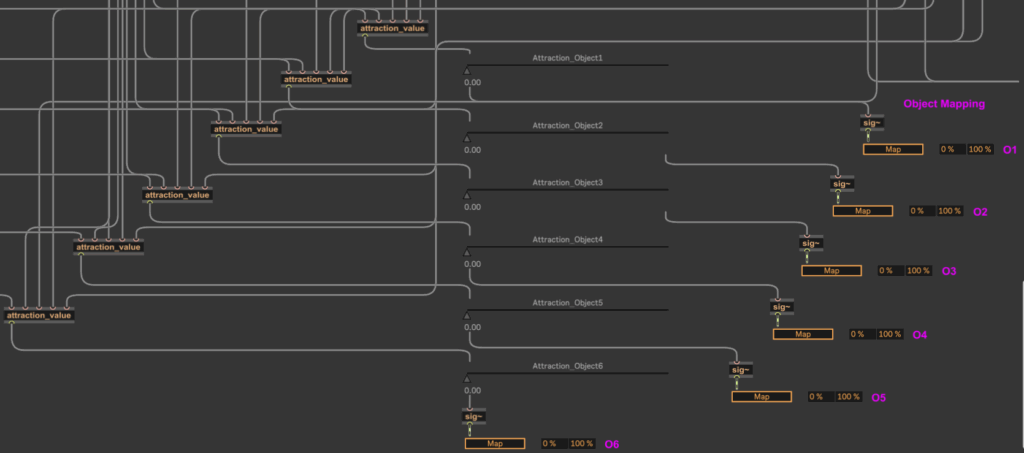
  3. If the user’s XY position falls within that radius, it triggers the attraction_value abstraction;
  4. This abstraction calculates the distance between the user position and the object using the classic formula:
    d = √([x₂ - x₁]²+[y₂ - y₁]²)
  5. This distance is then normalized between 0 and 1 based on the radius and used to control mapping parameters; in this case, faders that modulate each object’s sound layer.

This system gives users a gradient-based interaction model, where getting closer to an object increases its influence, allowing for more natural and exploratory listening behaviors. To give the creators further possibilities to influence the responsiveness, there is an additional smoothing fader, that allows control over how long panning movements need to take action (100-4000ms).

Trigger System

To complement the panner, I also implemented the trigger system that sits directly on top of the mapped objects.

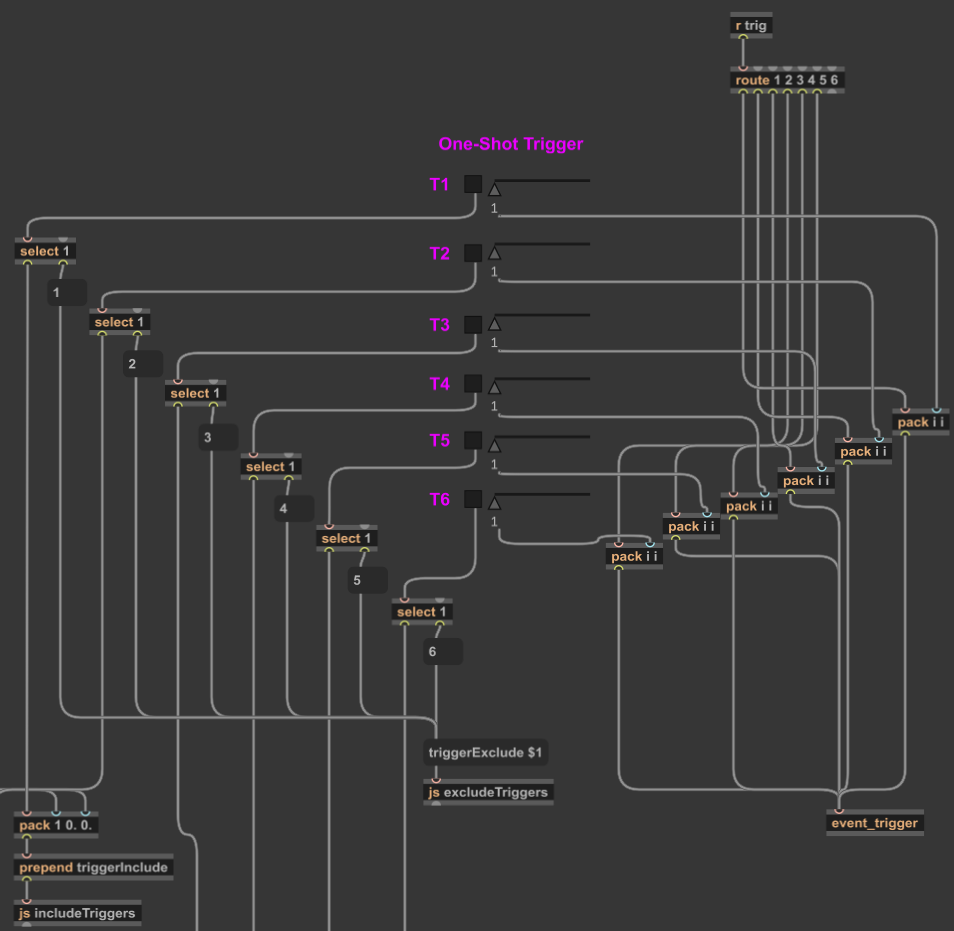
To keep the patch clean and user-friendly, I wrote a custom JavaScript file;
includeTriggers.js

Using JavaScript in Max/MSP provided me with several advantages:

First of all it allows controlled patch editing without the user needing to dive into patch internals.

Further I could implement accurate placement of the trigger buttons in both the patcher and the presentation mode (which further on equals the UI of the Max for Live-Device).

I could also establish invisible connections to the send object that routes interaction to my event_trigger abstraction.

This script is activated via a simple toggle switch in the user interface. When toggled on, it triggers the following actions:

  1. Finds the correct trigger button templates;
  2. Positions them on top of the corresponding object locations;
  3. Connects them invisibly to the back-end.

When toggled off, a sister script, excludeTriggers.js, removes them from presentation mode, disabling interaction safely without deleting anything.

Using the Max for Live API

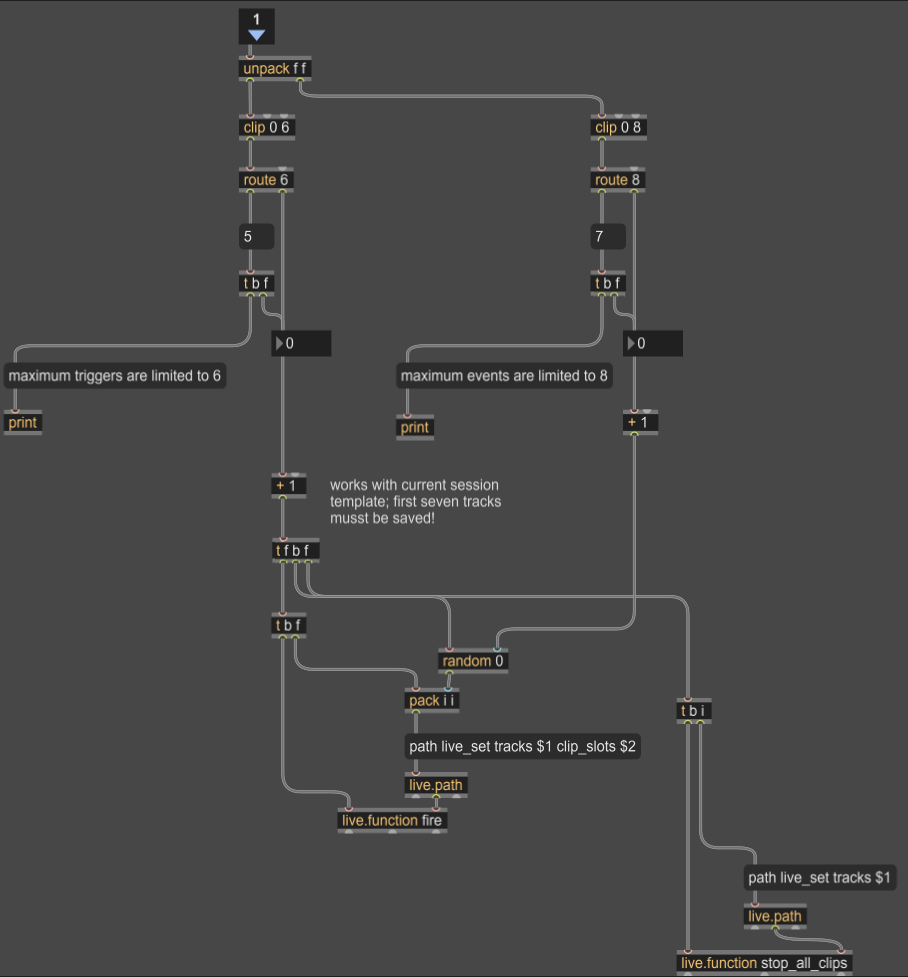
When a user activates one of the visible triggers, the event_trigger abstraction takes action. It uses the Max for Live API to launch a clip from Ableton Live’s Session View; playing a sound event specifically assigned to that object.

Each object can hold multiple events, which are randomly triggered using a round-robin system. As pointed out in the previous blog entry, this ensures variation and prevents repetition.

Learning Through the Implementation

This implementation phase was not only functional but also very much educational. Working with Max for Live’s UI elements and the API gave me a much better understanding of the platform’s architecture.

In particular, experimenting with JavaScript within Max/MSP allowed me to see and manipulate the underlying hierarchy of patch elements; something normally hidden from view. It definitely was a somewhat tedious process, that forced me to rely a lot on trial and error, due to a bad documentation. But this experiments resulted in a handful of reusable scripts like e.g. createTriggers.js and deleteTriggers.js, which I may refine further for future iterations. Same thing counts for working with Max for Live. Even though I might not use every approach I have some patches now, that I can easily adapt for other UIs.

Since I already mention, that it’s quite a new challenge for me to work with the idea of a broader usability in mind, some feedback would be really nice: So if you’re working with spatial sound, Max for Live, or experimental interaction systems and would like to test this prototype or collaborate; feel free to reach out.

Building the Panner: Creating an interface for Sound, Space, and Interaction

After thinking about the concept for my sound toolkit, the next step in my development focused on the implementation of a central feature: the panner interface. This module allows both creators and audiences to explore and interact with sound in space, directly connecting objects within a room to specific sonic materials.

Mapped Space and Sculpted Sound

The basic functionality of the panner is simple in concept but provides an intuitive experience: it lets users navigate a mapped room and “find” interesting objects through their sonic feature. These objects are linked to compositional materials; for instance, looping ambient pads that are distributed over all of the objects. As you move across the interface, you transition between these materials, and with that inherently between the acoustic properties of each object, they begin to transform what you hear.

This movement isn’t just technical; it’s compositional. Further the potential is there, that the listener becomes part of the performance, shaping the sonic outcome through their interaction with the panning-position; references for similar ideas and use-cases can be found in spatial audio, game sound, and interactive installation art.

Introducing Triggers

To deepen the interaction, I added another layer to the interface: object-based triggers. These can be placed on top of objects in the room and are activated through user interaction. Each trigger is connected to a collection of sound events; sonic gestures that may be specific to certain objects.

What makes these events interesting is that they can be tailored to the object’s qualities. A metallic object, for instance, might trigger sharp industrial sounds, while a soft, fabric-covered object could respond with warm filtered tones. But of course the creative potential is broad. So for example the compositional logic could be based also on affordances; a concept introduced by psychologist James J. Gibson.

Affordance refers to the perceived and actual properties of an object that determine how it could be used. In this context, a desk might afford work or stress, and thus be linked to fast-paced or “busy” sounds.
(Source: Gibson, James J. “The Theory of Affordances” The Ecological Approach to Visual Perception. Boston: Houghton Mifflin, 1979)


Triggers play back events using randomized selection, similar to round-robin techniques used in video games. This ensures variation and prevents the experience from becoming predictable or repetitive; especially useful in exhibition settings, where visitors move at their own pace and may stay for different durations. With just six triggers each holding eight events, you already have 48 sonic elements that can be recombined into an evolving aleatoric composition.

Between Creator Tool and Public Interface

Importantly, this panner isn’t only meant for audiences; it’s also built to serve creators as a composition tool. Implemented as a Max for Live plug-in, I further provide an Ableton Live session template that simplifies the setup, which now consists of the following steps:

  • Load a map of the room.
  • Place objects using the provided visual grid.
  • Begin composing within the sessions structure without worrying about the technical backend.

The final panning interface itself can also serve as a user interface for an audience. The most simple solution for this would be the use of Max/MSP’s presentation mode, which of course already works. This dual-purpose design supports both easy prototyping for composers and a potential for more public oriented contexts like e.g. exhibitions, offering flexibility to musicians, designers, and curators alike.

What’s Next: Integration and Testing

The next planned development steps for this specific elemnt of my toolbox include:

  • Adding OSC integration, so creators can use external XY controller apps (e.g., on smartphones or tablets) to interact with the panner in real-time.
  • User testing with other creators, to gain feedback on interface design, usability, and creative workflows.

As someone used to designing tools mainly for my own use, this phase marks an important shift. Building something for others has pushed me to rethink how I structure code, name parameters, and guide the user. This process has also begun to improve my own workflow, making it easier for me to revisit and repurpose tools in the future.

Closing Thoughts

This latest phase of development has brought together many of the themes I’ve been exploring; from spatial sound and interaction to composition, psychology, and usability. The panner is not just a technical feature; it’s a conceptual lens for thinking about how space, sound, and interface design come together to shape musical experience and my workflow as musician.