↬ Technischer Unterschied zwischen analoger und digitaler Fotografie

1. Bildentstehung: Licht trifft auf Film vs. Sensor

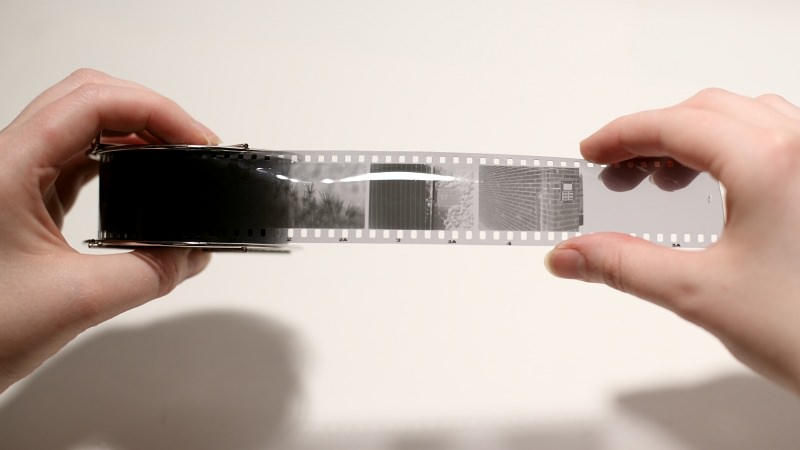
  • Analog: In der analogen Fotografie wird Licht durch die Linse einer Kamera auf einen lichtempfindlichen Film projiziert. Dieser Film enthält eine chemische Emulsion, die auf das einfallende Licht reagiert und ein latentes Bild erzeugt. Erst durch die Entwicklung mit speziellen Chemikalien wird das Bild sichtbar.
  • Digital: Digitale Kameras verwenden einen elektronischen Bildsensor (CMOS oder CCD), der Licht in elektrische Signale umwandelt. Diese Signale werden anschließend durch den Bildprozessor in digitale Daten umgerechnet und als Datei gespeichert.

Relevanz: Der physikalische Kontakt zwischen Licht und Film bei der analogen Fotografie erzeugt eine direkte, materielle Verbindung zur Realität. In der digitalen Fotografie wird dieser direkte Bezug durch die elektronische Verarbeitung aufgebrochen, was die Manipulierbarkeit erhöht.

2. Speicherung und Materialität

  • Analog: Das Bild ist physisch auf dem Film oder Fotopapier gespeichert. Negative oder Dias können archiviert und später erneut vergrößert werden. Die Materialität des Mediums verleiht dem Bild eine Haptik und eine eigene Alterungsdynamik.
  • Digital: Die Daten werden als Datei in Formaten wie JPEG, RAW oder TIFF gespeichert. Die Speicherung erfolgt auf Speicherkarten, Festplatten oder in der Cloud. Digitale Bilder sind theoretisch unbegrenzt reproduzierbar, ohne an Qualität zu verlieren.

Relevanz: Während analoge Fotos durch physische Spuren altern (Vergilbung, Kratzer, Verblassen), bleiben digitale Bilder unverändert, solange die Datei nicht absichtlich bearbeitet wird. Dadurch wird der Effekt der Vergänglichkeit abgeschwächt, was sich auf die emotionale Wirkung eines Bildes auswirkt.

3. Bildqualität und Ästhetik

  • Analog: Die Körnung des Films variiert je nach ISO-Wert und Filmtyp. Analoge Fotos haben oft weichere Übergänge zwischen Farben und Lichtverhältnissen, was zu einem organischen und “lebendigen” Look führt.
  • Digital: Bildsensoren bieten eine hohe Detailtreue und ermöglichen eine flexible Nachbearbeitung. Die Schärfe und Klarheit digitaler Bilder sind oft künstlich verstärkt, wodurch sie technisch perfekt, aber manchmal auch steril wirken.

Relevanz: Die Unvollkommenheiten analoger Bilder – Filmkorn, leichte Unschärfen, Farbstiche – tragen zur Authentizität und Emotionalität bei. Digitale Bilder wirken oft „zu perfekt“ und können eine distanziertere Wahrnehmung erzeugen.

4. Manipulierbarkeit und Authentizität

  • Analog: Veränderungen am Bild sind nur durch chemische Prozesse (z. B. Doppelbelichtungen, Filter bei der Entwicklung) möglich. Jede Aufnahme ist einzigartig und nicht einfach nachträglich veränderbar.
  • Digital: Bilder können sofort bearbeitet, retuschiert oder manipuliert werden. Farbkorrekturen, Retuschen oder sogar komplette Veränderungen der Bildkomposition sind problemlos möglich.

Relevanz : Die Authentizität analoger Fotografie ergibt sich aus der direkten Spur der Realität. Digitale Bilder hingegen sind flexibel, aber genau dadurch auch weniger glaubwürdig, da sie oft stark verändert werden. Dies unterstreicht, warum analoge Fotos eine stärkere emotionale Verbindung zur Vergangenheit schaffen können.

5. Betrachtungsweise: Haptik vs. Bildschirm

  • Analog: Gedruckte Fotos oder Abzüge aus dem Fotolabor sind physische Objekte, die man anfassen kann. Das Durchblättern eines Fotoalbums ist eine bewusste Handlung.
  • Digital: Bilder werden meist auf Bildschirmen betrachtet – auf dem Smartphone, Tablet oder Computer. Sie sind oft Teil eines schnellen Konsums und werden selten in Ruhe betrachtet.

Relevanz: Analoge Fotos laden zur bewussten Reflexion ein und tragen zu einer stärkeren emotionalen Auseinandersetzung mit der Vergangenheit bei. Digitale Bilder hingegen bleiben oft in Archiven verborgen oder werden in sozialen Medien schnell konsumiert und vergessen.

Bücher & Fachliteratur:
Batchen, Geoffrey – Burning with Desire
Barthes, Roland – Die helle Kammer
Sontag, Susan – Über Fotografie
Schrey, Dominik – Analoge Nostalgie in der digitalen Welt
08 Frameworks for control: ISO 9001 and ISO 9241-210

In this blog post I would like to highlight two ISO (International Organization for Standardization) norms that could create a framework for ensuring the quality and usability of eHealth applications. Quality control is not just a regulatory requirement; it is crucial for enhancing user satisfaction and achieving positive health outcomes. By examining the principles outlined in ISO 9241-210 and ISO 9001, I will explore how these standards can help create applications that are not only functional but also user-friendly and effective.

ISO 9001

ISO 9001 is an international standard that specifies requirements for a quality management system (QMS). It is part of the ISO 9000 family of standards, which focus on various aspects of quality management. Here are some key points about ISO 9001:

  1. Quality Management System (QMS): ISO 9001 provides a framework for organizations to establish a QMS that ensures consistent quality in products and services.
  2. Customer Focus: One of the main principles of ISO 9001 is a strong focus on customer satisfaction. Organizations are encouraged to understand customer needs and strive to meet or exceed those expectations.
  3. Process Approach: The standard emphasizes the importance of managing interrelated processes to achieve desired outcomes efficiently. Organizations are encouraged to identify, manage, and improve their processes.
  4. Continuous Improvement: ISO 9001 promotes a culture of continuous improvement within organizations, encouraging them to regularly evaluate and enhance their practices to increase efficiency and effectiveness.
  5. Evidence-Based Decision Making: The standard encourages organizations to rely on data and analysis to support decision-making processes, ensuring that actions are based on objective evidence.
  6. Risk Management: ISO 9001 incorporates a risk-based thinking approach, helping organizations identify and address potential risks that could affect the quality of products and services.
  7. Certification: Organizations can seek certification to ISO 9001 through accredited certification bodies. Having this certification demonstrates a commitment to quality management and can enhance credibility with customers and stakeholders.

ISO 9001 is applicable to organizations of all sizes and sectors, making it a widely recognized standard for quality management worldwide.

ISO 9241-210

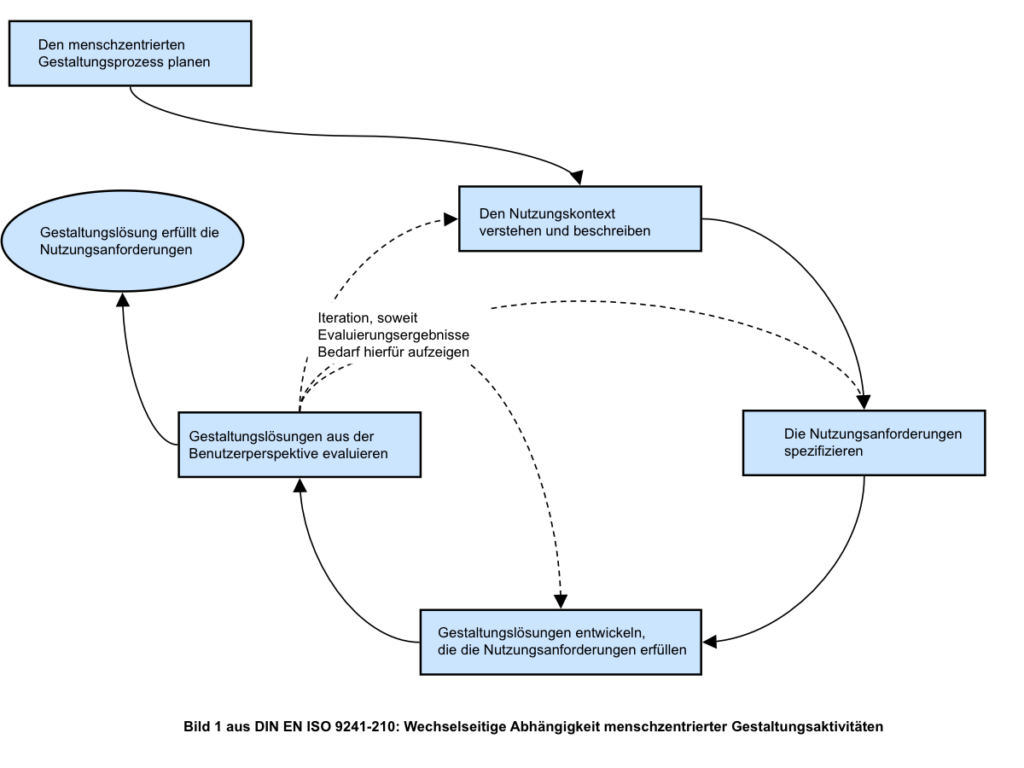
ISO 9241-210, titled “Ergonomics of human-system interaction — Part 210: Human-centered design for interactive systems,” is an international standard that provides guidelines for human-centered design (HCD) processes for interactive systems. This standard is part of the broader ISO 9241 series, which focuses on ergonomics and usability in human-system interactions. Here are some key aspects of ISO 9241-210:

  1. Human-Centered Design Principles: ISO 9241-210 emphasizes the importance of placing the user at the center of the design process. It aims to ensure that the needs, preferences, and limitations of users are considered throughout the development lifecycle.
  2. Design Process: The standard outlines a structured design process consisting of several essential activities:
    • Understanding and specifying the context of use: Identifying users, their tasks, and the environments in which the system will be used.
    • Specifying user and organizational requirements: Gathering and documenting user needs and preferences to inform the design.
    • Producing design solutions: Creating designs and prototypes that address the identified requirements.
    • Evaluating design solutions: Testing and assessing the usability of the design with real users to gather feedback and make improvements.
  3. Iterative Approach: ISO 9241-210 promotes an iterative design process, where designs are continuously refined based on user feedback and evaluation results. This helps ensure that the final product effectively meets user needs.
  4. User Involvement: The standard encourages active user involvement throughout the design process. Engaging users helps designers understand their experiences and preferences, leading to more effective design solutions.
  5. Multidisciplinary Collaboration: ISO 9241-210 acknowledges that successful human-centered design often requires collaboration among various stakeholders, including designers, developers, users, and subject matter experts.
  6. Documentation and Communication: The standard emphasizes the importance of documenting the design process, decisions made, and user feedback. Clear communication among team members and stakeholders is essential for successful design outcomes.
  7. Applicability: ISO 9241-210 is applicable to a wide range of interactive systems, including software applications, websites, and hardware interfaces, making it relevant for various industries.

In summary, both ISO 9241-210 and ISO 9001 provide valuable frameworks for enhancing the quality of eHealth solutions, but they focus on different aspects of quality assurance. ISO 9241-210 centers on human-centered design principles, emphasizing usability and user experience in interactive systems. In contrast, ISO 9001 is broader in scope, focusing on quality management systems and organizational processes to ensure consistent quality in products and services. By integrating the insights from both standard into developing eHealth solutions it could be ensured that the applications truly serve the needs of their users, ultimately leading to improved health outcomes and greater user satisfaction.

Resources

https://www.iso.org

ISO 9001:2015 Certification Process: Expert Insights.

↬ Nostalgie als kulturelle Antwort auf die Digitalisierung

Dominik Schrey argumentiert, dass Nostalgie in der modernen Medienkultur eng mit der Digitalisierung verbunden ist. Während die digitale Revolution durch Geschwindigkeit, Perfektion und Reproduzierbarkeit geprägt ist, entsteht ein kulturelles Bedürfnis, sich an die analoge Welt zurückzuerinnern – eine Welt, die mit Materialität, Beständigkeit und Unvollkommenheit assoziiert wird. In Schreys Worten wird die analoge Fotografie zum Symbol einer “verlorenen Authentizität”.

  • Kontext zur analogen Fotografie: Analoge Fotos repräsentieren in diesem Sinne mehr als bloße Bilder – sie stehen für eine “greifbare Vergangenheit”. Ihre Haptik, Alterung und die sichtbaren Gebrauchsspuren verstärken das Gefühl von Einzigartigkeit, das digitale Bilder nicht vermitteln können.
  • Digitale Flüchtigkeit vs. Analoge Beständigkeit: Schrey betont, dass digitale Medien durch ihre theoretisch unbegrenzte Reproduzierbarkeit eine gewisse Austauschbarkeit erfahren. Analoge Fotos dagegen, die als physische Objekte existieren, können Alterungsspuren tragen, die sie individuell machen. Dies erzeugt einen starken nostalgischen Reiz.

Aura und Materialität des Analogen

Schrey greift Walter Benjamins Konzept der Aura auf, um die besondere Wirkung analoger Medien zu beschreiben. Diese Aura entsteht durch die Einzigartigkeit und Unwiederholbarkeit eines Objekts, die sich in der analogen Fotografie besonders manifestiert. Schrey hebt hervor, dass digitale Medien diese Aura durch ihre Reproduzierbarkeit und Perfektion einbüßen.

  • Materielle Präsenz: Ein analoges Foto ist nicht nur ein Bild, sondern ein Objekt, das man berühren, aufbewahren und altern sehen kann. Diese Materialität verleiht dem analogen Foto eine emotionale Tiefe, die digitale Fotos nur schwer erreichen.
  • Fehler und Authentizität: Die sichtbaren Fehler in analogen Fotos (z. B. Lichtlecks, Kratzer oder Farbveränderungen) werden nicht als Mängel wahrgenommen, sondern als Zeugnisse der Echtheit und Einzigartigkeit. Diese “Imperfektion” trägt dazu bei, die Aura des Analogen zu bewahren.

Analoge Nostalgie als mediales und ästhetisches Phänomen

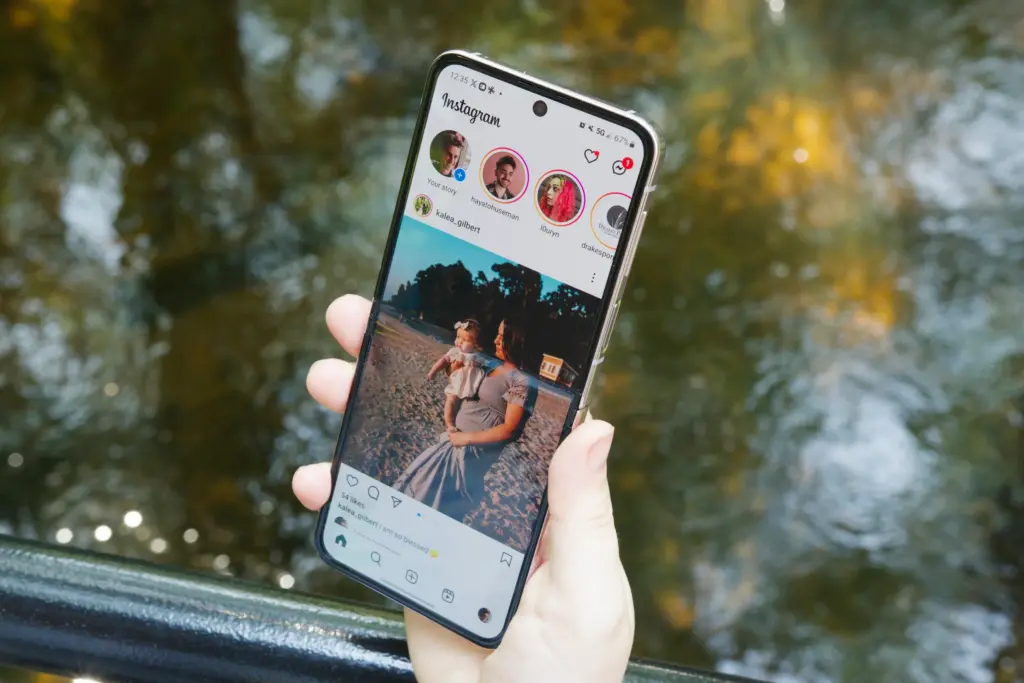
Ein zentraler Punkt bei Schrey ist die Idee, dass analoge Medien wie die Fotografie nicht nur für ihre technischen Eigenschaften geschätzt werden, sondern auch als kulturelle Symbole für eine Zeit, in der Medien noch mit mehr Haptik und “Körperlichkeit” verbunden waren. Dies ist besonders relevant in der Retrowelle, die digitale Filter simulieren, um analoge Ästhetiken nachzuahmen (z. B. Instagram).

  • Simulation und Rückgriff auf das Analoge: Schrey beschreibt, wie digitale Technologien (z. B. Filter in Instagram oder Hipstamatic) versuchen, die Ästhetik der analogen Fotografie nachzuahmen, weil diese als “authentischer” wahrgenommen wird.

Source: Analoge Nostalgie in der Digitalen Medienkultur – Dominik Schrey

07 Best practices

In this post I would like to highlight two examples of best practices in eHealth services,

Bettercare

Bettercare is an eHealth solution that focuses on improving healthcare delivery through digital tools. It aims to enhance communication between patients and healthcare providers, streamline workflows, and facilitate access to healthcare services. It was developed in Slovenia in 2016 and since then has claimed their platform users have 70 % less unnecessary outpatient appointments.

As a low code plattform, Bettercare allows healthcare providers to create and customize applications and workflows with minimal coding expertise, enabling faster development and deployment of digital health solutions. This flexibility helps organizations adapt to changing healthcare needs and integrate various digital tools efficiently.

Bettercare uses openEHR, which is an open standard specification for electronic health record (EHR) systems that emphasizes the management of health information over time. It provides a framework for creating, sharing, and managing health data in a way that is interoperable and vendor-independent. openEHR is based on a two-level modeling approach, separating the information model from the application model. This means that clinical data is stored in a standardized format while allowing flexibility in how it is presented and used by different applications.

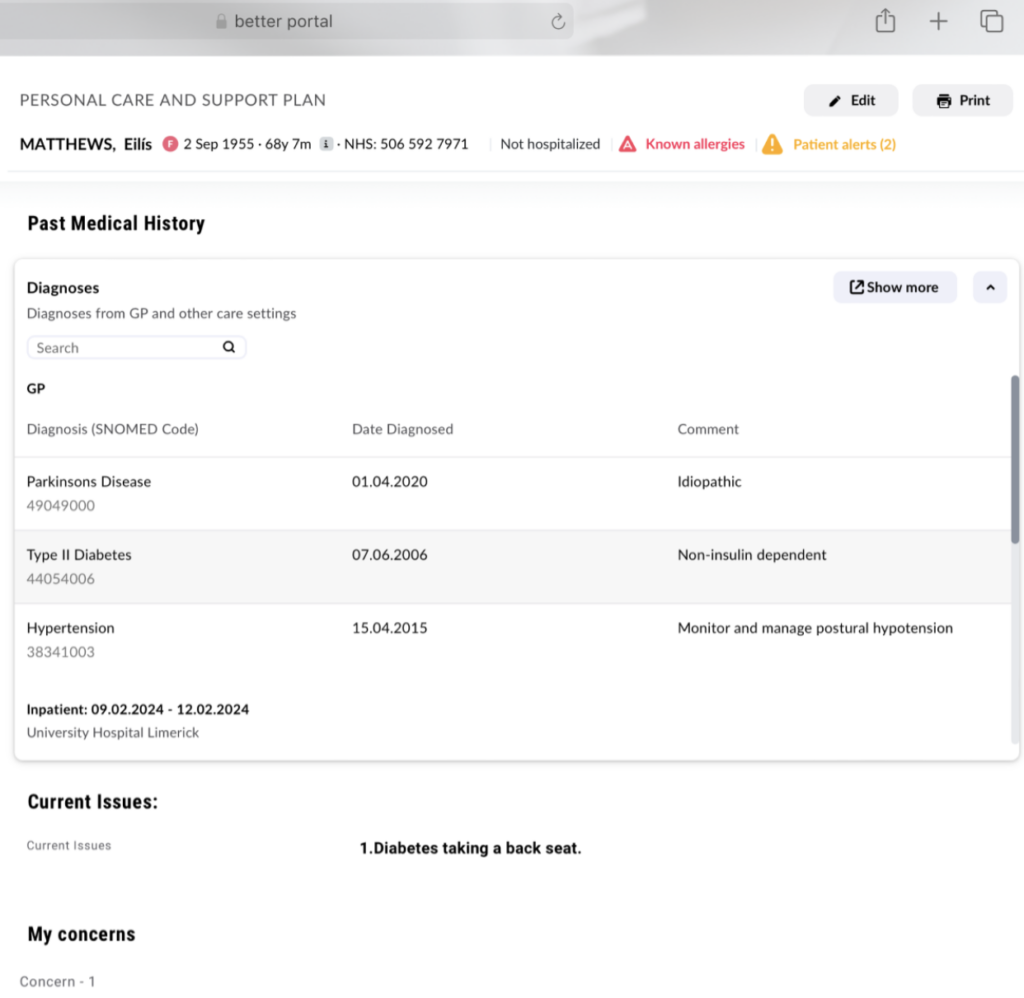
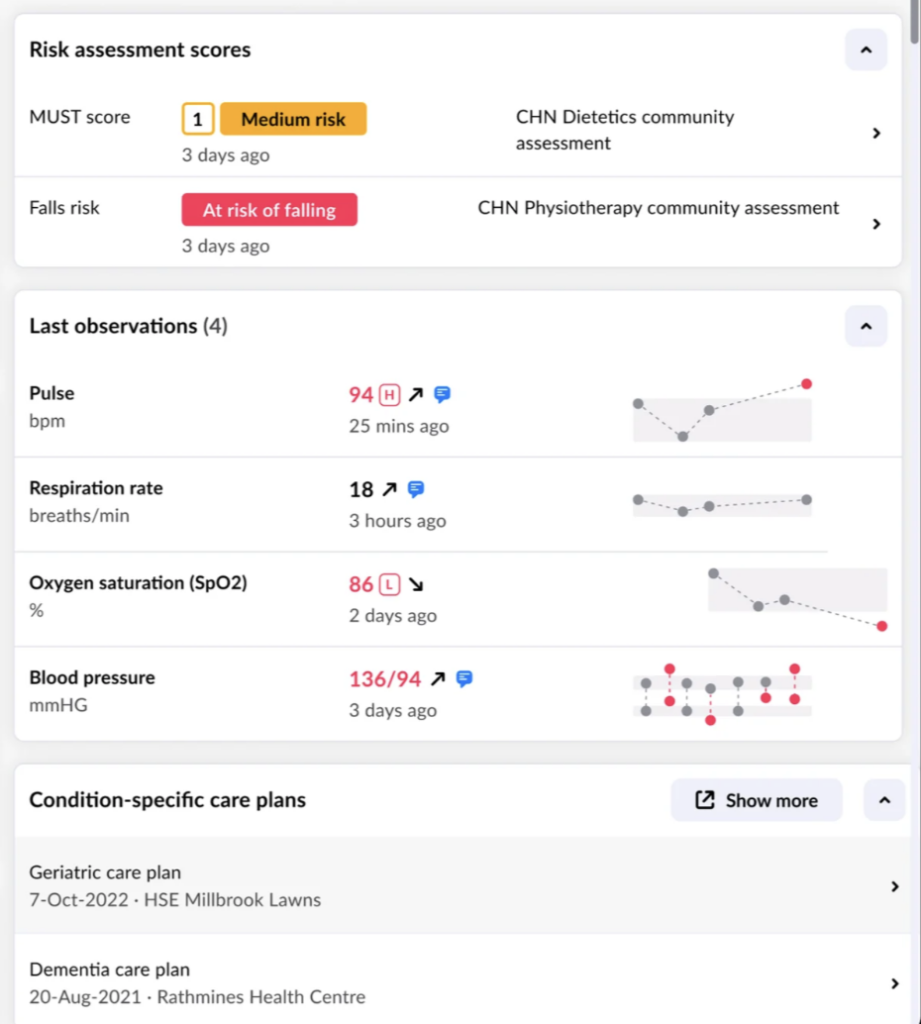
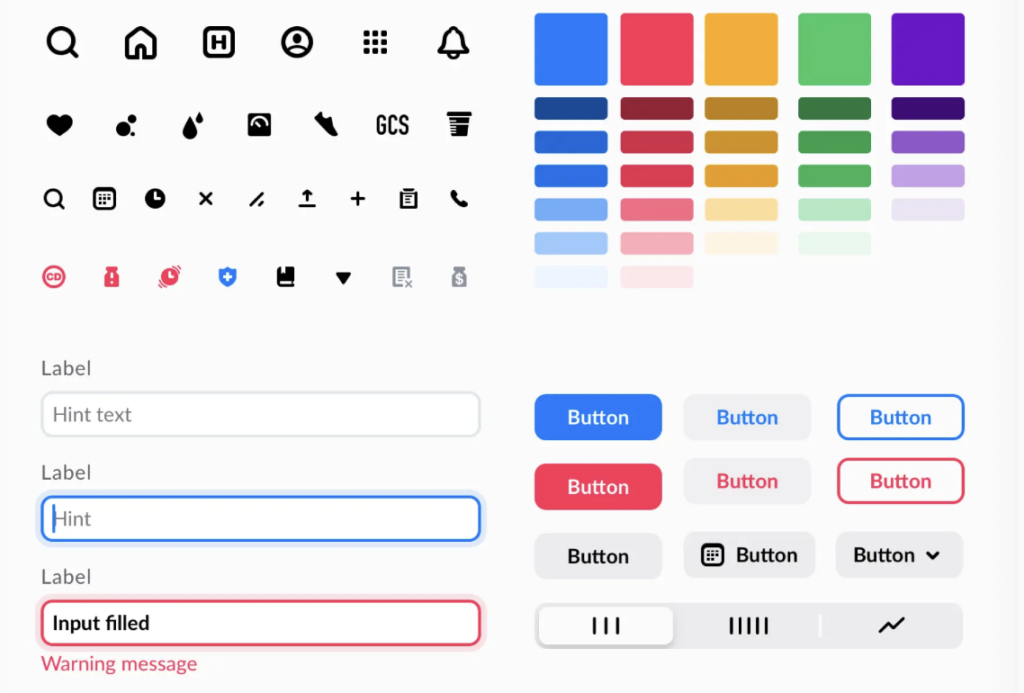
A standardized design system offers users the possibility to create user friendly and consistent healthcare applications without thinking of the UI Design. The screenshots below show some examples from the design system.

Bettercare claims that it is used in 20+ countries and over 1000 healthcare institutions are connected. However, I wasn’t able to find detailed information on which institutions or countries use Bettercare.

e-nabiz

e-Nabız (translates to e-pulse) is a digital health platform developed in Turkey that serves as a personal health management system. It allows individuals to access their health information, manage their medical records, and communicate with healthcare providers.

By providing access to personal health information and facilitating communication with healthcare providers, e-Nabız empowers individuals to take an active role in managing their health.

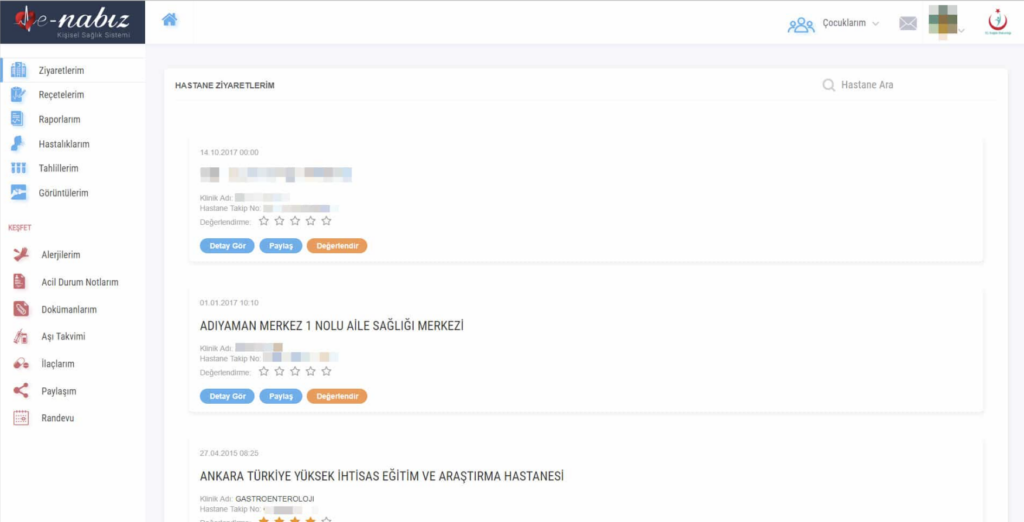
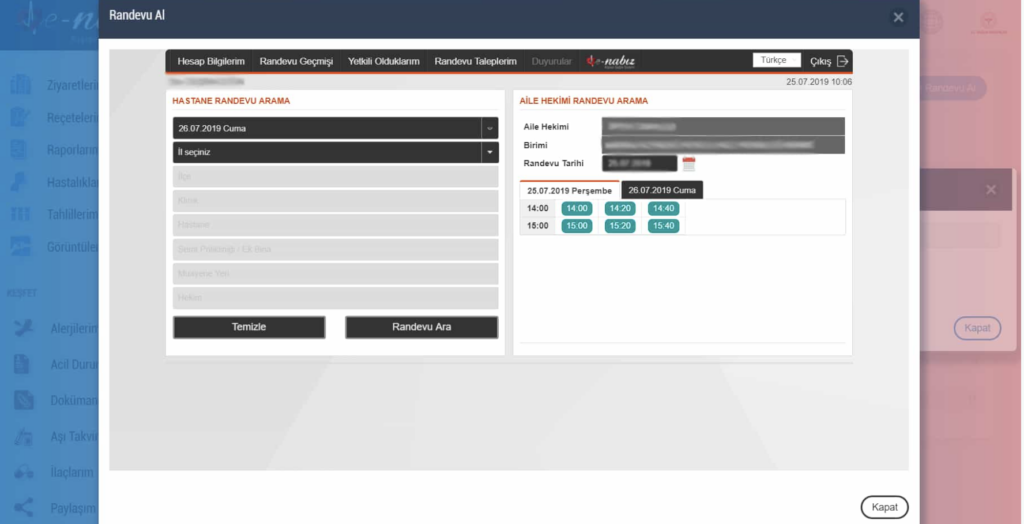
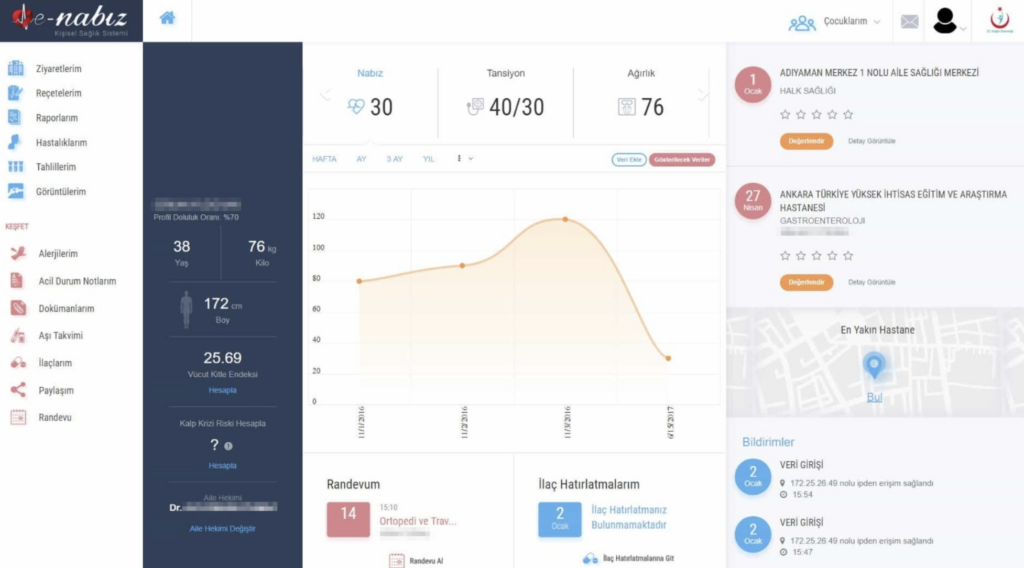
The following screenshots show some of the key features the application offers:

Health Records: Users can view and manage their medical history, including laboratory results, prescriptions, and treatment plans.

Appointment Management: The platform enables users to schedule and manage appointments with healthcare professionals easily.

Telemedicine: e-Nabız supports telehealth services, allowing patients to consult with doctors remotely.

Medication Tracking: Users can keep track of their medications, dosages, and schedules.

Health Monitoring: The platform may integrate with wearable devices or health apps to monitor health metrics and provide insights.

Interoperability: e-Nabız aims to connect with various healthcare institutions, enhancing the accessibility of medical data across different providers.

The platform has won many awards such as the title “Best Health Application” in 2017.

Resources

https://www.dailysabah.com/health/2017/03/23/un-award-for-best-health-app-goes-to-turkey

https://www.better.care/

#10 Feasibility and Market Potential for Selling ABC Learning Cards

The success of selling the ABC learning cards depends on several factors, including market demand, target audience size, pricing strategies, and distribution channels. Below is a detailed analysis of the feasibility of this product and an estimate of its market potential.

1. Target Audience and Market Size

The primary target audience for ABC learning cards includes:

  • Parents of preschool and early elementary school children (ages 2–7).
  • Early childhood educators, including preschool and kindergarten teachers.
  • Childcare centers, daycare facilities, and homeschoolers.
Estimated Market Size:
  • Global Population: Approximately 120 million children are born globally each year. By focusing on children aged 2–7, this creates a potential market of 600–700 million children worldwide.
  • United States (example): In 2023, the U.S. Census reported around 24 million children aged 2–7. Assuming 30–40% of these children’s families actively purchase educational materials, this translates to a potential market of about 7–9 million buyers in the U.S. alone.

2. Potential Demand

  • Increased Focus on Early Childhood Education: The global early childhood education market is projected to grow significantly due to the rising awareness of the importance of foundational literacy skills. By 2030, the market size for early education products is estimated to surpass $100 billion.
  • Preference for Physical and Interactive Learning Materials: Parents and educators are increasingly seeking tactile, hands-on educational tools to complement digital learning, especially post-pandemic, due to concerns about screen time for children.
Surveys and Data:
  • A survey conducted by Statista in 2022 showed that 65% of parents are willing to spend on educational products for their children, averaging $100–$500 per year.
  • Among educators, 80% report regularly purchasing classroom supplies out-of-pocket, including tools like flashcards, books, and educational toys.

3. Projected Number of Buyers

To estimate potential sales:

  • Assume the cards are marketed globally but primarily in regions with high purchasing power, such as North America, Europe, and parts of Asia.
  • Market Penetration Rate: A conservative estimate would be capturing 1–3% of the target market in developed economies.

Example Calculation for the U.S.:

  • Total target audience: 7–9 million families.
  • Estimated buyers: 1–3% of the target audience = 70,000–270,000 buyers.
  • If expanded globally, the potential number of buyers could reach 1–2 million annually.

4. Pricing and Revenue Potential

Pricing Strategy:
  • Retail price per set: $15–$30, depending on the design, quality, and whether additional features (e.g., bilingual versions or digital add-ons) are included.
  • Production cost per set: Estimated at $3–$5 for high-quality materials and packaging.
Revenue Calculation:
  • U.S. example: 100,000 sets sold at $20 each = $2,000,000 in gross revenue.
  • Global potential: 1,000,000 sets sold at $20 each = $20,000,000 in gross revenue.

5. Distribution Channels

  • Online Sales: Amazon, Etsy, and educational websites.
  • Retail Stores: Toy stores, bookstores, and learning centers.
  • Schools and Daycare Centers: Selling directly to schools or through educational distributors.
  • Subscription Services: Partnering with subscription boxes like KiwiCo or Bookroo for recurring revenue streams.

6. Competitor Analysis

There are similar products already in the market, such as flashcards and alphabet books. Key competitors include:

  • Lakeshore Learning: Offers a variety of alphabet and literacy cards priced at $20–$30.
  • Melissa & Doug: Known for high-quality learning toys and flashcards priced at $15–$25.
  • Amazon Marketplace: Numerous alphabet flashcards from different sellers, often priced lower but with variable quality.

#9 Learning Cards with Near-Field Communication (NFC)

The integration of technology into early childhood education offers opportunities to create more interactive, engaging, and personalized learning experiences. Near-Field Communication (NFC) technology, which enables wireless communication between devices over short distances, has significant potential to enhance traditional educational tools.

NFC Technology in Education

NFC is a wireless communication technology that facilitates the exchange of data between an NFC-enabled tag and a compatible device (e.g., a smartphone or tablet). In an educational context, NFC tags embedded within learning cards can provide instant access to supplementary content, such as audio recordings, videos, games, and augmented reality (AR) features. This technology bridges the gap between physical and digital learning, creating a multisensory experience that enhances cognitive processing and memory retention.

Applications of NFC in ABC Learning Cards

1. Interactive Letter Exploration

NFC-enabled cards can transform static letters into interactive experiences. For instance:

  • Tapping a card with the letter “A” could open a video about apples, including fun facts and animations.
  • Audio recordings can teach the phonetic sound of the letter, along with example words (e.g., “A makes the /æ/ sound, as in apple”). This multisensory approach reinforces letter recognition and sound associations, critical components of early literacy.
2. Phonics and Pronunciation Support

By linking to audio guides, NFC cards can support phonics instruction:

  • Children can hear the pronunciation of each letter and example words, building their phonemic awareness.
  • Multilingual support can introduce vocabulary in multiple languages, fostering bilingual or multilingual development.
3. Multisensory Tracing Activities

NFC cards can connect to tracing activities on a digital platform:

  • A child taps the card and is guided through a step-by-step tracing activity on a tablet or screen.
  • Feedback, such as visual corrections or encouraging sounds, reinforces proper letter formation and motor skills.
4. Augmented Reality (AR) Features

Combining NFC with AR capabilities enhances the visual and interactive aspects of learning:

  • A child taps a card with the letter “B,” triggering a 3D animation of a bouncing ball.
  • AR features can also include games, such as matching letters to objects in a virtual environment, which promotes active learning.
5. Gamified Learning

Gamification motivates children to engage with the learning material:

  • NFC-enabled cards can unlock rewards, such as points or badges, when a child completes tasks like identifying letters or tracing them correctly.
  • Collaborative and competitive modes can be introduced, encouraging social interaction and teamwork.
6. Progress Tracking and Personalization

NFC cards can connect to an app that tracks a child’s progress:

  • Data on which letters and activities the child interacts with can help identify strengths and areas for improvement.
  • Personalized recommendations can adjust the difficulty level or suggest additional exercises, ensuring that the learning experience evolves with the child’s needs.

Practical Implementation of NFC in ABC Learning Cards

Design and Functionality
  1. Physical Design: The cards retain their traditional format, with a large, clearly printed letter, an image representing the letter, and the word written below. An embedded NFC tag links to digital content.
  2. Device Compatibility: The NFC tags are designed to be compatible with most smartphones and tablets, ensuring accessibility.
  3. Supplementary App: A companion app provides a centralized platform for accessing interactive content, tracking progress, and managing activities.
Example: The “C” Card
  1. Physical Interaction: The child sees the letter “C,” paired with a colorful image of a cat.
  2. NFC Interaction: Tapping the card opens a short video of a cat meowing, along with an audio recording of the letter sound and word.
  3. Digital Engagement: The child traces the letter “C” on the app, earning a virtual badge upon completion.

Alnfiai, M. (2020). A user-centered design approach to Near Field Communication-based applications for childrenInternational Journal of Advanced Computer Science and Applications, 11(12). https://doi.org/10.14569/IJACSA.2020.0111259

Sánchez, I., Oyarzun, D., Morales, R., & Sas, C. (2011). NFC-based interactive learning environments for children. In Proceedings of the 10th International Conference on Interaction Design and Children (pp. 205–208). ACM. https://doi.org/10.1145/1999030.1999062

Goecke, T. (n.d.). NFC (Near Field Communication) technology in education. SupraTix. Retrieved from https://supratix.com/blog/elearning-starterkit/near-field-communication-in-education/

NFC in smart classrooms: Revolutionizing education technology. (n.d.). QR Lab. Retrieved from https://qrlab.com/blog/post/nfc-in-smart-classrooms-revolutionizing-education-technology

Tap and teach with NFC on the BenQ Board. (2024, October 30). BenQ. Retrieved from https://www.benq.com/en-us/education/edtech-blog/tap-and-teach-with-nfc-on-the-benq-board.html

NFC-based interactive learning environments for children [PDF]. (n.d.). ResearchGate. Retrieved from https://www.researchgate.net/profile/Ivan-Sanchez-Milara/publication/221238516_NFC-based_interactive_learning_environments_for_children/links/54e59de40cf276cec1746ef8/NFC-based_interactive_learning_environments_for_children.pdf

Education industry using NFC RFID. (n.d.). GAO RFID Inc. Retrieved from https://gaorfid.com/education-industry-using-nfc-rfid/

Near Field Communication – Which potentials does NFC bring for teaching and learning materials. (n.d.). ResearchGate. Retrieved from https://www.researchgate.net/publication/258180194_Near_Field_Communication_-_Which_Potentials_Does_NFC_Bring_for_Teaching_and_Learning_Materials

NFC and education: The future of smart classrooms. (n.d.). Yazılım-DA. Retrieved from https://www.yazilimda.com.tr/eng/blog-detail-NFC-and-Education-The-Future-of-Smart-Classrooms.html

How NFC keeps children engaged with books. (n.d.). Avery Dennison. Retrieved from https://rfid.averydennison.com/en/home/news-insights/insights/sports-events-gaming-how-nfc-keeps-children-engaged-with-books.html

#8 Cultural and Linguistic Diversity in Learning Materials

The Importance of Inclusivity in Educational Materials

Children from diverse linguistic and cultural backgrounds benefit from learning materials that reflect their identities and experiences. This is especially significant during early childhood, as young learners are forming their sense of self and developing their worldview. Inclusive educational tools can:

  1. Promote a Sense of Belonging: Representation of children’s cultural and linguistic backgrounds helps them feel included and valued, fostering a positive attitude toward learning.
  2. Enhance Engagement: Materials that reflect children’s lived experiences resonate more with them, improving their focus and motivation.
  3. Support Cognitive Development: Exposure to diverse languages, images, and cultural contexts enriches children’s cognitive flexibility, problem-solving skills, and creativity.
  4. Build Cultural Awareness: Inclusive materials also expose children to cultures other than their own, encouraging empathy and understanding.

Representing Diversity in Learning Cards

Incorporating linguistic and cultural diversity into learning cards requires a thoughtful, multifaceted approach to ensure that the materials are accessible, engaging, and relevant to all children. Key strategies include:

1. Language Representation
  • Bilingual or Multilingual Cards: Each card can include the target letter and corresponding word(s) in multiple languages. For instance:
    • The “A” card could feature “apple” (English), “apfel” (German), or “ají” (Spanish), along with images of objects from each culture.
  • Phonetic Guidance: Including simple phonetic symbols for each word helps children pronounce the words correctly, even if they are learning a second language.
2. Cultural Representation
  • Culturally Relevant Images: Instead of limiting the visual design to objects from a single culture, include items that reflect a broad spectrum of traditions. For example:
    • “B” could feature a “ball” alongside a “biryani pot” or a “boomerang.”
  • Themes and Settings: The imagery and scenarios used on the cards can depict culturally diverse environments, such as festivals, traditional attire, and architecture from different regions.
3. Diverse Names and Characters
  • Incorporating names from various languages and cultures ensures inclusivity. For example:
    • The “L” card could feature “Lila” (English) and “Luis” (Spanish) as examples of names beginning with the letter “L.”
  • Including illustrations of children or characters with diverse appearances (skin tones, clothing, hairstyles) helps children see themselves in the materials.
4. Universal Design
  • Using symbols and images that are universally recognized ensures accessibility across cultures, even when linguistic differences exist.
  • Avoid stereotypes or cultural appropriations to maintain sensitivity and accuracy.

Psychological Learning Principles Supporting Inclusion

Incorporating diversity does not detract from the psychological principles underpinning effective learning; rather, it enriches the learning process. Some ways to align inclusivity with established learning methods include:

  1. Multisensory Learning:
    • By engaging with images, words, and letters that reflect their culture, children form stronger emotional and sensory connections with the material.
    • For instance, a child might better retain the letter “C” when it is paired with “curry,” an object or dish familiar to them, rather than “cat,” which might be less relevant.
  2. Motivation through Relevance:
    • Familiar cultural elements create a sense of relatability, encouraging children to engage with the materials enthusiastically.
    • For example, seeing a picture of a culturally specific festival like Diwali or Lunar New Year on a card can spark curiosity and joy in children who identify with these traditions.
  3. Gradual Exposure to New Cultures:
    • Introducing unfamiliar cultural elements alongside familiar ones helps children gradually expand their understanding of the world while still feeling connected to their own identities.

Practical Applications

The inclusive design of learning cards can take many forms to address the needs of diverse populations effectively. Some examples include:

  1. Localized Versions: Developing region-specific editions of the cards tailored to linguistic and cultural demographics. For instance:
    • A version for North America might feature “E for Eagle,” while one for India might use “E for Elephant.”
  2. Thematic Sets: Creating thematic subsets of cards that explore cultural topics, such as food, festivals, or traditional clothing.
  3. Interactive Activities: Incorporating diversity into games and exercises, such as matching letters to images from different cultures or creating stories that incorporate multilingual words.

Banks, J. A. (2015). Multicultural education: Characteristics and goals. National Education Association. Retrieved from https://www.nea.org/assets/docs/Multicultural-Education.pdf

Cummins, J. (2021). Rethinking bilingual education: The role of language in learning and identity. International Journal of Multilingualism. Retrieved from https://doi.org/10.1080/14790718.2021.1990529

UNESCO. (2009). Policy guidelines on inclusion in education. United Nations Educational, Scientific and Cultural Organization. Retrieved from https://unesdoc.unesco.org/ark:/48223/pf0000177849

UNICEF. (2022). Early childhood education: Building inclusive and equitable learning foundations. UNICEF Reports. Retrieved from https://www.unicef.org/education/early-childhood-education

U.S. Department of Education. (2016). Early literacy: A strong foundation for learning. Retrieved from https://www.ed.gov/sites/default/files/early-literacy.pdf

Neuman, S. B., & Roskos, K. A. (2022). Strategies for teaching culturally diverse classrooms. Reading Rockets. Retrieved from https://www.readingrockets.org/article/strategies-teaching-culturally-diverse-classrooms

National Association for the Education of Young Children (NAEYC). (2021). Principles of effective early literacy instruction. NAEYC Publications. Retrieved from https://www.naeyc.org/resources/topics/early-literacy

Global Partnership for Education. (2022). Inclusive education and its benefits. Retrieved from https://www.globalpartnership.org/results/education-inclusive-equitable

#7 Incorporating Technology in ABC Learning

1. Interactivity and Engagement

  • Dynamic Feedback: Digital tools can provide instant feedback to children as they interact with virtual versions of learning cards. For example, a child could tap a letter on a screen and hear its corresponding sound, reinforcing phonics.
  • Gamified Elements: Features such as earning points, unlocking levels, or receiving badges can motivate children to engage more with the learning material.
  • Adaptive Learning: Apps can analyze a child’s progress and adjust the difficulty or content accordingly, ensuring that the learning experience remains challenging yet achievable.

2. Multisensory Learning

  • Visual and Auditory Integration: While physical cards focus on visual and tactile interaction, digital tools can add sound, animations, and videos to enhance understanding. For example, a card for the letter “B” could show a bouncing ball on the screen and play a sound that starts with the letter.
  • Kinesthetic Interaction: Touchscreen interfaces allow children to trace letters, drag and drop objects, or match words with images, engaging their motor skills alongside cognitive processing.

3. Personalized Learning Paths

  • Digital platforms can track individual progress and tailor content to a child’s unique needs. If a child struggles with certain letters or concepts, the app can provide additional practice or alternative ways to explain the material.
  • Children can revisit specific topics as needed, allowing them to learn at their own pace.

4. Access to a Broader Library

  • Unlike physical cards, which are limited by production constraints, digital platforms can offer an expansive range of content. Children can access additional letters, words, games, and activities with just a few taps.
  • This scalability also enables the inclusion of diverse cultural representations, ensuring that the learning experience feels inclusive and relatable to a wide audience.

Features Digital Tools Can Offer

1. Augmented Reality (AR)

  • Bridge Between Physical and Digital: By scanning a physical card with a smartphone or tablet, children could see 3D animations of the object associated with the letter. For example, scanning a card with the letter “F” might display a flying fish on the screen.
  • Interactive Layers: AR features could include sound effects, pronunciation guides, or fun facts about the object, creating a richer learning experience.

2. Voice Recognition

  • Apps could integrate voice recognition technology to help children practice pronunciation. A child could say the word displayed on the card, and the app could provide feedback on accuracy, helping to develop phonological awareness.

3. Multilingual Options

  • Digital versions of learning cards could support multiple languages, allowing children to learn not just letters and sounds but also translations and pronunciations in other languages. This is especially beneficial in bilingual or multilingual households.

4. Game-Based Learning

  • Challenges and Rewards: Apps could include mini-games where children match letters to objects, solve puzzles, or complete word-building challenges. Rewards like stars or badges keep them motivated.
  • Story-Driven Learning: Some apps could integrate the cards into a larger narrative, where children progress through a story by completing educational tasks.

5. Parent and Educator Dashboards

  • Digital platforms can provide detailed insights into a child’s progress, identifying strengths and areas needing improvement. Parents and teachers could receive recommendations for additional activities or strategies to support learning.

Practical Examples of Integration

1. Physical Cards with QR Codes

  • Each physical card could include a QR code that links to an interactive activity or video. For example, scanning a card with the letter “A” could lead to a short animation about apples or a phonics song featuring the sound.

2. Virtual Flashcards

  • Apps could offer digital replicas of the physical cards, with added features like sound effects, animations, or the ability to trace letters directly on the screen. Children could choose between physical or digital formats depending on their preference or environment.

3. Collaborative Features

  • Digital tools could enable multiplayer modes where children work together to complete challenges. For example, siblings could compete to match letters with objects, fostering teamwork and friendly competition.

Possibilities for Future Development

1. AI-Powered Learning Assistants

  • Integrating artificial intelligence (AI) could allow digital tools to act as virtual tutors, answering children’s questions, providing encouragement, and offering personalized explanations.

2. Virtual and Mixed Reality

  • As technology advances, virtual reality (VR) or mixed reality (MR) could be used to create fully immersive learning environments. Children could “step into” a virtual classroom where they interact with letters and objects in 3D space.

3. Interactive Storybooks

  • Physical cards could be part of a larger interactive storybook experience. For instance, a card with the letter “D” might unlock a story segment about a dog, complete with animations and voice narration.

4. Community and Social Learning

  • Apps could include social features where children share their progress or creations (e.g., words they’ve built) with a safe, moderated community of peers.

Potential Challenges and Considerations

  1. Screen Time Management: Digital tools must be balanced with physical activities to ensure that children don’t spend excessive time on screens.
  2. Accessibility: Apps should be designed to be inclusive for children with disabilities, such as offering audio descriptions, larger text options, or alternative input methods.
  3. Cost and Accessibility: While digital tools can offer immense value, developers must consider affordability and offline access to make these tools available to a broad audience.

Burns, M. (2013, January 15). Test prep with virtual tools: 10 flashcard apps for mobile devices. Edutopia. Retrieved from https://www.edutopia.org/blog/10-flashcard-apps-mobile-devices-monica-burns

Sun, Y., Nambiar, R., & Vidyasagaran, V. (2023). Gamifying math education using object detection. arXiv preprint arXiv:2304.06270. Retrieved from https://arxiv.org/abs/2304.06270

Sabuncuoğlu, A., Yantaç, A. E., & Sezgin, T. M. (2021). Teaching K-12 classrooms data programming: A three-week workshop with online and unplugged activities. arXiv preprint arXiv:2110.05303. Retrieved from https://arxiv.org/abs/2110.05303

Educational technology. (n.d.). In Wikipedia. Retrieved from https://en.wikipedia.org/wiki/Educational_technology

Brainscape: The best flashcards app | Make flashcards online. (n.d.). Brainscape. Retrieved from https://www.brainscape.com/

Flashcards for kids & toddlers 4+. (n.d.). App Store. Retrieved from https://apps.apple.com/us/app/flashcards-for-kids-toddlers/id1605651786

ABC flash cards – sight words. (n.d.). Google Play Store. Retrieved from https://play.google.com/store/apps/details?hl=en_US&id=com.skc.english.learning.flashcards.for.kids

The ultimate guide: 10 digital tools for elementary students. (2024, June 27). ASU Prep Digital. Retrieved from https://www.asuprepglobal.org/news/digital-tools-for-elementary-students/

Vocabulary / ESL flashcards for iPhone, iPad (iOS). (n.d.). Twinkl. Retrieved from https://www.twinkl.com/apps/twinkl-flashcards

Educational apps and tools: Empowering kids in a tech-driven world. (2024, March 15). SimonStapleton.com. Retrieved from https://www.simonstapleton.com/educational-apps-and-tools-empowering-kids-in-a-tech-driven-world/

#6 Design Efficiency of Learning Cards

When it comes to designing learning tools for children, every design choice matters. The colors, fonts, and layouts we use can either support a child’s learning journey or unintentionally hinder their ability to focus and process information. Understanding the role of design in reducing cognitive load is essential for creating effective educational materials—like learning cards that help kids absorb content effortlessly. Let’s dive into what research tells us about optimizing design for young learners.

Why Cognitive Load Matters

Cognitive load refers to the mental effort required to process and understand information. For children, whose brains are still developing, the ability to focus and learn is heavily influenced by how information is presented. Overloading them with unnecessary visual elements, complex fonts, or cluttered layouts can overwhelm their mental capacity, making it harder to absorb new concepts.

Educational materials, such as ABC learning cards, need to minimize distractions and present information in a clear, engaging way. By doing so, children can focus on the core content, like recognizing letters, understanding words, or associating sounds with symbols.

Key Design Elements for Reducing Cognitive Load

1. Fonts: The Foundation of Readability

Fonts are the unsung heroes of effective design. The wrong font can make it difficult for children to recognize letters, while the right one can enhance readability and comprehension.

  • Simple is Best: Sans-serif fonts like Arial, Verdana, or Comic Sans are often recommended for young learners because they are clean and legible. Fonts with excessive flourishes or decorative elements can confuse children who are still mastering letter shapes.
  • Size Matters: Large font sizes (18–24 points) ensure that letters and words are easily visible, even from a distance. Consistency in font size across cards also creates a sense of familiarity.
  • Avoid Overuse of Styles: Bold or italicized text can be used sparingly to emphasize key information, but excessive styling can distract from the primary content.

2. Colors: Balancing Vibrancy and Focus

Colors are one of the first elements that catch a child’s attention. While bright and bold hues are engaging, they need to be used thoughtfully to avoid overstimulation.

  • High Contrast for Visibility: A classic example is black text on a white or pastel background. High-contrast color schemes make content easier to read and understand.
  • Purposeful Color Use: Colors can guide attention:
    • Warm tones (e.g., red, yellow) are great for drawing focus to specific elements.
    • Cool tones (e.g., blue, green) can create a calming effect, helping children concentrate better.
  • Consistency in Color Coding: For example, vowels could always appear in one color (e.g., red) and consonants in another (e.g., blue). This reinforces patterns and aids recognition.

3. Layout: Structure Over Clutter

The layout of a learning card is more than just aesthetics; it dictates how children interact with and process the information presented.

  • Keep It Clean: A minimalist design with plenty of white space ensures that the key elements—letters, images, and words—stand out. Avoid cramming too much information onto a single card.
  • Group Related Information: For example, on a card for the letter “A,” the letter should appear prominently at the top, followed by an image (e.g., apple) and the word “apple” underneath. Grouping these elements reduces the need for visual scanning and makes connections clearer.
  • Maintain Consistency: A predictable layout across all cards helps children focus on learning the content rather than figuring out how to interpret each card’s design.

Full Fabric. (n.d.). How to design visual learning resources for neurodiverse students. Retrieved from https://www.fullfabric.com/articles/how-to-design-visual-learning-resources-for-neurodiverse-students

eSchool News. (2024, January 2). Designing digital learning experiences. Retrieved from https://www.eschoolnews.com/digital-learning/2024/01/02/designing-digital-learning-experiences

Edutopia. (n.d.). Using lessons from visual design to make better materials for students. Retrieved from https://www.edutopia.org/article/using-lessons-visual-design-make-better-materials-students

↬ Storytelling: Die Geschichte hinter dem analogen Foto

Mario Pricken legt großen Wert darauf, dass ein Bild oder eine kreative Arbeit eine starke Geschichte erzählt. Analoge Fotos sind dafür prädestiniert, da sie durch ihre Materialität und ihre Verbindung zur Vergangenheit bereits „Geschichten in sich tragen“.

  • Analoge Fotografie ist nicht nur ein Medium, sondern eine Erzähltechnik, die durch Materialität und Kontext Geschichten transportiert.

2. Emotionale Ansprache durch kreative Gestaltung

  • Emotionen durch analoge Imperfektionen: Pricken würde darauf hinweisen, dass es gerade die authentischen Fehler und die spürbare Menschlichkeit eines analogen Fotos sind, die eine starke emotionale Bindung zum Betrachter schaffen.
  • Strategisches Storytelling: Pricken zeigt auf, dass jede kreative Entscheidung – sei es bei der Bildkomposition oder der Wahl des Mediums – gezielt zur emotionalen Ansprache eingesetzt werden kann. Analoge Fotos könnten so gezielt genutzt werden, um eine nostalgische, authentische oder intime Atmosphäre zu erzeugen.

Mögliche Verbindung:

  • Analoge Fotografie spricht nicht nur durch ihr Motiv, sondern durch ihre ästhetische und materielle Gestaltung – genau das, was Pricken in Bezug auf emotionale Kreativität hervorhebt.

3. Kreativität und Reduktion: Analoge Fotografie als bewusste Einschränkung

Pricken beschreibt in seinen Arbeiten oft, dass Kreativität durch bewusste Einschränkungen gefördert wird. Diese Idee passt perfekt zur analogen Fotografie:

  • Begrenzte Ressourcen: Analoge Fotografie zwingt den Fotografen, bewusste Entscheidungen zu treffen – von der Anzahl der Bilder (z. B. ein Film mit nur 36 Aufnahmen) bis hin zur Bildkomposition. Dies fördert eine kreative Auseinandersetzung mit dem Motiv.
  • Langsamer Prozess: Der analoge Entwicklungsprozess erfordert Geduld und Hingabe. Diese Entschleunigung lässt Fotografen intensiver mit ihrem Werk interagieren, was in der digitalen Welt oft verloren geht.

Source: Buch_Die Aura des Wertvollen – Mario Pricken
Abb.: https://de.wikipedia.org/wiki/Ansel_Adams