It is amazing to me personally that this talk was almost entirely about introducing one of the most underrated coding language in data viz, D3.js, which is a lang that should be a staple in every team that wants to create bespoke charts and design beautiful yet functional dashboards from scratch and proudly enough my master’s thesis main topic is about a SaaS that has a dashboard that was created entirely by the unpopular D3.js.
I was involved in designing all the components needed for the dashboard which is called “Steering” and also in the appropriate research to find out how to develop those components on a web app level which is was done later by a fellow full stack developer.
Author: tarek.marzouki
Design Patterns for Search UX in 2025
One of the main reflections that I took from this talk is the fact that search UX patterns are often overlooked and misused, even in very important websites like governmental
websites or e-commerce web shops you will struggle to find what you’re looking for and the speaker emphasized something that is really important in fixing this issue which is that searching, filtering and sorting should be treated as one UX pattern both on a design and development level.
Also the notion of selective scanning which is a mental behavior that users use intentially and unintentially to scan interfaces for information relevant to them which highlights the importance of using visual hierarchy along with real usability testing to determine the right UI patterns.
Business Management x Customer Experience x Data Visualisation: 1st prototype
In the current digital era, Customer Experience has evolved with multichannel support, chatbots, self-care, and virtual assistants to reduce customer effort, driving the development of Customer Relationship Management tools. However, while significant investments have focused on empowering AI-assisted agents, the role of managers has been largely underserved.
I’m designing a solution to empower the “Augmented Manager”, equipping leaders with advanced tools and analytics to optimize real-time-onsite–remote-team performances and deliver outstanding results in an increasingly complex, tech-driven customer experience ecosystem.
Beside.you is a Software As A Service (SaaS) solution, is developed to simplify decision-making and boost efficiency for managers.
By solving the biggest business challenges, with intuitive functionalities simplifying Steering, Performance management, and resources’ Growth, it is shaping a future whereall business tools work seamlessly together, unlocking unmatched operational excellence for organizations everywhere.
This small demo showcases some parts of the product experience that is offered beginning with Steering on its macro micro levels:
Testing & Iterating using Lean UX: ‘Macro’ Steering Dashboard
As part of my SaaS project, one of the user interfaces that had to be done is the Steering dashboard but it required a lot of back and fourth of feedback, iterations and meetings to finally come to a great enough version in terms of functionality and business but as a product designer and using Lean UX as a methodolgy , at some stage I had to do an iteration test.
Macro and Steering are the fundamentals of what consists this interface, they serve the business internally as much as they serve it externally with clients and prospects.
Macro: refers to the holistic overview of an insights dashboard and its part of the macro-micro dynamic that I’m using as a system thinking for the whole project.
Steering: provides a real-time view of every KPI needed to make better decisions and steer the business towards a better course.
This testing/iteration process shows the first level of a user interface that required little user interview, user feedback and zero iteration but it served as a good foundation and a stepping stone to a later version that will pave the way to the “final” iteration.
The first version was even called ‘Adherence Planning’ which was an innacurate term of what we are trying to achieve and also because it defined only one aspect of the whole dashboard.
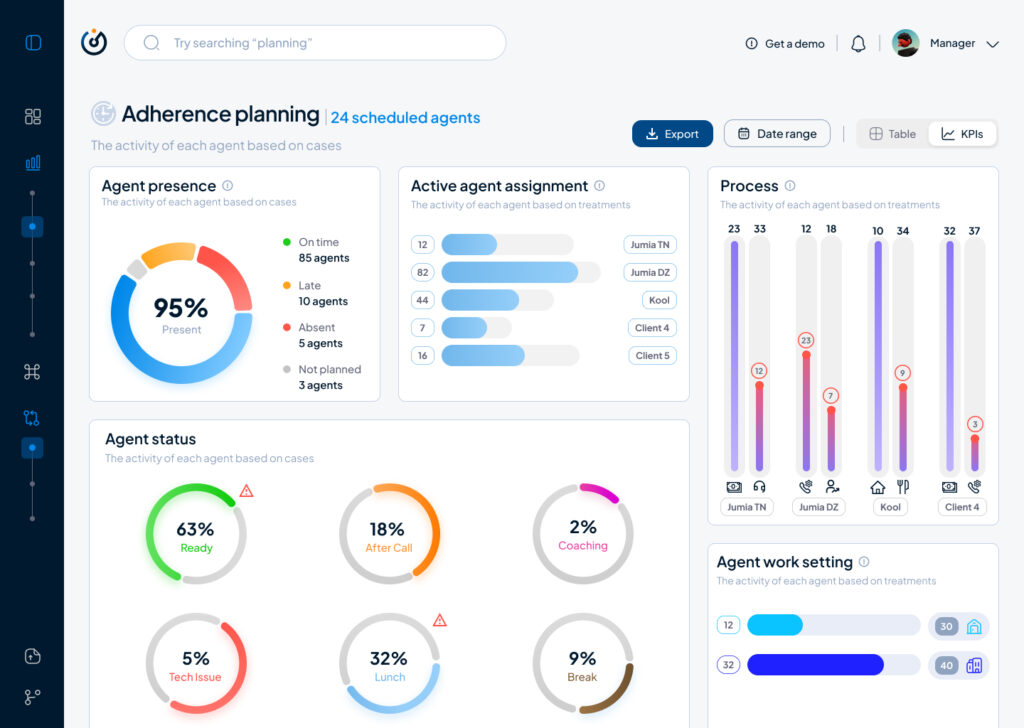
It had the basic insights that we want to show without much output but it was limited, inefficient and not value driven on a business level.
So after much stakeholder’s feedback we iterated that version to a much effective version that visualised the data in a much more functional manner and I did that through designing the work force performance gauge chart, rearranging the cards to suit the data monitoring priority, tweaked the charts and their colors on a UI level for more effective anomaly identification, streamlied the data visualisation with proper alerts identification and finally made the 3 dots ‘kebab’ compartment the drawer where every additional setting is hidden, and here is where I arrived:

The Steering Dashboard is now much more structured and serves the decision making business goal on a decent level, every KPI can be checked and monitored in real time along with checking the business performance in terms of profit and loss through the “Work force performance” gauge.
What I learned
A disruptive data vizualisation product can never be done, but through proper UI UX design, testing, iterating and coming up with the optimal solutions, it can reach a certain level of efficient structure that will propel it to achieve some of the business goals that were far further in the roadmap of the product experience and all of the above can only be done through collaboration and proper communication within a team.
All and all, I’m just getting started and i’m thrilled to work more on the refinement of both my skills and everything that I get involved in
What I learned as the Best Practices For Designing an Intuitive Mobile Dashboard
A mobile dashboard may not offer the full functionality of its desktop counterpart, but it can still provide users with a scannable view of top-line data and statistics to let them make informed decisions. It can also give managers and executives the necessary tooling to quickly approve orders, contracts, and procedure and policy documents.
I drew from experience and other proficient UX Designers some of the best practices and key aspects that designers can use to design better mobile dashboards:
Smooth Navigation
Let’s start with navigation as this is how users will get acquainted with your dashboard and find the information they’re looking for. If the navigation for your mobile dashboard is clumsy or disjointed, or your search bar or navigation menu isn’t well suited to touch-based interactions, you are likely to turn off users.
Visual prioritization is key. Responsive mobile dashboards should communicate information quickly and prioritize it in a clear visual hierarchy. Another dashboard design best practice is using the principle of progressive disclosure to reveal information only when the user needs it.
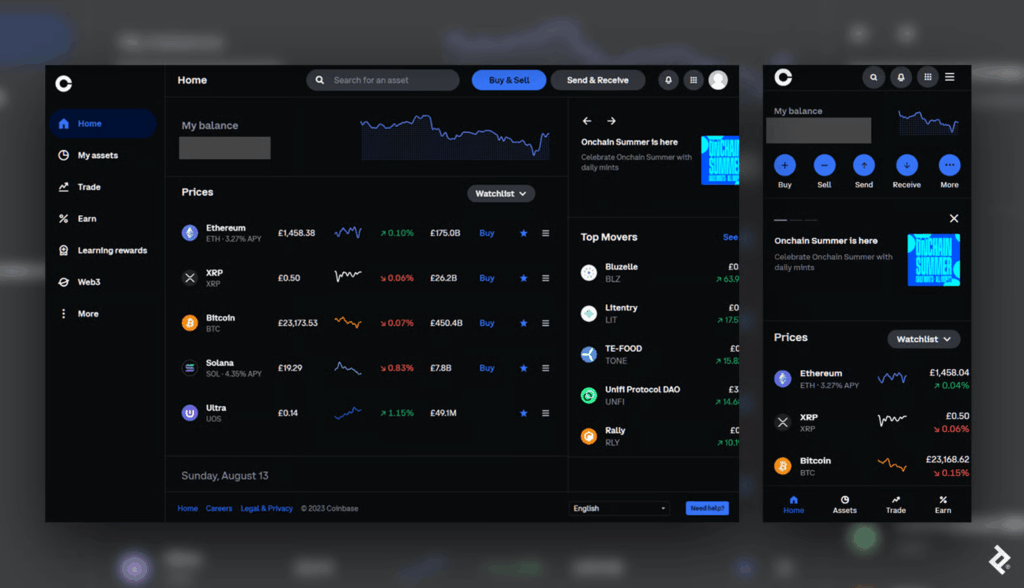
This mobile dashboard effectively uses space to prioritize the most essential options. Crucial buttons from the left-hand panel on desktop become the bottom navigation bar on mobile, a standard for mobile menus as the position falls into the “Z” page scanning pattern where users’ attention tends to land.
Responsive Tables and Charts
Designing responsive mobile tables and charts can be a challenge, but in my experience, the customer satisfaction it provides is worth it.
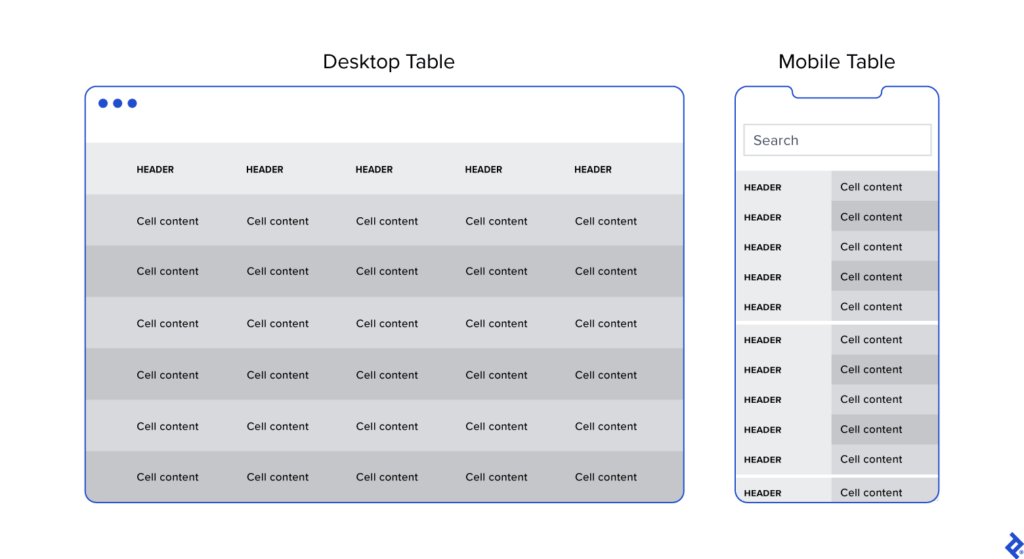
Generally, I advocate for responsive web designs that send a single code set to all devices but use fluid grids and media queries to change the appearance of elements based on a device’s size and orientation. This common and effective method is used in mobile dashboards to collapse table row headers into column headers in a set of stacked, standalone cards that can be scrolled through vertically. The approach offers an elegant mobile presentation that avoids squishing cells, while allowing the user to quickly peruse large amounts of data.
Button Design
Arguably, one of the biggest challenges in creating a responsive mobile dashboard is sizing and arranging buttons. Why? Because, unlike on desktop, you touch them, rather than select them with a cursor or keyboard command. They need to be big enough and spaced out enough to be tapped comfortably, and, due to the limited screen space, some will have to be collapsed into sub-menus or even hidden.
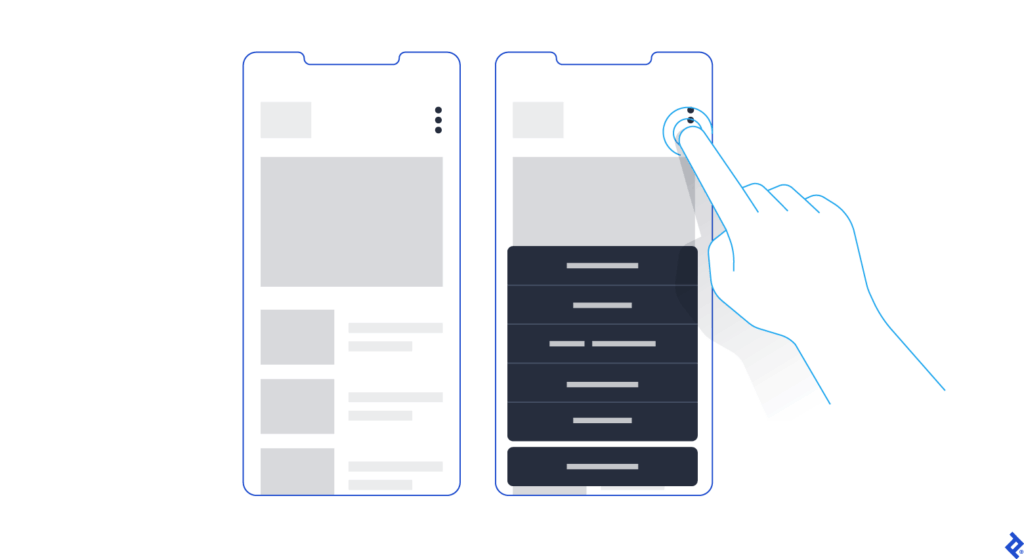
Standard button design principles should apply to your mobile designs. I tend to divide button design into two main principles: You should present buttons in a range of styles (sizes, colors, and shapes) that denote their relative importance through visual cues; and the text label or icon associated with a button should connote its semantic meaning and intended function—for instance, whether the button affirms an action, selects a tool, navigates to a new page, or cancels an action.
But you may have important buttons that can’t be hidden. As an alternative to the kebab menu, you could simply increase the button size to meet the mobile guidelines and then stack them vertically. Another alternative would be to leave the most crucial buttons at full size and make secondary buttons smaller by replacing the text label with an icon. When considering which technique to use, decide which buttons are most essential on each page.
Conclusion
When the project scope and budget allow, it’s most efficient to consider how a responsive mobile dashboard will look and function as you’re building out the desktop version. This will save time and development costs later in the product life cycle, and it will also help ensure brand consistency across devices. It’s also paramount to recruit a skilled developer to assess the feasibility of various design approaches, and, where needed, define CSS rules for reconfiguring tables and charts. Above all, try to faithfully recreate as much of the desktop experience as you can: You may have to eliminate some features and functionality, but it’s important not to dumb down the design and to follow the UX design process.
Mobile dashboard UI shouldn’t be an afterthought. If designed with care and foresight, mobile dashboards can provide significant value to users.
Empty States: Why They Drive Business Change and Why They Matter in UX
Empty states are often overlooked in UX design, but they can be drivers of substantial business benefits, and if done right, contribute to a more compelling user experience.

One of the UI UX patterns that I came across while working on my data viz project was the pattern/notion of Empty States which can be obsolete for some designers because they may see it as redundant or sometimes they don’t know that its a notion that should be contributing to the user experience as a whole.
Here are a few empty state examples:
Searching for something in Gmail and getting no results.
A new Dropbox screen where no files or folders have been created.
The resulting screen after completing all tasks in a to-do list manager.
Getting an error screen in Slack when a command isn’t supported.
Starting a new social networking account and there are no connections.
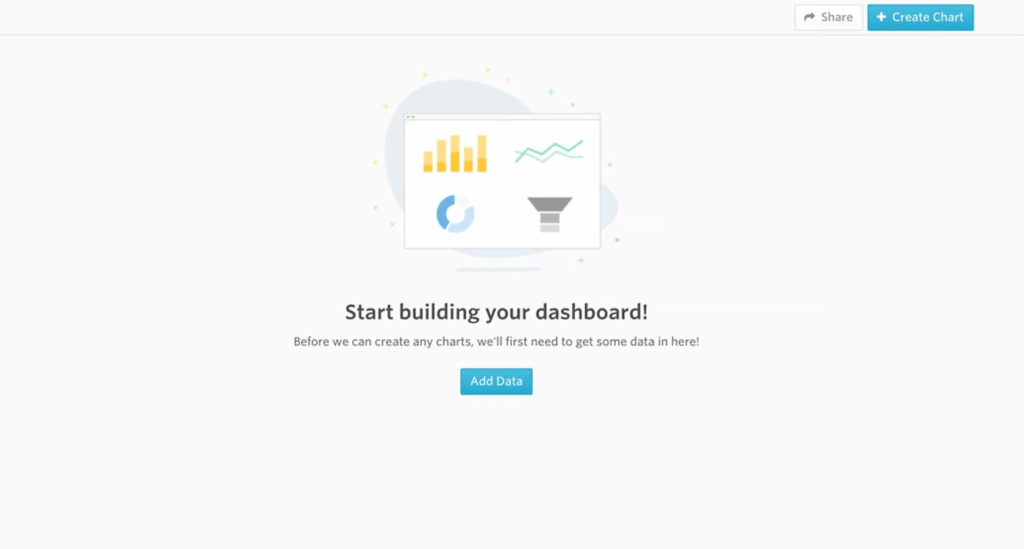

Types of Empty States
Here are four types of frequently encountered empty states:
- First use – Occurs with a new product or service when there is still nothing to show, such as a new Evernote or Dropbox account.
- User cleared – Occurs when users complete actions such as clearing their inbox or task list, and the result is an empty screen.
- Errors – These occur when something goes wrong, or when there are issues such as a mobile phone going offline due to network problems.
- No results/No data – No data found UI design occurs when there is nothing to show. This can happen if someone performs a search and the query is empty or there isn’t data available to show (when filtering for a date-range that has no data for example).
The Benefits of Using Well-designed Empty States
Designing well-thought-out and useful empty state illustrations and screens can help drive product engagement, delight users, and reduce churn. This decreases the chances of losing users to competitor products, thus leaving them frustrated or lost.
When applied to empty state design, these principles can be of great benefit to a business—for example, an increase in product satisfaction, and the lowering of abandonment rates.
Here are three additional areas that can also benefit from good empty state design:
- User onboarding – Provides an opportunity to build trust and continued use of the product in addition to an elevated user experience.
- Brand building – Generates awareness and promotes the company in order to build increased brand equity.
- Personalization – Can be playful, fun, serious, or dynamic in various states of use; creates a sense of a personal touch.
The benefits of well-designed empty states cannot be underestimated. They not only contribute to a compelling customer experience, but as windows of opportunity to keep customers happy and engaged get shorter and shorter, they are just plain good business.
Conclusion
It’s easy to overlook empty states (or empty screens) in UX design because they occur infrequently and aren’t always well understood. However, the benefits to their inclusion are understated because they enhance the user experience and help create a more cohesive product.
What I learned as the Core Principles for Designing Better Quantitative Content
Clutter and confusion are not attributes of data—they are shortcomings of design. – Edward Tufte
Michael Friendly defines data visualization as “information which has been abstracted in some schematic form, including attributes or variables for the units of information.” In other words, it is a coherent way to visually communicate quantitative content. Depending on its attributes, the data may be represented in many different ways, such as a line graph, bar chart, pie chart, scatter plot, or map.
It’s important for product designers to adhere to data visualization best practices and determine the best way to present a data set visually. Data visualizations should be useful, visually appealing and never misleading. Especially when working with very large data sets, developing a cohesive format is vital to creating visualizations that are both useful and aesthetic.

Principles
Define a Clear Purpose
Data visualization should answer vital strategic questions, provide real value, and help solve real problems. It can be used to track performance, monitor customer behavior, and measure effectiveness of processes, for instance. Taking time at the outset of a data visualization project to clearly define the purpose and priorities will make the end result more useful and prevent wasting time creating visuals that are unnecessary.
Know the Audience
A data visualization is useless if not designed to communicate clearly with the target audience. It should be compatible with the audience’s expertise and allow viewers to view and process data easily and quickly. Take into account how familiar the audience is with the basic principles being presented by the data, as well as whether they’re likely to have a background in STEM fields, where charts and graphs are more likely to be viewed on a regular basis.
Visual Features to Show the Data Properly
There are so many different types of charts. Deciding what type is best for visualizing the data being presented is an art unto itself. The right chart will not only make the data easier to understand, but also present it in the most accurate light. To make the right choice, consider what type of data you need to convey, and to whom it is being conveyed.
Make Data Visualization Inclusive
Color is used extensively as a way to represent and differentiate information. According to a recent study conducted by Salesforce, it is also a key factor in user decisions.
They analyzed how people responded to different color combinations used in charts, assuming that they would have stronger preferences for palettes that had subtle color variations since it would be more aesthetically appealing.
However, they found that while appealing, subtle palettes made the charts more difficult to analyze and gain insights. That entirely defeats the purpose of creating a visualization to display data.
The font choice can affect the legibility of text, enhancing or detracting from the intended meaning. Because of this, it’s better to avoid display fonts and stick to more basic serif or sans serif typefaces.
Conclusion
Good data visualization should communicate a data set clearly and effectively by using graphics. The best visualizations make it easy to comprehend data at a glance. They take complex information and break it down in a way that makes it simple for the target audience to understand and on which to base their decisions.
As Edward R. Tufte pointed out, “the essential test of design is how well it assists the understanding of the content, not how stylish it is.” Data visualizations, especially, should adhere to this idea. The goal is to enhance the data through design, not draw attention to the design itself.
Keeping these data visualization best practices in mind simplifies the process of designing infographics that are genuinely useful to their audience.
Disruptive Data Visualisation: From a Sketch to a Lo-Fi Wireframe to a Hi-Fi Wireframe
Introducing Beside You: the Augmented Managment software that will later be introduced as a SaaS (Software as a Service).
Initially, working on this project has been a ride since the beginning, being the sole product designer at a company that specializes in customer experience and business management along with a team of full stack devs and data scientists meant that we either we will get things done or we will get things done.
One of the early challenges was to convert a data driven platform to an intuitive and cohesive interface that offers the ease of analysis and ultimately efficient decision making.

One of the early challenges was to convert a data driven platform to intuitive and cohesive interface that offers the ease of analysis and ultimately efficient decision making.
Sketching consisted of building a skeleton that will overaly the first foundation that will eventually convey the design language that the software will adopt and in the meantime everything has to be succintly explained to the stakeholders in order for them to grasp the design system and for me to extract more insights from them since they will be the first users of the software.

Moving on to a low fidelity wireframe with the intention of giving more meaning and structure to the interface meant that progress is happening and things are starting to evolve in terms of results from the ideation and the user interviews. Also, the latter gave me the playground to begin building the design system from the layout, color palette, and typography to the spacing and the accessibilty.
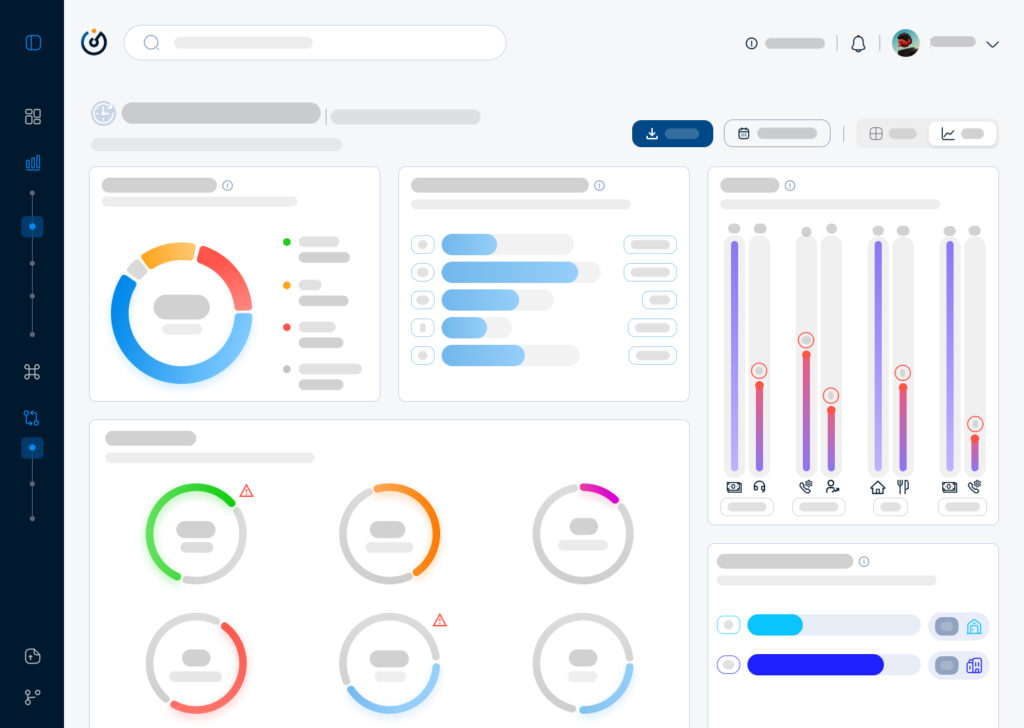
Moving on to a highfidelity wireframe that paved the way to add real data to the interface that allowed us as a team to get a realistic first look on how the software will behave in terms of data visualisation and user navigation and from there began our first user test which will give us a direction to make the right adjustments and iterations.
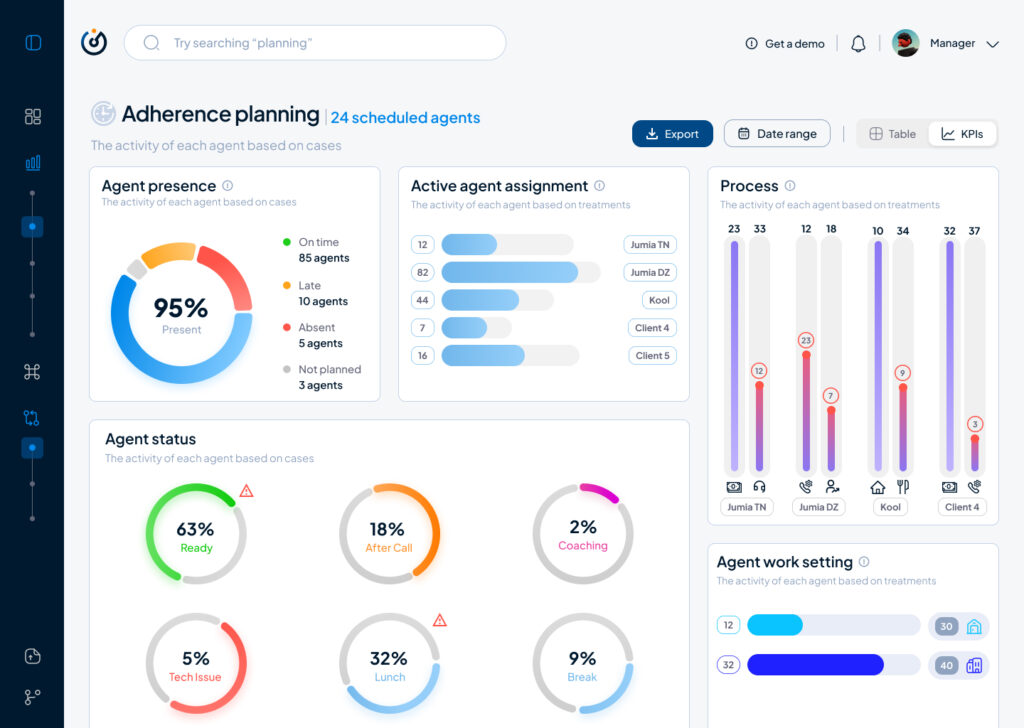
To conclude, this article is a condensed version of what actually happened and the process behind creating a data driven product from the ground up, otherwise I will have to write a journal that won’t serve nobody but nonetheless it is always beneficial to write about a design process that was complicated and challenging at times, the benefits are a documentation and a clarity that will even pave the way to iterate better on the next stages of the product life cycle.
Customer Experience (CX) and its relation to User Experience (UX) in Product Design
Customer experience (CX) and user experience (UX) in UI/UX design are closely intertwined concepts that directly impact how users interact with products or services. While CX refers to the overall experience a customer has with a brand or company, UX specifically deals with the user’s interaction with a product or service, particularly in terms of interface and design. Here are some key insights into their relationship and how they influence each other:
1. CX Encompasses the Entire Journey; UX Focuses on Specific Interactions
- Customer Experience (CX) refers to the cumulative experience a customer has with a brand across all touchpoints—whether it’s in-store, on a website, via customer support, or through social media interactions. It’s about how the customer feels throughout the entire process of discovering, purchasing, and using a product or service.
- User Experience (UX), on the other hand, is more focused on the user’s experience when interacting with specific digital interfaces (websites, apps, etc.). It focuses on the ease of use, functionality, and satisfaction during the interaction with a product’s interface, and it’s a subset of CX.
2. UX Design Drives Positive CX
The design of digital interfaces directly impacts the customer’s overall experience. A well-designed interface that is intuitive, aesthetically pleasing, and easy to navigate will improve the user’s experience and contribute to a positive overall perception of the brand.
Example: If a customer is able to easily find and purchase a product through a brand’s mobile app, the smooth interaction boosts their overall customer experience with that brand. A complicated or frustrating UX, on the other hand, can lead to negative CX, causing users to abandon the process or develop negative perceptions of the brand.
3. CX and UX Are Both About Satisfaction
While UX design focuses on the user’s satisfaction during the interaction with the product, CX is about the satisfaction derived from the brand’s overall offering, including service, support, and communication. Positive experiences in both areas often go hand-in-hand.
5. Customer Feedback and Continuous Improvement
Both CX and UX thrive on continuous improvement based on user feedback. For UX design, user testing, and behavioral analysis help identify friction points, improve usability, and address user pain points. In turn, customer feedback from the broader CX perspective (e.g., satisfaction surveys, social media comments) helps refine the overall customer journey.
6. Emotion and Brand Perception
Both UX and CX heavily influence how a customer feels about a brand. UX focuses on the emotional connection a user has during interactions with the product, whereas CX involves how a customer feels about the entire brand, including its mission, communication, and product quality.
Example: A well-designed website with a simple checkout process (good UX) can make users feel empowered and positive about the brand. Conversely, if the company’s customer service is slow and unhelpful (poor CX), the overall experience may be tainted, even if the website interaction was flawless.
7. Personalization and User-Centered Design
Personalization plays an important role in both UX and CX. Personalizing digital experiences, such as recommending products based on a user’s browsing history or customizing an app’s interface to the user’s preferences, makes the interaction more relevant and engaging.
8. UX Metrics Impact CX Strategy
UX metrics such as task completion rate, user satisfaction, and time on task offer valuable insights into how users engage with a product. These metrics can inform broader CX strategies. For instance, if UX testing shows that users frequently abandon the checkout process, it signals that the CX strategy should be adjusted to address these pain points (e.g., by improving the checkout experience).
Conclusion
In summary, user experience (UX) and customer experience (CX) are deeply connected and mutually influential. UX focuses on optimizing interactions with the product’s interface, while CX encompasses the overall brand experience across all touchpoints. A seamless, enjoyable UX directly contributes to a positive CX, leading to customer satisfaction, loyalty, and advocacy. By prioritizing both UX and CX, companies can create holistic, user-centered experiences that drive long-term success.
References
Robbio Alex, User Experience Is Now Your Business Strategy, Forbes 2019
Shatny Alex, Top UX KPIs and UX Metrics to Measure the Success of Your Design, Softteco.com 2022
Marketing Success Through Augmentation
There is no such thing as a commodity. All goods and services are differentiable. Though the usual presumption is that this is more true of consumer goods than of industrial goods and services, the opposite is the actual case.
In the marketplace, differentiation is everywhere. Everybody—producer, fabricator, seller, broker, agent, merchant—tries constantly to distinguish his or her offering from all others. This is true even of those who produce and deal in primary metals, grains, chemicals, plastics, and money. Says Theodore Levitt in his marketing piece in Harvard Magazine in January 1980.
In most cases, these differences are not salient. More important are the characteristics of the expected components of the product.
The Augmented Product
Differentiation is not limited to giving customers what they expect. What they expect may be augmented by things they have never thought about. When a computer manufacturer implants a diagnostic module that automatically locates the source of failure or breakdown inside his equipment (as some now do), the product goes beyond what was required or expected by the buyer. It has become an augmented product. When a securities brokerage firm includes with its customers’ monthly statements a current balance sheet for each customer and an analysis of sources and disposition of funds, that firm has augmented its product beyond what was required or expected by the buyer. When a manufacturer of health and beauty aids offers warehouse management advice and training programs for the employees of its distributors, that company too has augmented its product beyond what was required or expected by the buyer.
These voluntary or unprompted “augmentations” to the expected product are shown in Exhibit 1 by the irregular band that surrounds the expected product.
In every case, the supplier has exceeded the normal expectations of the buyer. In the steel example, it can be done by developing better ways of fabricating and coating the product or by reducing thickness to cut weight. The seller may provide other unexpected but moderately helpful aids, such as new delivery scheduling ideas, more “interesting” terms, different ways of delivering batches so as to reduce the buyer’s handling problems and costs, and invoicing systems that give more information about the use patterns of the generic product by the buyer’s various plants, divisions, or brands.
Not all customers for all products and under all circumstances, however, can be attracted by an ever-expanding bundle of differentiating value satisfactions. Some customers may prefer lower prices to product augmentation. Some cannot use the extra services offered. Steel users, for instance, once dependent on mills for applications help and engineering support, gradually grew sufficiently sophisticated to free themselves of that dependence—a freedom which, incidentally, led to the rapid growth of independent steel distribution centers in competition with the mills.
(Now the centers, which have distinguished themselves from the mills by faster delivery on standard grades and sizes, a wider item mix, and ability to handle small orders, have augmented their product by doing more minor fabricating and adding certain specialty steel application services.)
As a rule, the more a seller expands the market by teaching and helping customers to use his or her product, the more vulnerable that seller becomes to losing them. A customer who no longer needs help gains the flexibility to shop for things he or she values more—such as price.
At this point, it makes sense to embark on a systematic program of customer-benefiting, and therefore customer-keeping, product augmentation. The seller should also, of course, focus on cost and price reduction. And that’s the irony of product maturity: precisely when price competition heightens, and therefore when cost reduction becomes more important, is when the seller is also likely to benefit by incurring the additional costs of new product augmentation.
The augmented product is a condition of a mature market or of relatively experienced or sophisticated customers. Not that they could not benefit from or would not respond to extra services; but when customers know or think they know everything and can do anything, the seller must test that assumption or be condemned to the purgatory of price competition alone. The best way to test a customer’s assumption that he or she no longer needs or wants all or any part of the augmented product is to consider what’s possible to offer that customer.
References
Marketing Success Through Differentiation by Harvard Business Review