Title: “Looking Ahead: Preparing for the Next Steps”
This week was focused on planning and setting the stage for the next phases of the project. While no physical progress was made, the time spent organizing and reaching out to potential collaborators was essential for moving forward.
INTERNSHIP UPDATE:
I reached out to the owner of Cabianca Surfboards to discuss the possibility of an internship this summer. While I haven’t received a definitive answer yet, the initial response was encouraging. If confirmed, this internship would provide invaluable hands-on experience and access to professional surfboard builders, as well as potential connections to the WSL (World Surf League).
RESEARCH AND DEVELOPMENT TIMELINE:
Based on my current progress and future plans, I’ve adjusted the timeline for the project:
Until June 2024: Focus on research, sensor selection, and software exploration.
July-August 2024: Internship at Cabianca Surfboards (if confirmed). During this time, I’ll work on integrating sensors into a surfboard and conducting initial tests.
September 2024 – Spring 2025: Develop the software for data visualization and sound synthesis. Conduct interviews with surfers and experts to refine the project.
Summer 2025: Finalize the prototype and prepare for the final presentation in autumn 2025.
CHALLENGES:
The internship is not yet confirmed, which adds some uncertainty to the timeline.
Balancing research with practical work will be crucial as the project progresses.
The timeline is ambitious, and there’s a lot to accomplish in the next year and a half.
NEXT STEPS:
Follow up with Cabianca Surfboards to confirm the internship.
Continue researching sensors and software tools.
Begin planning for interviews and how they’ll inform the project.
This week was about setting the stage for the next phases. While there’s still much to be determined, the planning process has provided clarity and direction for the road ahead.
Title: “Exploring Data Visualization Platforms: A Week of Discovery”
This week shifted the focus from hardware to software, as I explored various platforms for visualizing the data that the sensors will eventually collect. While no physical progress was made, the exploration of these tools was a necessary step in shaping the project’s creative direction.
PLATFORMS EXPLORED:
Grafana: A robust tool for creating dashboards and visualizing time-series data. Its customization options make it a strong contender for displaying real-time sensor data.
TouchDesigner: A visual programming language ideal for creating interactive visuals. I’m considering using it to design dynamic, wave-inspired visuals that respond to the surfboard’s motion.
Pure Data: An open-source platform for audio synthesis. It could be used to map sensor data to sound, creating an immersive auditory experience.
CHALLENGES:
Each platform has its own learning curve, and I need to determine which one aligns best with the project’s goals.
Syncing the sensor data with these platforms in real-time will require further exploration.
The challenge lies in creating visuals and sounds that are not only technically sound but also emotionally resonant.
NEXT STEPS:
Dive deeper into TouchDesigner and Pure Data to assess their suitability for the project.
Experiment with sample data sets to understand how they can be transformed into sound and visuals.
Continue researching other visualization tools that might offer a better fit.
This week was about laying the groundwork for the creative aspects of the project. While no concrete outcomes were achieved, the exploration of these tools has opened up exciting possibilities.
Title: “Exploring Sensor Options: A Week of Research and Consultation”
This week was dedicated to deepening my understanding of the technical aspects of the project. While no physical tests were conducted, the focus on research and consultation with professors proved to be incredibly valuable. The goal was to identify the most suitable sensors for capturing the surfboard’s motion, and the discussions opened up new possibilities.
SENSOR RESEARCH:
One of the highlights of the week was being introduced to the x-IMU3 by x-io Technologies during a consultation with a professor. This sensor combines an accelerometer, gyroscope, and magnetometer, offering a comprehensive solution for tracking motion. Its advanced capabilities make it a strong candidate for the project, though its cost and integration requirements will need careful consideration.
CHALLENGES:
The x-IMU3 is more sophisticated than the MPU-6050 I initially considered, but its higher price point could impact the project budget.
Integrating the sensor into the surfboard without compromising performance remains a key concern.
Powering the sensor during extended surfing sessions is another hurdle that needs addressing.
NEXT STEPS:
Continue researching the x-IMU3 and compare it with other sensor options.
Reach out to x-io Technologies for technical specifications and potential support.
Begin planning for the internship and how it can facilitate sensor integration.
This week reinforced the importance of thorough research. By exploring the available tools and consulting with experts, I’m better equipped to make informed decisions as the project progresses.
Title: “From Concept to Reality: The First Steps Toward a Sensor-Embedded Surfboard”
This week was all about laying the groundwork for the project. I spent hours researching sensors, microcontrollers, and data visualization tools. The goal is to create a surfboard that not only performs well in the water but also captures the essence of the surfing experience through sound and visuals.
SENSOR SELECTION:
After some research, I’ve decided to start with the MPU-6050 accelerometer and gyroscope. These sensors are affordable, widely available, and perfect for capturing motion data. I’m also considering adding a waterproof microphone (hydrophone) to capture the sounds of the water as the board moves through it.
PROTOTYPING:
I’ve started planning to attach sensors to a skateboard to simulate the motion of a surfboard. This will allow me to test the sensors in a controlled environment before moving to the water. I will be using an Arduino to collect and transmit the data, which will later be processed using Pure Data for sound synthesis and TouchDesigner for visual effects.
COLLABORATIONS:
I reached out to a local surfboard shaper to discuss the possibility of embedding sensors into a board. He was intrigued by the idea and offered to help me with the design. This collaboration will be crucial in ensuring that the board remains functional and aesthetically pleasing.
CHALLENGES:
Waterproofing the sensors and electronics is a major concern.
I need to figure out how to power the system while it’s in the water.
The data needs to be transmitted in real-time, which requires a reliable wireless connection.
NEXT STEPS:
Finalizing the idea of the sensor setup and start collecting data from the skateboard.
Begin experimenting with Pure Data and TouchDesigner to map the data to sound and visuals.
Continue discussions with the surfboard
This week was all about turning the concept into something tangible. It’s exciting to see the project taking shape, but there’s still a long way to go.
Title: “The Sonic Wave: Where Surfing Meets Sound and Technology”
This week marked the beginning of an exciting journey. The idea of merging surfing, sound, and technology has been on my mind for some time, and now it’s time to bring it to life. The concept is simple yet profound: embed sensors into a surfboard to capture the motion, speed, and vibrations of the board as it rides the waves. Then, transform this data into sound and visuals, creating an immersive experience that highlights the rhythm and beauty of surfing.
RESEARCH AND INSPIRATION:
I started by exploring existing projects that combine sports and technology. The Surflogic GPS Tracker and TRACE were particularly inspiring. These tools track surfers’ performance metrics like speed and wave count, but they don’t delve into the artistic side of things. I want to go beyond performance tracking and explore how surfing can be experienced as a multisensory art form.
CHALLENGES AND QUESTIONS:
How do I integrate sensors into a surfboard without affecting its performance?
What kind of sensors will give me the most accurate and meaningful data?
How can I translate raw data into something that resonates emotionally with an audience?
NEXT STEPS:
Research sensor technology (accelerometers, gyroscopes, hydrophones).
Reach out to surfboard shapers and tech experts for advice.
Start sketching out a prototype design.
This project feels like a perfect blend of my passions—surfing, technology, and art. I’m eager to see where this journey takes me.
Das Ziel des zweiten Design & Research Projekts im Masterstudiengang CMS24 besteht darin, einen Prototypen zu entwickeln, der im weiteren Verlauf auch für die Masterarbeit von Bedeutung sein wird. Dieser Prototyp dient als experimentelles Werkzeug zur Untersuchung der Rolle von Videomapping als künstlerische Technik zur Veränderung der architektonischen Wahrnehmung durch Licht und Bewegung.
Anpassung der Forschungsfrage
Zunächst möchte ich die zentrale Forschungsfrage anpassen, bzw. um einen neuen Gedankenimpuls erweitern. Anstatt nur den kulturellen Kontext des Gebäudes zu berücksichtigen, soll auch die Auswirkung der Projektion auf die Architektur untersucht werden: „Wie kann Videomapping als künstlerische Technik die Wahrnehmung von Architektur durch Licht und Bewegung verändern?“
Folgende Themenbereiche dienen als theoretische Grundlage:
Geschichte des Lichtdesigns in der Architektur
Wahrnehmungspsychologie von Lichtprojektionen
Interaktion von Licht, Farbe und Materialität
Prototypenentwicklung
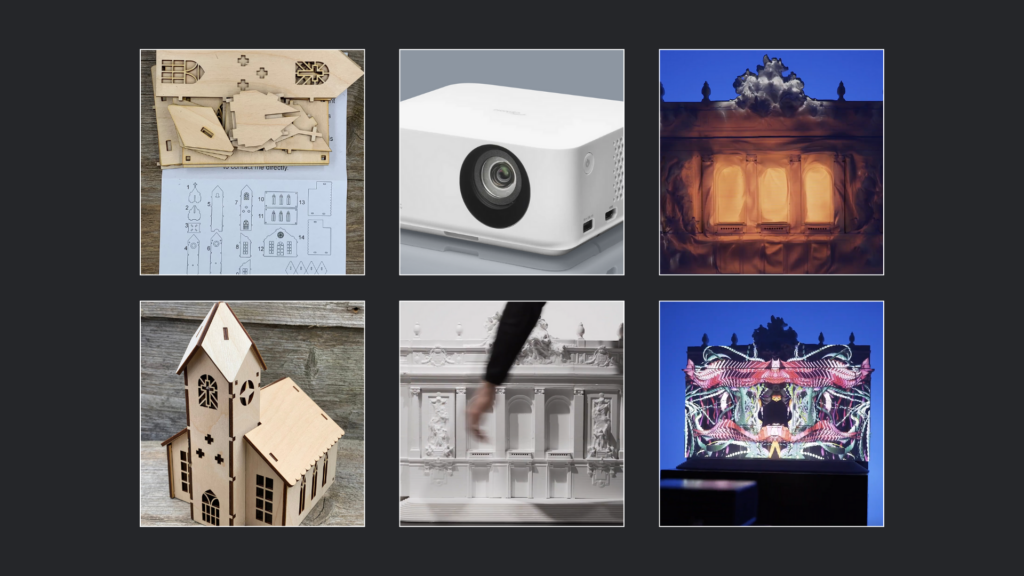
In meinem Projekt plane ich, ein Modell – voraussichtlich eine Miniaturkirche – entweder als fertigen Bausatz aus dem Internet zu bestellen und zusammenzubauen oder es als Laser-Cutter-Vorlage mit dem Lasercutter der Fachhochschule auszuschneiden.
Projektion & Videomapping
Nach der Fertigstellung des Modells soll dieses mithilfe eines Beamers projiziert und durch Videomapping visuell bespielt werden. Hierfür ist der Einsatz eines Kurzdistanzprojektors oder eines kleinen mobilen Beamers vorgesehen, um maximale Flexibilität bei der Aufstellung und Projektion zu gewährleisten. Ziel dieser Projektionen ist es, verschiedene Techniken, Farben, Texturen, Animationen und Visualisierungen auf die Miniaturkirche anzuwenden, um deren Wirkung auf die Oberflächenstruktur und die architektonische Gestaltung zu untersuchen. Besonders relevant ist hierbei die Frage, wie Licht auf Architektur wirkt und inwieweit Projektionen als erweiterte Gestaltungsebene dienen können.
Prototypenvarianten und Herausforderungen
Um ein möglichst authentisches 3D-Mapping zu erzielen, plane ich, die Miniaturkirche auch als digitales 3D-Modell zu erstellen. Dies würde die Flexibilität erhöhen und eventuell auch die Möglichkeit bieten, virtuelle Prototypen in VR oder AR zu testen. Ein potenzielles Problem bei der Projektion auf physische Modelle ist deren geringe Größe von etwa 20 bis 30 cm sowie die eingeschränkte Auflösung des Beamers. Es bleibt fraglich, ob feine Konturen und Linien des Modells präzise genug dargestellt werden können, um eine ästhetisch ansprechende und wirksame Projektion zu ermöglichen.
Software & Technik
Das Videomapping soll audio-reaktiv gestaltet werden, wobei ich derzeit überlege, ob ich dafür Cinema4D oder Blender verwenden soll. Optimalerweise würde ich eine Kombination der besten Features beider Programme nutzen. Blender bietet aufgrund seiner leistungsstarken Geometrie- und Simulations-Nodes deutlich mehr Optionen zur Erstellung sanfter, dynamischer Animationen, während Cinema4D in diesem Bereich bisher limitiert ist – jedoch in anderen audio-reaktiven Anwendungsbereichen deutlich intuitiver ist. Weitere Untersuchungen und Experimente dazu werden im nächsten Blogpost (BlogPost #2) dokumentiert.
Der Medientheoretiker Marshall McLuhan stellte einst fest: „Das Medium ist die Botschaft.“ Diese Aussage hat in unserer von digitalen Technologien geprägten Zeit eine besondere Relevanz und dient als Leitsatz für die Entwicklung dieses Prototyps.
🤖🧠Disclaimer zur Nutzung von Künstlicher Intelligenz (KI):
Dieser Blogbeitrag wurde unter Zuhilfenahme von Künstlicher Intelligenz (ChatGPT) erstellt. Die KI wurde zur Recherche, zur Korrektur von Texten, zur Inspiration und zur Einholung von Verbesserungsvorschlägen verwendet. Alle Inhalte wurden anschließend eigenständig ausgewertet, überarbeitet und in den hier präsentierten Beitrag integriert.
In my testing I want to focus on color schemes, refining call-to-action buttons (CTA) as well as enhancing mobile responsiveness, in order to use the outcome of the testing to make sure what to focus on when it comes to my neurodesign approach. When choosing a color scheme for example, it is important to think about how all design elements interact. Are they making users squint or, worse, leave? In an A/B test, I want to test different color combinations that still align with the individual branding but are easier on the eyes. The dream result? A color palette that promotes clarity and comfort as well as making the user stay on the website longer.
CTAs are like road signs for your users. If your buttons are too small, poorly worded, or blend into the background, users may never “see” them. When it comes to testing I want to experiment with button color, size, and the text itself. Maybe wording like “Get Started” works better than “Submit,” or a bright, standout color for your button makes it easier to spot. A well-designed CTA can act like a neon arrow pointing the way to conversion. For me it is important to integrate the psychological aspect we explored in the previous semester, to enhance the design to a next level. Improving design not only through aesthetic, composition but also through a more humane approach.
One of the last parts of my testing would be the enhancing mobile responsiveness. With everyone glued to their phones, a website that doesn’t work well on mobile is practically a crime. Maybe you’ve seen those sites where you have to pinch and zoom to read anything. An A/B test where one version of your site is optimized for mobile (with bigger buttons, shorter text, and a cleaner layout) could show that mobile-first design improves engagement, session times, and overall satisfaction.
A/B testing is an ongoing journey of refinement and improvement. It’s not a one-time magic bullet. Once you’ve conducted a test and seen which version performs better, it’s crucial to act on that data. Iterating based on feedback is the next logical step for me. For example, if users showed a preference for a simplified navigation menu, it would be beneficial making that the default across the entire website.
Another thing to keep in mind is staying updated with trends. The digital world evolves quickly, and so do user preferences. Even if I’ve nailed cognitive ease for the current audience, the way people interact with websites may change. Testing new design elements regularly should help staying ahead of the curve.
Let’s break this down into actionable steps:
Defining my hypothesis: Identifying a pain point in a website design. I will do the testing in combination with our Branding Exercise in this course as well, to use my testing in a more useful way. Here the focus on the hypothesis would be the rebranding of the webpage for “Oma’s Teekanne”.
Creating my A/B versions: Designing two versions of the page. Version A is the control—the existing “bad” design, and Version B is my experiment with changes to navigation or layout, based on my hypothesis. In this case, Version B might feature a cleaner, simplified navigation bar.
Splitting the audience: Using tools like Google Optimize to divide your audience. Half of the users will see Version A, and the other half will see Version B. These tools can automatically randomize the audience, ensuring that the test results are statistically sound.
Track key metrics: Metrics are the bread and butter of A/B testing. For cognitive ease, I want to measure things like:
Bounce rate: Do fewer people leave immediately?
Session duration: Are users staying longer?
Click-through rate: Are people interacting with calls to action more?
Conversions: Are users completing desired actions like signing up or making a purchase?
Analyze the results: After gathering enough data, it’s time to look at which version performed better. If Version B (the simplified design) results in users staying on the page longer, clicking more, and converting better, I’ve successfully enhanced the cognitive ease.
Iterate and improve: A/B testing doesn’t end with one successful experiment. The goal would be using the results to inform future tests and continue optimizing for cognitive ease. Remembering, the goal is to reduce cognitive load for users, so looking for areas of friction and testing new ways to make the user experience as smooth as possible.
Communicate findings: Once you have results, it’s important to share them with the costumer or stakeholders in a clear and actionable way. Visual aids like graphs or charts help convey how Version B improved metrics compared to Version A.
When information flows so smoothly that your brain barely breaks a sweat, that’s the magic of cognitive ease. You can think of cognitive ease as your brain’s comfort zone. When information is easy to process, you’re more likely to engage with it, trust it, and stick around. On the other hand, when things are complicated or confusing, your brain throws up a big red flag and says, “Nope, not today, I’m out.”
So, how do we keep our users lounging in the comfort of cognitive ease? Here comes A/B testing into play, a very helpful tool of user experience design, I would like to further explore in the next few months. A/B testing is like a popularity contest for website elements. You create two versions (A and B) of a webpage or feature, show them to different user groups, and see which one performs better. My goal with this is pretty simple, first I want to test the previous established commandments and their actual functionality. Do they work on target groups? Is there an actual significant difference between the “conservative” (A) way of designing a website or does the “neuro” (B) way actually work better when it comes to our cognitive comprehension. By comparing variations of various design elements, I want to identify which versions make information processing a breeze. After researching a little further I came up with the following schedule of testing:
Hypothesis Formation: Guess which design tweaks might enhance cognitive ease. Maybe simplifying navigation or tweaking color schemes could do the trick.
Version Creation: Develop two versions of the webpage—Version A (the conservative design) and Version B (the new design with said proposed changes).
User Exposure: Randomly present these versions to users, ensuring each group experiences only one version. Also switching between several target groups.
Data Collection: Gather data on user interactions—click-through rates, time spent on the page, conversion rates, eye-tracking, you name it.
Analysis: Crunching the numbers to see which version led to smoother user experiences and better engagement.
A common issue many users face is getting lost or overwhelmed by a website’s menu. Imagine your website is a maze with too many twists and turns, and users are just looking for the exit. Simplifying the navigation bar is one way to prevent users from hitting that “Back” button out of frustration. In an A/B test, you could create a streamlined version of the navigation with fewer categories and clearer labels, and compare it with your existing complex menu. If users find what they’re looking for faster in the new version, congratulations—you’ve just made their experience more cognitively pleasing.
Let’s talk about optimizing content layout. No one likes staring at a wall of text—it’s a one-way ticket to mental exhaustion. A solution? Breaking up the content with bullet points, subheadings, and images, making sure to introduce any sort of hierarchy for the brain and eyes. To put this to the test, creating a version that’s broken up with more digestible chunks of information and visuals, and compare it to the original text-heavy layout. If the users engage more with your new format, you’ve made their cognitive load lighter. This ties into Information Processing Theory, developed by George A. Miller, which explains how our brains process and store information. The theory suggests that our minds work similarly to computers, where information is received, processed, and stored in stages. A key concept is “chunking,” where we group information into manageable units, allowing short-term memory to handle more. Additionally, the TOTE model—Test, Operate, Test, Exit—shows that behavior involves ongoing processes of testing and revising until a goal is reached. In the context of content layout, applying these principles means organizing information in a way that reduces cognitive load, making it easier for users to process and retain the material, ultimately increasing engagement.
Reggelin, Jonas. (2023). Neurowebdesign: Shaping the Future of Web Experiences with Neuroscience.
Miller, G. A. (1956). The magical number seven, plus or minus two: Some limits on our capacity for processing information. Psychological Review, 63(2), 81–97. https://doi.org/10.1037/h0043158
Th first new task I got this semester was to write six more blog posts and create (3) prototypes, of a possible project for my masters thesis. So naturally I asked myself, what could be a possible masters thesis and four different possible themes came to mind: 1. I could continue my bachelors thesis about digital mental health support programs. 2. I recently got into workshop facilitation & meeting facilitation, I thought the combination of being able to run workshops could be a great asset to every designer. 3. I could continue my research from last semester and deepen my knowledge in the understanding of biases. 4. Lastly I may get the opportunity to work together with a company to write about Design Systems.
Brainstorming
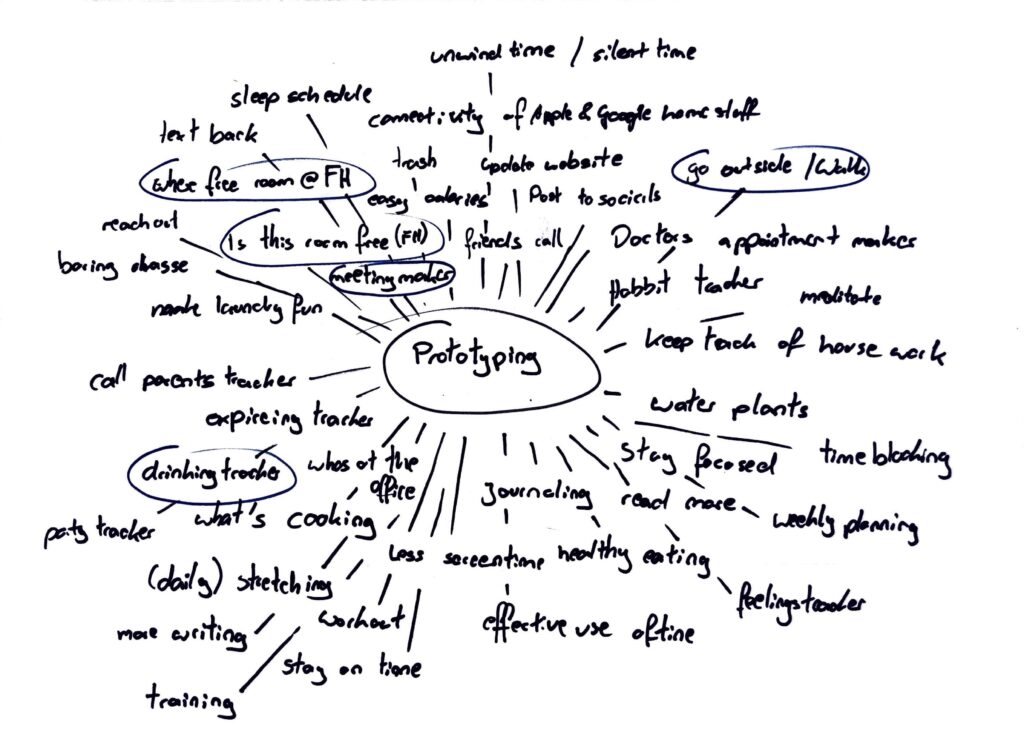
Naturally I couldn’t figure all of this out in one week, so I just started brainstorming, to figure out what problems I could solve with a quick prototype. On the picture below, you can see my ideas.
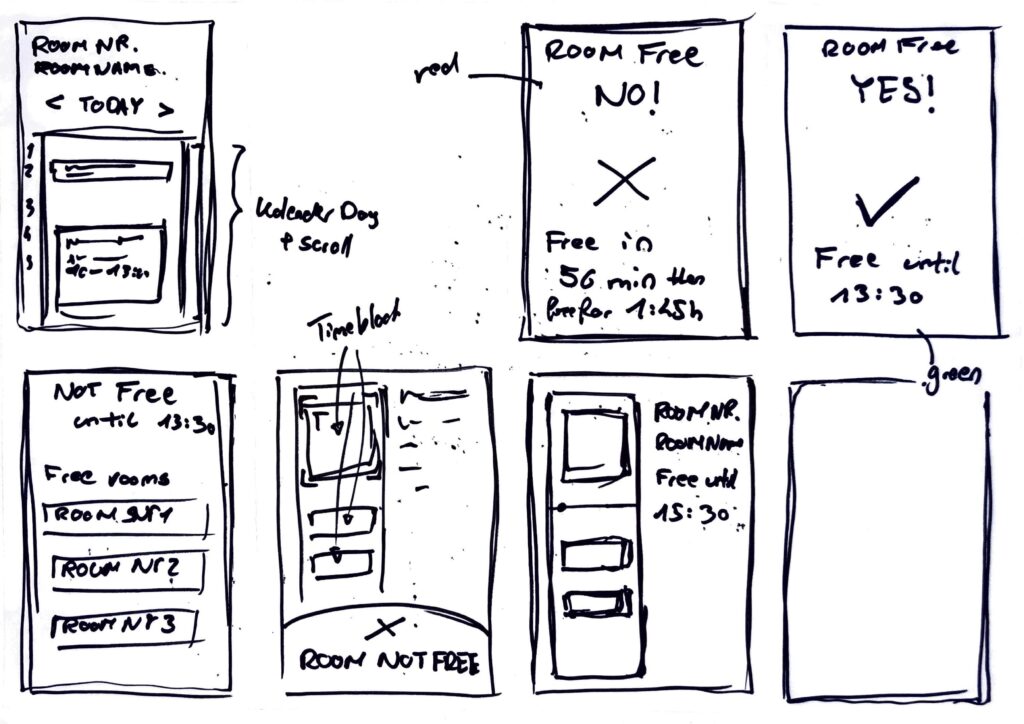
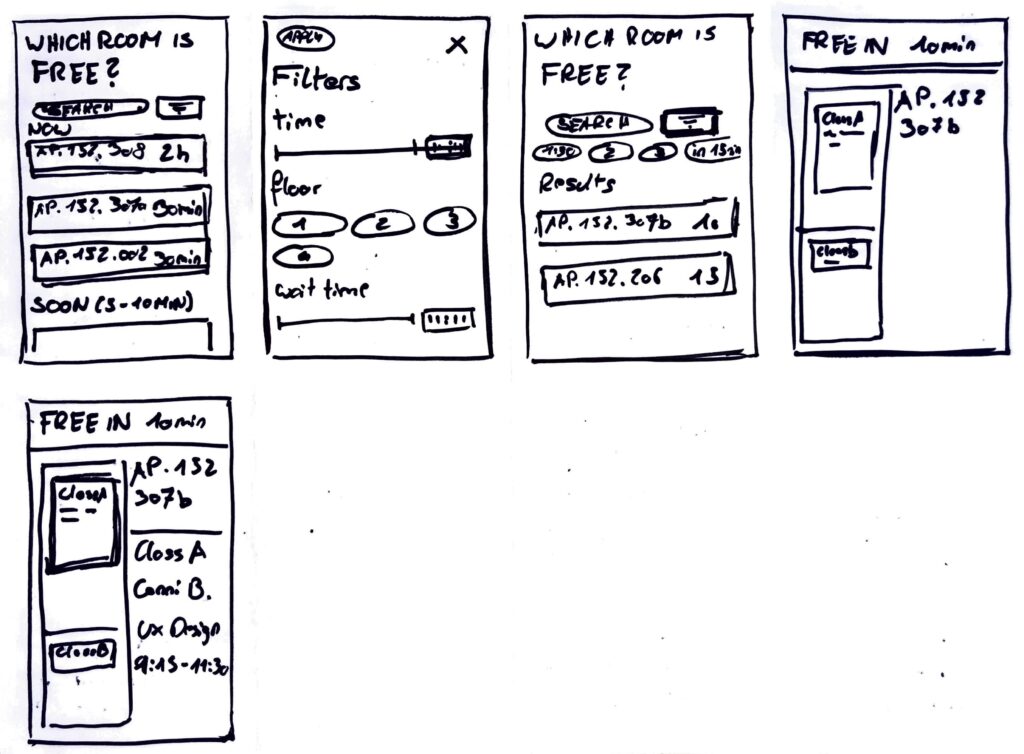
Four topics stuck with me: An app or similar digital solution that reminds you to go for a walk and motivate you to go outside. A drinking tracker, so you know how much you drank last night. A meeting maker, to help make meetings less confusing and draining. Lastly a solution for not finding a room at FH that is not occupied, to eat and work in.
Prototype 1
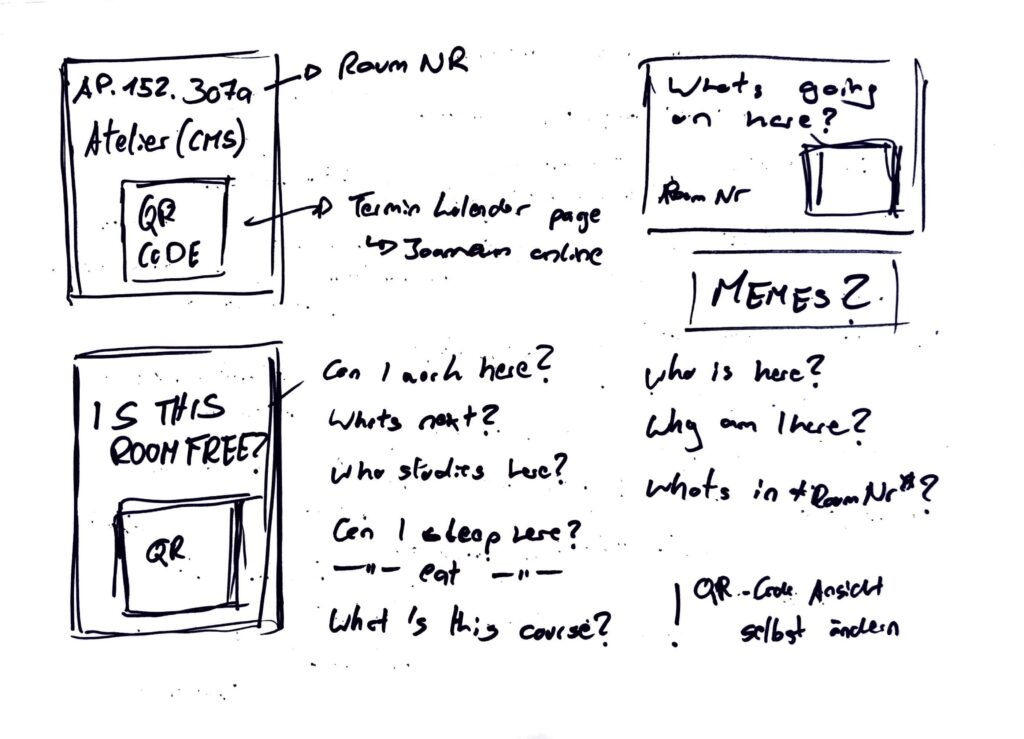
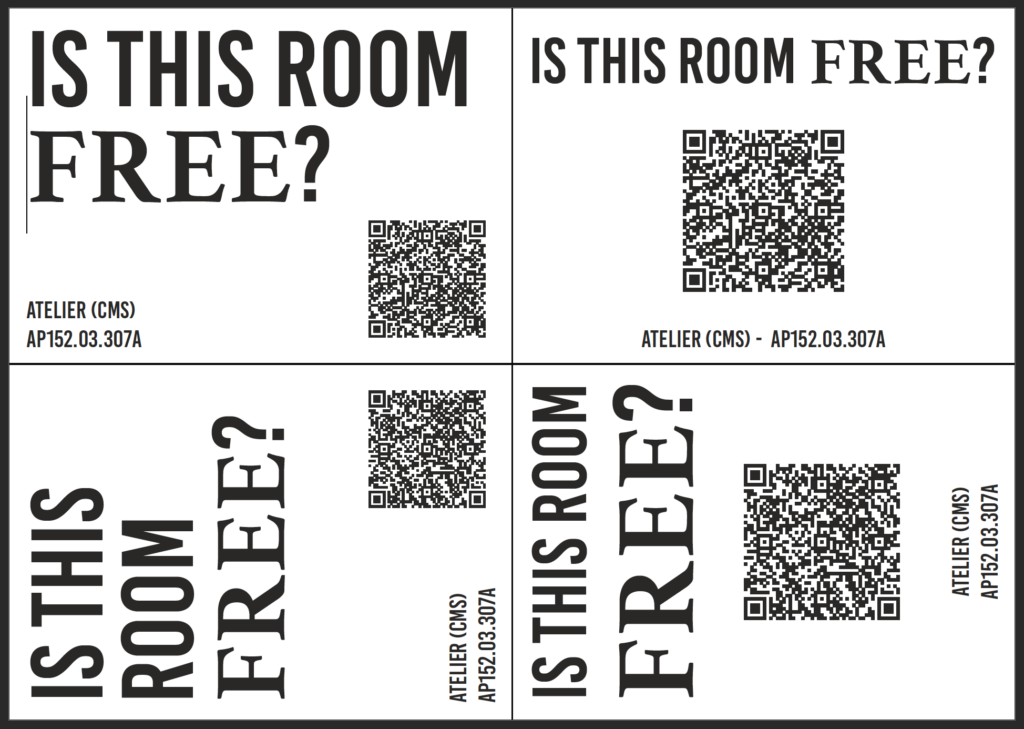
The last topic really stuck with me so I started a 20 minute timer and started sketching. After a quick research I found a way to see unoccupied rooms using Joanneum Online, but it’s confusing. So I tried a new approach, what if the process of checking a rooms schedule could be easier. My idea was to stick QR codes, next to every rooms sign, that lead to the rooms schedule. I started by sketching first ideas, of the signs and had just enough time to also create a first “mockup” of a sign. Later funny quotes or memes could be added to the signs, to make them more interesting.
Prototype 2
After creating the first prototype I got stuck on the idea of having an easy way to check for free rooms at our FH building. So continuing with the previous idea, I started another timer and started to generate first ideas for a website, that could display the desired information in a better way. Faster and easier to understand for the users. Since I love the crazy eight method, I used it to create this prototype
Prototype 3
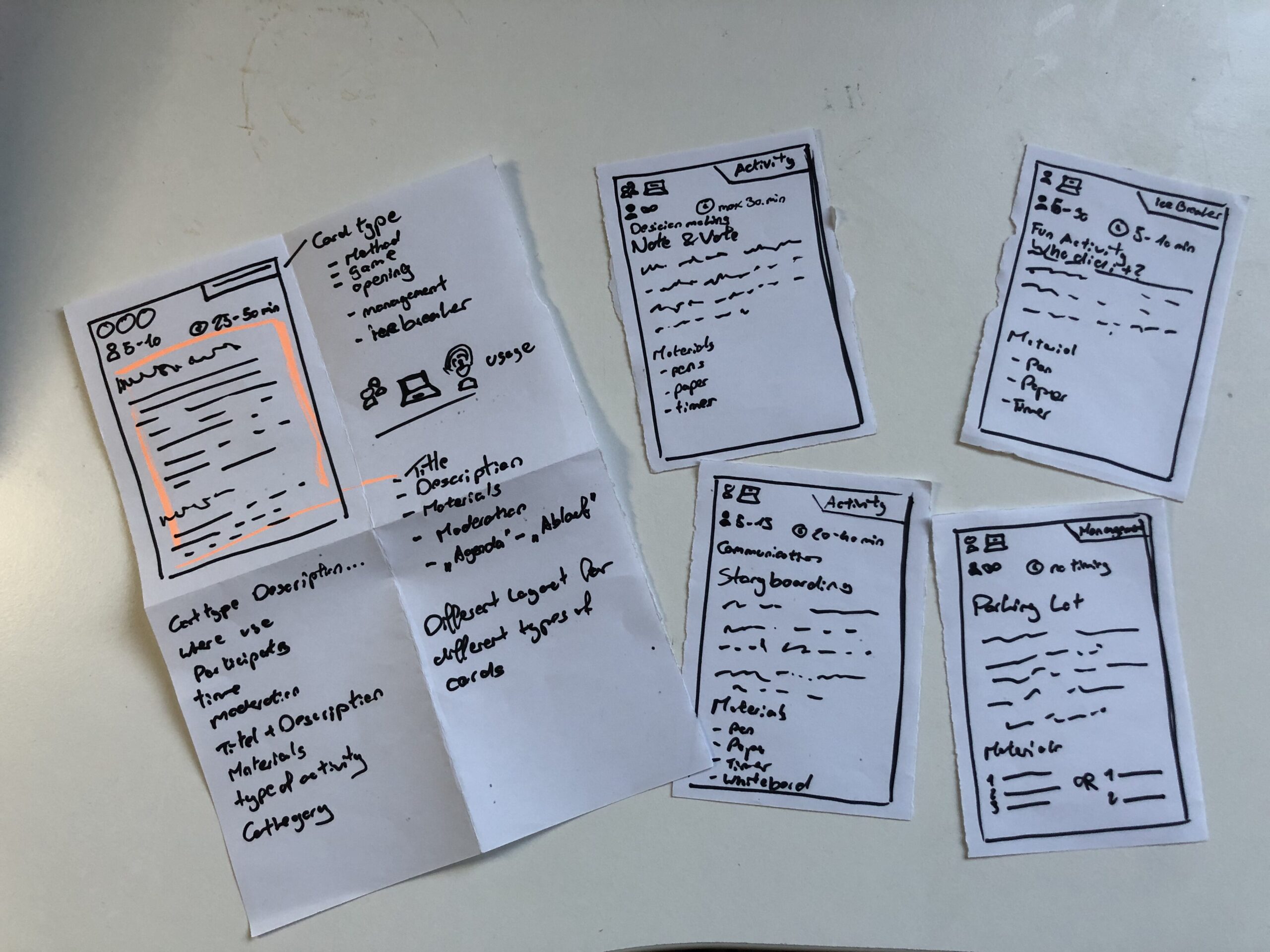
The last prototype went into a whole different direction, I still wanted to create something, that I could use for my masters thesis. So I just sat in my room thinking and then I had an idea. I could create a prototype for a card deck, that informs its owner about different work shop facilitation techniques. (Theoretically a card deck can be created for any topic, so I could also do one for biases and how to combat them) This is also the prototype I then brought to class, to discuss with my class mates. The cards show what type of method you hold in your hands, if it can be used online or only live, how many people Ould participate, how long each activity takes, what you need to run it and of course the name and description of the method.
Speed Dating
So with my Prototype I headed to class, no clue, what was going to happen. In class we sat together, one on one and were given a task. Five rounds, each round with a new person and a new tasks. First we let the other person take a wild guess and describe the prototype to us. Next the partner had to give an idea for a new feature, without knowing the full potential of the prototype. This, was to create a dating profile for each prototype. Fourth, thinking big about the future and your prototype, maybe you are hosting a TED talk. Lastly we talked about the most unexpected feedback about our prototype. A very fun and insightful session, next I want to share my takeaways.
Almost all of my “dates” mistook my playing cards, as wireframes for an app. Maybe, we all are a little biased towards digital solutions. But thinking about it makes something clear, my playing card prototype, doesn’t look like playing cards. Maybe it’s the size, the material or the way I drew on the paper.
When I didn’t explain the prototype all of my partners needed the “instructions” to understand what the prototype was about and for what it could be used. This was also feedback I received, to add more and better instructions. ;D
Additionally, most of them didn’t know, what to do with these flimsy pieces of paper. I figured, they didn’t want to break it.
One “date” suggested to add QR codes to make the instructions on each card more accessible.
I saved the best for last: When talking about the future of the prototype, I said I would have sold or given out a lot of decks and would be holding a TED Talk about a second version. Everything would be Creative Commons and open source, for everyone to use. The Interview partner then called me “the new Mark Zuckerberg, but with a conscious mind”.
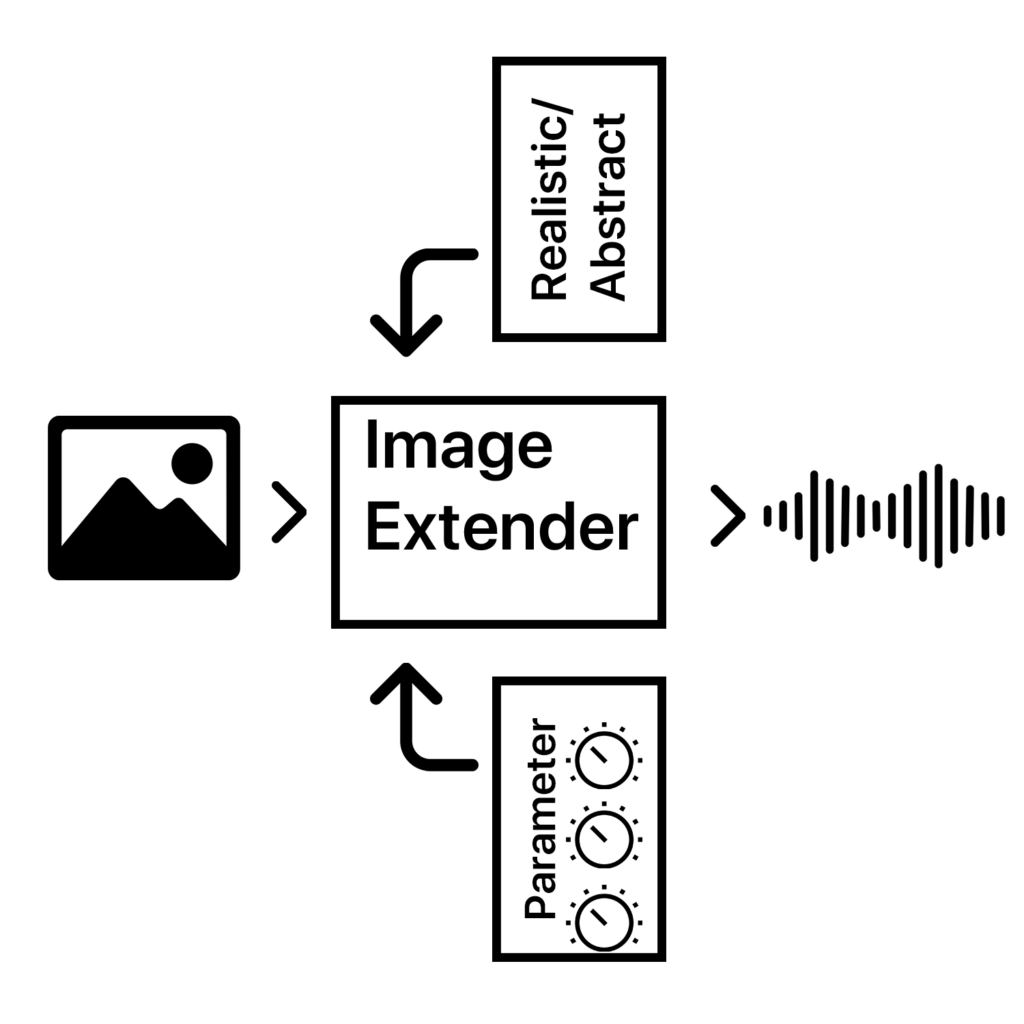
The Image Extender project bridges accessibility and creativity, offering an innovative way to perceive visual data through sound. With its dual-purpose approach, the tool has the potential to redefine auditory experiences for diverse audiences, pushing the boundaries of technology and human perception.
The project is designed as a dual-purpose tool for immersive perception and creative sound design. By leveraging AI-based image recognition and sonification algorithms, the tool will transform visual data into auditory experiences. This innovative approach is intended for:
1. Visually Impaired Individuals 2. Artists and Designers
The tool will focus on translating colors, textures, shapes, and spatial arrangements into structured soundscapes, ensuring clarity and creativity for diverse users.
Core Functionality: Translating image data into sound using sonification frameworks and AI algorithms.
Target Audiences: Visually impaired users and creative professionals.
Platforms: Initially desktop applications with planned mobile deployment for on-the-go accessibility.
User Experience: A customizable interface to balance complexity, accessibility, and creativity.
Working Hypotheses and Requirements
Hypotheses:
Cross-modal sonification enhances understanding and creativity in visual-to-auditory transformations.
Intuitive soundscapes improve accessibility for visually impaired users compared to traditional methods.
Requirements:
Develop an intuitive sonification framework adaptable to various images.
Integrate customizable settings to prevent sensory overload.
Ensure compatibility across platforms (desktop and mobile).
Subtasks
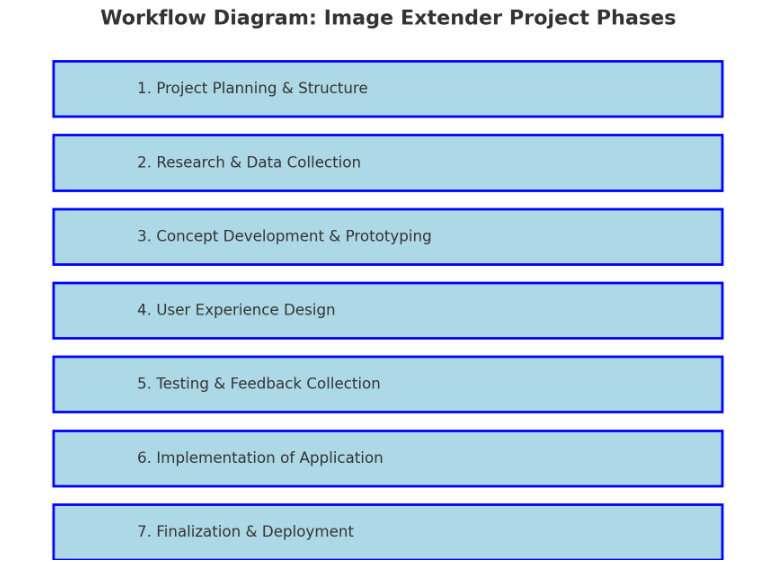
1. Project Planning & Structure
Define Scope and Goals: Clarify key deliverables and objectives for both visually impaired users and artists/designers.
Research Methods: Identify research approaches (e.g., user interviews, surveys, literature review).
Project Timeline and Milestones: Establish a phased timeline including prototyping, testing, and final implementation.
Identify Dependencies: List libraries, frameworks, and tools needed (Python, Pure Data, Max/MSP, OSC, etc.).
2. Research & Data Collection
Sonification Techniques: Research existing sonification methods and metaphors for cross-modal (sight-to-sound) mapping and research different other approaches that can also blend in the overall sonification strategy.
Psychoacoustics & Perceptual Mapping: Review how different sound frequencies, intensities, and spatialization affect perception.
Existing Tools & References: Study tools like Melobytes, VOSIS, and BeMyEyes to understand features, limitations, and user feedback.
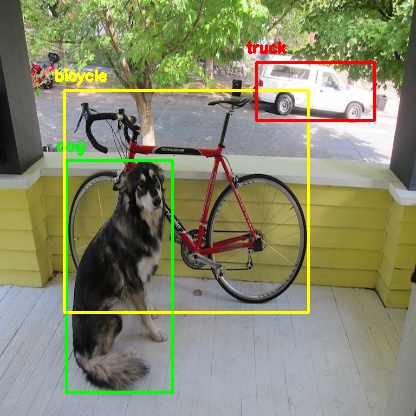
object detection from python yolo library
3. Concept Development & Prototyping
Develop Sonification Mapping Framework: Define rules for mapping visual elements (color, shape, texture) to sound parameters (pitch, timbre, rhythm).
Simple Prototype: Create a basic prototype that integrates:
AI content recognition (Python + image processing libraries).
Sound generation (Pure Data or Max/MSP).
Communication via OSC (e.g., using Wekinator).
Create or collect Sample Soundscapes: Generate initial soundscapes for different types of images (e.g., landscapes, portraits, abstract visuals).
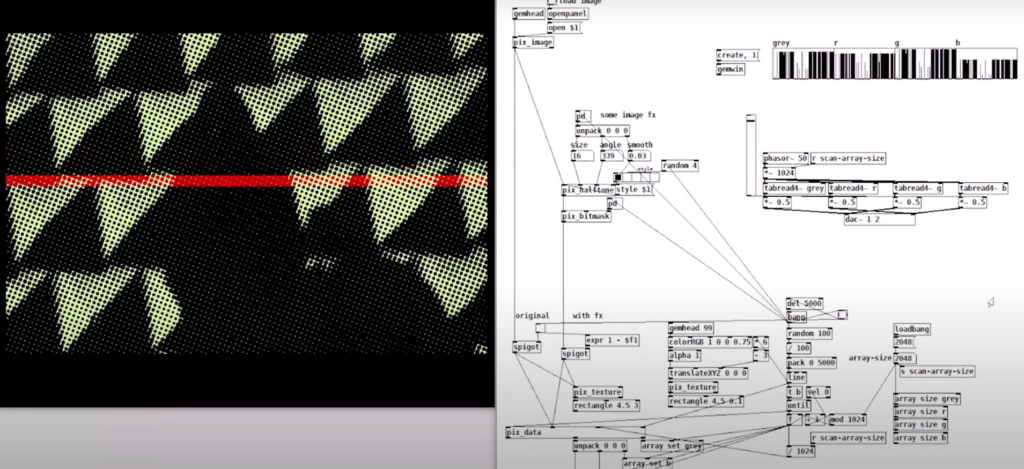
example of puredata with rem library (image to sound in pure data by Artiom Constantinov)
4. User Experience Design
UI/UX Design for Desktop:
Design intuitive interface for uploading images and adjusting sonification parameters.
Mock up controls for adjusting sound complexity, intensity, and spatialization.
Accessibility Features:
Ensure screen reader compatibility.
Develop customizable presets for different levels of user experience (basic vs. advanced).
Mobile Optimization Plan:
Plan for responsive design and functionality for smartphones.
5. Testing & Feedback Collection
Create Testing Scenarios:
Develop a set of diverse images (varying in content, color, and complexity).
Usability Testing with Visually Impaired Users:
Gather feedback on the clarity, intuitiveness, and sensory experience of the sonifications.
Identify areas of overstimulation or confusion.
Feedback from Artists/Designers:
Assess the creative flexibility and utility of the tool for sound design.
Iterate Based on Feedback:
Refine sonification mappings and interface based on user input.
6. Implementation of Standalone Application
Develop Core Application:
Integrate image recognition with sonification engine.
Implement adjustable parameters for sound generation.
Error Handling & Performance Optimization:
Ensure efficient processing for high-resolution images.
Handle edge cases for unexpected or low-quality inputs.
Cross-Platform Compatibility:
Ensure compatibility with Windows, macOS, and plan for future mobile deployment.
7. Finalization & Deployment
Finalize Feature Set:
Balance between accessibility and creative flexibility.
Ensure the sonification language is both consistent and adaptable.
Documentation & Tutorials:
Create user guides for visually impaired users and artists.
Provide tutorials for customizing sonification settings.
Deployment:
Package as a standalone desktop application.
Plan for mobile release (potentially a future phase).
Technological Basis Subtasks:
Programming: Develop core image recognition and processing modules in Python.
Sonification Engine: Create audio synthesis patches in Pure Data/Max/MSP.
Integration: Implement OSC communication between Python and the sound engine.
UI Development: Design and code the user interface for accessibility and usability.
Testing Automation: Create scripts for automating image-sonification tests.
Possible academic foundations for further research and work:
Chatterjee, Oindrila, and Shantanu Chakrabartty. “Using Growth Transform Dynamical Systems for Spatio-Temporal Data Sonification.” arXiv preprint, 2021.
Chion, Michel. Audio-Vision. New York: Columbia University Press, 1994.
Ziemer, Tim. Psychoacoustic Music Sound Field Synthesis. Cham: Springer International Publishing, 2020.
Ziemer, Tim, Nuttawut Nuchprayoon, and Holger Schultheis. “Psychoacoustic Sonification as User Interface for Human-Machine Interaction.” International Journal of Informatics Society, 2020.
Ziemer, Tim, and Holger Schultheis. “Three Orthogonal Dimensions for Psychoacoustic Sonification.” Acta Acustica United with Acustica, 2020.