Room-Aware Mixing – From Image Analysis to Coherent Acoustic Spaces
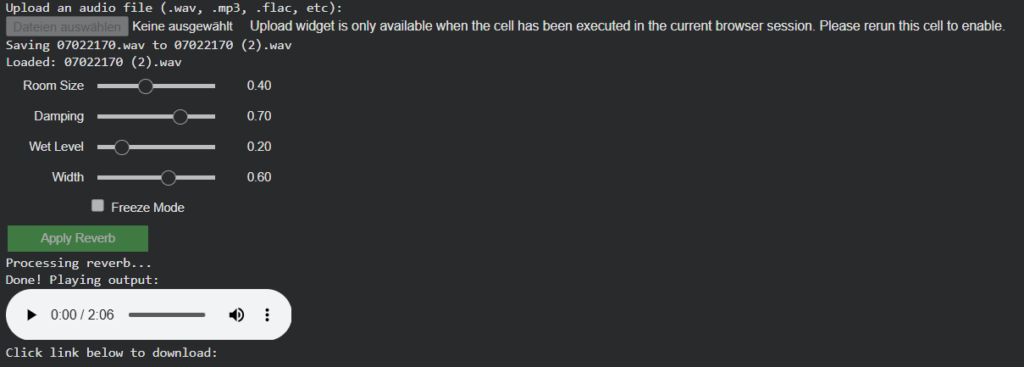
Instead of attempting to recover exact physical properties, the system derives normalized, perceptual room parameters from visual cues such as geometry, materials, furnishing density, and openness. These parameters are intentionally abstracted to work with algorithmic reverbs.
The introduced parameters are:
room_detected (bool) Indicates whether the image depicts a closed indoor space or an outdoor/open environment.
room_size (0.0–1.0) Represents the perceived acoustic size of the room (small rooms → short decay, large spaces → long decay).
damping (0.0–1.0) Estimates high-frequency absorption based on visible materials (soft furnishings, carpets, curtains vs. glass and hard walls).
wet_level (0.0–1.0) Describes how reverberant the space naturally feels.
width (0.0–1.0) Estimates perceived stereo width derived from room proportions and openness.
All parameters are stored flat within the same dictionary as objects, panning, and importance values, forming a single coherent scene representation.
Dereverberation: Explored, Then Intentionally Abandoned
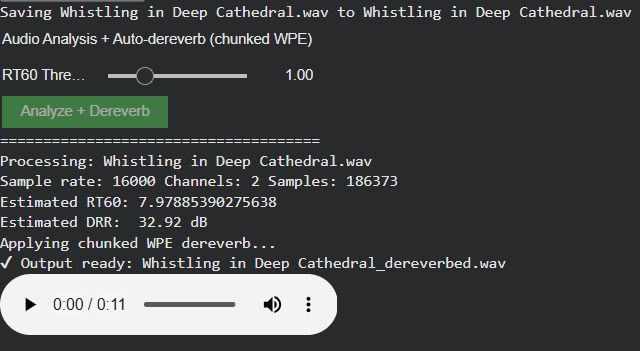
As part of this phase, automatic analysis of existing reverberation (RT60, DRR estimation) and dereverberation was evaluated.
The outcome:
Computationally expensive, especially in Google Colab
Inconsistent and often unsatisfactory audio results
High complexity with limited practical benefit
Decision: Dereverberation is not pursued further in this project. Instead, the system relies on:
Consistent room estimation
Controlled, unified reverb application
Preventive design rather than corrective processing
The next step will be to focus on the analysis of the sounds (especially rt60 and drr values) to make the reverb (if its a closed room) less on the specific sound.
Dynamic Audio Balancing Through Visual Importance Mapping
This development phase introduces sophisticated volume control based on visual importance analysis, creating audio mixes that dynamically reflect the compositional hierarchy of the original image. Where previous systems ensured semantic accuracy, we now ensure proportional acoustic representation.
The core advancement lies in importance-based volume scaling. Each detected object’s importance value (0-1 scale from visual analysis) now directly determines its loudness level within a configurable range (-30 dBFS to -20 dBFS). Visually dominant elements receive higher volume placement, while background objects maintain subtle presence.
Key enhancements include:
– Linear importance-to-volume mapping creating natural acoustic hierarchies
The system now distinguishes between foreground emphasis and background ambiance, producing mixes where a visually central “car” (importance 0.9) sounds appropriately prominent compared to a distant “tree” (importance 0.2), while “urban street atmo” provides unwavering environmental foundation.
This represents a significant evolution from flat audio layering to dynamically balanced soundscapes that respect visual composition through intelligent volume distribution.
Intelligent Sound Fallback Systems – Enhancing Audio Generation with AI-Powered Semantic Recovery
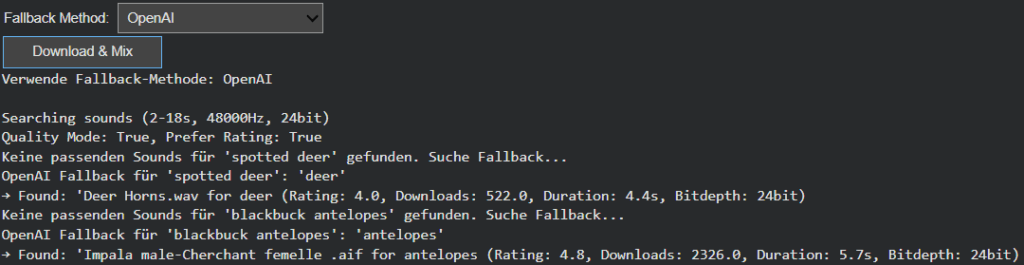
After refining Image Extender’s sound layering and spectral processing engine, this week’s development shifted focus to one of the system’s most practical yet creatively crucial challenges: ensuring that the generation process never fails silently. In previous iterations, when a detected visual object had no directly corresponding sound file in the Freesound database, the result was often an incomplete or muted soundscape. The goal of this phase was to build an intelligent fallback architecture—one capable of preserving meaning and continuity even in the absence of perfect data.
Closing the Gap Between Visual Recognition and Audio Availability
During testing, it became clear that visual recognition is often more detailed and specific than what current sound libraries can support. Object detection models might identify entities like “Golden Retriever,” “Ceramic Cup,” or “Lighthouse,” but audio datasets tend to contain more general or differently labeled entries. This mismatch created a semantic gap between what the system understands and what it can express acoustically.
The newly introduced fallback framework bridges this gap, allowing Image Extender to adapt gracefully. Instead of stopping when a sound is missing, the system now follows a set of intelligent recovery paths that preserve the intent and tone of the visual analysis while maintaining creative consistency. The result is a more resilient, contextually aware sonic generation process—one that doesn’t just survive missing data, but thrives within it.
Dual Strategy: Structured Hierarchies and AI-Powered Adaptation
Two complementary fallback strategies were introduced this week: one grounded in structured logic, and another driven by semantic intelligence.
The CSV-based fallback system builds on the ontology work from the previous phase. Using the tag_hierarchy.csv file, each sound tag is part of a parent–child chain, creating predictable fallback paths. For example, if “tiger” fails, the system ascends to “jungle,” and then “nature.” This rule-based approach guarantees reliability and zero additional computational cost, making it ideal for large-scale batch operations or offline workflows.
In contrast, the AI-powered semantic fallback uses GPT-based reasoning to dynamically generate alternative tags. When the CSV offers no viable route, the model proposes conceptually similar or thematically related categories. A specific bird species might lead to the broader concept of “bird sounds,” or an abstract object like “smartphone” could redirect to “digital notification” or “button click.” This layer of intelligence brings flexibility to unfamiliar or novel recognition results, extending the system’s creative reach beyond its predefined hierarchies.
User-Controlled Adaptation
Recognizing that different projects require different balances between cost, control, and creativity, the fallback mode is now user-configurable. Through a simple dropdown menu, users can switch between CSV Mode and AI Mode.
CSV Mode favors consistency, predictability, and cost-efficiency—perfect for common, well-defined categories.
AI Mode prioritizes adaptability and creative expansion, ideal for complex visual inputs or unique scenes.
This configurability not only empowers users but also represents a deeper design philosophy: that AI systems should be tools for choice, not fixed solutions.
Toward Adaptive and Resilient Multimodal Systems
This week’s progress marks a pivotal evolution from static, database-bound sound generation to a hybrid model that merges structured logic with adaptive intelligence. The dual fallback system doesn’t just fill gaps, it embodies the philosophy of resilient multimodal AI, where structure and adaptability coexist in balance.
The CSV hierarchy ensures reliability, grounding the system in defined categories, while the AI layer provides flexibility and creativity, ensuring the output remains expressive even when the data isn’t. Together, they form a powerful, future-proof foundation for Image Extender’s ongoing mission: transforming visual perception into sound not as a mechanical translation, but as a living, interpretive process.
Following the foundational phase of last week, where the OpenAI API Image Analyzer established a structured evaluation framework for multimodal image analysis, the project has now reached a significant new milestone. The second release integrates both OpenAI’s GPT-4.1-based vision models and Google’s Gemini (MediaPipe) inference pipeline into a unified, adaptive system inside the Image Extender environment.
Unified Recognition Interface
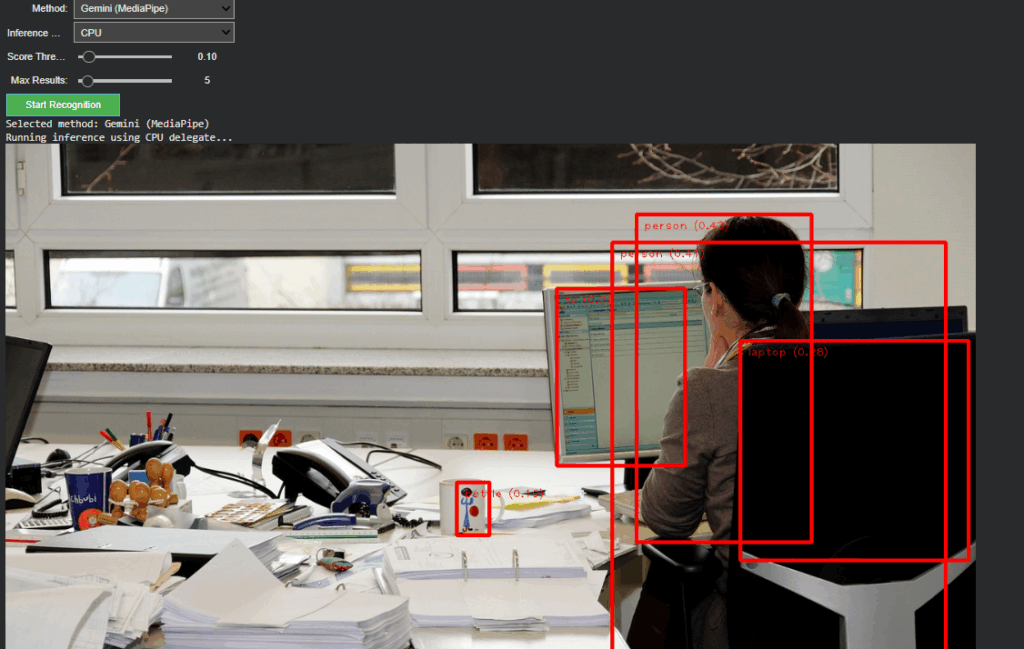
In The current version, the recognition logic has been completely refactored to support runtime model switching. A dropdown-based control in Google Colab enables instant selection between:
Gemini (MediaPipe) – for efficient, on-device object detection and panning estimation
OpenAI (GPT-4.1 / GPT-4.1-mini) – for high-level semantic and compositional interpretation
Non-relevant parameters such as score threshold or delegate type dynamically hide when OpenAI mode is active, keeping the interface clean and focused. Switching back to Gemini restores all MediaPipe-related controls. This creates a smooth dual-inference workflow where both engines can operate independently yet share the same image context and visualization logic.
Architecture Overview
The system is divided into two self-contained modules:
Image Upload Block – handles external image input and maintains a global IMAGE_FILE reference for both inference paths.
Recognition Block – manages model selection, executes inference, parses structured outputs, and handles visualization.
This modular split keeps the code reusable, reduces side effects between branches, and simplifies later expansion toward GUI-based or cloud-integrated applications.
OpenAI Integration
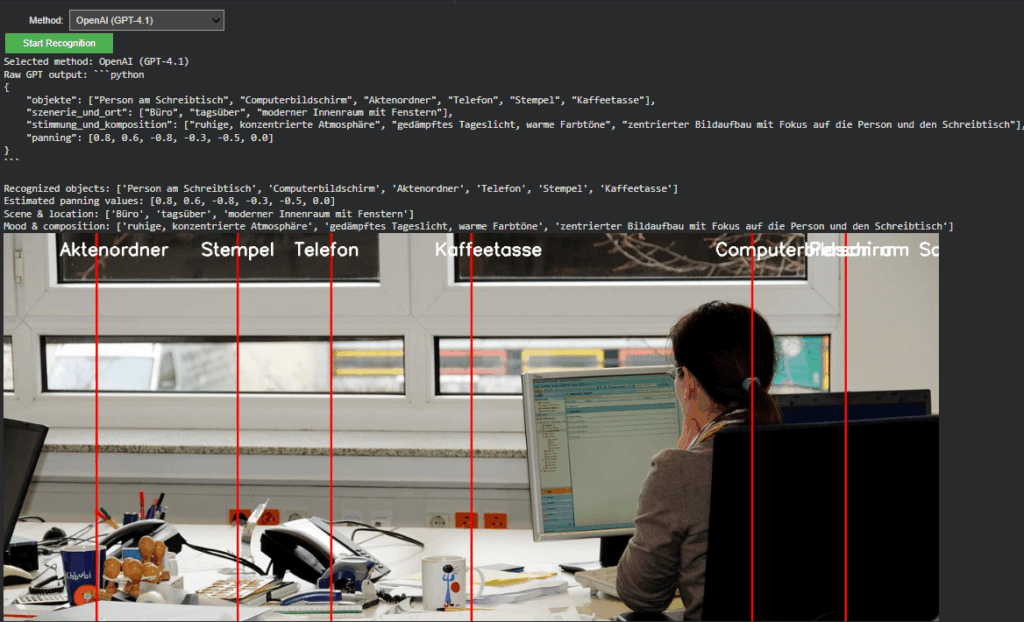
The OpenAI branch extends directly from Last week but now operates within the full environment. It converts uploaded images into Base64 and sends a multimodal request to gpt-4.1 or gpt-4.1-mini. The model returns a structured Python dictionary, typically using the following schema:
{
“objects”: […],
“scene_and_location”: […],
“mood_and_composition”: […],
“panning”: […]
}
A multi-stage parser (AST → JSON → fallback) ensures robustness even when GPT responses contain formatting artifacts.
Prompt Refinement
During development, testing revealed that the English prompt version initially returned empty dictionaries. Investigation showed that overly strict phrasing (“exclusively as a Python dictionary”) caused the model to suppress uncertain outputs. By softening this instruction to allow “reasonable guesses” and explicitly forbidding empty fields, the API responses became consistent and semantically rich.
Debugging the Visualization
A subtle logic bug was discovered in the visualization layer: The post-processing code still referenced German dictionary keys (“objekte”, “szenerie_und_ort”, “stimmung_und_komposition”) from Last week. Since the new English prompt returned English keys (“objects”, “scene_and_location”, etc.), these lookups produced empty lists, which in turn broke the overlay rendering loop. After harmonizing key references to support both language variants, the visualization resumed normal operation.
Cross-Model Visualization and Validation
A unified visualization layer now overlays results from either model directly onto the source image. In OpenAI mode, the “panning” values from GPT’s response are projected as vertical lines with object labels. This provides immediate visual confirmation that the model’s spatial reasoning aligns with the actual object layout, an important diagnostic step for evaluating AI-based perception accuracy.
Outcome and Next Steps
The project now represents a dual-model visual intelligence system, capable of using symbolic AI interpretation (OpenAI) and local pixel-based detection (Gemini).
Next steps
The upcoming development cycle will focus on connecting the openAI API layer directly with the Image Extender’s audio search and fallback system.
Advanced Automated Sound Mixing with Hierarchical Tag Handling and Spectral Awareness
The Image Extender project continues to evolve in scope and sophistication. What began as a relatively straightforward pipeline connecting object recognition to the Freesound.org API has now grown into a rich, semi-intelligent audio mixing system. This recent development phase focused on enhancing both the semantic accuracy and the acoustic quality of generated soundscapes, tackling two significant challenges: how to gracefully handle missing tag-to-sound matches, and how to intelligently mix overlapping sounds to avoid auditory clutter.
Sound Retrieval Meets Semantic Depth
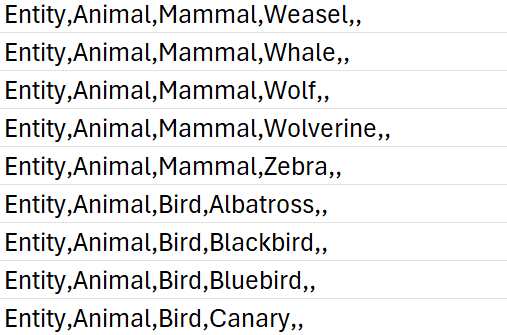
One of the core limitations of the original approach was its dependence on exact tag matches. If no sound was found for a detected object, that tag simply went silent. To address this, I introduced a multi-level fallback system based on a custom-built CSV ontology inspired by Google’s AudioSet.
This ontology now contains hundreds of entries, organized into logical hierarchies that progress from broad categories like “Entity” or “Animal” to highly specific leaf nodes like “White-tailed Deer,” “Pickup Truck,” or “Golden Eagle.” When a tag fails, the system automatically climbs upward through this tree, selecting a more general fallback—moving from “Tiger” to “Carnivore” to “Mammal,” and finally to “Animal” if necessary.
Implementation of temporal composition
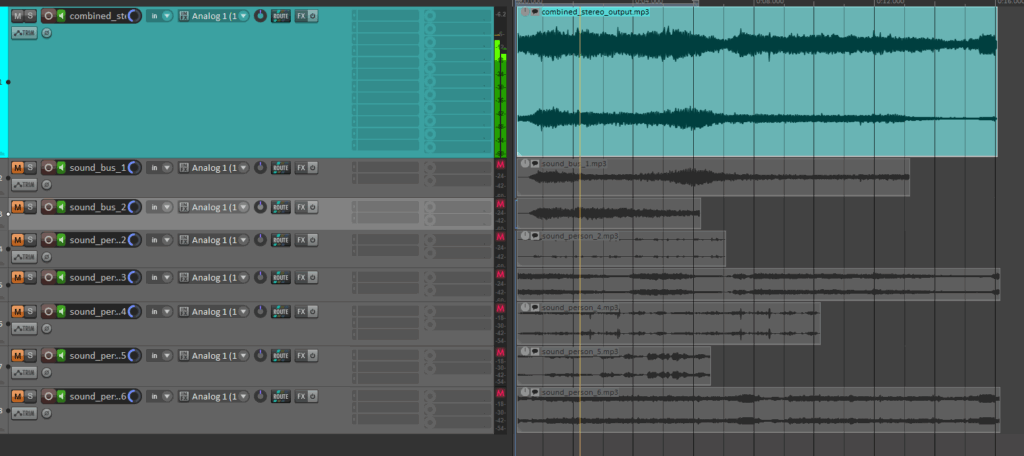
Initial versions of Image Extender merely stacked sounds on top of each other by only using the spatial composition in the form of panning. Now, the mixing system behaves more like a simplified DAW (Digital Audio Workstation). Key improvements introduced in this iteration include:
Random temporal placement: Shorter sound files are distributed at randomized time positions across the duration of the mix, reducing sonic overcrowding and creating a more natural flow.
Automatic fade-ins and fade-outs: Each sound is treated with short fades to eliminate abrupt onsets and offsets, improving auditory smoothness.
Mix length based on longest sound: Instead of enforcing a fixed duration, the mix now adapts to the length of the longest inserted file, which is always placed at the beginning to anchor the composition.
These changes give each generated audio scene a sense of temporal structure and stereo space, making them more immersive and cinematic.
Frequency-Aware Mixing: Avoiding Spectral Masking
A standout feature developed during this phase was automatic spectral masking avoidance. When multiple sounds overlap in time and occupy similar frequency bands, they can mask each other, causing a loss of clarity. To mitigate this, the system performs the following steps:
Before placing a sound, the system extracts the portion of the mix it will overlap with.
Both the new sound and the overlapping mix segment are analyzed via FFT (Fast Fourier Transform) to determine their dominant frequency bands.
If the analysis detects significant overlap in frequency content, the system takes one of two corrective actions:
Attenuation: The new sound is reduced in volume (e.g., -6 dB).
EQ filtering: Depending on the nature of the conflict, a high-pass or low-pass filter is applied to the new sound to move it out of the way spectrally.
This spectral awareness doesn’t reach the complexity of advanced mixing, but it significantly reduces the most obvious masking effects in real-time-generated content—without user input.
Spectrogram Visualization of the Final Mix
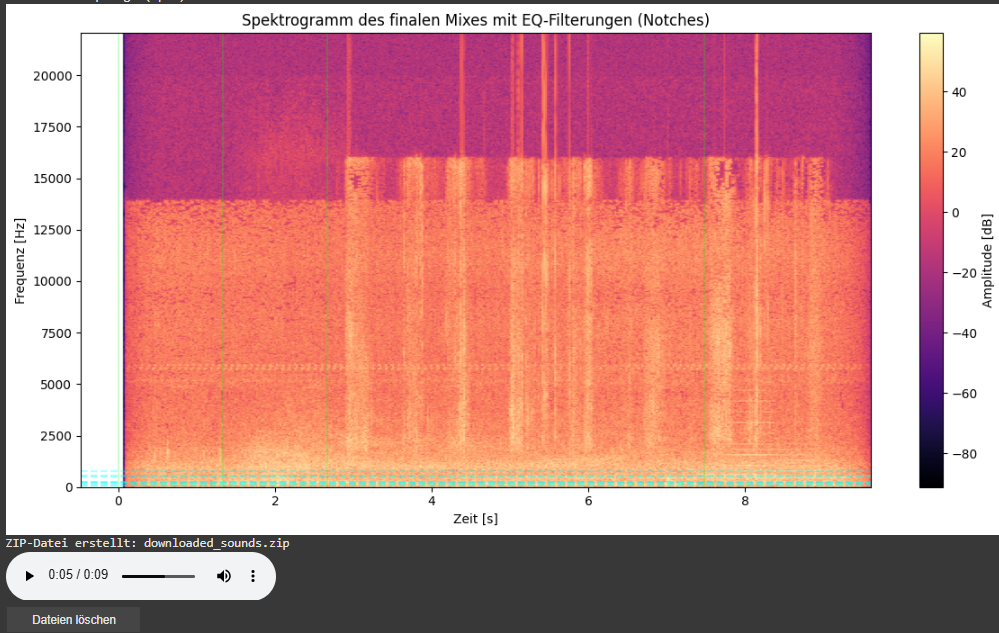
As part of this iteration, I also added a spectrogram visualization of the final mix. This visual feedback provides a frequency-time representation of the soundscape and highlights which parts of the spectrum have been affected by EQ filtering.
Vertical dashed lines indicate the insertion time of each new sound.
Horizontal lines mark the dominant frequencies of the added sound segments. These often coincide with spectral areas where notch filters have been applied to avoid collisions with the existing mix.
This visualization allows for easier debugging, improved understanding of frequency interactions, and serves as a useful tool when tuning mixing parameters or filter behaviors.
Looking Ahead
As the architecture matures, future milestones are already on the horizon. We aim to implement:
Visual feedback: A real-time timeline that shows audio placement, duration, and spectral content.
Advanced loudness control: Integration of dynamic range compression and LUFS-based normalization for output consistency.
Mixing of the automatically searched audio files into one combined stereo file:
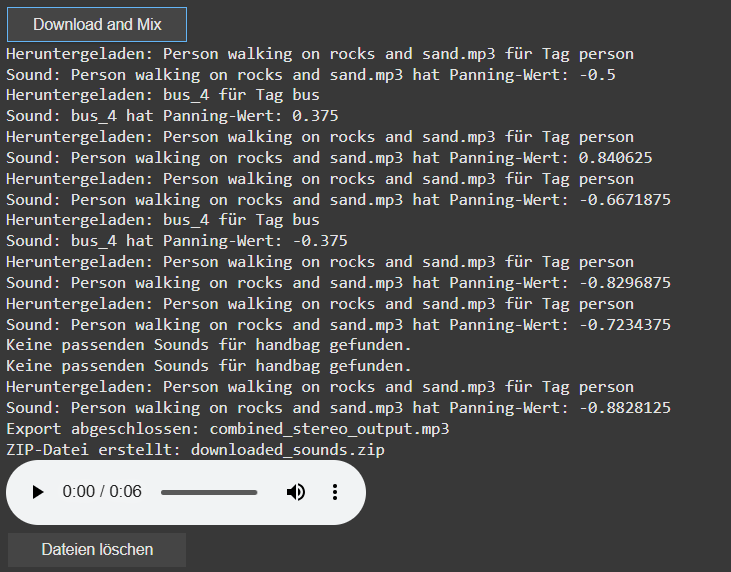
In this latest update, I’ve implemented several new features to create the first layer of an automated sound mixing system for the object recognition tool. The tool now automatically adjusts pan values and applies attenuation to ensure a balanced stereo mix, while seamlessly handling multiple tracks. This helps avoid overload and guarantees smooth audio mixing.
check of the automatically searched and downloaded files + the automatically generated combined audiofile
A key new feature is the addition of a sound_pannings array, which holds unique panning values for each sound based on the position of the object’s bounding box within an image. This ensures that each sound associated with a recognized object gets an individualized panning, calculated from its horizontal position within the image, for a more dynamic and immersive experience.
display of the sound panning values [-1 left, 1 right]
I’ve also introduced a system to automatically download sound files directly into Google Colab’s file system. This eliminates the need for managing local folders. Users can now easily preview audio within the notebook, which adds interactivity and helps visualize the results instantly.
The sound downloading process has also been revamped. The filters for the search can now be saved via a buttonclick to apply for the search and download for the audiofile. Currently for each tags there are 10 sounds per tag preloaded, with each sound randomly selected to avoid duplication but ensure the use of multiple times of the same tag. A sound is only downloaded if it hasn’t been used before. If all sound options for a tag are exhausted, no sound will be downloaded for that tag.
Additionally, I’ve added the ability to create a ZIP file that includes all the downloaded sounds as well as the final mixed audio output. This makes it easy to download and share the files. To keep things organized, I’ve also introduced a delete button that removes all downloaded files once they are no longer needed. The interface now includes buttons for controlling the download, file cleanup, and audio playback, simplifying the process for users.
Looking ahead, I plan to continue refining the system by working on better mixing techniques, focusing on aspects like spectrum, frequency, and the overall importance of the sounds. Future updates will also look at integrating volume control and more far in the future an LLM Model that can check the correctness of the found file title.
New features in the object recognition and test run for images:
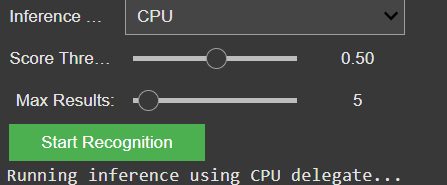
Since the initial freesound.org and GeminAI setup, I have added several improvements. You can now choose between different object recognition models and adjust settings like the number of detected objects and the minimum confidence threshold.
GUI for the settings of the model
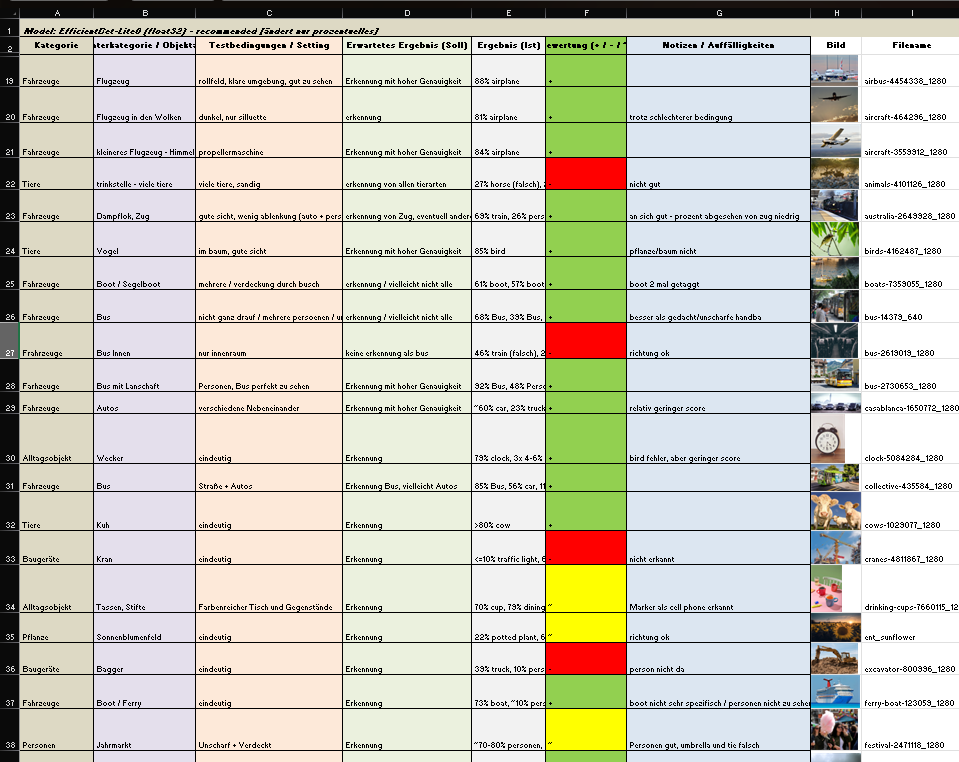
I also created a detailed testing matrix, using a wide range of images to evaluate detection accuracy. Due to that there might be the change of the model later on, because it seems the gemini api only has a very basic pool of tags and is also not a good training in every category.
Test of images for the object recognition
It is still reliable for these basic tags like “bird”, “car”, “tree”, etc. And for these tags it also doesn’t really matter if theres a lot of shadow, you only see half of the object or even if its blurry. But because of the lack of specific tags I will look into models or APIs that offer more fine-grained recognition.
Coming up: I’ll be working on whether to auto-play or download the selected audio files including layering sounds, adjusting volumes, experimenting with EQ and filtering — all to make the playback more natural and immersive. Also, I will think about categorization and moving the tags into a layer system. Beside that I am going to check for other object recognition models, but I might stick to the gemini api for prototyping a bit more and change the model later.
Integration of AI-Object Recognition in the automated audio file search process:
After setting up the initial interface for the freesound.org API and confirming everything works with test tags and basic search filters, the next major milestone is now in motion: AI-based object recognition using the GeminAI API.
The idea is to feed in an image (or a batch of them), let the AI detect what’s in it, and then use those recognized tags to trigger an automated search for corresponding sounds on freesound.org. The integration already loads the detected tags into an array, which is then automatically passed on to the sound search. This allows the system to dynamically react to the content of an image and search for matching audio files — no manual tagging needed anymore.
So far, the detection is working pretty reliably for general categories like “bird”, “car”, “tree”, etc. But I’m looking into models or APIs that offer more fine-grained recognition. For instance, instead of just “bird”, I’d like it to say “sparrow”, “eagle”, or even specific songbird species if possible. This would make the whole sound mapping feel much more tailored and immersive.
A list of test images will be prepared, but there’s already a testing matrix for different objects, situations, scenery and technical differences
On the freesound side, I’ve got the basic query parameters set up: tag search, sample rate, file type, license, and duration filters. There’s room to expand this with additional parameters like rating, bit depth, and maybe even a random selection toggle to avoid repetition when the same tag comes up multiple times.
Coming up: I’ll be working on whether to auto-play or download the selected audio files, and starting to test how the AI-generated tags influence the mood and quality of the soundscape. The long-term plan includes layering sounds, adjusting volumes, experimenting with EQ and filtering — all to make the playback more natural and immersive.
Research on sonification of images / video material and different approaches – focus on RGB
The paper by Kopecek and Ošlejšek presents a system that enables visually impaired users to perceive color images through sound using a semantic color model. Each primary color (such as red, green, or blue) is assigned a unique sound, and colors in an image are approximated by the two closest primary colors. These are represented through two simultaneous tones, with volume indicating the proportion of each color. Users can explore images by selecting pixels or regions using input devices like a touchscreen or mouse. The system calculates the average color of the selected area and plays the corresponding sounds. Distinct audio cues indicate image boundaries, and sounds can be either synthetic or instrument-based, with timbre and pitch helping to differentiate them. Users can customize colors and sounds for a more personalized experience. This approach allows for dynamic, efficient exploration of images and supports navigation via annotated SVG formats.
image seperation by Kopecek and Ošlejšek
The review by Sarkar, Bakshi, and Sa offers an overview of various image sonification methods designed to help visually impaired users interpret visual scenes through sound. It covers techniques such as raster scanning, query-based, and path-based approaches, where visual data like pixel intensity and position are mapped to auditory cues. Systems like vOICe and NAVI use high and low-frequency tones to represent image regions vertically. The paper emphasizes the importance of transfer functions, which link image properties to sound attributes such as pitch, volume, and frequency. Different rendering methods—like audification, earcons, and parameter mapping—are discussed in relation to human auditory perception. Special attention is given to color sonification, including the semantic color model introduced by Kopecek and Ošlejšek, which improves usability through clearly distinguishable tones. The paper also explores applications in fields such as medical imaging, algorithm visualization, and network analysis, and briefly touches on sound-to-image conversions.
Principles of the image-to-sound mapping
Matta, Rudolph, and Kumar propose the theoretical system “Auditory Eyes,” which converts visual data into auditory and tactile signals to support blind users. The system comprises three main components: an image encoder that uses edge detection and triangulation to estimate object location and distance; a mapper that translates features like motion, brightness, and proximity into corresponding sound and vibration cues; and output generators that produce sound using tools like Csound and tactile feedback via vibrations. Motion is represented using effects like Doppler shift and interaural time difference, while spatial positioning is conveyed through head-related transfer functions. Brightness is mapped to pitch, and edges are conveyed through tone duration. The authors emphasize that combining auditory and tactile information can create a richer and more intuitive understanding of the environment, making the system potentially very useful for real-world navigation and object recognition.
References
Kopecek, Ivan, and Radek Ošlejšek. 2008. “Hybrid Approach to Sonification of Color Images.” In Third 2008 International Conference on Convergence and Hybrid Information Technology, 721–726. IEEE. https://doi.org/10.1109/ICCIT.2008.152.
Sarkar, Rajib, Sambit Bakshi, and Pankaj K Sa. 2012. “Review on Image Sonification: A Non-visual Scene Representation.” In 1st International Conference on Recent Advances in Information Technology (RAIT-2012), 1–5. IEEE. https://doi.org/10.1109/RAIT.2012.6194495.
Matta, Suresh, Heiko Rudolph, and Dinesh K Kumar. 2005. “Auditory Eyes: Representing Visual Information in Sound and Tactile Cues.” In Proceedings of the 13th European Signal Processing Conference (EUSIPCO 2005), 1–5. Antalya, Turkey. https://www.researchgate.net/publication/241256962.
Expanded research on sonification of images / video material and different approaches:
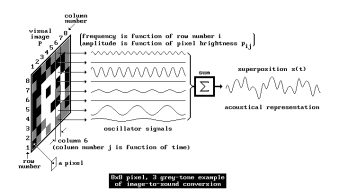
Yeo and Berger (2005) write in “A Framework for Designing Image Sonification Methods” about the challenge of mapping static, time-independent data like images into the time-dependent auditory domain. They introduce two main concepts: scanning and probing. Scanning follows a fixed, pre-determined order of sonification, whereas probing allows for arbitrary, user-controlled exploration. The paper also discusses the importance of pointers and paths in defining how data is mapped to sound. Several sonification techniques are analyzed, including inverse spectrogram mapping and the method of raster scanning (which already was explained in the Prototyping I – Blog entry), with examples illustrating their effectiveness. The authors suggest that combining scanning and probing offers a more comprehensive approach to image sonification, allowing for both global context and local feature exploration. Future work includes extending the framework to model human image perception for more intuitive sonification methods.
Time on “perpendicular” axis. (Yeo, Berger, 2005)Raster scanning method (Yeo, Berger, 2005)Pointers in different shapes: (a) single point, (b) line/curve, (c) area, and (d) set of distributed points. (Yeo, Berger, 2005)Inverse spectrogram scanning (Yeo, Berger, 2005)
Sharma et al. (2017) explore action recognition in still images using Natural Language Processing (NLP) techniques in “Action Recognition in Still Images Using Word Embeddings from Natural Language Descriptions.” Rather than training visual action detectors, they propose detecting prominent objects in an image and inferring actions based on object relationships. The Object-Verb-Object (OVO) triplet model predicts verbs using object co-occurrence, while word2vec captures semantic relationships between objects and actions. Experimental results show that this approach reliably detects actions without computationally intensive visual action detectors. The authors highlight the potential of this method in resource-constrained environments, such as mobile devices, and suggest future work incorporating spatial relationships and global scene context.
Iovino et al. (1997) discuss developments in Modalys, a physical modeling synthesizer based on modal synthesis, in “Recent Work Around Modalys and Modal Synthesis.” Modalys allows users to create virtual instruments by defining physical structures (objects), their interactions (connections), and control parameters (controllers). The authors explore the musical possibilities of Modalys, emphasizing its flexibility and the challenges of controlling complex synthesis parameters. They propose applications such as virtual instrument construction, simulation of instrumental gestures, and convergence of signal and physical modeling synthesis. The paper also introduces single-point objects, which allow for spectral control of sound, bridging the gap between signal synthesis and physical modeling. Real-time control and expressivity are emphasized, with future work focused on integrating Modalys with real-time platforms.
McGee et al. (2012) describe Voice of Sisyphus, a multimedia installation that sonifies a black-and-white image using raster scanning and frequency domain filtering in “Voice of Sisyphus: An Image Sonification Multimedia Installation.” Unlike traditional spectrograph-based sonification methods, this project focuses on probing different image regions to create a dynamic audio-visual composition. Custom software enables real-time manipulation of image regions, polyphonic sound generation, and spatialization. The installation cycles through eight phrases, each with distinct visual and auditory characteristics, creating a continuous, evolving experience. The authors discuss balancing visual and auditory aesthetics, noting that visually coherent images often produce noisy sounds, while abstract images yield clearer tones. The project draws inspiration from early experiments in image sonification and aims to create a synchronized audio-visual experience engaging viewers on multiple levels.
Software Interface for Voice of Sisyphus (McGee et al., 2012)
Roodaki et al. (2017) introduce SonifEye, a system that uses physical modeling sound synthesis to convey visual information in high-precision tasks, in “SonifEye: Sonification of Visual Information Using Physical Modeling Sound Synthesis.” They propose three sonification mechanisms: touch, pressure, and angle of approach, each mapped to sounds generated by physical models (e.g., tapping on a wooden plate or plucking a string). The system aims to reduce cognitive load and avoid alarm fatigue by using intuitive, natural sounds. Two experiments compare the effectiveness of visual, auditory, and combined feedback in high-precision tasks. Results show that auditory feedback alone can improve task performance, particularly in scenarios where visual feedback may be distracting. The authors suggest applications in medical procedures and other fields requiring precise manual tasks.
Dubus and Bresin review mapping strategies for the sonification of physical quantities in “A Systematic Review of Mapping Strategies for the Sonification of Physical Quantities.” Their study analyzes 179 publications to identify trends and best practices in sonification. The authors find that pitch is the most commonly used auditory dimension, while spatial auditory mapping is primarily applied to kinematic data. They also highlight the lack of standardized evaluation methods for sonification efficiency. The paper proposes a mapping-based framework for characterizing sonification and suggests future work in refining mapping strategies to enhance usability.
References
Yeo, Woon Seung, and Jonathan Berger. 2005. “A Framework for Designing Image Sonification Methods.” In Proceedings of ICAD 05-Eleventh Meeting of the International Conference on Auditory Display, Limerick, Ireland, July 6-9, 2005.
Sharma, Karan, Arun CS Kumar, and Suchendra M. Bhandarkar. 2017. “Action Recognition in Still Images Using Word Embeddings from Natural Language Descriptions.” In 2017 IEEE Winter Conference on Applications of Computer Vision (WACV), 978-1-5090-4941-7/17. DOI: 10.1109/WACVW.2017.17.
Iovino, Francisco, Rene Causse, and Richard Dudas. 1997. “Recent Work Around Modalys and Modal Synthesis.” In Proceedings of the International Computer Music Conference (ICMC).
McGee, Ryan, Joshua Dickinson, and George Legrady. 2012. “Voice of Sisyphus: An Image Sonification Multimedia Installation.” In Proceedings of the 18th International Conference on Auditory Display (ICAD-2012), Atlanta, USA, June 18–22, 2012.
Roodaki, Hessam, Navid Navab, Abouzar Eslami, Christopher Stapleton, and Nassir Navab. 2017. “SonifEye: Sonification of Visual Information Using Physical Modeling Sound Synthesis.” IEEE Transactions on Visualization and Computer Graphics 23, no. 11: 2366–2371. DOI: 10.1109/TVCG.2017.2734320.
Dubus, Gaël, and Roberto Bresin. 2013. “A Systematic Review of Mapping Strategies for the Sonification of Physical Quantities.” PLoS ONE 8(12): e82491. DOI: 10.1371/journal.pone.0082491.