#05 The Art and Science of Sound

Sound is more than a medium for communication—it’s a profound tool for conveying meaning, evoking emotions, and guiding interaction. Two critical concepts in this domain, Perception, Cognition and Action in Auditory Displays and Sonic Interaction Design (SID), illustrate the potential of sound to transform user experiences. Let’s dive into these fascinating dimensions and explore how they enrich interaction design.

Understanding Auditory Displays: Perception Meets Cognition

The world of sound is intricate, with perception playing a central role in translating acoustic signals into meaning. Chapter 4 of The Sonification Handbook emphasizes the interplay between low-level auditory dimensions (pitch, loudness, timbre) and higher-order cognitive processes.

1. Multidimensional Sound Mapping: Designers often map data variables to sound dimensions. For instance:
• Pitch represents stock price fluctuations.
• Loudness indicates proximity to thresholds.

2. Dimensional Interaction: These mappings aren’t always independent. For example, a rising pitch combined with falling loudness can distort perceptions, leading users to overestimate changes.

3. Temporal and Spatial Cues: Sound’s inherent temporal qualities make it ideal for monitoring processes and detecting anomalies. Spatialized sound, like binaural audio, enhances virtual environments by creating immersive experiences.

The Human Connection

What sets auditory displays apart is their alignment with human cognition:
Auditory Scene Analysis: Our brains can isolate sound streams (a melody amidst noise).
Action and Perception Loops: Interactive displays that let users modify sounds in real-time (tapping to control rhythm) leverage embodied cognition, connecting users’ actions to auditory feedback.

Sonic Interaction Design: Designing for Engagement

SID extends the principles of auditory perception into the realm of interaction. It focuses on creating systems where sound is an active, responsive participant in user interaction. This isn’t about adding sound arbitrarily; it’s about making sound integral to the product experience.

Core Concepts:

1. Closed-Loop Interaction: Users generate sound through actions, which then guide their behavior. Think of a rowing simulator where audio feedback helps athletes fine-tune their movements.

2. Multisensory Design: SID integrates sound with visual, tactile, and proprioceptive cues, ensuring a cohesive experience. For example, the iPod’s click wheel creates a pseudo-haptic illusion through auditory feedback.

3. Natural Sounds vs. Arbitrary Feedback: Research shows users prefer natural, intuitive sound interactions—like the “clickety-clack” of a spinning top model—over abstract sounds.

Aesthetic and Emotional Dimensions

Sound isn’t just functional; it’s deeply emotional:
Pleasantness and Annoyance: Sounds that align with user expectations can make interactions enjoyable, while poorly designed sounds risk irritation.
Emotional Resonance: Artifacts like the Blendie blender, which responds to vocal imitations, evoke playful and emotional responses, enhancing engagement.

Techniques for Sonic Innovation

Both frameworks underline the importance of crafting meaningful sonic interactions. Here’s how designers can apply these insights:

1. Leverage Auditory Feedback Loops:
Use real-time feedback to enhance tasks requiring precision. A surgical tool that changes pitch based on pressure can guide users intuitively.

2. Foster Emotional Connections:
Integrate sounds that mirror real-world actions or emotions. For example, soundscapes that reflect pouring water can make mundane interactions delightful.

3. Design for Multisensory Consistency:
Ensure that sound complements visual and tactile feedback. Synchronizing auditory and visual cues can improve user understanding and create a seamless experience.

The Future of Interaction Design with Sound

As technology evolves, sound’s role in interaction design will expand—from aiding navigation in virtual reality to enhancing everyday products with subtle, meaningful audio cues. By combining cognitive insights with creative sound design, we can craft experiences that are not only functional but also profoundly human.

Reference

T. Hermann, A. Hunt, and J. G. Neuhoff, Eds., The Sonification Handbook, 1st ed. Berlin, Germany: Logos Publishing House, 2011, 586 pp., ISBN: 978-3-8325-2819-5.
https://sonification.de/handbook

#04 Sonification Tools

DataSonifyer

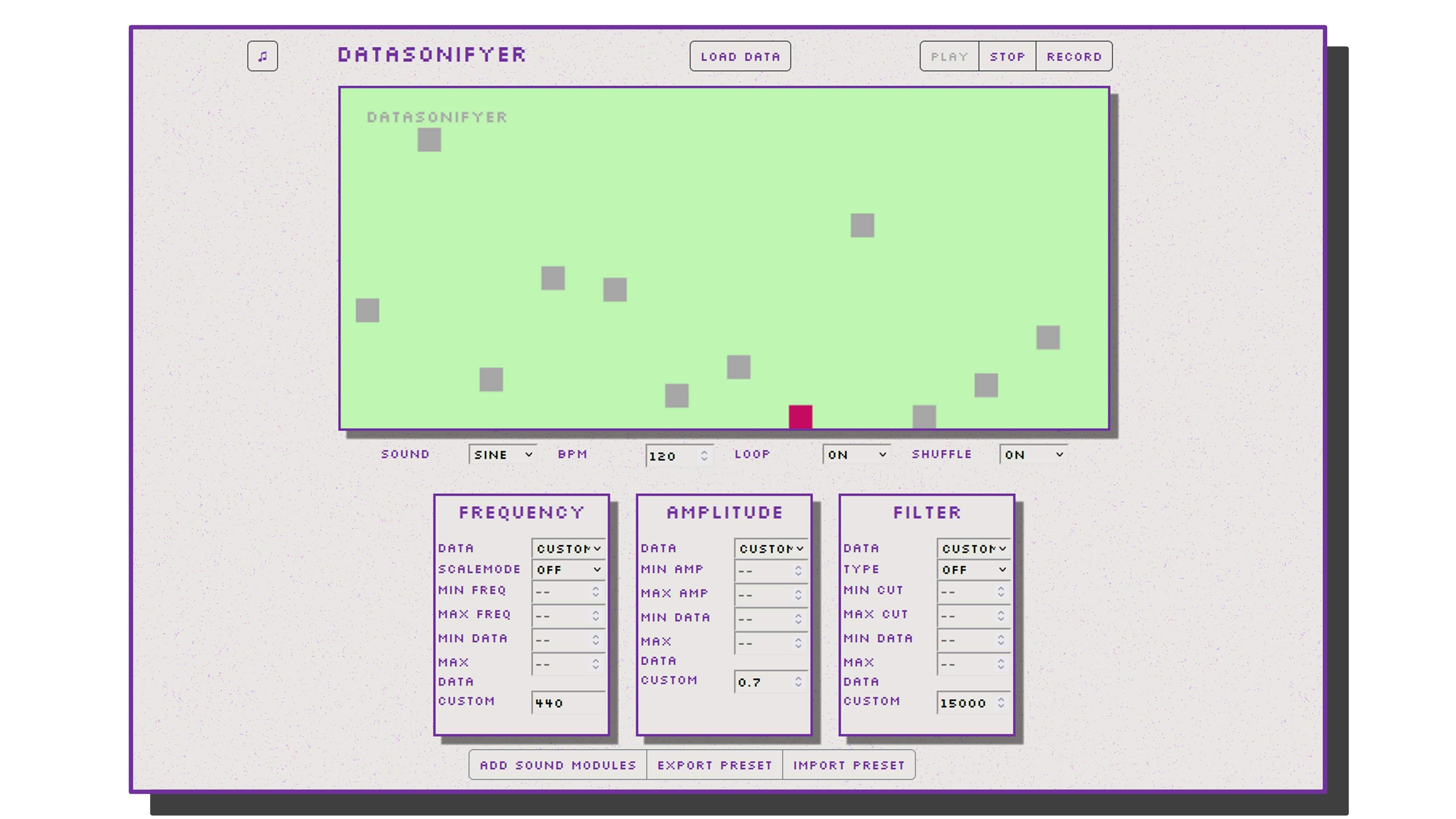
DataSonifyer is a free online tool (no registration required) that turns data into sound. It creates “audible” information from numeric values by translating the datasets into musical parameters (pitch, volume, rhythm, etc.). The result is similar to a musical score that can be played and recorded. DataSonifyer was developed in 2023 by Christian Basl, supported by the Innovation Fund of the Science Press Conference.

https://studio.datasonifyer.de/en


TwoTone

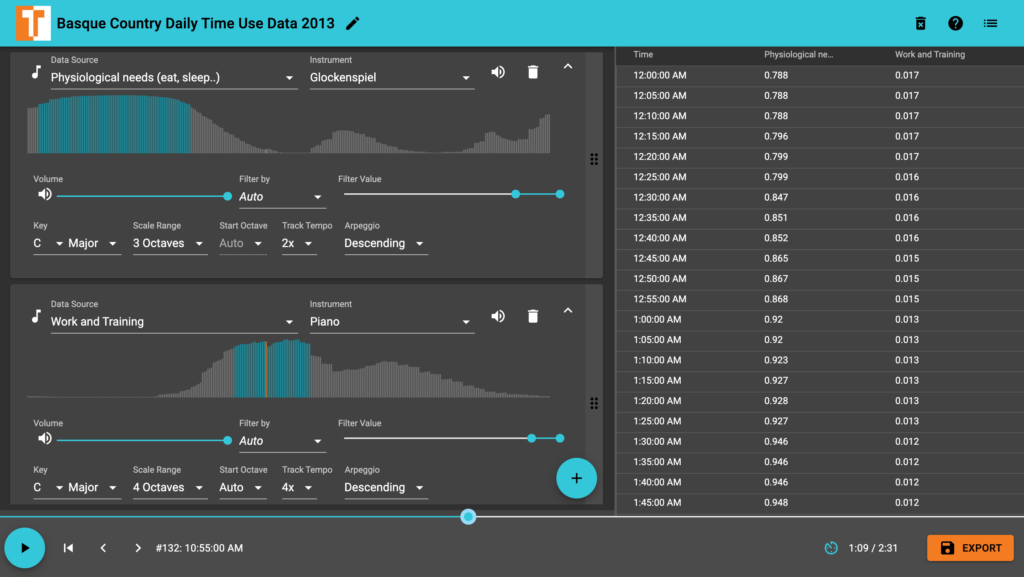
TwoTone is a free, web-based tool (no downloads required) that turns data into sound and music—no coding or musical expertise necessary. Originally developed by Datavized Technologies with support from the Google News Initiative and now maintained by Sonify, the project was commissioned by Simon Rogers at Google and advised by Alberto Cairo. TwoTone uses data sonification to help users understand complex datasets and create data-driven compositions, offering an intuitive interface that works on desktops, tablets, and phones.

https://twotone.io


Music Algorithms

Music Algorithms offers a step-by-step approach to creating your own music from data—no advanced musical knowledge required. Simply load or paste a comma-separated sequence of numbers, then use a series of tools to map those values into musical pitches and durations, lock them to a scale, and finally play and export your composition as a MIDI file. Whether you’re exploring algorithmic composition or just experimenting with aural representations of data, these interactive features let you transform numbers into creative soundscapes.

https://musicalgorithms.org/4.1/app/#


MAX

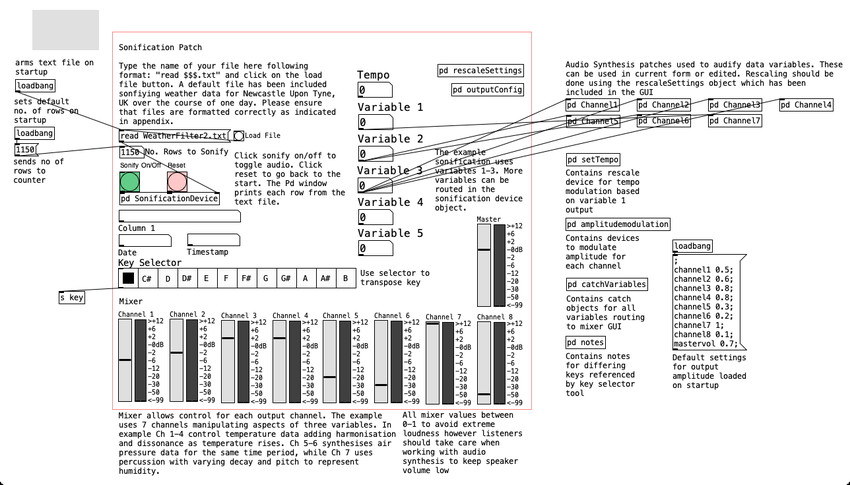
Max is a flexible, visual programming environment originally developed by Miller Puckette at IRCAM in the 1980s. Though not specifically designed for data sonification, it offers that capability. While Max does have a steep learning curve, it also boasts extensive documentation, a wealth of tutorials, and a supportive user community that shares tips and instructional videos.


Pure Data

This free open source alternative to MAX is well documented by its community but might not be as beginner friendly.


References

https://mlaetsc.hcommons.org/2023/01/18/data-sonification-for-beginners

#03 Multisensory Examples

NASA’s data sonification project converts astronomical observations into sound. By assigning different frequencies or instruments to distinct wavelengths of light (X-ray, optical, infrared), cosmic phenomena such as the Bullet Cluster, Crab Nebula, and Supernova 1987A can be “heard”. These audio interpretations highlight features like dark matter, spinning neutron stars, and supernova shockwaves, providing a new, immersive way to experience and understand the universe.


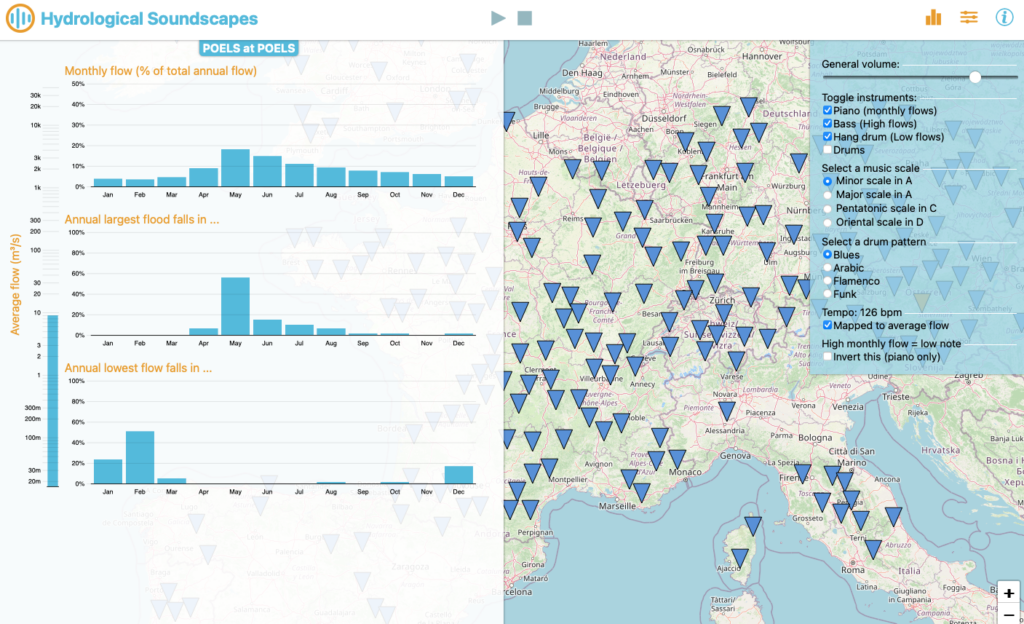
https://hydrologicalsoundscapes.github.io

Hydrological Soundscapes | Ivan Horner and Benjamin Renard (2023)

This app visualizes river hydrological data from thousands of global hydrometric stations in both bar charts and musical form. Each of four hydrological variables (average flow, monthly flows, monthly frequency of annual daily maxima, and monthly frequency of annual 30-day averaged minima) controls different musical elements, such as tempo, pitch, volume, and instrument choice. Users are encouraged to wear headphones for the best experience and can either follow a brief tutorial or start exploring immediately.

Reference

https://sonification.design


This passage describes a musical representation of library traffic patterns throughout the year. Each “row” of notes corresponds to a different time of day (weeks, mornings, afternoons/evenings, and nights) and is placed in a progressively higher pitch range. School breaks, weekends, and term times are reflected in gaps or surges in the music, illustrating how library hours and visitor numbers change across the summer, fall, winter, and spring quarters. Nights are only represented during school terms, highlighted by two-note arpeggios in the highest pitch range.

https://mlaetsc.hcommons.org/2023/01/18/data-sonification-for-beginners


Multisensory Data: Insights from “DATA AND DASEIN”

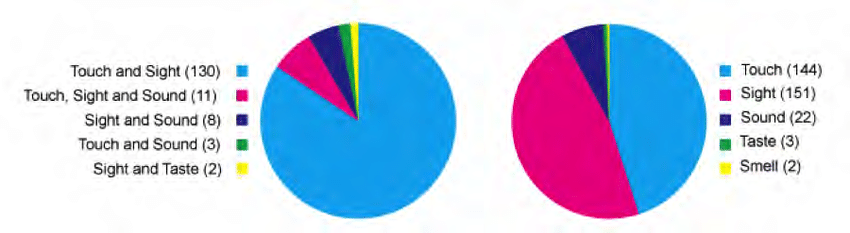
In the dissertation “DATA AND DASEIN – A Phenomenology of Human-Data Relations,” by T. Hogan a review of 154 data representations revealed that most rely on sight (151) and touch (144) to interpret data (Figure 1, B). A smaller subset (22) also incorporated sound, and even fewer tapped into taste or smell. Moreover, 139 examples combined both sight and touch, while only 11 used more than two sensory channels (Figure 1, A).

Figure 1: A: Pie chart (right): distribution of sensory modalities used in combination with other modalities. B: Pie chart (left): Combinations of sensory modalities.

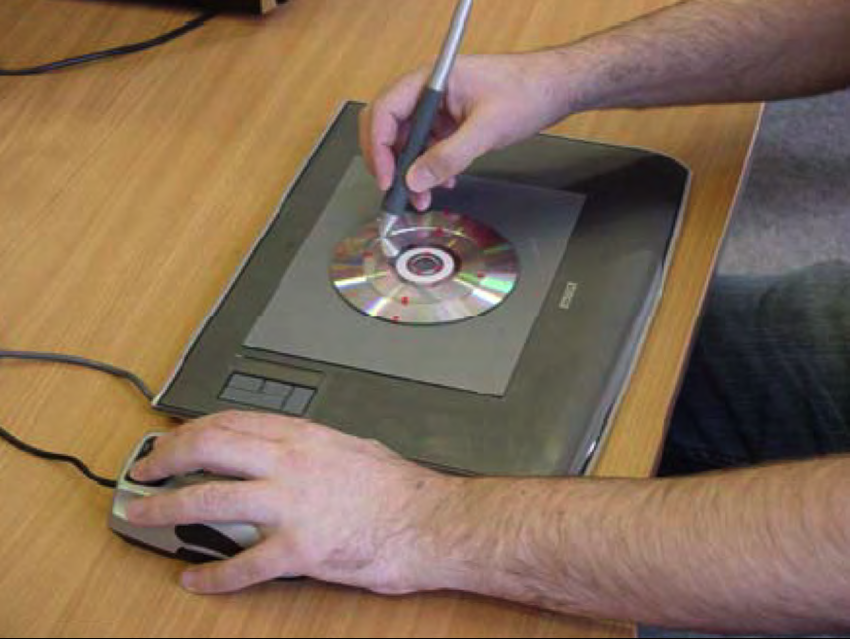
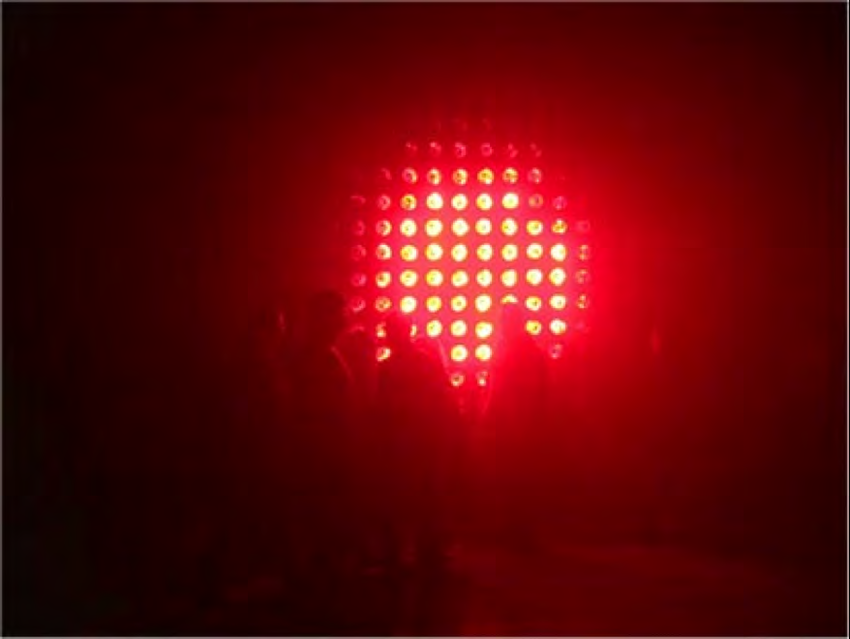
One standout example is Tac-tile (Figure 2), designed for visually impaired users. By combining tactile (via vibrotactile feedback through a stylus) and auditory (adjusting pitch through speakers) elements, Tac-tile highlights how multiple modalities can enable a richer, more inclusive data exploration. This concept extends beyond assistive technology: artist Ryoji Ikeda’s Data.anatomy[civic] [2] merges audio and dynamic graphics to immerse audiences in the intricate data driving Honda Civic car design. Meanwhile, Perpetual (Tropical) SUNSHINE [3] (Figure 3) uses infrared light bulbs to convey real-time temperature data from stations around the Tropic of Capricorn, translating environmental data directly into heat and light. And in more experimental territory, Data Cuisine by Moritz Stefaner [4] explores taste, smell, and sight to transform data into “edible diagrams.”

Figure 2: Tac-tile system. Graphics tablet augmented with a tangible pie chart relief, with dynamic tactile display [1]
Figure 3: Perpetual (Tropical) SUNSHINE by fabric

These examples underscore the creative possibilities of thinking beyond purely visual representations. When designers and researchers integrate multiple sensory channels, they can unlock new forms of engagement, accessibility, and emotional resonance.

Reference

T. Hogan, Data and Dasein – A Phenomenology of Human-Data Relations, Ph.D. dissertation, Bauhaus-Universität Weimar, Weimar, Germany, 2016, sect. 5.5.1.1 (Sensory Modalities).

[1] Steven A. Wall and Stephen A. Brewster. “Tac-tiles: Multimodal Pie Charts for Visually Impaired Users.” In: Proceedings of the 4th Nordic conference on Human-computer interaction changing roles – NordiCHI ’06. Association for Computing Machinery (ACM), 2006. doi: 10.1145/1182475.1182477. url: https://doi.org/10.1145%2F1182475.1182477.
[2] Ryoji Ikeda. data.anatomy.civic. website. 2012. url: http://dataanatomy.net/.
[3] fabric | ch. Perpetual (Tropical) SUNSHINE. (2006). website. 2012. url: http://www.fabric.ch/pts/.
[4] Moritz Stefaner. Data Cuisine. website. 2014. url: http://data-cuisine.net/.

#02 Human Senses

How do different combinations of visual, auditory, and tactile cues influence users’ ability to detect and interpret complex pattern in data?

Human Senses and Beyond

When we talk about the human senses, the classic list of sight, sound, smell, touch, and taste usually comes to mind. However, there is growing evidence that humans perceive the world through far more than these five fundamental channels. In addition to balance, proprioception (awareness of body position), and temperature sensation, researchers continue to uncover other nuanced ways in which we sense and interpret our surroundings.
https://aeon.co/videos/aristotle-was-wrong-and-so-are-we-there-are-far-more-than-five-senses

For the scope of this research, I will concentrate on sight, sound, and touch—particularly regarding how data can be represented and experienced through these modalities.


Accessibility in Design

In modern design practice, accessibility is a fundamental principle rather than an afterthought. Whether creating websites, data visualizations, or interactive installations, designers should integrate accessibility guidelines from the start. These guidelines typically include:

  • Color Contrast and Shape Differentiation
    Ensuring legibility and clarity for individuals with various visual abilities, including color blindness.
  • Alternative Text and Descriptions
    Providing alt text for images and clear labeling for data charts to support screen readers.
  • Flexible Interaction Methods
    Offering keyboard or alternate navigation modes for users who cannot interact with a mouse or touch interfaces.

Adhering to these practices benefits not just users with disabilities; it often leads to improved usability and clarity for everyone.
https://accessibility.huit.harvard.edu/data-viz-charts-graphs

Listen, Feel, Hear the Data

Sonification: Transforming Data into Sound

Definition and Rationale
Sonification involves mapping numerical data or other abstract information to audible properties such as pitch, volume, rhythm, or timbre. Its fundamental goal is to leverage the human auditory system’s sensitivity to changes in frequency and amplitude. This can be particularly useful when data contains temporal patterns or fluctuations that might be more readily perceived through sound than sight.

  • Time-Based Patterns: For datasets that evolve rapidly, detecting a small uptick or sudden dip is sometimes easier when it’s rendered as a change in pitch or tempo.
  • Parallel Processing: The brain processes auditory and visual stimuli along different pathways, so combining both channels can help distribute cognitive load.
  • Inclusive Experiences: Individuals with visual impairments or color-vision deficiencies can gain richer insights by “listening” to data, reducing reliance on purely visual cues.
Design Considerations
  1. Data-to-Sound Mapping: Deciding which data variables map to pitch, volume, or rhythmic patterns is crucial. Overly complex mappings can overwhelm users, while oversimplified mappings might convey only superficial insights.
  2. Contextual Meaning: Providing brief textual or spoken labels can clarify what changes in pitch or tempo signify, helping users build intuitive mental models.
  3. Avoiding Auditory Overload: Continuous, intense auditory cues can be fatiguing. Subtle sound cues or situational “alerts” (playing a specific note only when a threshold is crossed) often strike a better balance.

https://www.loudnumbers.net
https://datasonifyer.de/en/
https://science.nasa.gov/mission/hubble/multimedia/sonifications/


Tactile Interfaces: Feeling the Data

Definition and Applications
Tactile interfaces, often called haptic interfaces, communicate information through the sense of touch—vibrations, pressure, temperature changes, or textural shifts. This approach is notably valuable for individuals with visual or auditory impairments, but it also holds potential for creating richer, more immersive data experiences for all users.

  • Vibrotactile Feedback: Short pulses or vibration patterns can indicate specific data thresholds or events, such as crossing a predefined limit or detecting an anomaly.
  • Physical or 3D Representations: Tactile data displays can take the form of raised surfaces, 3D-printed graphs, or shape-changing interfaces. Users can literally feel the peaks, troughs, or relationships in data.
  • Thermal or Pressure Feedback: Emerging technologies allow for subtle temperature changes or pneumatic feedback. For instance, temperature gradients might mirror climate data, enabling users to “feel” environmental shifts over time.
Design Considerations

Integration with Other Senses: Tactile interfaces often work best with visual or auditory cues. Each modality can reinforce or clarify the other, fostering a more complete understanding of the data.

Tactile Resolution: Human touch has limits in distinguishing small differences in vibration frequency or texture. Designers must tailor the granularity of feedback to what users can reliably perceive.

Attention and Comfort: Continuous or intense haptic signals can lead to sensory fatigue. Designers should consider using event-based or gentle transitions to avoid discomfort.


Connecting Sensory Design and Accessibility

The overarching theme linking these ideas is that designing for accessibility often creates a more inclusive, engaging experience for everyone. This approach demands thoughtful consideration of how data is conveyed: beyond color and labels, it involves weaving together sight, sound, and touch. Whether in assistive technologies, artistic installations, or everyday data dashboards, a multisensory perspective can expand what is possible in data communication.

#01 Multisensory Data Visualisation

Introduction to Multisensory Data Visualisation

Multisensory data visualization refers to the use of multiple sensory modalities—such as sight, hearing, and touch—to represent complex data sets in more intuitive and accessible ways. While conventional visualization techniques rely on graphs, charts, and maps, these predominantly visual methods can become overwhelming or fail to convey subtle patterns, especially when dealing with high-dimensional or time-sensitive data. Beyond auditory cues (e.g., sonification), incorporating tactile feedback (e.g., haptic vibrations) and other sensory channels has the potential to significantly enhance data interpretation by distributing cognitive load and addressing diverse user needs.


Background and Inspiration

During my bachelor and bachelor project, I initially explored and dealt with “traditional” forms of data representation, which led me to examine various approaches to accessibility in design. This exploration was further enriched by the talk “Lessons Learned From Our Accessibility-First Approach to Data Visualisation” by Kent Eisenhuth from the Usability Congress in Graz. There I first consiously encountered signification of data and was instantly intrigued.


Why Consider a Multisensory Approach?

  1. Reduced Cognitive Overload
    Representing data through multiple senses can distribute the processing demands across different sensory channels. For instance, tactile cues (such as haptic vibrations) and auditory cues (such as high or low sounds) can indicate threshold crossings or significant deviations in data, relieving some of the burden placed solely on visual elements.
  2. Enhanced Engagement and Emotional Resonance
    Research indicates that incorporating different sensory modalities—particularly auditory and tactile—may intensify user engagement. Whether through auditory signals highlighting sudden shifts or vibrations indicating key events, users often develop deeper cognitive and emotional connections when more than one sense is involved.
  3. Expanded Accessibility
    For users with visual impairments, sonification and tactile feedback can serve as vital tools for understanding data trends and outliers. Similarly, for users with hearing impairments, strategic use of visual and tactile elements can ensure equal access to critical insights. A truly multisensory system can be configured to accommodate a broad range of abilities.
  4. Detection of Subtle or Transient Patterns
    Time-sensitive or multi-dimensional data (e.g., financial fluctuations, climate patterns, or sensor readings) can be challenging to track visually. By adding non-visual modalities, patterns that might be overlooked in a purely visual chart can become more apparent through changes in pitch, rhythm, or tactile pulses.

Next Steps

My next steps will focus on gathering and analyzing data on how combining visual, auditory, and potentially tactile elements can influence user comprehension, retention, and emotional engagement with complex information. This research will involve reviewing existing literature, examining various sensory-mapping strategies, and identifying critical factors (e.g., cognitive load, accessibility requirements, and user preferences) that shape effective multisensory data representations. Comparative studies and expert interviews may inform which modalities are most beneficial for certain data types or user groups. These insights will guide the theoretical framework for understanding multisensory design principles, culminating in recommendations for inclusive and impactful data visualization practices.


Keywords for my Research

AI generated list of keywords to help me in my research.

  1. Sonification
  2. Tactile Feedback / Haptic Interfaces
  3. Data Accessibility
  4. Inclusive Design
  5. Universal Design
  6. Cognitive Load
  7. Sensory Mapping
  8. Multimodal Interaction
  9. Cross-Modal Perception
  10. User Experience (UX) Testing
  11. Threshold Detection
  12. Emotional Resonance
  13. Accessibility Guidelines (e.g., WCAG)
  14. Alt Text and Descriptive Metadata
  15. Adaptive/Assistive Technologies
  16. Perceptual Illusions in Multisensory Design
  17. Pattern Recognition in Data
  18. Interaction Design Principles
  19. Context-Aware Computing
  20. Sensory Substitution

Literature

T. Hogan and E. Hornecker, “Towards a Design Space for Multisensory Data Representation,” Interacting with Computers, vol. 29, no. 2, pp. 147–167, Mar. 2017, doi: 10.1093/iwc/iww015.

S. Tak and L. Toet, “Towards Interactive Multisensory Data Representations,” in Proceedings of the International Conference on Computer Graphics Theory and Applications and International Conference on Information Visualization Theory and Applications (IVAPP-2013), 2013, pp. 558–561. doi: 10.5220/0004346405580561.

A. Storto, “Using Data Visualisations in a Participatory Approach to Multilingualism: ‘I Feel What You Don’t Feel’,” 2024. doi: 10.2307/jj.20558241.11.