Explore II: Image Extender – Image sonification tool for immersive perception of sounds from images and new creation possiblities

The Image Extender project bridges accessibility and creativity, offering an innovative way to perceive visual data through sound. With its dual-purpose approach, the tool has the potential to redefine auditory experiences for diverse audiences, pushing the boundaries of technology and human perception.
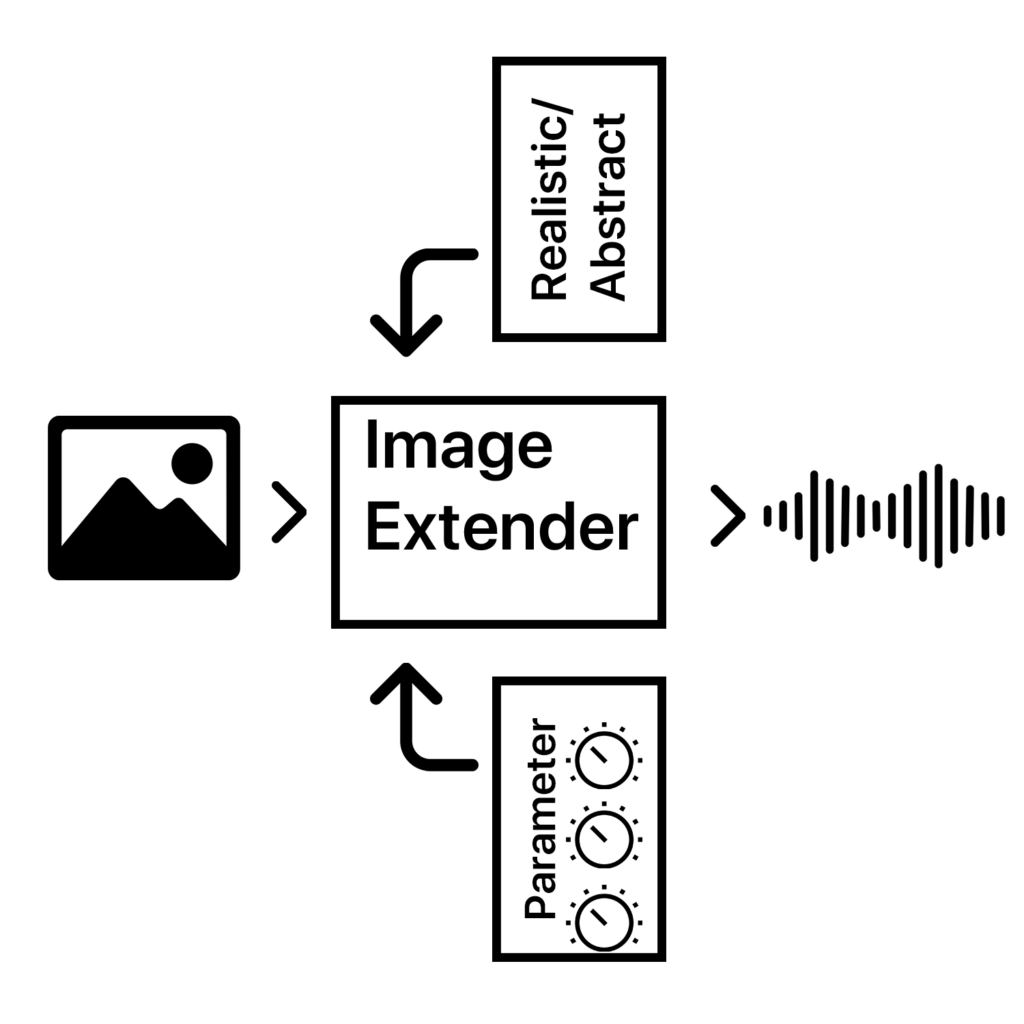
The project is designed as a dual-purpose tool for immersive perception and creative sound design. By leveraging AI-based image recognition and sonification algorithms, the tool will transform visual data into auditory experiences. This innovative approach is intended for:

1. Visually Impaired Individuals
2. Artists and Designers

The tool will focus on translating colors, textures, shapes, and spatial arrangements into structured soundscapes, ensuring clarity and creativity for diverse users.

  • Core Functionality: Translating image data into sound using sonification frameworks and AI algorithms.
  • Target Audiences: Visually impaired users and creative professionals.
  • Platforms: Initially desktop applications with planned mobile deployment for on-the-go accessibility.
  • User Experience: A customizable interface to balance complexity, accessibility, and creativity.

Working Hypotheses and Requirements

  • Hypotheses:
    1. Cross-modal sonification enhances understanding and creativity in visual-to-auditory transformations.
    2. Intuitive soundscapes improve accessibility for visually impaired users compared to traditional methods.
  • Requirements:
    • Develop an intuitive sonification framework adaptable to various images.
    • Integrate customizable settings to prevent sensory overload.
    • Ensure compatibility across platforms (desktop and mobile).

    Subtasks
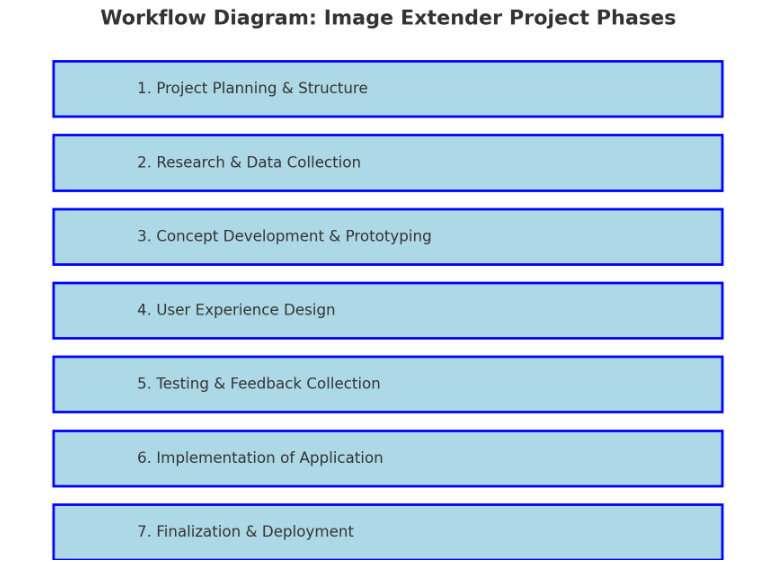
    1. Project Planning & Structure

    • Define Scope and Goals: Clarify key deliverables and objectives for both visually impaired users and artists/designers.
    • Research Methods: Identify research approaches (e.g., user interviews, surveys, literature review).
    • Project Timeline and Milestones: Establish a phased timeline including prototyping, testing, and final implementation.
    • Identify Dependencies: List libraries, frameworks, and tools needed (Python, Pure Data, Max/MSP, OSC, etc.).

    2. Research & Data Collection

    • Sonification Techniques: Research existing sonification methods and metaphors for cross-modal (sight-to-sound) mapping and research different other approaches that can also blend in the overall sonification strategy.
    • Image Recognition Algorithms: Investigate AI image recognition models (e.g., OpenCV, TensorFlow, PyTorch).
    • Psychoacoustics & Perceptual Mapping: Review how different sound frequencies, intensities, and spatialization affect perception.
    • Existing Tools & References: Study tools like Melobytes, VOSIS, and BeMyEyes to understand features, limitations, and user feedback.
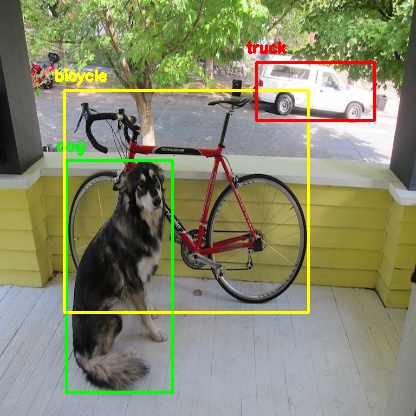
    object detection from python yolo library

    3. Concept Development & Prototyping

    • Develop Sonification Mapping Framework: Define rules for mapping visual elements (color, shape, texture) to sound parameters (pitch, timbre, rhythm).
    • Simple Prototype: Create a basic prototype that integrates:
      • AI content recognition (Python + image processing libraries).
      • Sound generation (Pure Data or Max/MSP).
      • Communication via OSC (e.g., using Wekinator).
    • Create or collect Sample Soundscapes: Generate initial soundscapes for different types of images (e.g., landscapes, portraits, abstract visuals).
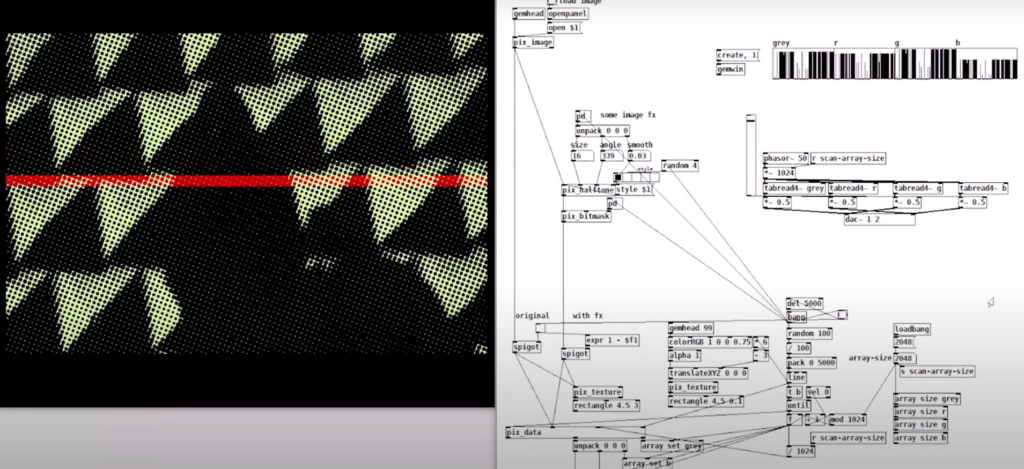
    example of puredata with rem library (image to sound in pure data by Artiom
    Constantinov)

    4. User Experience Design

    • UI/UX Design for Desktop:
      • Design intuitive interface for uploading images and adjusting sonification parameters.
      • Mock up controls for adjusting sound complexity, intensity, and spatialization.
    • Accessibility Features:
      • Ensure screen reader compatibility.
      • Develop customizable presets for different levels of user experience (basic vs. advanced).
    • Mobile Optimization Plan:
      • Plan for responsive design and functionality for smartphones.

    5. Testing & Feedback Collection

    • Create Testing Scenarios:
      • Develop a set of diverse images (varying in content, color, and complexity).
    • Usability Testing with Visually Impaired Users:
      • Gather feedback on the clarity, intuitiveness, and sensory experience of the sonifications.
      • Identify areas of overstimulation or confusion.
    • Feedback from Artists/Designers:
      • Assess the creative flexibility and utility of the tool for sound design.
    • Iterate Based on Feedback:
      • Refine sonification mappings and interface based on user input.

    6. Implementation of Standalone Application

    • Develop Core Application:
      • Integrate image recognition with sonification engine.
      • Implement adjustable parameters for sound generation.
    • Error Handling & Performance Optimization:
      • Ensure efficient processing for high-resolution images.
      • Handle edge cases for unexpected or low-quality inputs.
    • Cross-Platform Compatibility:
      • Ensure compatibility with Windows, macOS, and plan for future mobile deployment.

    7. Finalization & Deployment

    • Finalize Feature Set:
      • Balance between accessibility and creative flexibility.
      • Ensure the sonification language is both consistent and adaptable.
    • Documentation & Tutorials:
      • Create user guides for visually impaired users and artists.
      • Provide tutorials for customizing sonification settings.
    • Deployment:
      • Package as a standalone desktop application.
      • Plan for mobile release (potentially a future phase).

    Technological Basis Subtasks:

    1. Programming: Develop core image recognition and processing modules in Python.
    2. Sonification Engine: Create audio synthesis patches in Pure Data/Max/MSP.
    3. Integration: Implement OSC communication between Python and the sound engine.
    4. UI Development: Design and code the user interface for accessibility and usability.
    5. Testing Automation: Create scripts for automating image-sonification tests.

    Possible academic foundations for further research and work:

    Chatterjee, Oindrila, and Shantanu Chakrabartty. “Using Growth Transform Dynamical Systems for Spatio-Temporal Data Sonification.” arXiv preprint, 2021.

    Chion, Michel. Audio-Vision. New York: Columbia University Press, 1994.

    Görne, Tobias. Sound Design. Munich: Hanser, 2017.

    Hermann, Thomas, Andy Hunt, and John G. Neuhoff, eds. The Sonification Handbook. Berlin: Logos Publishing House, 2011.

    Schick, Adolf. Schallwirkung aus psychologischer Sicht. Stuttgart: Klett-Cotta, 1979.

    Sigal, Erich. “Akustik: Schall und seine Eigenschaften.” Accessed January 21, 2025. mu-sig.de.

    Spence, Charles. “Crossmodal Correspondences: A Tutorial Review.” Attention, Perception, Psychophysics, 2011.

    Ziemer, Tim. Psychoacoustic Music Sound Field Synthesis. Cham: Springer International Publishing, 2020.

    Ziemer, Tim, Nuttawut Nuchprayoon, and Holger Schultheis. “Psychoacoustic Sonification as User Interface for Human-Machine Interaction.” International Journal of Informatics Society, 2020.

    Ziemer, Tim, and Holger Schultheis. “Three Orthogonal Dimensions for Psychoacoustic Sonification.” Acta Acustica United with Acustica, 2020.
    Explore I: Image Extender – Image sonification tool for immersive perception of sounds from images and new creation possiblities

    The project would be a program that uses either AI-content recognition or a specific sonification algorithm by using equivalent of the perception of sight (cross-model metaphors).

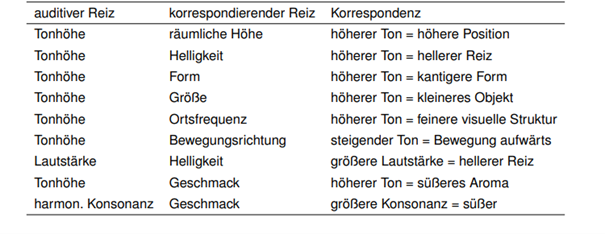
    examples of cross modal metaphors (Görne, 2017, S.53)

    This approach could serve two main audiences:

    1. Visually Impaired Individuals:
    The tool would provide an alternative to traditional audio descriptions, aiming instead to deliver a sonic experience that evokes the ambiance, spatial depth, or mood of an image. Instead of giving direct descriptive feedback, it would use non-verbal soundscapes to create an “impression” of the scene, engaging the listener’s perception intuitively. Therefore, the aspect of a strict sonification language might be a good approach. Maybe even better than just displaying the sounds of the images. Or maybe a mixture of both.

    2. Artists and Designers:
    The tool could generate unique audio samples for creative applications, such as sound design for interactive installations, brand audio identities, or cinematic soundscapes. By enabling the synthesis of sound based on visual data, the tool could become a versatile instrument for experimental media artists.

    Purpose

    The core purpose would be the mixture of both purposes before, a tool that supports and helps creating in the same suite.

    The dual purpose of accessibility and creativity is central to the project’s design philosophy, but balancing these objectives poses a challenge. While the tool should serve as a robust aid for visually impaired users, it also needs to function as a practical and flexible sound design instrument.

    The final product can then be used by people who benefit from the added perception they get of images and screens and for artists or designers as a tool.

    Primary Goal

    A primary goal is to establish a sonification language that is intuitive, consistent, and adaptable to a variety of images and scenes. This “language” would ideally be flexible enough for creative expression yet structured enough to provide clarity for visually impaired users. Using a dynamic, adaptable set of rules tied to image data, the tool would be able to translate colors, textures, shapes, and contrasts into specific sounds.

    To make the tool accessible and enjoyable, careful attention needs to be paid to the balance of sound complexity. Testing with visually impaired individuals will be essential for calibrating the audio to avoid overwhelming or confusing sensory experiences. Adjustable parameters could allow users to tailor sound intensity, frequency, and spatialization, giving them control while preserving the underlying sonification framework. It’s important to focus on realistic an achievable goal first.

    • planning on the methods (structure)
    • research and data collection
    • simple prototyping of key concept
    • testing phases
    • implementation in an standalone application
    • ui design and mobile optimization

    The prototype will evolve in stages, with usability testing playing a key role in refining functionality. Early feedback from visually impaired testers will be invaluable in shaping how soundscapes are structured and controlled. Incorporating adjustable settings will likely be necessary to allow users to customize their experience and avoid potential overstimulation. However, this customization could complicate the design if the aim is to develop a consistent sonification language. Testing will help to balance these needs

    Initial development will target desktop environments, with plans to expand to smartphones. A mobile-friendly interface would allow users to access sonification on the go, making it easier to engage with images and scenes from any device.

    In general, it could lead to a different perception of sound in connection with images or visuals.

    Needed components

    Technological Basis:

    Programming Language & IDE:
    The primary development of the image recognition could be done in Python, which offers strong libraries for image processing, machine learning, and integration with sound engines. Also wekinator could be a good start for the communication via OSC for example.

    Sonification Tools:
    Pure Data or Max/MSP are ideal choices for creating the audio processing and synthesis framework, as they enable fine-tuned audio manipulation. These platforms can map visual data inputs (like color or shape) to sound parameters (such as pitch, timbre, or rhythm).

    Testing Resources:
    A set of test images and videos will be required to refine the tool’s translations across various visual scenarios.

    Existing Inspirations and References:

    – Melobytes: Software that converts images to music, highlighting the potential for creative auditory representations of visuals.

    – VOSIS: A synthesizer that filters visual data based on grayscale values, demonstrating how sound synthesis can be based on visual texture.

    – image-sonification.vercel.app: A platform that creates audio loops from RGB values, showing how color data can be translated into sound.

    – BeMyEyes: An app that provides auditory descriptions for visually impaired users, emphasizing the importance of accessibility in technology design.

    Academic Foundations:

    Literature on sonification, psychoacoustics, and synthesis will support the development of the program. These fields will help inform how sound can effectively communicate complex information without overwhelming the listener.

    References / Source

    Görne, Tobias. Sound Design. Munich: Hanser, 2017.

    #07 Cross-Modal Perception

    In a world saturated with data, harnessing multiple senses to process and interpret information is not just innovative—it’s essential. Cross-modal perception—the integration of sensory inputs such as vision, sound, and touch—has emerged as a powerful tool for designing multisensory systems that enhance our ability to detect patterns, navigate spatial and temporal relationships, and interpret complex datasets.

    How Does Cross-Modal Perception Work?

    Our senses, once thought to function independently, are now understood to be deeply interconnected. Neuroimaging studies reveal that sensory inputs like sound and touch can activate traditionally “unisensory” brain areas.

    Sound Enhancing Vision: Auditory cues, such as a sharp tone, can draw visual attention to specific locations. This phenomenon, known as auditory-driven visual saliency, highlights the brain’s efficiency in synchronizing sensory inputs .

    Touch Activating Visual Cortex: When engaging in tactile exploration, parts of the brain associated with visual processing (like the lateral occipital cortex) can light up. This cross-talk enriches our perception of texture, shape, and movement .

    The brain’s metamodal organization—a task-based, rather than modality-specific, neural structure—allows for seamless sensory integration, enhancing our ability to interpret complex environments.

    Applications of Cross-Modal Integration in Design

    1. Auditory-Spatial Cues in Data Visualization:

    Designers can pair sound with visuals to highlight spatial relationships or changes over time.

    2. Tactile and Visual Synergy in 3D Models:

    Haptic interfaces enable users to “feel” data through vibrations or pressure, while visual feedback reinforces spatial understanding. A tactile interface might allow users to explore the topography of a 3D map while receiving visual updates.

    3. Dynamic Feedback in Collaborative Tools:

    Platforms like interactive dashboards or 3D spaces can integrate synchronized sensory cues—such as visual highlights and audio alerts—to guide group decision-making and enhance collaboration.


    Challenges:

    Sensory Overload: Overlapping sensory inputs can overwhelm users, especially if the stimuli are not intuitively aligned.

    Conflicting Cues: When sensory inputs are incongruent (e.g. an audio cue suggesting motion in one direction while a visual cue suggests another), they can disrupt perception rather than enhance it.

    User Variability: People’s preferences and sensitivities to sensory stimuli differ, complicating universal design.

    Best Practices:

    1. Ensure Modality Congruence:

    Align sensory inputs logically. For instance, a high-pitched sound should correspond to upward movement or increasing values, reinforcing intuitive associations.

    2. Layer Sensory Stimuli Gradually:

    Introduce sensory inputs in stages, starting with the most critical. Gradual layering prevents cognitive overload and helps users adapt to the system.

    3. Test and Iterate:

    Conduct user testing to assess how well sensory combinations work for the target audience. Iterative design ensures that cross-modal systems remain effective and user-friendly.


    Multisensory Design

    Cross-modal perception transforms data representation by leveraging the brain’s natural ability to integrate sensory information. From enhancing accessibility to uncovering hidden patterns, combining vision, sound, and touch opens up new possibilities for engaging, intuitive, and effective data experiences.


    References

    B. Baier, A. Kleinschmidt, and N. G. Müller, “Cross-Modal Processing in Early Visual and Auditory Cortices depends on Expected Statistical Relationship of Multisensory Information,” Journal of Neuroscience, vol. 26, no. 47, pp. 12260–12265, Nov. 22, 2006, doi: 10.1523/JNEUROSCI.1457-06.2006.

    S. Lacey and K. Sathian, “Crossmodal and multisensory interactions between vision and touch,” Scholarpedia J., vol. 10, no. 3, p. 7957, 2015, doi: 10.4249/scholarpedia.7957

    T. Hermann, A. Hunt, and J. G. Neuhoff, Eds., The Sonification Handbook, 1st ed. Berlin, Germany: Logos Publishing House, 2011, 586 pp., ISBN: 978-3-8325-2819-5.
    https://sonification.de/handbook