#09 Multisensory Accessibility: Expanding Inclusive Design Through Sensory Substitution

As digital environments become increasingly immersive, multisensory design is transforming the way we interact with data, technology, and the world around us. However, ensuring these experiences are accessible to all remains a challenge. Traditional accessibility efforts have largely focused on visual-centric approaches, often excluding those who rely more on auditory, tactile, or cross-modal interactions.

A promising solution lies in sensory substitution techniques, which translate one sensory input into another. These techniques, often used in assistive technologies, have the potential to move beyond niche applications and become mainstream tools that enhance accessibility for everyone.


Beyond Visual-First Interfaces: Rethinking Multisensory Accessibility

Most digital interfaces prioritise visual information—charts, text, and images dominate how we consume data. However, not everyone experiences the world through sight. A more inclusive design approach considers:

  • Sonification for Blind and Visually Impaired Users: Mapping data trends to sound (pitch rising for higher values) enables auditory pattern recognition.
  • Haptic Feedback for Deaf and Hard-of-Hearing Users: Vibrations and force feedback provide real-time alerts and spatial awareness.
  • Multisensory Adaptation for Neurodivergent Users: Some individuals process information better when it’s presented in multiple overlapping modalities, such as visual cues paired with subtle audio reinforcement.

Rather than designing separate assistive solutions, multisensory experiences should be natively inclusive, allowing users to select the sensory mode that best suits them.


Sensory Substitution: A Bridge to Universal Access

Sensory substitution devices (SSDs) replace information from one sensory modality with another, making data accessible in novel ways. For example:

  • Visual-to-Auditory Substitution: Devices like The vOICe convert camera images into real-time soundscapes, allowing users to “hear” shapes and motion.
  • Visual-to-Tactile Interfaces: Systems like BrainPort translate images into electrical pulses felt on the tongue, enabling spatial navigation for the visually impaired.
  • Cross-Modal Mapping in Mainstream Design: Everyday interfaces can integrate these concepts—imagine a navigation app that offers both vibration-based and sound-based guidance, allowing all users to choose their preferred sensory format.

Despite their proven effectiveness, SSDs have not yet seen widespread adoption. A key challenge is that they are often designed only as assistive devices, rather than as features that could benefit all users in various contexts.


Real-World Applications of Inclusive Multisensory Design

By embedding sensory substitution and multisensory feedback into mainstream products, we unlock new ways of engaging with technology:

  • Tactile Data Exploration: Raised surfaces, interactive touchpads, or vibration-based data encoding allow users to physically experience data trends.
  • Multisensory VR & AR Experiences: Augmented and virtual reality environments can become more accessible by incorporating soundscapes, haptic responses, and cross-modal cues that extend beyond sight.
  • Flexible Accessibility in Public Spaces: Interactive kiosks and wayfinding systems should support dynamic mode-switching, allowing users to receive information through visual, auditory, or tactile outputs based on their needs.

Designing for Multisensory Accessibility

To create truly inclusive multisensory experiences, designers must:

  1. Prioritize Sensory Adaptability – Allow users to customize how they receive information (toggling between visual, auditory, and tactile cues).
  2. Focus on Cross-Modal Integration – Ensure sensory inputs reinforce each other rather than competing (subtle haptic cues guiding users toward an audio source).
  3. Adopt a Universal Design Perspective – Move away from “assistive add-ons” and instead create mainstream products that naturally support diverse sensory abilities.

By making multisensory design accessible to all, we enhance usability for disabled users while also creating richer, more engaging experiences for everyone. Instead of viewing accessibility as an afterthought, it should be the foundation of future technology.

References

T. Lloyd-Esenkaya, V. Lloyd-Esenkaya, E. O’Neill, et al., “Multisensory inclusive design with sensory substitution,” Cognitive Research, vol. 5, no. 37, 2020, doi: 10.1186/s41235-020-00240-7.

M. Leung, “A look toward the future: The power of creating accessible multisensory experiences,” Accessibility.com, Feb. 19, 2024. [Online]. Available: https://www.accessibility.com/blog/a-look-toward-the-future-the-power-of-creating-accessible-multisensory-experiences. [Accessed: Jan. 31, 2025].
#08 The Role of Ambient Displays in Multisensory Data Representation

As digital interfaces evolve, ambient displays are becoming a critical tool for integrating multisensory data into everyday environments. Unlike traditional visualisations that demand direct attention, ambient displays operate at the periphery of perception, using light, sound, temperature, or movement to subtly communicate information. However, as these displays evolve, so does the need to understand their relationship with data and the context in which they exist.

Beyond Peripheral Awareness: Understanding Context in Ambient Displays

Historically, ambient displays have been discussed in terms of peripheral awareness—providing information in a non-intrusive manner. However, research by Vande Moere & Offenhuber (Beyond Ambient Display) suggests that ambient displays should not only be classified based on how they present data but also on the context in which they exist. Their model proposes three categories:

  1. Visualisation as Translation – Data is presented in an abstract form, independent of its environment (an ambient color-changing orb that visualises air quality).
  2. Visualisation as Augmentation – The display integrates into an existing object, enhancing its natural affordances (a lamp that glows brighter based on energy consumption).
  3. Visualisation as Embodiment – The display itself is the context, shaping meaning through its physical presence (large-scale urban installations that respond to public data).

By categorising displays in this way, designers can better align the modality, environment, and function of ambient displays to create more intuitive and meaningful interactions.

Designing for Subtlety and Context

The effectiveness of ambient displays lies in their ability to convey meaning without overwhelming users.

  • Selecting the Right Modality – Light, sound, or haptics should be chosen based on how users engage with their environment. A museum exhibit might use soft pulses of sound to indicate visitor density, while a wearable device could use gentle temperature shifts.
  • Context Sensitivity – Displays should align with their physical and social context. A public installationvisualising air pollution might use smoke-like visuals, reinforcing an intuitive connection between representation and data.
  • Balancing Functionality and Presence – An ambient display should enhance awareness without becoming the focal point. If too dominant, it shifts from being “ambient” to demanding attention, which can disrupt the user experience.

The Future of Ambient Displays in Multisensory Data Design

By rethinking ambient displays as context-sensitive interfaces rather than just passive visualisations, designers can integrate seamless, non-disruptive data experiences into everyday life. Whether through urban-scale data sculptures, responsive architectural spaces, or adaptive environmental displays, the next wave of ambient visualisation will focus on how context shapes perception—blurring the line between information and environment.

Reference

D. Offenhuber, “Beyond Ambient Display,” International Journal of Ambient Computing and Intelligence, 2009.

Designing and Evaluating Ambient Information Systems: Workshop at Pervasive 2007, The 5th International Conference on Pervasive Computing, Toronto, ON, Canada, May 13, 2007.

1.7. Engaging the Senses: Multisensory Design in Museums

Revolutionizing Museum Spaces

Museums are evolving from static to vibrant, interactive spaces designed to engage visitors on a deeper level. Among the most transformative innovations is the incorporation of multisensory experiences, which activate sight, touch, sound, smell, and even taste to create unforgettable moments.

The Benefits of Multisensory Engagement

Multisensory engagement enriches learning by mirroring real-life environments, where information is naturally processed through multiple senses. Research highlights that combining modalities, such as pairing visual stimuli with sound, facilitates faster and more effective learning. This approach not only improves memory retention but also makes museums more accessible to diverse audiences, including people with disabilities [1][2].

Multisensory Solutions Through Design and Technology

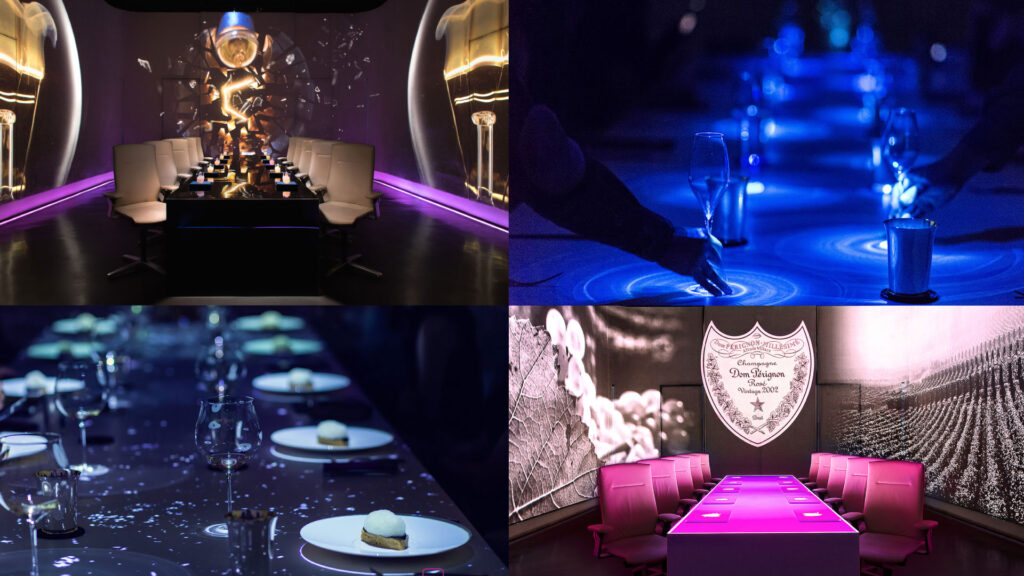
Museums are redefining visitor engagement by crafting multisensory experiences that combine traditional methods with cutting-edge technology. Curated scents and immersive soundscapes transport visitors to distinct times and places—whether through the aroma of ancient spices or the ambient noise of a bustling historical market. Similarly, edible exhibits and tasting stations tied to cultural or historical themes deepen emotional connections and leave lasting impressions [5].

Technology enhances these sensory elements by introducing new layers of interaction and immersion. Augmented reality (AR) and virtual reality (VR) bring historical events to life, allowing visitors to explore ancient environments or interact with digital reconstructions of artifacts. Haptic feedback devices simulate the sensation of touch, enabling users to “feel” objects that might otherwise be inaccessible due to fragility or preservation concerns. Furthermore, spatial audio systems adapt soundscapes to visitor movements, creating dynamic, personalized auditory experiences [4][5].

By blending sensory-rich design with innovative technologies, museums are crafting deeply immersive journeys that connect audiences to art, history, and culture in ways never before possible. These integrated approaches encourage visitors not just to observe, but to feel and actively engage, forging emotional and intellectual connections that linger long after their visit.

images source: Ultraviolet by Paul Pairet

Deepening Emotional Connections

Beyond accessibility, multisensory strategies can evoke emotions, foster empathy, and deepen cultural understanding. Experiences like tasting culturally significant foods, hearing ambient sounds of historical sites, and smelling curated scents transport visitors to the essence of different eras and places. This approach strengthens their emotional connection to history and art, enriching their overall museum experience [3][4][5].

The Future of Multisensory Museums

By embracing multisensory design, museums can transcend traditional boundaries, making cultural heritage accessible, inclusive, and engaging for all. As the future unfolds, multisensory solutions stand as a beacon for museum innovation, enhancing visitor experiences and reshaping how we interact with cultural heritage [5].

References

[1] L. Shams and A. R. Seitz, “Benefits of Multisensory Learning,” Trends in Cognitive Sciences, vol. 12, no. 11, pp. 411–417, 2008.
[2] T. Harada, Y. Hideyoshi, E. Gressier-Soudan, and C. Jean, “Museum Experience Design Based on Multi-Sensory Transformation Approach,” in International Design Conference, 2018, pp. 2221–2228.
[3] S. Subramanian, “Creating Multi-Sensory Experiences: Integrating Emotions into Design,” Medium, May 16, 2018. [Online]. Available: https://medium.com/@shriyasub101/creating-multi-sensory-experiences-integrating-emotions-into-design-2ba4cf379643.
[4] D. Luo, L. Doucé, and K. Nys, “Multisensory Museum Experience: An Integrative View and Future Research Directions,” Museum Management and Curatorship, vol. 39, no. 1, pp. 1–22, 2024.
[5] “What Is a Multisensory Experience? 5 Powerful Examples,” Peek, Jan. 2025. [Online]. Available: https://www.peekpro.com/blog/multisensory-experience.

#07 Cross-Modal Perception

In a world saturated with data, harnessing multiple senses to process and interpret information is not just innovative—it’s essential. Cross-modal perception—the integration of sensory inputs such as vision, sound, and touch—has emerged as a powerful tool for designing multisensory systems that enhance our ability to detect patterns, navigate spatial and temporal relationships, and interpret complex datasets.

How Does Cross-Modal Perception Work?

Our senses, once thought to function independently, are now understood to be deeply interconnected. Neuroimaging studies reveal that sensory inputs like sound and touch can activate traditionally “unisensory” brain areas.

Sound Enhancing Vision: Auditory cues, such as a sharp tone, can draw visual attention to specific locations. This phenomenon, known as auditory-driven visual saliency, highlights the brain’s efficiency in synchronizing sensory inputs .

Touch Activating Visual Cortex: When engaging in tactile exploration, parts of the brain associated with visual processing (like the lateral occipital cortex) can light up. This cross-talk enriches our perception of texture, shape, and movement .

The brain’s metamodal organization—a task-based, rather than modality-specific, neural structure—allows for seamless sensory integration, enhancing our ability to interpret complex environments.

Applications of Cross-Modal Integration in Design

1. Auditory-Spatial Cues in Data Visualization:

Designers can pair sound with visuals to highlight spatial relationships or changes over time.

2. Tactile and Visual Synergy in 3D Models:

Haptic interfaces enable users to “feel” data through vibrations or pressure, while visual feedback reinforces spatial understanding. A tactile interface might allow users to explore the topography of a 3D map while receiving visual updates.

3. Dynamic Feedback in Collaborative Tools:

Platforms like interactive dashboards or 3D spaces can integrate synchronized sensory cues—such as visual highlights and audio alerts—to guide group decision-making and enhance collaboration.


Challenges:

Sensory Overload: Overlapping sensory inputs can overwhelm users, especially if the stimuli are not intuitively aligned.

Conflicting Cues: When sensory inputs are incongruent (e.g. an audio cue suggesting motion in one direction while a visual cue suggests another), they can disrupt perception rather than enhance it.

User Variability: People’s preferences and sensitivities to sensory stimuli differ, complicating universal design.

Best Practices:

1. Ensure Modality Congruence:

Align sensory inputs logically. For instance, a high-pitched sound should correspond to upward movement or increasing values, reinforcing intuitive associations.

2. Layer Sensory Stimuli Gradually:

Introduce sensory inputs in stages, starting with the most critical. Gradual layering prevents cognitive overload and helps users adapt to the system.

3. Test and Iterate:

Conduct user testing to assess how well sensory combinations work for the target audience. Iterative design ensures that cross-modal systems remain effective and user-friendly.


Multisensory Design

Cross-modal perception transforms data representation by leveraging the brain’s natural ability to integrate sensory information. From enhancing accessibility to uncovering hidden patterns, combining vision, sound, and touch opens up new possibilities for engaging, intuitive, and effective data experiences.


References

B. Baier, A. Kleinschmidt, and N. G. Müller, “Cross-Modal Processing in Early Visual and Auditory Cortices depends on Expected Statistical Relationship of Multisensory Information,” Journal of Neuroscience, vol. 26, no. 47, pp. 12260–12265, Nov. 22, 2006, doi: 10.1523/JNEUROSCI.1457-06.2006.

S. Lacey and K. Sathian, “Crossmodal and multisensory interactions between vision and touch,” Scholarpedia J., vol. 10, no. 3, p. 7957, 2015, doi: 10.4249/scholarpedia.7957

T. Hermann, A. Hunt, and J. G. Neuhoff, Eds., The Sonification Handbook, 1st ed. Berlin, Germany: Logos Publishing House, 2011, 586 pp., ISBN: 978-3-8325-2819-5.
https://sonification.de/handbook

#06 Kinesthetic Design and Embodiment

In the realm of data visualisation, understanding complex relationships often requires more than just seeing or hearing the data. Kinesthetic design—grounded in physical interaction and body movement—offers a compelling way to connect with information. By engaging the body, this approach transforms abstract datasets into tangible, interactive experiences, fostering deeper understanding, creativity, and even emotional resonance.

What Is Kinesthetic Design?

Kinesthetic design focuses on using physical movements and gestures to explore and interpret data. This interaction creates a loop between the user’s actions and the feedback they receive, making the experience both intuitive and memorable.

For instance, imagine interacting with a 3D map where moving your hand across a surface changes the terrain display or simulates wind patterns. By physically engaging with the data, you can better grasp its spatial and temporal dimensions—concepts that are often difficult to capture in static visualisations.


The Power of Embodiment

Embodied interaction, a cornerstone of kinesthetic design, bridges the gap between abstract data and physical experience. As researchers like Dourish have pointed out, interacting with physical objects enhances cognition by embedding data into the world being manipulated. This principle applies across various contexts, from tangible interfaces to immersive virtual environments.

Key benefits of embodied interaction include:

Enhanced Comprehension: Physical movement aligns with natural learning processes, helping users better understand spatial relationships.

Reflective Practice: Physical interactions encourage experimentation and exploration, often leading to insights that might be missed in purely visual or auditory systems.

Emotional Engagement: The tactile nature of kinesthetic design fosters a stronger connection to the data, making the experience more meaningful.


Applications of Kinesthetic Design

1. Interactive Data Sculptures:

Physical objects that represent data, such as 3D-printed models, allow users to “feel” the peaks, troughs, and connections within datasets. For example, a sculpture representing temperature fluctuations over time might use varying textures to highlight extreme weather events.

2. Sports and Motion Simulators:

In sports training, simulators that replicate real-world actions—like swinging a golf club or rowing—merge physical motion with data feedback. These systems use real-time haptic and auditory cues to refine movements and improve performance.

3. Collaborative Platforms:

Tools like the Campfire platform allow teams to interact with data through 3D projections. Participants can move around the environment, using gestures to manipulate variables and explore relationships from multiple angles.


Designing for Kinesthetic Interaction

Creating effective kinesthetic experiences requires careful attention to user behavior and sensory feedback.

Physical Intuition: Design interactions that align with natural movements, such as rotating, pushing, or pulling.

Sensory Feedback: Integrate tactile cues (e.g. vibration, pressure) or auditory signals to reinforce actions and provide guidance.

Collaborative Dynamics: In group settings, ensure interactions encourage communication and shared decision-making.


References

M. N. Folkmann, “The Aesthetics of Digital Objects,” in Design and Semantics of Form and Movement, final published version, 2015.

P. Search, “Multisensory Physical Environments for Data Representation,” in Design, User Experience, and Usability: Technological Contexts. DUXU 2016. Lecture Notes in Computer Science, vol. 9748, A. Marcus, Ed. Cham, Switzerland: Springer, 2016, doi: 10.1007/978-3-319-40406-6_19.
https://link.springer.com/chapter/10.1007/978-3-319-40406-6_19

https://instructionaldesign.com.au/different-strokes-for-different-folks-learning-styles

#05 The Art and Science of Sound

Sound is more than a medium for communication—it’s a profound tool for conveying meaning, evoking emotions, and guiding interaction. Two critical concepts in this domain, Perception, Cognition and Action in Auditory Displays and Sonic Interaction Design (SID), illustrate the potential of sound to transform user experiences. Let’s dive into these fascinating dimensions and explore how they enrich interaction design.

Understanding Auditory Displays: Perception Meets Cognition

The world of sound is intricate, with perception playing a central role in translating acoustic signals into meaning. Chapter 4 of The Sonification Handbook emphasizes the interplay between low-level auditory dimensions (pitch, loudness, timbre) and higher-order cognitive processes.

1. Multidimensional Sound Mapping: Designers often map data variables to sound dimensions. For instance:
• Pitch represents stock price fluctuations.
• Loudness indicates proximity to thresholds.

2. Dimensional Interaction: These mappings aren’t always independent. For example, a rising pitch combined with falling loudness can distort perceptions, leading users to overestimate changes.

3. Temporal and Spatial Cues: Sound’s inherent temporal qualities make it ideal for monitoring processes and detecting anomalies. Spatialized sound, like binaural audio, enhances virtual environments by creating immersive experiences.

The Human Connection

What sets auditory displays apart is their alignment with human cognition:
Auditory Scene Analysis: Our brains can isolate sound streams (a melody amidst noise).
Action and Perception Loops: Interactive displays that let users modify sounds in real-time (tapping to control rhythm) leverage embodied cognition, connecting users’ actions to auditory feedback.

Sonic Interaction Design: Designing for Engagement

SID extends the principles of auditory perception into the realm of interaction. It focuses on creating systems where sound is an active, responsive participant in user interaction. This isn’t about adding sound arbitrarily; it’s about making sound integral to the product experience.

Core Concepts:

1. Closed-Loop Interaction: Users generate sound through actions, which then guide their behavior. Think of a rowing simulator where audio feedback helps athletes fine-tune their movements.

2. Multisensory Design: SID integrates sound with visual, tactile, and proprioceptive cues, ensuring a cohesive experience. For example, the iPod’s click wheel creates a pseudo-haptic illusion through auditory feedback.

3. Natural Sounds vs. Arbitrary Feedback: Research shows users prefer natural, intuitive sound interactions—like the “clickety-clack” of a spinning top model—over abstract sounds.

Aesthetic and Emotional Dimensions

Sound isn’t just functional; it’s deeply emotional:
Pleasantness and Annoyance: Sounds that align with user expectations can make interactions enjoyable, while poorly designed sounds risk irritation.
Emotional Resonance: Artifacts like the Blendie blender, which responds to vocal imitations, evoke playful and emotional responses, enhancing engagement.

Techniques for Sonic Innovation

Both frameworks underline the importance of crafting meaningful sonic interactions. Here’s how designers can apply these insights:

1. Leverage Auditory Feedback Loops:
Use real-time feedback to enhance tasks requiring precision. A surgical tool that changes pitch based on pressure can guide users intuitively.

2. Foster Emotional Connections:
Integrate sounds that mirror real-world actions or emotions. For example, soundscapes that reflect pouring water can make mundane interactions delightful.

3. Design for Multisensory Consistency:
Ensure that sound complements visual and tactile feedback. Synchronizing auditory and visual cues can improve user understanding and create a seamless experience.

The Future of Interaction Design with Sound

As technology evolves, sound’s role in interaction design will expand—from aiding navigation in virtual reality to enhancing everyday products with subtle, meaningful audio cues. By combining cognitive insights with creative sound design, we can craft experiences that are not only functional but also profoundly human.

Reference

T. Hermann, A. Hunt, and J. G. Neuhoff, Eds., The Sonification Handbook, 1st ed. Berlin, Germany: Logos Publishing House, 2011, 586 pp., ISBN: 978-3-8325-2819-5.

https://sonification.de/handbook

#01 Multisensory Data Visualisation

Introduction to Multisensory Data Visualisation

Multisensory data visualization refers to the use of multiple sensory modalities—such as sight, hearing, and touch—to represent complex data sets in more intuitive and accessible ways. While conventional visualization techniques rely on graphs, charts, and maps, these predominantly visual methods can become overwhelming or fail to convey subtle patterns, especially when dealing with high-dimensional or time-sensitive data. Beyond auditory cues (e.g., sonification), incorporating tactile feedback (e.g., haptic vibrations) and other sensory channels has the potential to significantly enhance data interpretation by distributing cognitive load and addressing diverse user needs.


Background and Inspiration

During my bachelor and bachelor project, I initially explored and dealt with “traditional” forms of data representation, which led me to examine various approaches to accessibility in design. This exploration was further enriched by the talk “Lessons Learned From Our Accessibility-First Approach to Data Visualisation” by Kent Eisenhuth from the Usability Congress in Graz. There I first consiously encountered signification of data and was instantly intrigued.


Why Consider a Multisensory Approach?

  1. Reduced Cognitive Overload
    Representing data through multiple senses can distribute the processing demands across different sensory channels. For instance, tactile cues (such as haptic vibrations) and auditory cues (such as high or low sounds) can indicate threshold crossings or significant deviations in data, relieving some of the burden placed solely on visual elements.
  2. Enhanced Engagement and Emotional Resonance
    Research indicates that incorporating different sensory modalities—particularly auditory and tactile—may intensify user engagement. Whether through auditory signals highlighting sudden shifts or vibrations indicating key events, users often develop deeper cognitive and emotional connections when more than one sense is involved.
  3. Expanded Accessibility
    For users with visual impairments, sonification and tactile feedback can serve as vital tools for understanding data trends and outliers. Similarly, for users with hearing impairments, strategic use of visual and tactile elements can ensure equal access to critical insights. A truly multisensory system can be configured to accommodate a broad range of abilities.
  4. Detection of Subtle or Transient Patterns
    Time-sensitive or multi-dimensional data (e.g., financial fluctuations, climate patterns, or sensor readings) can be challenging to track visually. By adding non-visual modalities, patterns that might be overlooked in a purely visual chart can become more apparent through changes in pitch, rhythm, or tactile pulses.

Next Steps

My next steps will focus on gathering and analyzing data on how combining visual, auditory, and potentially tactile elements can influence user comprehension, retention, and emotional engagement with complex information. This research will involve reviewing existing literature, examining various sensory-mapping strategies, and identifying critical factors (e.g., cognitive load, accessibility requirements, and user preferences) that shape effective multisensory data representations. Comparative studies and expert interviews may inform which modalities are most beneficial for certain data types or user groups. These insights will guide the theoretical framework for understanding multisensory design principles, culminating in recommendations for inclusive and impactful data visualization practices.


Keywords for my Research

AI generated list of keywords to help me in my research.

  1. Sonification
  2. Tactile Feedback / Haptic Interfaces
  3. Data Accessibility
  4. Inclusive Design
  5. Universal Design
  6. Cognitive Load
  7. Sensory Mapping
  8. Multimodal Interaction
  9. Cross-Modal Perception
  10. User Experience (UX) Testing
  11. Threshold Detection
  12. Emotional Resonance
  13. Accessibility Guidelines (e.g., WCAG)
  14. Alt Text and Descriptive Metadata
  15. Adaptive/Assistive Technologies
  16. Perceptual Illusions in Multisensory Design
  17. Pattern Recognition in Data
  18. Interaction Design Principles
  19. Context-Aware Computing
  20. Sensory Substitution

Literature

T. Hogan and E. Hornecker, “Towards a Design Space for Multisensory Data Representation,” Interacting with Computers, vol. 29, no. 2, pp. 147–167, Mar. 2017, doi: 10.1093/iwc/iww015.

S. Tak and L. Toet, “Towards Interactive Multisensory Data Representations,” in Proceedings of the International Conference on Computer Graphics Theory and Applications and International Conference on Information Visualization Theory and Applications (IVAPP-2013), 2013, pp. 558–561. doi: 10.5220/0004346405580561.

A. Storto, “Using Data Visualisations in a Participatory Approach to Multilingualism: ‘I Feel What You Don’t Feel’,” 2024. doi: 10.2307/jj.20558241.11.