Installing a PiHole (Homelabbing_3) – Impulse #6

In my last homelabbing post, I talked about getting my server set up with Docker and hosting my first applications. A logical next step on my list was to tackle network-wide ad-blocking. As I hinted before, the time finally came to set up a PiHole. I was excited to improve my own network but also to get my hands on a piece of open-source software that is widely loved.

For those unfamiliar, PiHole works differently than an add blocking browser extension. Instead of scanning websites for ad-like code, it operates as a DNS sinkhole. In simple terms, when any device on your network tries to contact a server known for serving ads, the PiHole intercepts that request and sends back an empty response, so the ad never even loads. The biggest advantage? It works for everything on your network, your laptop, your phone, and even your Smart TV, where ad-blockers are often non-existent.

The setup process itself was a great hands-on experience. I used a tiny Raspberry Pi Zero that I got from my brother for christmas, flashed the operating system to an SD card, enabled SSH for remote access, and plugged it into my router. From there, running the single install command and watching it work its magic was incredibly satisfying. A few configuration changes on my router to direct all DNS traffic through the Pi, and it was up and running, protecting me from ads. ;D

Impact for my Masters Thesis

This is where this little project became a huge impulse for my thesis. While exploring the PiHole’s web dashboard, I stumbled upon a perfect, real-world UX issue. To block a domain, you add it to a blocklist. To allow one, you add it to an “allow list.” On the dashboard, the button to add a domain to the allow list is green.
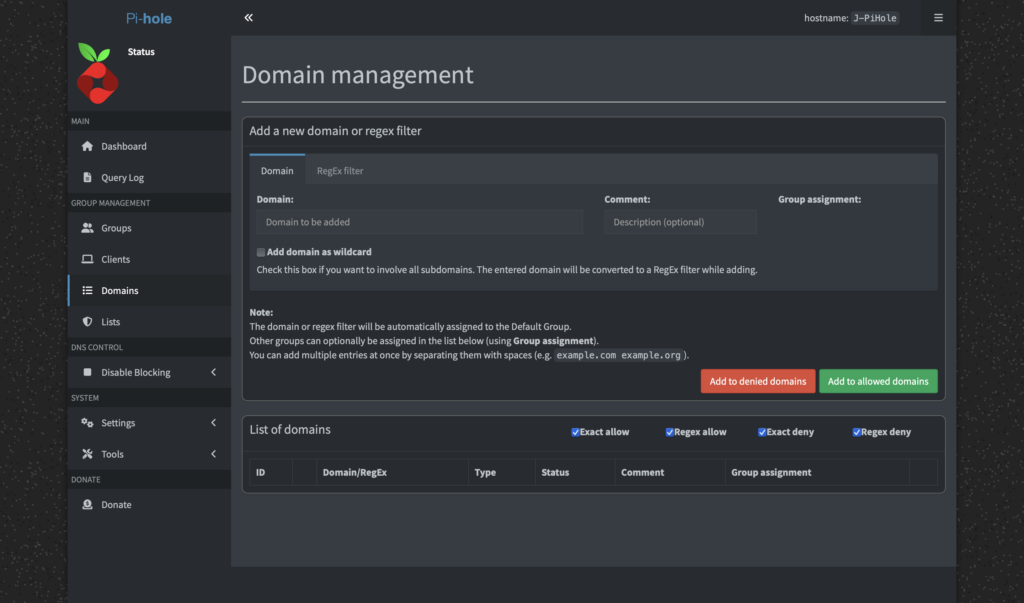
As a designer, green signifies a positive action, like adding something while red signals a negative action, like deleting something. More than once, I found myself accidentally clicking the green “Allow” button when my actual intention was to block a domain. It’s a classic UX problem where the visual signifier conflicts with the user’s intent. For a developer, a green button for “allow” might make perfect sense, it’s the “good” list. But for a user managing blocklists, it creates confusion.

This was a firsthand example of a barrier a designer could help lower. I immediately thought, “This is open source, I should be able to fix this!” I wanted to change the button color, maybe add an icon, or just improve the layout. But then I hit another wall: the documentation on how to change interface elements wasn’t straightforward for a non-developer. I literally had no idea, where to start.

This entire experience perfectly encapsulates the core of my thesis. It’s not just about finding UX issues, but about the entire process: identifying a problem, understanding the contribution workflow, and finding the right documentation. My simple home lab project has given me a tangible case study, a real problem to solve, and a clear path to explore for my “Designer’s Guide to Open Source.” It’s the first step in moving from theory to a real, practical contribution.

Accompanying Links

Pi-hole official website – https://pi-hole.net/

Raspberry Pi Zero – https://www.raspberrypi.com/products/raspberry-pi-zero/

Ai was used to formulate this blogpost (Gemini + WisprFlow)

Hosting Applications (Homelabbing_2) – Impulse #2

In my last blog post I wrote about my first steps in homelabbing, to clarify in homelabbing you try to setup a home server environment to run services, test and learn new stuff. Some examples: Host a cloud service, a picture backup service, a home NAS (Network Attached Storage), your own streaming service or even a Minecraft server. I set up a “home server” an old laptop got it a new operating system and installed the first services.

After this first success, I felt ready to dive deeper. To really host a service, that I can use, maybe even outside of my home network. And the first thing, that came to my mind was a Minecraft server. My cousin had done it, other friends had done it, so it can’t be that hard. And it really isn’t. The documentation is good, all in all it’s just installing java & the basic server run file. I just had one issue, which was exposing a port to the internet, which I could solve after a while of searching through forums. (I ended up finding the answer in the docs, just not where I looked.)

Now, I had used the terminal, I had a service running, why not set up something that I can use in a more productive way? And this one, didn’t go so well. See for a lot of the services most people run on their homelab you need a separate software for them to run properly, most of the time that is Docker. In short, Docker solves the “It works on my machine…” problem, a lot of new software has. (Here is a Network Chuck tutorial explaining Docker in more detail: https://youtu.be/eGz9DS-aIeY?si=aSPVoBCwRwZ6zaLs) It basically creates the perfect environment to run a certain piece of software. And just getting that to work, took me a while, reading documentation, forums, watching video tutorials.

After I had setup Docker and it was running properly, I decided to install a Remote Desktop application, so I could make changes to my home server from where ever I wanted, without having to use the old laptop to do so. I planned to hook it up to my home network and leave it running, without having to open it up to make changes. Through a Reddit post I discovered RustDesk, an open source remote access software, which can be self hosted through Docker. And for the first time, installing a new service just worked. The Docs were easy to follow and in less than an hour, I had RustDesk running.

After this first success I really wanted to have a service running, that would provide a benefit to my day to day life. Three different ones really caught my eye: PiHole, a network wide ad-blocking service, Immich, a Google Photos like picture backup cloud and n8n, a patching tool similar to Max that let’s you create Ai supported automations. (I provided Links to the projects below)

Sadly It was not all fun and games. Like all good homelabbing projects I ran into another problem, which had put this whole experience to a hold. Everything I had done until now ran through the W-Lan of my apartment, which is suboptimal, it clogs up the WiFi for other mobile devices and is slower, compared to a wired connection. Since I planned to put the server somewhere in the apartment and never move it again, I wanted to hook it up immediately. This lead to the laptop not booting, so I couldn’t do anything while it was hooked up to the network, but it would work fine when I unplugged it.

Impact for my Masters Thesis

Thinking back now, when I tried to set up Docker, this actually was my first encounter with a big problem in open source: Bad newcomer onboarding and difficult documentation. As I would find out later, during deepening my research in open source, this is also one of the areas that experts see the most use for UX work, creating an easy to understand onboarding and easy to read documentation. It’s a hit or miss. Sometimes it takes hours to troubleshoot a problem and reading through forum posts, to find the solution, that works for you.

What still stuck with me this whole time, thinking about open source, was the thought of coming into a new area or hobby and trying to solve a problem I don’t truly understand. I have used open source software before, I read docs and learned a lot, still finding a research question or a problem to solve is hard. I guess I need to dive deeper into this whole field to truly understand it. Everything I thought about felt strange, a new person coming in and trying to solve a problem that they read about in some forum or book. This lead me more into the direction of documenting, how to contribute as a designer in the first place or how to run/ start an open source project, since I really like the way of providing a product for others to use and change, best case for free.

Accompanying Links

Here are some links to the different services I mentioned im the blog post:

https://rustdesk.com

https://minecraft.wiki/w/Tutorial:Setting_up_a_Java_Edition_server

https://n8n.io

https://immich.app

https://www.docker.com

https://pi-hole.net