Dual-Model Vision Interface – OpenAI × Gemini Integration for Adaptive Image Understanding
Following the foundational phase of last week, where the OpenAI API Image Analyzer established a structured evaluation framework for multimodal image analysis, the project has now reached a significant new milestone. The second release integrates both OpenAI’s GPT-4.1-based vision models and Google’s Gemini (MediaPipe) inference pipeline into a unified, adaptive system inside the Image Extender environment.
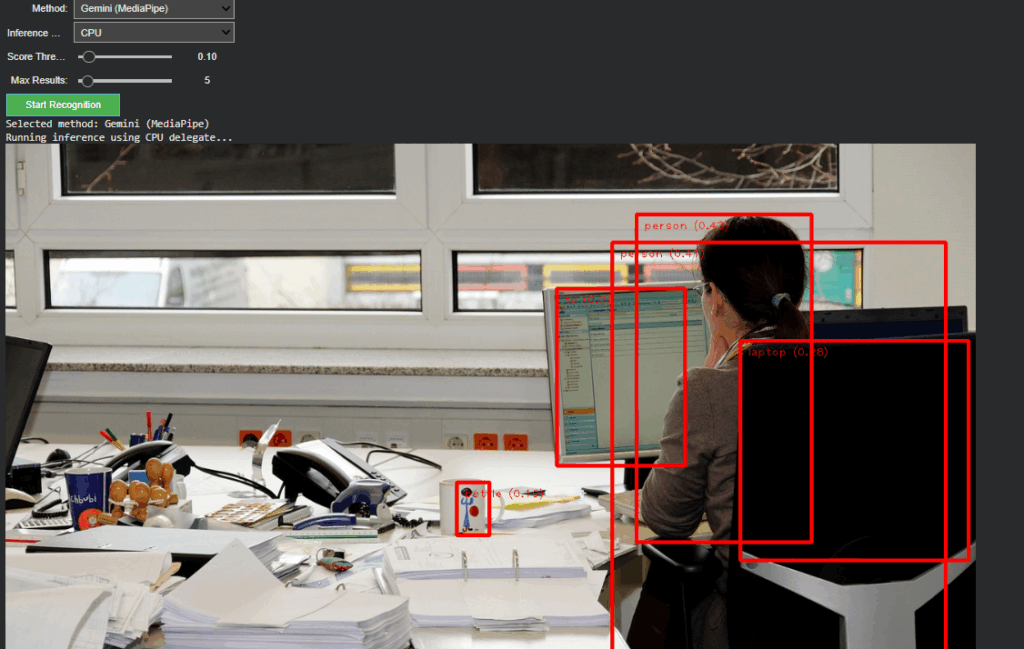
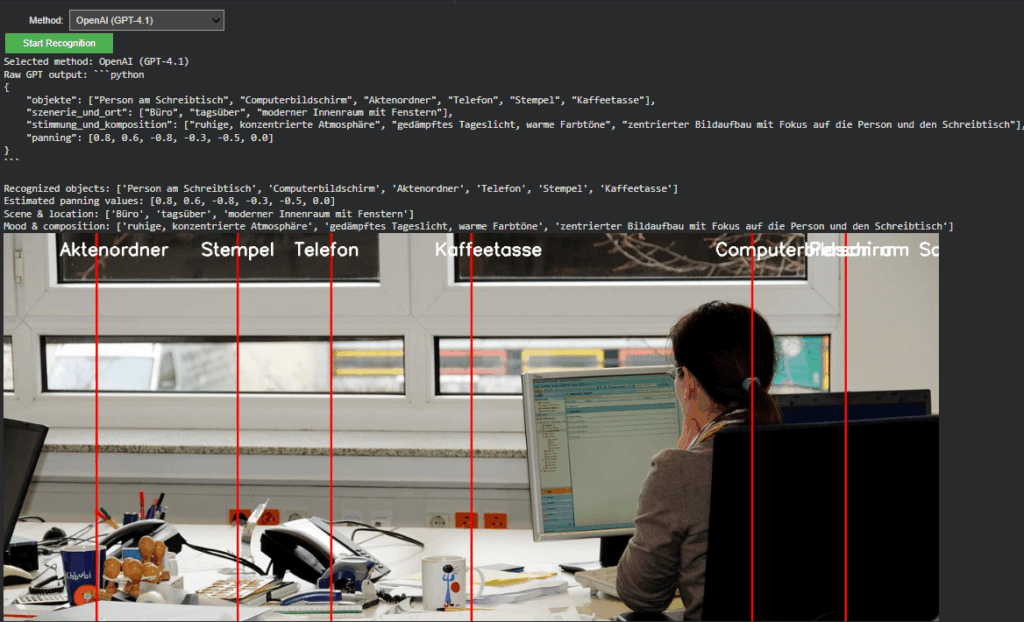
Unified Recognition Interface
In The current version, the recognition logic has been completely refactored to support runtime model switching.
A dropdown-based control in Google Colab enables instant selection between:
- Gemini (MediaPipe) – for efficient, on-device object detection and panning estimation
- OpenAI (GPT-4.1 / GPT-4.1-mini) – for high-level semantic and compositional interpretation
Non-relevant parameters such as score threshold or delegate type dynamically hide when OpenAI mode is active, keeping the interface clean and focused. Switching back to Gemini restores all MediaPipe-related controls.
This creates a smooth dual-inference workflow where both engines can operate independently yet share the same image context and visualization logic.
Architecture Overview
The system is divided into two self-contained modules:
- Image Upload Block – handles external image input and maintains a global IMAGE_FILE reference for both inference paths.
- Recognition Block – manages model selection, executes inference, parses structured outputs, and handles visualization.
This modular split keeps the code reusable, reduces side effects between branches, and simplifies later expansion toward GUI-based or cloud-integrated applications.
OpenAI Integration
The OpenAI branch extends directly from Last week but now operates within the full environment.
It converts uploaded images into Base64 and sends a multimodal request to gpt-4.1 or gpt-4.1-mini.
The model returns a structured Python dictionary, typically using the following schema:
{
“objects”: […],
“scene_and_location”: […],
“mood_and_composition”: […],
“panning”: […]
}
A multi-stage parser (AST → JSON → fallback) ensures robustness even when GPT responses contain formatting artifacts.
Prompt Refinement
During development, testing revealed that the English prompt version initially returned empty dictionaries.
Investigation showed that overly strict phrasing (“exclusively as a Python dictionary”) caused the model to suppress uncertain outputs.
By softening this instruction to allow “reasonable guesses” and explicitly forbidding empty fields, the API responses became consistent and semantically rich.
Debugging the Visualization
A subtle logic bug was discovered in the visualization layer:
The post-processing code still referenced German dictionary keys (“objekte”, “szenerie_und_ort”, “stimmung_und_komposition”) from Last week.
Since the new English prompt returned English keys (“objects”, “scene_and_location”, etc.), these lookups produced empty lists, which in turn broke the overlay rendering loop.
After harmonizing key references to support both language variants, the visualization resumed normal operation.
Cross-Model Visualization and Validation
A unified visualization layer now overlays results from either model directly onto the source image.
In OpenAI mode, the “panning” values from GPT’s response are projected as vertical lines with object labels.
This provides immediate visual confirmation that the model’s spatial reasoning aligns with the actual object layout, an important diagnostic step for evaluating AI-based perception accuracy.
Outcome and Next Steps
The project now represents a dual-model visual intelligence system, capable of using symbolic AI interpretation (OpenAI) and local pixel-based detection (Gemini).
Next steps
The upcoming development cycle will focus on connecting the openAI API layer directly with the Image Extender’s audio search and fallback system.