What comes to your mind when you hear the word Slack?
I presume business and workplace communication. What comes to your mind when you hear the word, Discord? I guess games.
If I can bore you further with more rhetorical questions, is there a specific industry to which you can align WhatsApp, iMessage, or Facebook messenger? I supposed not. This brings up the question, what makes Discord and Slack different?
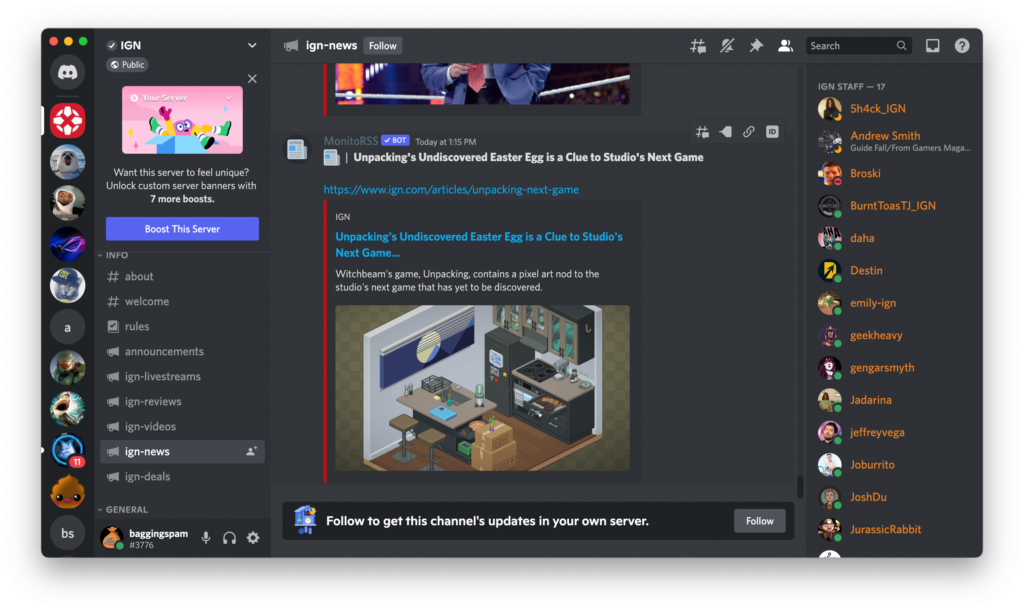
The scheme is simple – it’s the UI and UX design of the app. When you open Discord, you don’t need an additional clue to know this application is designed primarily for game enthusiasts. The app’s interface was designed with its target users, namely gamers, in mind, making it an innovation worth investing billions of dollars in. The same goes for Slack. The app’s features, interactions and user interface define the brand’s target audience, use cases and strategy to differentiate it from the competition.
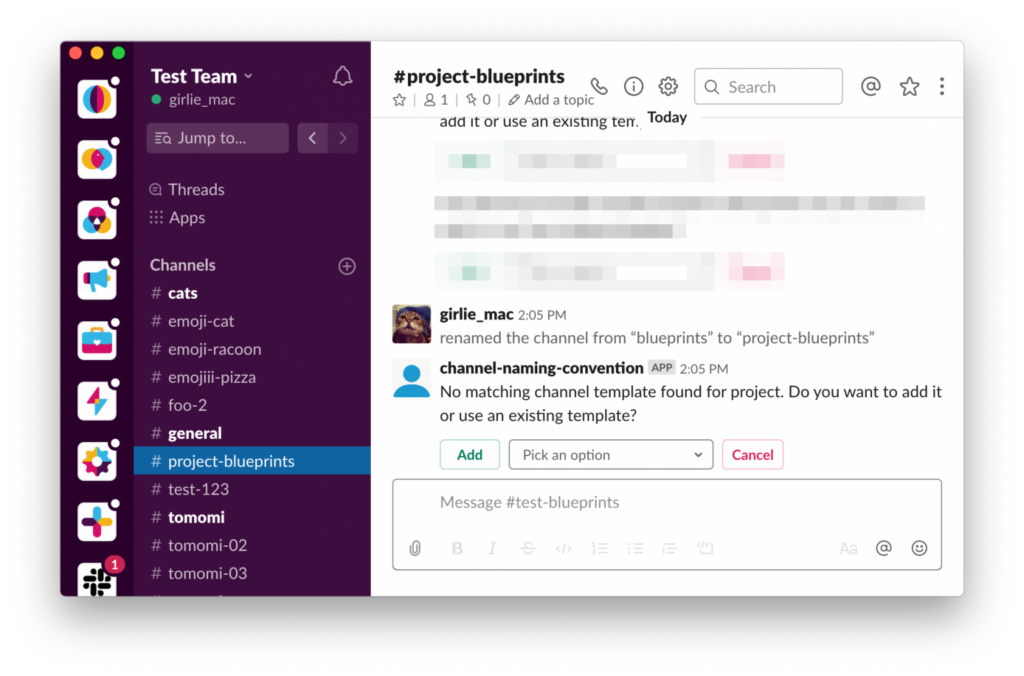
When comparing Slack and Discord in terms of UI/UX design, the key difference lies in their target audiences, primary use cases, and design philosophies, which affect how the two platforms approach product differentiation and innovation.
1. Target Audience
- Slack is primarily designed for business and professional communication. Its UX is optimized for productivity, with a focus on helping teams collaborate and manage projects.
- Discord initially targeted gamers but has since expanded to a wider audience, including content creators, hobbyist groups, and communities. Its UX is designed to create a social, fun, and interactive environment with voice, video, and text chat functionalities.
2. Interface and Navigation
- Slack:
- Organized Channels: Slack’s UI emphasizes structure, with channels and direct messages taking center stage. The sidebar navigation is key here, with well-organized folders and the option to pin or highlight important conversations.
- Minimalist, Professional Aesthetic: The design prioritizes clarity and productivity. It features a simple, streamlined aesthetic, avoiding unnecessary distractions, which helps maintain focus on work.
- Customization: While Slack offers some customization options, such as themes, the design is relatively restrained. The goal is consistency and ease of use, not heavy personalization.
- Discord:
- Fluid Social Interface: Discord’s UI is much more vibrant, with more customization options, including custom themes and the ability to change channel aesthetics. This plays into the casual, personal, and creative ethos of the platform.
- Server-centric Design: Discord organizes communication around servers, which function as distinct communities. Within these servers, users can create various text and voice channels, making it easier for communities to have multiple ongoing conversations in parallel.
- Customization and Personalization: Discord places a strong emphasis on personalization, with users able to customize their profiles, avatars, status, and more. The design is more visually engaging than Slack’s, allowing for a high level of user-driven interaction.
3. Focus on Collaboration vs. Socialization
- Slack:
- Work Collaboration: Slack’s design is built for productivity—tasks, project management, integrations with work tools (Google Drive, Asana, etc.), and communication are all tightly integrated. Slack’s UX emphasizes creating a unified workspace where everything is connected and easily accessible, with clear paths for team communication.
- Threads and Mentions: Slack’s thread functionality is key for maintaining organized conversations, while @mentions and notifications are designed to streamline communication and reduce noise.
- Discord:
- Social Collaboration: While Discord has added some work-oriented features (like integrations with GitHub, Trello, and more), it remains heavily focused on social interaction. The UX design reflects this social-first approach with emphasis on easy, free-flowing conversations, voice chats, and a sense of community.
- Voice & Video Chat: Discord’s standout feature is its robust voice and video communication, making it perfect for informal meetings or casual hangouts. The design for these features is very fluid, with easy-to-access buttons for voice channels, screen sharing, and video chats.
4. Innovation and Feature Set
- Slack:
- Workflow Builder: A key innovation for Slack has been its Workflow Builder, which enables users to automate routine tasks and streamline processes. This is a feature aimed at improving work efficiency and enhancing team productivity.
- Advanced Search and Integration: Slack’s search functionality is highly robust, allowing users to find specific messages, files, and data across channels. Slack also stands out for its deep integrations with third-party work tools and apps, such as project management tools, CRM systems, and cloud storage.
- Channel-specific Design: Slack’s innovation in organizing work around channels is a hallmark of its design. Channels can be highly customized to fit the needs of a specific team, project, or topic, creating tailored workspaces that increase focus.
- Discord:
- Custom Emoji and Bots: Discord has led innovation in enabling fun and personalization with custom emojis and bots that help automate server tasks or add fun features like games or interactive content.
- Rich Media Sharing: Discord’s chat features allow seamless media sharing (images, video, links) and have a more immersive design for games, streamers, and content creators, with features such as screen sharing, live streaming, and in-game overlays.
- Live Streaming and Video Integration: While Slack has video calling, Discord took things a step further by offering low-latency live streaming for server members and integrations that allow communities to watch games together or participate in live events.
5. Notifications and Alerts
- Slack:
- Professional, Focused Notifications: Slack’s notifications are designed to keep users on task without overwhelming them. There’s a granular level of control over notification preferences, such as muting specific channels, only getting alerts for direct mentions, or customizing how notifications appear across different devices.
- Discord:
- Engaging and Fun Notifications: Discord’s notifications, by contrast, are more dynamic and customizable. Users can be notified for mentions, new messages, or even activities like voice channel activity, giving users a more interactive experience.
6. Design Approach and Responsiveness
- Slack:
- Slack’s design is relatively consistent across platforms, including desktop and mobile. It focuses on ease of use and scalability for businesses and enterprises. The UX is clean and offers a high level of accessibility, supporting various assistive features (e.g., keyboard shortcuts, screen readers).
- Discord:
- Discord’s design is equally responsive across desktop and mobile but is more visually oriented. It adapts well to both casual users and communities, emphasizing user-driven design choices (custom emojis, themes) that allow for more individual expression.
Conclusion
- Slack: Best for businesses and teams where communication is primarily task-oriented and needs to stay streamlined, professional, and integrated with various productivity tools. Slack’s UX design reflects its focus on work collaboration and task management with an emphasis on clean, minimalist interfaces and a strong focus on productivity.
- Discord: Ideal for community-based or social communication, with a focus on casual interactions, community building, and content creation. Discord’s UX design is more vibrant, with interactive, customizable elements aimed at fostering communication and engagement in an informal environment.
In terms of innovation:
- Slack innovates through its integrations, workflow automations, and focus on creating a professional, focused workspace.
- Discord shines in its flexibility, personalization, and features aimed at fostering community engagement, such as live streaming, custom emojis, and interactive bots.
Ultimately, the UI/UX design of both platforms is tailored to their respective use cases—Slack emphasizes streamlined productivity, while Discord emphasizes social interaction and creative expression.
References
UI and UX Design for better product strategy by Dodonut
