AI is no longer limited to creating images. Today, it is also possible to animate illustrations. Short videos, subtle motion, and atmospheric loops can be generated from a image or prombt. Since I had never animated illustrations with AI before, I decided to try it out and see how it works in practice. i knew that its possible to create illustrateded animation videosfrom the scratch, but I am intrested in using already existing illustrations and animating them. I heared it works best for minimalistic, subtle animations. That’s why I chose my illustration, which I’ve used once before. I think it has the potential to be pretty good. This blog post is an exploration and an experiment with AI and based on the previous post.
Why I Wanted to Try AI Animation
As an illustrator, animation has always felt like a separate skill set. Traditional animation takes time, planning, and technical knowledge. AI promises a faster and more accessible way to bring illustrations to life, even without animation experience. Sometimes even small animations enhance an illustrations more, especially for soocial media.
Over all I was curious to find out:
- how much control I actually have
- how natural the movements look
- whether AI animation feels like a useful tool or just a visual effect
- which Generator is the best
How AI Animation Works (as a user)
Most AI animation tools work with an image-to-video approach. You upload a finished illustration and describe how it should move. The AI then creates a short animated clip based on your image and text prompt. Typical movements include flowing smoke, water, light, or subtle object motion. These animations are usually short and loopable, making them suitable for social media, websites, or mood visuals.
Let’s Start Animating
For my first tests, I decided to focus on tools that are commonly used (and free) for image-to-video animations. I let Chat GPT write the prombt for my imagined animation. Here how it turned out and the picture an want to use, which you may already know from my previous article:
Soft, slow animation. The pink smoke gently flows out of the teapot spout and moves upward in a smooth curve. The fish inside the smoke slowly swim forward. Calm, dreamy motion, no camera movement, subtle loop.
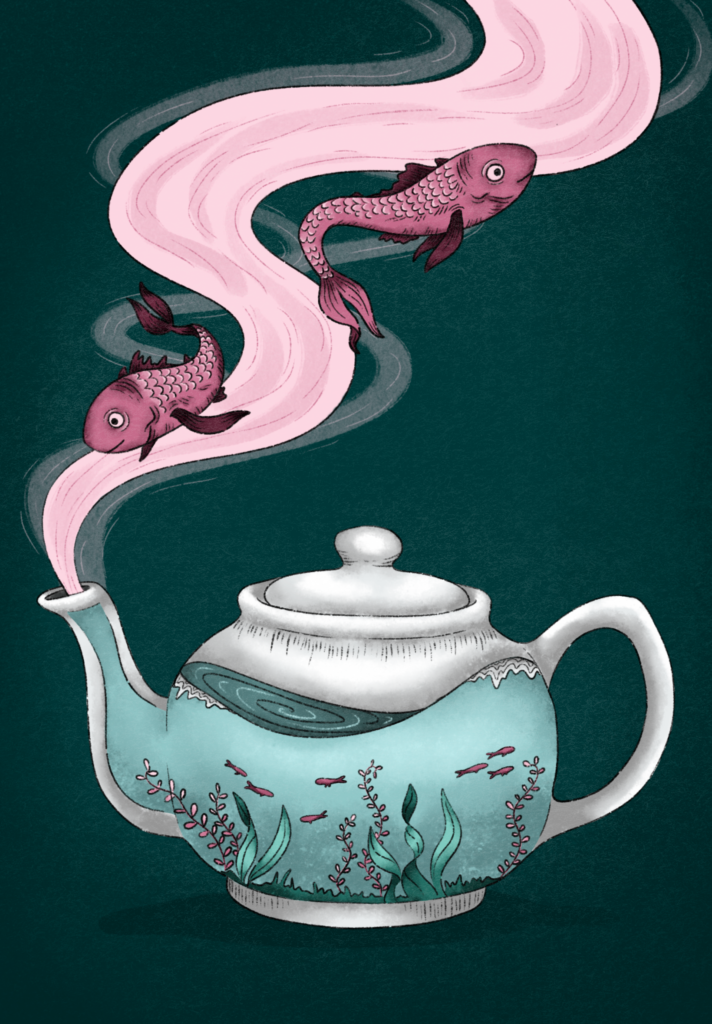
It was not easy to find Generators that are completly free. I just can just Firefly because I have an Adobe Subscription but there exclusive material as well. The good thing on Firefly is, that you can choose between a lof of diffrent models. Most websites require you to purchase credits, but there are some models where you have a few credits available in the free plan as Leonardo Ai or Stable Diffusion. However, I assume that you will achieve the best results with paid models.
- Firefly Veo 2: You just can create 9:16 or 16:9 which is very limiting, just the fishes are moving, even though one of the fishi sis turning weird, I like the flowy and slow motions
- Stable Diffusion: I tried Stable Diffusion for the first time and I have to admit I am very happy with this result, the movements of the fish are really realistic and I like how the smoke is slightly moving in the background, it looks very magical
- Firefly Ray 3 HDR: I like how the smoke is slowly moving upwards and how the fish are floating around it, I dont get why the camera is mocing upwards cause there is no information about it in the prombt but I kinda like it, what’s really strange are the colors and how gray and dark they’ve become.
- Firefly Pika 2.2: Really dont know whats going on there
- Leonardo AI: I had high hopes on that generator but it turned out a bit weird, i like how the smoke is flowing, but everything is moving way too fast
I think the best result so far came from Stable Diffusion. That’s why I wanted to refine the prompt and make it more precise, to see if I could achieve an even better result, even though I already really like how it turned out. Here’s what I got.
Unfortunately, I couldn’t manage to keep the fish inside the frame. Aside from that, I really like the movements inside the teapot, especially the gentle water motion and the way the small fish swim. If it were possible to combine these movements with the version shown above, that would be my ideal result.
Final Thoughts
Animating static illustrations with AI is something I find really interesting. Compared to fully creating illustrations with AI, I like this approach because it lets you add motion to existing artwork and create cool results very quickly. You don’t need any After Effects skills, and traditional animation usually takes a lot of time.
Especially for social media or small animated pieces, AI animation is a great option. You can get something moving without a complex workflow. It could also be interesting to animate individual layers separately and then combine them, which might lead to even better and more controlled results. Prompting is still challenging, especially when you have a very specific idea in mind, but overall it’s an exciting and accessible way to experiment with animation.
