Jobs To Be Done (Workshop) – WebExpo Day 2

On day one, I visited a lot of different talks, one of them was “What is the ‘Jobs To Be Done’ framework and why should you care?” by Martina Klimesová. Looking back, this was a pretty biased talk about this framework, for beginners, still a great way to get to know the framework better. It actually got me so interested, that I joined her short workshop the next day, to try working with Jobs To Be Done myself.

In short, what is JTBD? The framework is based on the assumption, that people don’t simply buy products. They hire them, to get a job done, for example: People don’t want a drill, they want to hang a picture. The goal is to stop focusing on solutions. Depending, on the scope and context, there is hundreds of different jobs, a person wants or needs to do, to achieve a certain goal. But how do you get there?

The JTBD framework consists of five steps:
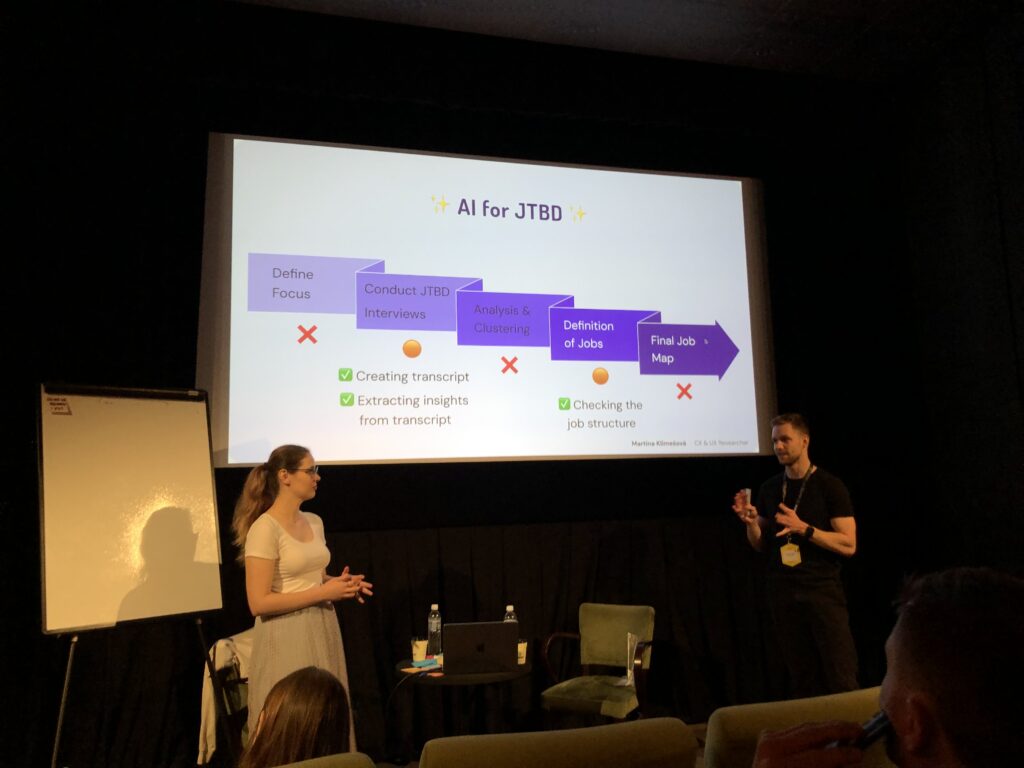
  1. Define the focus/scope of your project (start small)
  2. Talk to users – conduct interviews
  3. Analyse & Cluster your insight
  4. Define Jobs
  5. Create a Job Map

Defining the focus/ scope – During the workshop we focused on a small coffee stand, in front of a huge office building. The end goal was, to raise the profits of said stands to do that, we needed to conduct some research, to find out which jobs people need to do, on their way to work. Assuming, they would pass the coffee stand on their way to the office. So our focus was set, we wanted to analyse peoples “get to work routine”, from the moment they get up, to when they start work. In reality, you would base that decision, on business requirements, collected data or just gut feel.

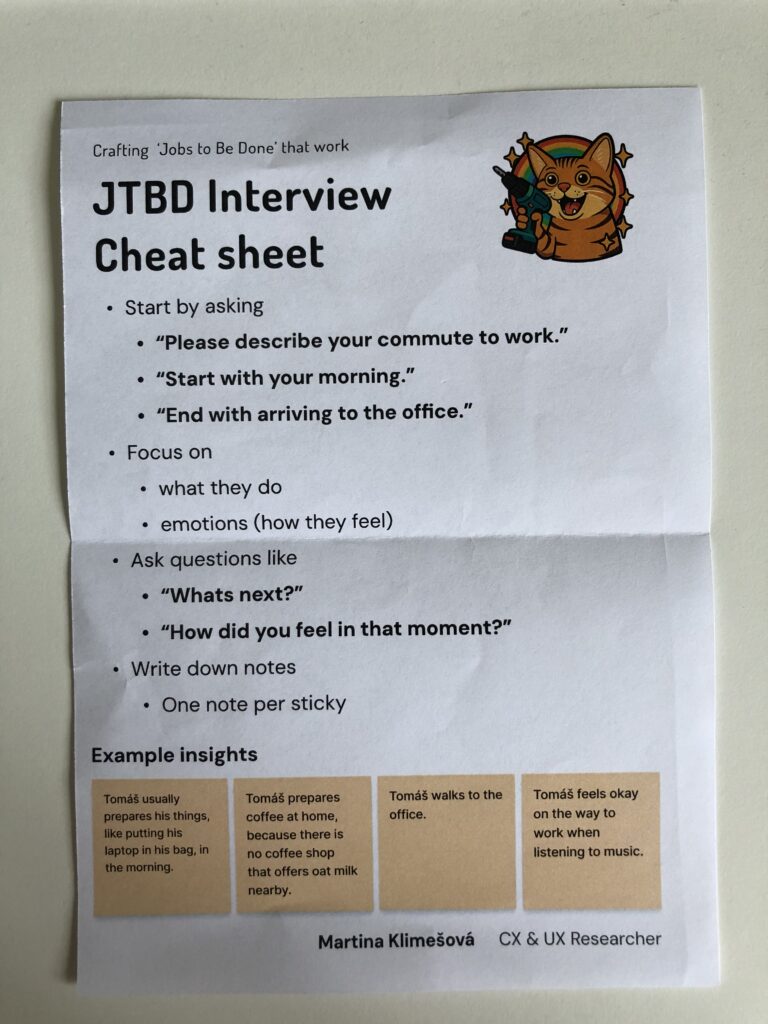
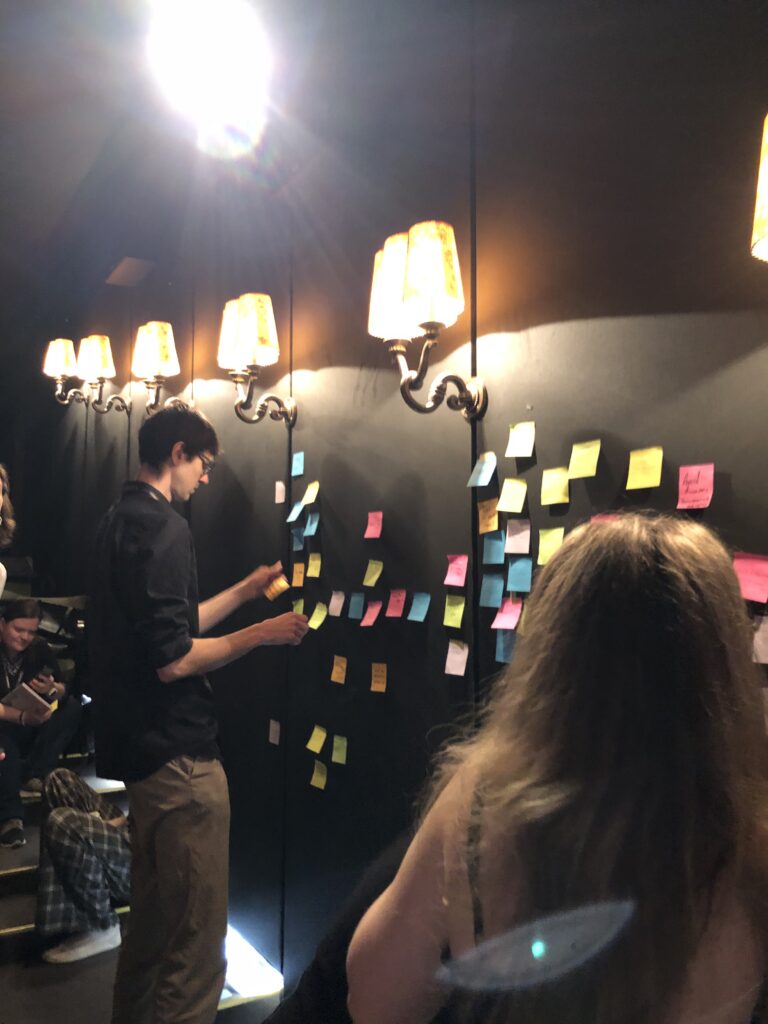
Conducting Interviews – Next is to interview between six to twelve people, or better yet until you can see certain patterns repeating themselves. The focus of those interviews are the feeling of people, in a certain situation and their processes they go through, to achieve their end goal, in this case, getting form home to their workplace. Martina advised us, to take notes of our insights on sticky notes, since they were easy to rearrange in the later stages of the process. One Insight per sticky note. She even handed out a cheat sheet, to help with the process.
Analysis & Clustering – After conducting your interviews, you should end up with a bunch of sticky notes, with a lot of insights. The next step, is to cluster those insights in different groups, try to find a headline for each of the groups. For the coffee stand example those groups were: How people commute to work, what they eat, when they have their first coffee, how they deal with the weather and a few more, I can’t remember. Try to keep the clusters small and separate them into smaller groups, if they get too big.

Defining Jobs – After clustering your insights, try to find job statements for each cluster, this could be just one or multiple. The statements can be very specific like “Buying a coffee” to very abstract like “not feeling sleepy”. This is the hardest part of the process and it will take a while to get all the jobs down.

Creating a Job Map – This is the last part of the process and probably the most fun. After creating job statements and writing them down on sticky notes, now you put it all together. The goal is to create a timeline of jobs, people need to do to reach their end goal. The time line can be separated into multiple milestones, like “leaving the house”, “commuting to work” & “sitting down in the office”- You put down the sticky notes according to the point in time, the users have to fulfil them. Additionally you should separate abstract from specific jobs, you could create a scale, having the most abstract jobs at the top and the very specific ones at the bottom. This map should then be shared with your whole team.
If you want to know more, here is a link to the book Martina kept recommending (both during the workshop & her talk): https://www.amazon.com/Jobs-Be-Done-Playbook-Organization/dp/1933820683
GenUi blew my mind – WebExpo Day 1

One the first day of WebExpo 2025, I listened to a talk from Tejas Kumar named “From GenAI to GenUI – Codify your UI on the fly”, during his live demo he went through the history of adding Ai to webpages, from 2022 to 2025 and beyond.

Starting with the basics, he showed how Ai chatbots were created, back when ChatGPT was still new and people didn’t know, how to best use it yet. Interfaces were simple, just a textfield to write a query into and a search button, afterwards, one would have to wait (in the dem it was about 15 seconds) until the answer arrived. As we all know, waiting, especially if its longer than ten seconds, sucks.

To combat this he implemented streaming, which means instead of waiting for the whole message before it is displayed, small parts of the Ais reply are shown, which makes the user experience much better. In addition, he parsed through the response to display different objects in a list. Making not only the wait time shorter, but also the readability better. But wait, there is more! If text can be streamed, so can html or css, since it is just a stream if text, converted into images by your browser.

He proceeded to show how asking an Ai to display a list of movies with a strong female lead could change, by adding generative UI. Instead of displaying just a list of movies, the Ai could display Netflix like panels, that are interactive and which take you directly to a page about the movie. The Ai could even embed trailers directly into the chat and not just provide a link. Last, he asked the Air Force to show him where he could watch the movie, the Ai asked for his location via a popup and then embedded a map with the correct rout right into the chat room. Amazing! Additionally all created Ui can be created by designers, which adds a layer of control about what the Ai actually generates, since it could also generate bad things.

He proceeded to demo, how he gave tools to an Ai, which would get information from an API (in this case an API containing all WebExpo talks), understand it and interact with it. “You don’t have to browse the web, it comes to you.” Using this he can now ask the Ai about the schedule of the conference, but not searching for specific things, asking the Ai about certain topics. Last he incorporated his own google calendar into the Ai model, enabling it to understand his calendar and even add events. This way he could tell the Ai to all an event to his calendar at the time of his friends talk at WebExpo, and it did. It even provided additional information about the talk.

If you got interested in the talk, here is a recording of it:
(Use the slider to increase & decrease the size of the video/Screen recording)

embed = new SlidesLiveEmbed(“presentation-embed-39043153”, { presentationId: “39043153”, autoPlay: false, verticalEnabled: true, });

Also, here is all other talks from this years WebExpo:
https://slideslive.com/webexpo

👩🏽‍💻 WebExpo Conference: Survival kit for advertising jungle by Kateřina Huňová & Vladimír Zikmund

This talk stood out with its metaphorical yet practical framework: surviving the modern advertising jungle. Kateřina Huňová and Vladimír Zikmund offered 10 sharp, memorable tips that went beyond theory, highlighting real campaigns, missteps, and surprisingly simple creative ideas.

Here’s the survival kit they proposed:

1. Get your survival kit
Know your brand, your product or service, and, most importantly, your audience. Messaging only works when it aligns with identity. Ryanair’s chaotic memes and British Airways’ premium tone couldn’t be swapped. Know who you are, and stay in your lane.

2. Enter with courage
Courage in advertising can mean budget bravery (like Lays going all-in on football and music) or daring to be different. Kaufland’s idea to hand out ice packs of carrots to hockey players is absurd, and that’s exactly why it worked. It was cheap, simple, and memorable.

3. Hunt one animal
Focus on one thing: one product, one message, one feeling. Trying to do everything results in nothing. Klarna’s “smooth fish” campaign was absurd but effective. The Ordinary, too, owns its scientific tone with brutally plain product names. Simplicity is power.

4. Stay on the path
Consistency and integration are critical. Skoda’s visual metaphor using plus and minus signs doubled campaign awareness. Long-term consistency, like Snickers’ “You’re not you when you’re hungry” builds recognition and emotional memory.

5. Take a buddy
Mascots work, whether they’re cute (like DuoLingo’s owl), absurd (like the Panda who gets mad if you say no to milk), or even annoying. If your tone is strong and consistent, your audience will remember it.

6. Climb the tree for better perspective
Think differently. IBM made clever physical installations to demonstrate smart ideas. Jeep used unexpected ad placements (like bizarre parking spots). Dog food brands made frisbees shaped like gym weights. Unexpected formats create attention.

7. Follow the river flow
Trend moments are fast and short-lived, like “brat summer” or meme formats. You can ride them, but don’t rely on them. Heineken’s flippable phone device for distraction-free cheering was a brilliant trend-relevant product.

8. Cooperate with indigenous people
Influencers can help, but only when they truly fit. Jeremy Allen White for Calvin Klein worked. But Kendall Jenner for Pepsi? A disaster. Influencers are not the idea, they’re just one tool, and they must align with your brand values.

9. Obstacles can’t stop you
Barriers can spark creativity. Legal restrictions in Brazil banned beer logos on football jerseys, so Brahma used hair dye to create beer-colored hairstyles. Penny fought consumer price-blindness by printing huge prices on product packaging.

10. Celebrate at the end
After surviving the jungle, don’t forget to appreciate your wins. Analyze your results, celebrate your team, and enjoy the moment. Every good campaign is a journey.

This was one of the most engaging and creatively structured talks at WebExpo. Even if advertising isn’t your main field, these lessons about clarity, creativity, and boldness are easily applied across all types of design and communication.

WebExpo Conference: Data Visualisation

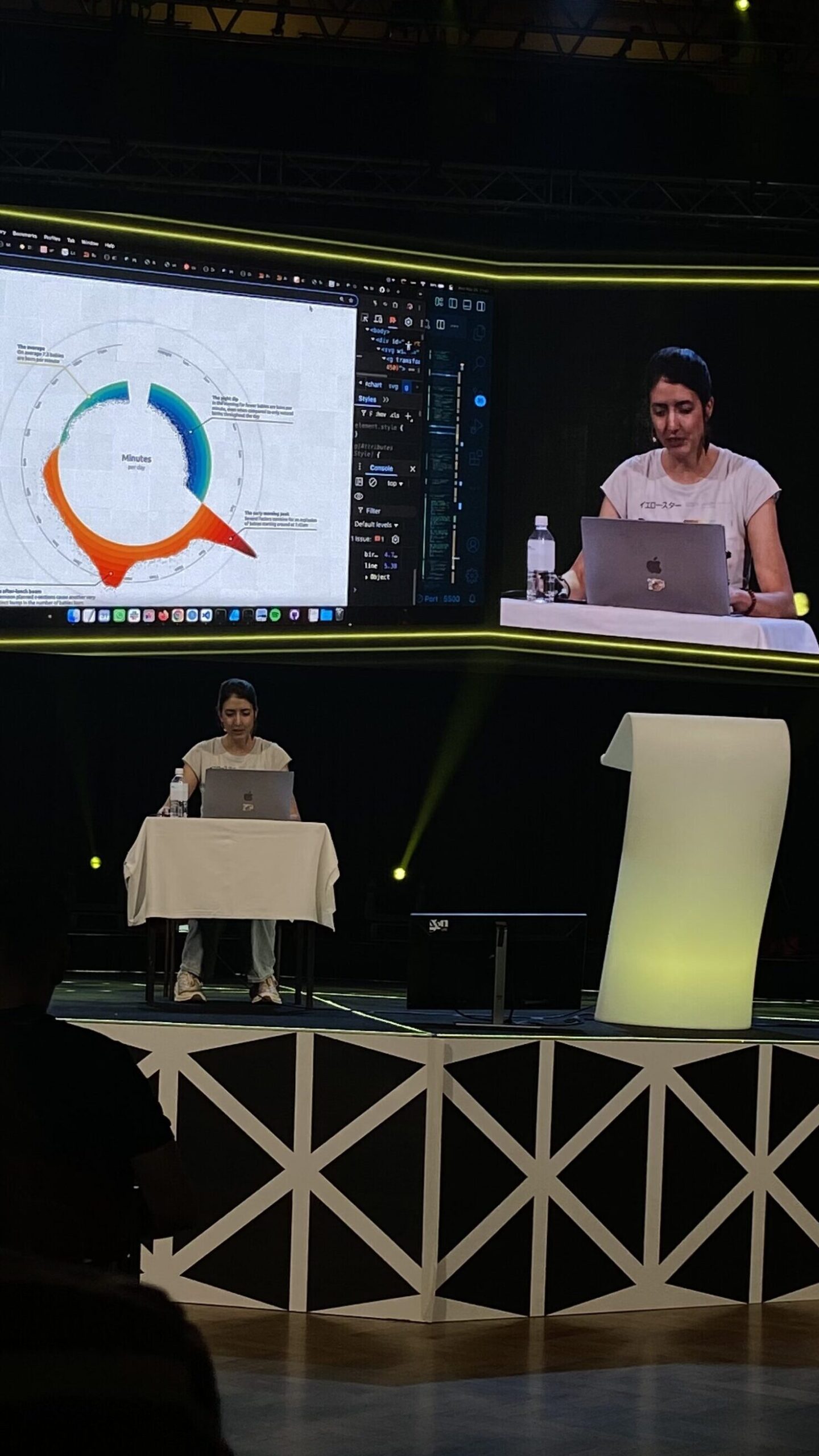
One of my favorite sessions on the first day was the workshop “Creating an Effective & Beautiful Data Visualisation from Scratch” by Nadie Bremer. She’s well-known profesionall, that created data visualizations for organizations like Google News Lab, UNICEF, and The New York Times

What really surprised me about this workshop was how hands-on it was, Nadie started with a completely blank screen and gradually built a stunning chart using d3.js (a JavaScript library for data visualization). Watching her go from scratch to a fully developed visual step by step was really engaging.

To be honest, I didn’t understand every part of the code she used, especially when she went into more technical things like indexes, cosine, and sine functions. But I could follow the general concept and the logic behind how she built the structure and visual elements. Even without knowing all the technical details, it was exciting to see how math and design came together in such a creative way.

What made this especially interesting to me was how relevant it felt to what I want to do. I’ve been thinking a lot about how to make dashboards more appealing. Most of them use the same types of basic charts, which get the job done but aren’t very exciting. Nadie’s approach showed how much more engaging and beautiful charts can be, without losing clarity.

She also shared some helpful tips about design decisions, like choosing the right color palette, how to simplify complex data, and how to guide the viewer’s attention with layout and motion. These small things make a big difference when it comes to making information easy to understand.

Even though I don’t remember coding very well, I’ve always been interested in it, and this workshop really made me want to dive back in and learn more. It made coding feel less intimidating and reminded me that there’s a creative side to it, especially when it’s used to tell a story through data.

Overall, I left the session feeling inspired. It was a great example of how technical skills and artistic thinking can come together. I’d definitely recommend checking out Nadie Bremer’s work if you’re curious about creative data visualization.

“Digital intimacy: Feeling human in an artificial world” WebExpo Conference Talk

One of the most surprising and emotional talks I attended at WebExpo was “Digital Intimacy: Feeling Human in an Artificial World” by Lutz Schmitt. It opened my eyes to how technology—especially artificial intelligence—is changing the way we connect with others, both in good and dangerous ways.

Lutz started by talking about intimacy—something we usually connect with people who are physically close to us: partners, friends, family. He showed how, in long-distance relationships, people use tech to keep that closeness alive. He gave the example of a product called Pillow Talk, which lets people feel their partner’s heartbeat even when they are far away. It sounds romantic, but it also made me think: what happens when machines start replacing real people in these connections?

One of the biggest ideas in the talk was that privacy is the basis of true intimacy. But online, our privacy is often not protected. Lutz pointed out that digital spaces are full of systems that track us, watch us, and try to influence how we feel. This makes it harder to build real trust—and trust is key for intimacy.

At the same time, Lutz showed that meaningful digital connections are possible. Many of us stay close with friends and family through social media or video calls. But he warned us about something growing even faster: AI companions and parasocial relationships. In the future, more people might become “friends” with AI agents. These relationships can feel real—but they are one-sided, and the AI is controlled by someone else.

He shared one shocking example: some men, after breakups, trained an AI using their ex-girlfriend’s messages, voice notes, and chats. They created an AI “clone” of their ex to continue the relationship. This raised serious questions about ethics, consent, and emotional health.

Lutz also spoke about AI counselors, which are already helping people with mental health support. He made an interesting point: people are often afraid of how their real friends will react to their problems. With an AI, there’s no fear of judgment. This makes it easier for some to open up. But again, it raises the question—who is behind the AI, and what is their goal?

One disturbing example he mentioned was an AI that told a young boy to kill his parents to get more screen time. This showed how dangerous it can be when we don’t fully understand or control what AI might say.

What I really appreciated about Lutz’s talk was how honest and thought-provoking it was. He didn’t try to scare people, but he didn’t avoid uncomfortable topics either. He showed both the beautiful and the dark sides of AI in relationships, and how important it is to ask questions now, before it’s too late.

For me, this talk was one of the highlights of WebExpo. It made me see AI not just as a tool, but as something that could shape our deepest emotions and relationships—for better or worse.

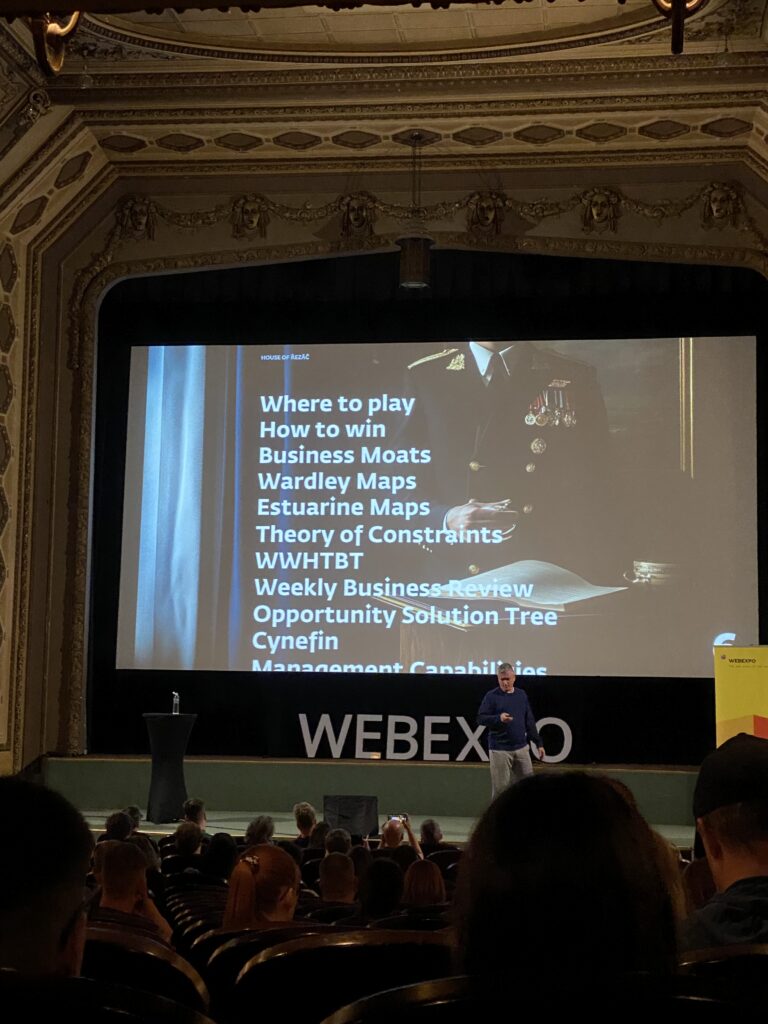
“12 Core Design Skills” at WebExpo Conference Talk

One of the talks that really made me think differently at this year’s WebExpo was Jan Řezáč’s presentation: 12 Core Design Skills. It wasn’t about shiny tools or the newest design trends. Instead, it focused on the skills that actually help designers succeed in the real world.

A big idea from the talk was this: Figma is not where design starts. Jan said that Figma is simply a place to document our design decisions, not where the design thinking happens. This hit me hard. Many of us spend so much time in design tools, but the real work starts much earlier—with ideas, research, and understanding problems.

He also warned about falling into what he called the “second diamond trap.” This means focusing only on the final stages of the design process—like making screens and prototypes—while ignoring the important early phases like research and problem definition. Skipping those steps can lead to pretty designs that don’t solve real issues.

One of my favorite takeaways was how important it is to design with intention. Every step we take should have a clear reason behind it. Jan talked about design as a form of creative problem-solving—not just making things beautiful, but making them work better.

Another important skill Jan talked about was facilitation. As designers grow in their careers, it’s not enough to do good design work alone. We also need to bring people together, lead workshops, and help teams think clearly. That means using techniques that create structure and trust in group settings.

But maybe the strongest point of the talk was this: stakeholder management is the most important skill a designer can have. You’re not just designing for users—you’re also working with managers, developers, and other teams. Jan said something that stuck with me: “Your real designer is your manager.” If they don’t support your work, it’s very hard to make an impact.

Jan also gave some advice on research. He said that during the research phase, designers should talk less and listen more. The goal is to make sense of what users and teams are saying. This skill—making sense of data and feedback—is something we should use all the time, not just during big research moments.

He also reminded us that most products—around 95%—fail. That’s a huge number. To avoid being part of that statistic, designers need to test ideas often and be open to learning, not just polishing.

Finally, Jan recommended watching a great video by John Cleese about creativity. I watched it after the talk—it really helped me see creative work in a new way.

This session made me reflect on my own work. Am I just moving shapes on a screen? Or am I solving the right problems in smart, intentional ways? Thanks to Jan’s talk, I feel more focused on what truly matters in design.

👩🏽‍💻 WebExpo Conference: 12 core design skills by Jan Řezáč

At this year’s WebExpo Conference, Jan Řezáč delivered one of the most insightful and practical talks I’ve heard in a long time. His talk, titled “12 Core Design Skills,” focused not on tools or trends, but on the essential skills that make a designer truly effective. Instead of obsessing over Figma or pixel perfection, he urged us to zoom out and look at the broader responsibilities of a designer.

One of his most striking points was that Figma is not design, it’s documentation. This might sound surprising at first, especially since many of us use Figma daily. But his message was clear: design happens before the tool. Real design is about solving problems, not just arranging rectangles on a screen. Figma, like Corel Draw or Photoshop before it, is just one of many tools to express an idea, but it’s the thinking behind the idea that matters most.

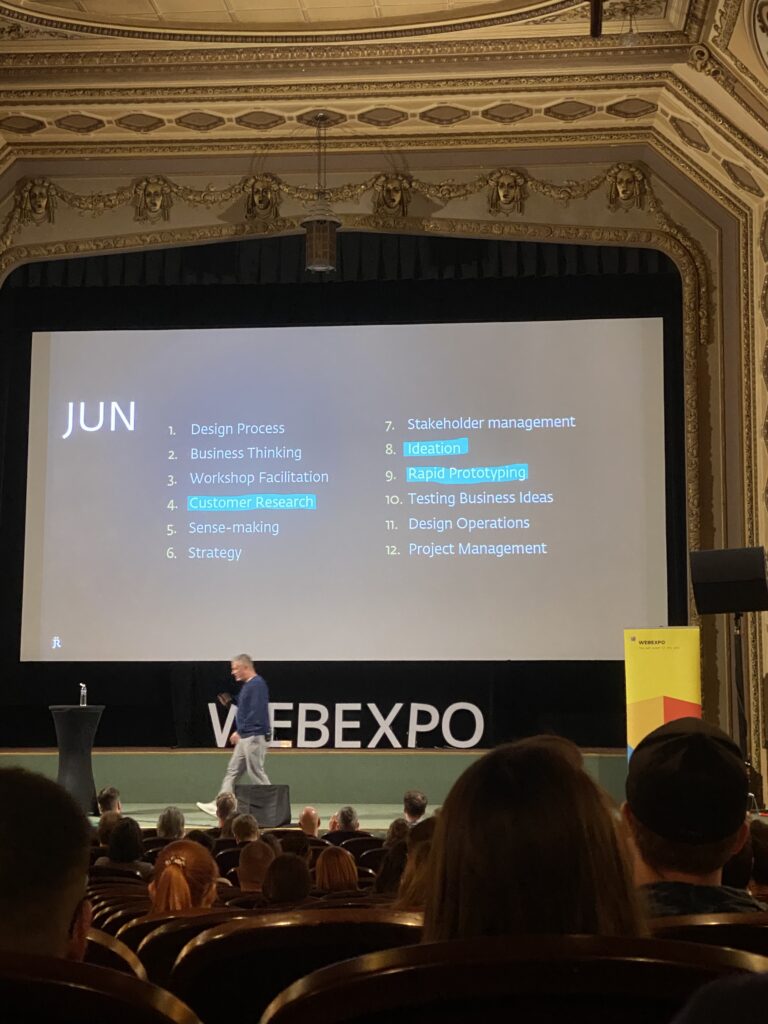
Jan criticized the tendency to focus only on the last phase of the double diamond process, execution. By doing so, we ignore the equally important stages of discovery, definition, and ideation. This is where his list of 12 core skills came in, but rather than listing them all, I want to highlight the ones that stood out the most to me:

  • Design Thinking: Jan called this “creative problem-solving.” He emphasized being intentional with whichever design process we choose. What matters is not the method itself, but how we use it to explore and solve problems.
  • Business Thinking: Designers need to understand business goals. Learning to speak the language of strategy, money, and spreadsheets allows us to have better conversations with managers and stakeholders. Without this skill, good design ideas often fail to get implemented.
  • Workshop Facilitation: This was a key point. While junior designers may come in with strong ideas and enthusiasm, experienced designers know how to guide a team through a process. Good facilitation involves tactical empathy, structure, and the ability to improve outcomes by leading people, not just projects.
  • Customer Research: Jan talked about using both qualitative and quantitative methods: interviews, surveys, testing, analytics. The takeaway: good designers don’t just guess; they listen, observe, and test. Senior designers carry this mindset with them all the time, not just during research phases.
  • Testing Business Ideas: A great reminder that ideas need to be tested early and often. Jan suggested testing 20–100 ideas per week. It sounds intense, but it shifts the mindset from perfection to learning.

Throughout the talk, Jan returned to one core message: the most important tool we have is our brain. Tools change. Trends come and go. But the ability to think critically, communicate clearly, and collaborate strategically is what defines a strong designer.

This talk encouraged me to step back from the screen and refocus on the bigger picture: problem-solving, strategy, and working with people. It was a refreshing and important reminder of what design is really about.