After extensive experimentation with the Touch Board, I’m excited to share a short video showcasing the final prototype in action. This interactive map invites people to discover Graz through touch and sound. Each spot on the map hides a small surprise: a sound, a memory, a piece of the city waiting to be heard. Everything you see here was designed to feel handmade and screen-free, turning simple tech into something a little more magical.
Watch the video to see how it all comes together.
And here’s the video with all the sound stories. Hope you enjoy 🙂
In this post, I’m documenting my first hands-on test with the Touch Board by Bare Conductive. After choosing it for its built-in capacitive touch sensors and MP3 playback, I wanted to validate whether this microcontroller could support the kind of screen-free, tactile storytelling I’m imagining, where visitors trigger audio simply by touching a point on a surface.
The Touch Board is basically an Arduino-compatible microcontroller designed for sound-based interactions.
It comes with:
12 capacitive touch electrodes (E0-E11)
Built-in microSD card slot for MP3s
Audio jack and speaker terminal
Micro-USB for power and programming
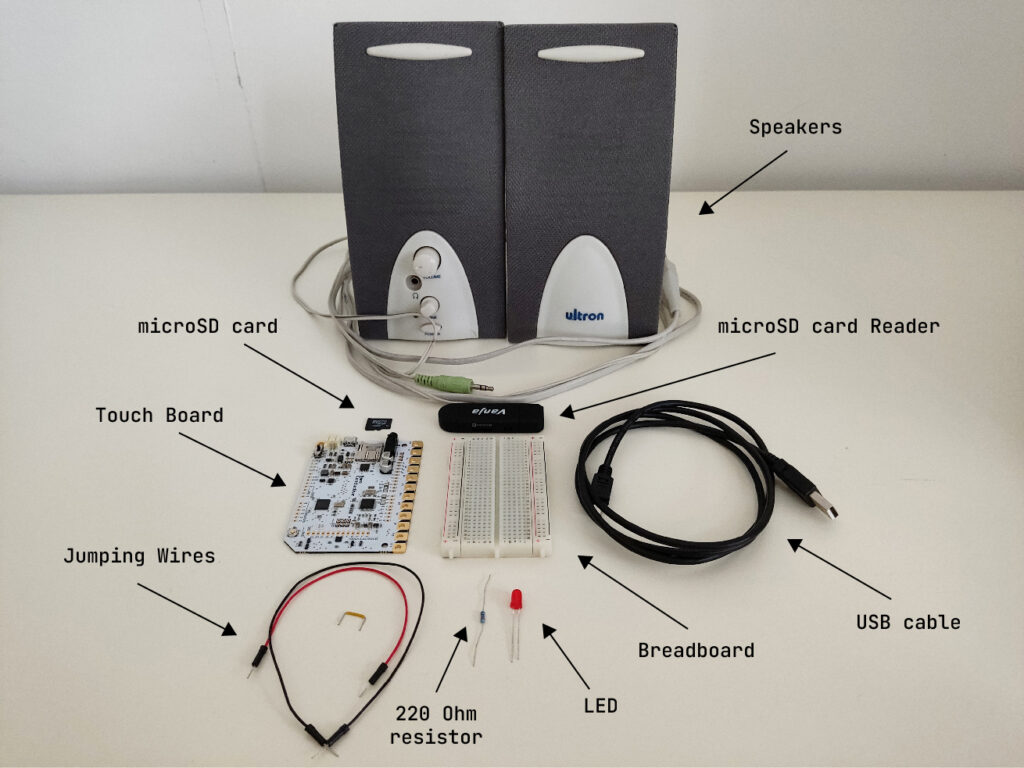
What I Used
1x Touch Board
1x microSD card
1x microSD card reader
1x Speaker
1x USB cable (for power and code upload)
1x LED (for basic feedback)
1x 220 Ohm resistor
1x Breadboard
3x Jumping Wires
Bare Conductive’s “Touch MP3 with LEDs” example code
Basic Wiring
The Touch Board’s default “Touch MP3” code links each of the 12 electrodes (E0-E11) to a corresponding MP3 file on the microSD card. When you touch an electrode, it plays the matching audio clip.
To make the interaction more multisensory and responsive, I added a simple LED feedback: when a sound plays, the LED lights up.
Here’s how I wired it:
Connected Touch Board’s GND to the breadboard’s ground rail using a jumper wire.
Placed a red LED on the breadboard.
Connected the long leg (anode) of the LED to a 220Ω resistor.
Connected the short leg (cathode) to the breadboard’s ground rail using a jumper wire.
Connected the other end of the resistor to one of the Touch Board’s pins using a jumper wire.
For more detailed instructions, check out this helpful tutorial: https://www.instructables.com/Touch-Board-and-LEDs/
First Test
Touching one of the electrodes triggered a short sound from the speaker. At the same time, the LED lit up, confirming that the interaction was happening.
Here’s a short video testing this simple interaction.
Observations
Responsiveness: Very fast, almost too sensitive. Occasionally triggered by nearby touches or objects.
Satisfaction: The sound + light combo made the interaction feel clear and complete.
Compactness: Everything fit neatly on one board. No need for additional modules at this stage.
Next Steps
For wrapping up this lo-fi prototype, I will:
Add more electrodes and connect multiple LEDs
Try using conductive ink or custom-designed graphics as touchpoints
Test a portable setup powered by a USB power bank
Design audio content that reflects unusual or hidden stories from Graz
Reflections
This first test confirmed that the Touch Board is a great fit for early-stage, lo-fi prototyping. It’s easy to set up, intuitive to work with, and lets me focus on designing interactions, not just solving hardware problems. More importantly, it opened up space for experimenting with storytelling, mapping emotion, sound, and place onto physical interaction. I’m excited to continue developing this idea and exploring how each touchpoint might reveal a different layer of the city.