Prototyping IX: Image Extender – Image sonification tool for immersive perception of sounds from images and new creation possibilities

Advanced Automated Sound Mixing with Hierarchical Tag Handling and Spectral Awareness

The Image Extender project continues to evolve in scope and sophistication. What began as a relatively straightforward pipeline connecting object recognition to the Freesound.org API has now grown into a rich, semi-intelligent audio mixing system. This recent development phase focused on enhancing both the semantic accuracy and the acoustic quality of generated soundscapes, tackling two significant challenges: how to gracefully handle missing tag-to-sound matches, and how to intelligently mix overlapping sounds to avoid auditory clutter.
Sound Retrieval Meets Semantic Depth

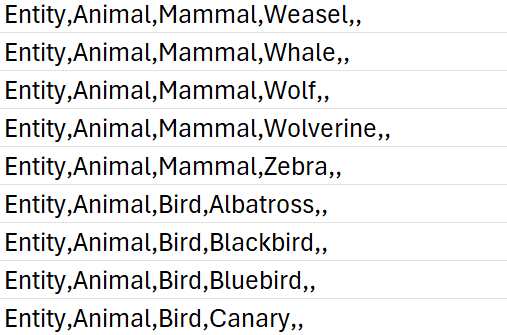
One of the core limitations of the original approach was its dependence on exact tag matches. If no sound was found for a detected object, that tag simply went silent. To address this, I introduced a multi-level fallback system based on a custom-built CSV ontology inspired by Google’s AudioSet.

This ontology now contains hundreds of entries, organized into logical hierarchies that progress from broad categories like “Entity” or “Animal” to highly specific leaf nodes like “White-tailed Deer,” “Pickup Truck,” or “Golden Eagle.” When a tag fails, the system automatically climbs upward through this tree, selecting a more general fallback—moving from “Tiger” to “Carnivore” to “Mammal,” and finally to “Animal” if necessary.

Implementation of temporal composition

Initial versions of Image Extender merely stacked sounds on top of each other by only using the spatial composition in the form of panning. Now, the mixing system behaves more like a simplified DAW (Digital Audio Workstation). Key improvements introduced in this iteration include:

  • Random temporal placement: Shorter sound files are distributed at randomized time positions across the duration of the mix, reducing sonic overcrowding and creating a more natural flow.
  • Automatic fade-ins and fade-outs: Each sound is treated with short fades to eliminate abrupt onsets and offsets, improving auditory smoothness.
  • Mix length based on longest sound: Instead of enforcing a fixed duration, the mix now adapts to the length of the longest inserted file, which is always placed at the beginning to anchor the composition.

These changes give each generated audio scene a sense of temporal structure and stereo space, making them more immersive and cinematic.

Frequency-Aware Mixing: Avoiding Spectral Masking

A standout feature developed during this phase was automatic spectral masking avoidance. When multiple sounds overlap in time and occupy similar frequency bands, they can mask each other, causing a loss of clarity. To mitigate this, the system performs the following steps:

  1. Before placing a sound, the system extracts the portion of the mix it will overlap with.
  2. Both the new sound and the overlapping mix segment are analyzed via FFT (Fast Fourier Transform) to determine their dominant frequency bands.
  3. If the analysis detects significant overlap in frequency content, the system takes one of two corrective actions:
    • Attenuation: The new sound is reduced in volume (e.g., -6 dB).
    • EQ filtering: Depending on the nature of the conflict, a high-pass or low-pass filter is applied to the new sound to move it out of the way spectrally.

This spectral awareness doesn’t reach the complexity of advanced mixing, but it significantly reduces the most obvious masking effects in real-time-generated content—without user input.

Spectrogram Visualization of the Final Mix

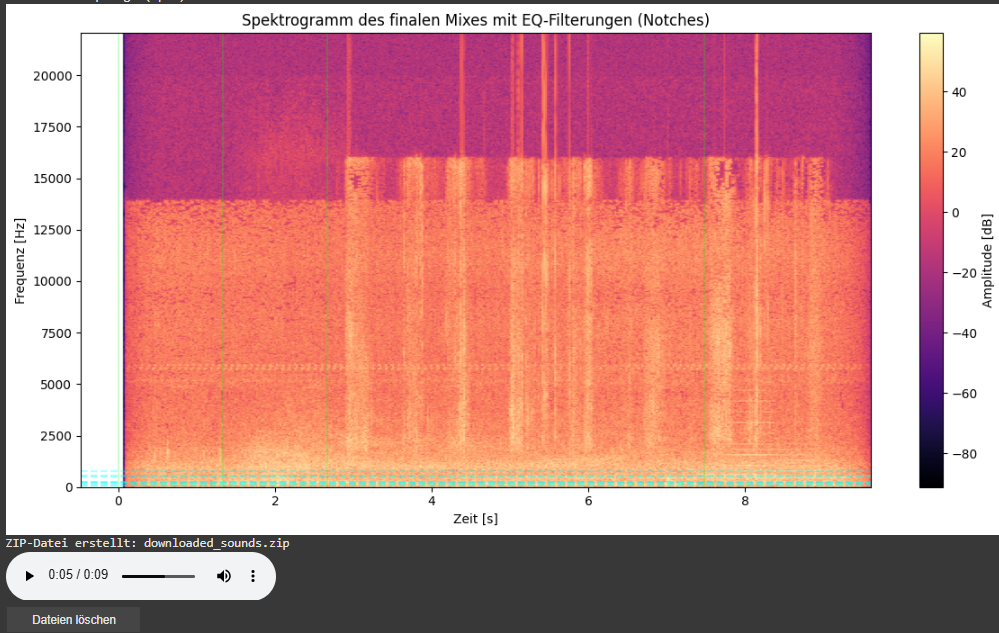
As part of this iteration, I also added a spectrogram visualization of the final mix. This visual feedback provides a frequency-time representation of the soundscape and highlights which parts of the spectrum have been affected by EQ filtering.

  • Vertical dashed lines indicate the insertion time of each new sound.
  • Horizontal lines mark the dominant frequencies of the added sound segments. These often coincide with spectral areas where notch filters have been applied to avoid collisions with the existing mix.

This visualization allows for easier debugging, improved understanding of frequency interactions, and serves as a useful tool when tuning mixing parameters or filter behaviors.
Looking Ahead

As the architecture matures, future milestones are already on the horizon. We aim to implement:

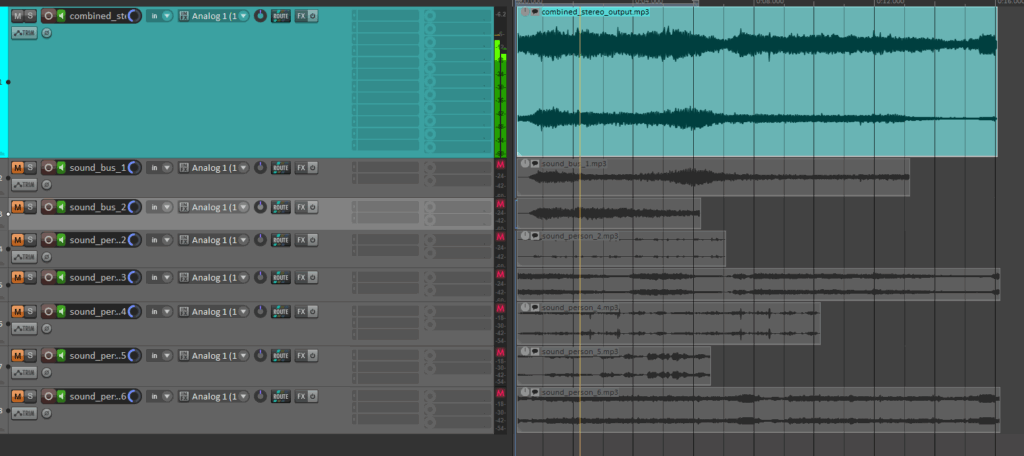
  • Visual feedback: A real-time timeline that shows audio placement, duration, and spectral content.
  • Advanced loudness control: Integration of dynamic range compression and LUFS-based normalization for output consistency.

Prototyping VIII: Image Extender – Image sonification tool for immersive perception of sounds from images and new creation possibilities

Sound-Image Matching via Semantic Tag Comparison

Continuing development on the Image Extender project, I’ve been exploring how to improve the connection between recognized visual elements and the sounds selected to represent them. A key question in this phase has been: How do we determine if a sound actually fits an image, not just technically but meaningfully?

Testing the Possibilities

I initially looked into using large language models to evaluate the fit between sound descriptions and the visual content of an image. Various API-based models showed potential in theory, particularly for generating a numerical score representing how well a sound matched the image content. However, many of these options required paid access or more complex setup than suited this early prototyping phase. I also explored frameworks like LangChain to help with integration, but these too proved a bit unstable for the lightweight, quick feedback loops I was aiming for.

A More Practical Approach: Semantic Comparison

To keep things moving forward, I’ve shifted toward a simpler method using semantic comparison between the image content and the sound description. In this system, the objects recognized in an image are merged into a combined tag string, which is then compared against the sound’s description using a classifier that evaluates their semantic relatedness.

Rather than returning a simple yes or no, this method provides a score that reflects how well the description aligns with the image’s content. If the score falls below a certain threshold, the sound is skipped — keeping the results focused and relevant without needing manual curation.

Why It Works (for Now)

This tag-based comparison system is easy to implement, doesn’t rely on external APIs, and integrates cleanly into the current audio selection pipeline. It allows for quick iteration, which is key during the early design and testing stages. While it doesn’t offer the nuanced understanding of a full-scale LLM, it provides a surprisingly effective filter to catch mismatches between sounds and images.

In the future, I may revisit the idea of using larger models once a more stable or affordable setup is in place. But for this phase, the focus is on building a clear and functional base — and semantic tag matching gives just enough structure to support that.

Prototyping VII: Image Extender – Image sonification tool for immersive perception of sounds from images and new creation possibilities

Mixing of the automatically searched audio files into one combined stereo file:

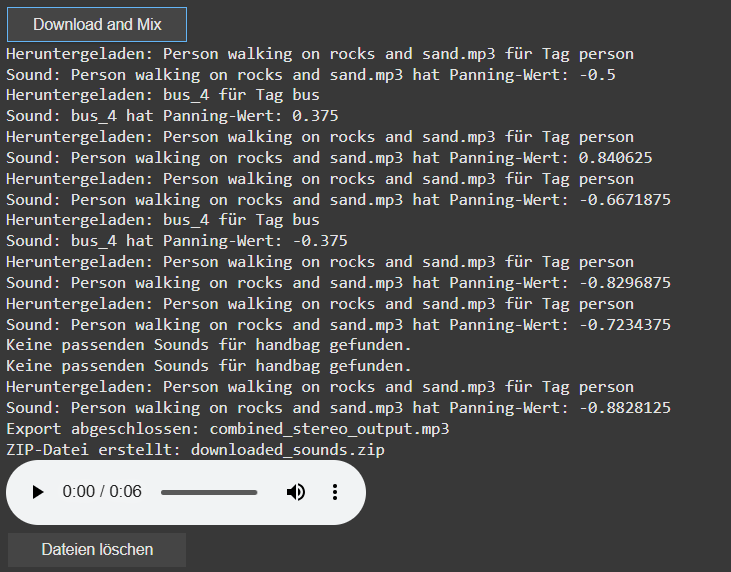
In this latest update, I’ve implemented several new features to create the first layer of an automated sound mixing system for the object recognition tool. The tool now automatically adjusts pan values and applies attenuation to ensure a balanced stereo mix, while seamlessly handling multiple tracks. This helps avoid overload and guarantees smooth audio mixing.

check of the automatically searched and downloaded files + the automatically generated combined audiofile

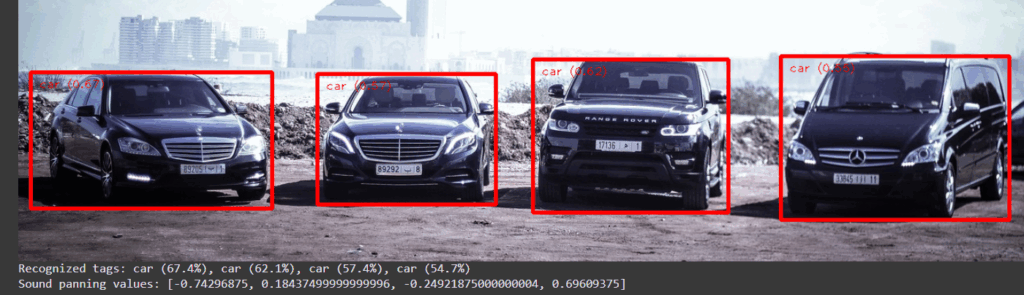
A key new feature is the addition of a sound_pannings array, which holds unique panning values for each sound based on the position of the object’s bounding box within an image. This ensures that each sound associated with a recognized object gets an individualized panning, calculated from its horizontal position within the image, for a more dynamic and immersive experience.

display of the sound panning values [-1 left, 1 right]

I’ve also introduced a system to automatically download sound files directly into Google Colab’s file system. This eliminates the need for managing local folders. Users can now easily preview audio within the notebook, which adds interactivity and helps visualize the results instantly.

The sound downloading process has also been revamped. The filters for the search can now be saved via a buttonclick to apply for the search and download for the audiofile. Currently for each tags there are 10 sounds per tag preloaded, with each sound randomly selected to avoid duplication but ensure the use of multiple times of the same tag. A sound is only downloaded if it hasn’t been used before. If all sound options for a tag are exhausted, no sound will be downloaded for that tag.

Additionally, I’ve added the ability to create a ZIP file that includes all the downloaded sounds as well as the final mixed audio output. This makes it easy to download and share the files. To keep things organized, I’ve also introduced a delete button that removes all downloaded files once they are no longer needed. The interface now includes buttons for controlling the download, file cleanup, and audio playback, simplifying the process for users.

Looking ahead, I plan to continue refining the system by working on better mixing techniques, focusing on aspects like spectrum, frequency, and the overall importance of the sounds. Future updates will also look at integrating volume control and more far in the future an LLM Model that can check the correctness of the found file title.

Prototyping VI: Image Extender – Image sonification tool for immersive perception of sounds from images and new creation possibilities

New features in the object recognition and test run for images:

Since the initial freesound.org and GeminAI setup, I have added several improvements.
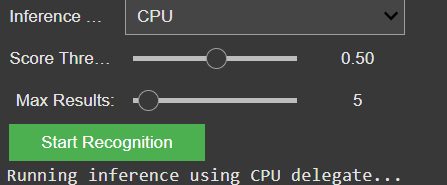
You can now choose between different object recognition models and adjust settings like the number of detected objects and the minimum confidence threshold.

GUI for the settings of the model

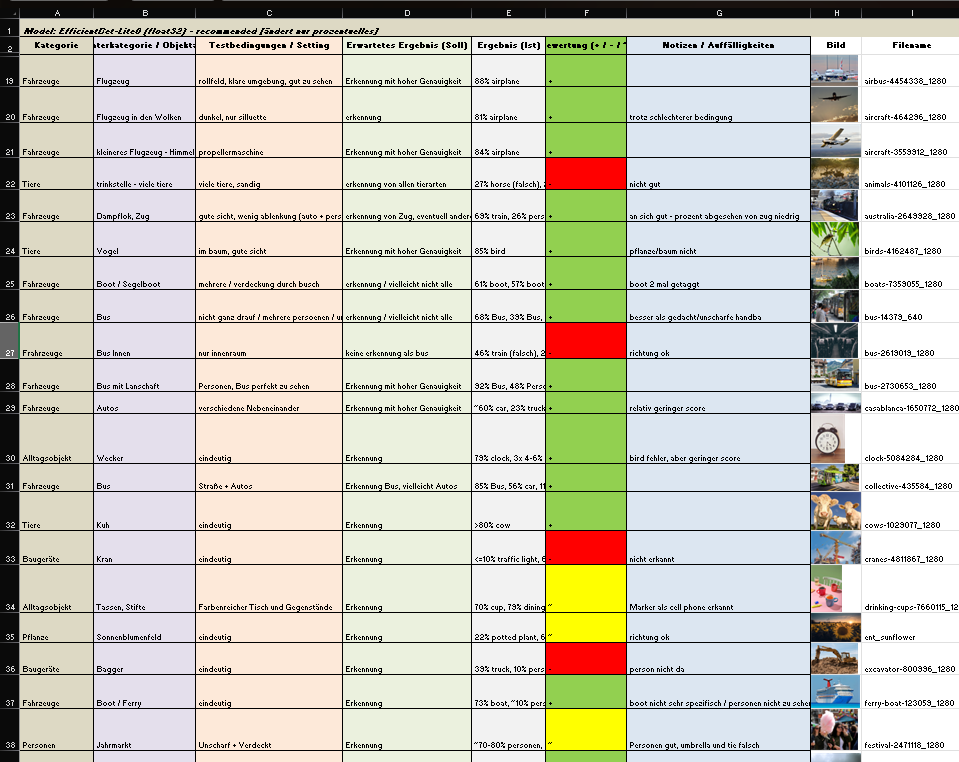
I also created a detailed testing matrix, using a wide range of images to evaluate detection accuracy. Due to that there might be the change of the model later on, because it seems the gemini api only has a very basic pool of tags and is also not a good training in every category.

Test of images for the object recognition

It is still reliable for these basic tags like “bird”, “car”, “tree”, etc. And for these tags it also doesn’t really matter if theres a lot of shadow, you only see half of the object or even if its blurry. But because of the lack of specific tags I will look into models or APIs that offer more fine-grained recognition.

Coming up: I’ll be working on whether to auto-play or download the selected audio files including layering sounds, adjusting volumes, experimenting with EQ and filtering — all to make the playback more natural and immersive. Also, I will think about categorization and moving the tags into a layer system. Beside that I am going to check for other object recognition models, but  I might stick to the gemini api for prototyping a bit more and change the model later.

Prototyping V: Image Extender – Image sonification tool for immersive perception of sounds from images and new creation possibilities

Integration of AI-Object Recognition in the automated audio file search process:

After setting up the initial interface for the freesound.org API and confirming everything works with test tags and basic search filters, the next major milestone is now in motion: AI-based object recognition using the GeminAI API.

The idea is to feed in an image (or a batch of them), let the AI detect what’s in it, and then use those recognized tags to trigger an automated search for corresponding sounds on freesound.org. The integration already loads the detected tags into an array, which is then automatically passed on to the sound search. This allows the system to dynamically react to the content of an image and search for matching audio files — no manual tagging needed anymore.

So far, the detection is working pretty reliably for general categories like “bird”, “car”, “tree”, etc. But I’m looking into models or APIs that offer more fine-grained recognition. For instance, instead of just “bird”, I’d like it to say “sparrow”, “eagle”, or even specific songbird species if possible. This would make the whole sound mapping feel much more tailored and immersive.

A list of test images will be prepared, but there’s already a testing matrix for different objects, situations, scenery and technical differences

On the freesound side, I’ve got the basic query parameters set up: tag search, sample rate, file type, license, and duration filters. There’s room to expand this with additional parameters like rating, bit depth, and maybe even a random selection toggle to avoid repetition when the same tag comes up multiple times.

Coming up: I’ll be working on whether to auto-play or download the selected audio files, and starting to test how the AI-generated tags influence the mood and quality of the soundscape. The long-term plan includes layering sounds, adjusting volumes, experimenting with EQ and filtering — all to make the playback more natural and immersive.

Prototyping IV: Image Extender – Image sonification tool for immersive perception of sounds from images and new creation possibilities

Tests on automated audio file search via freesound.org api:

For further use in the automated audio file search of the recognized objects I tested the freesound.org api and programmed the first interface for testing purposes. The first thing I had to do was request an API-Key by freesound.org. After that I noticed an interesting point to think about using it in my project: it is open for 5000 requests per year, but I will research on possibilities for using it more. For the testing 5000 is more than enough.

The current code already searches with a few testing tags and gives possibilities to filter the searches by samplerate, duration, licence and file type. There might be added more filter possibilities next like rating, bit depth, and maybe the possibility of random file selection so it won’t be always the same for each tag.

Next steps would also include to either download the file or just play it automatically. Then there will be tests on using the tags of the AI image recognition code for this automated search. And later in the process I have to figure out the playback of multiple files, volume staging and filtering or EQing methods for masking effects etc…

Test gui for automated sound searching via freesounds.org API

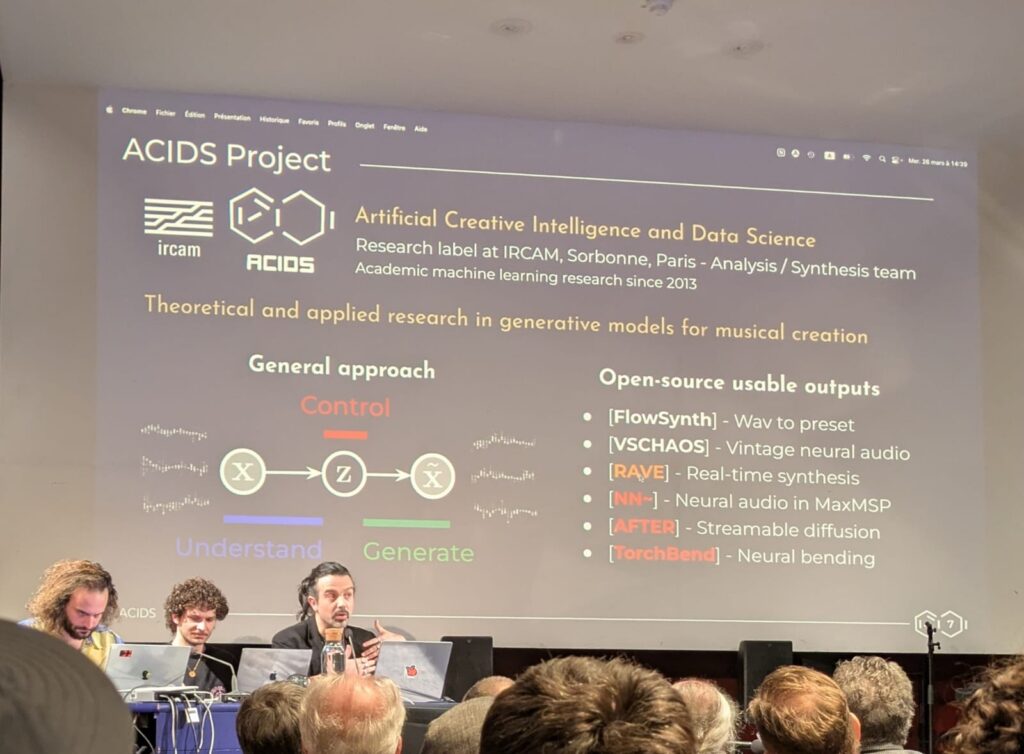
IRCAM Forum Workshops 2025 – ACIDS

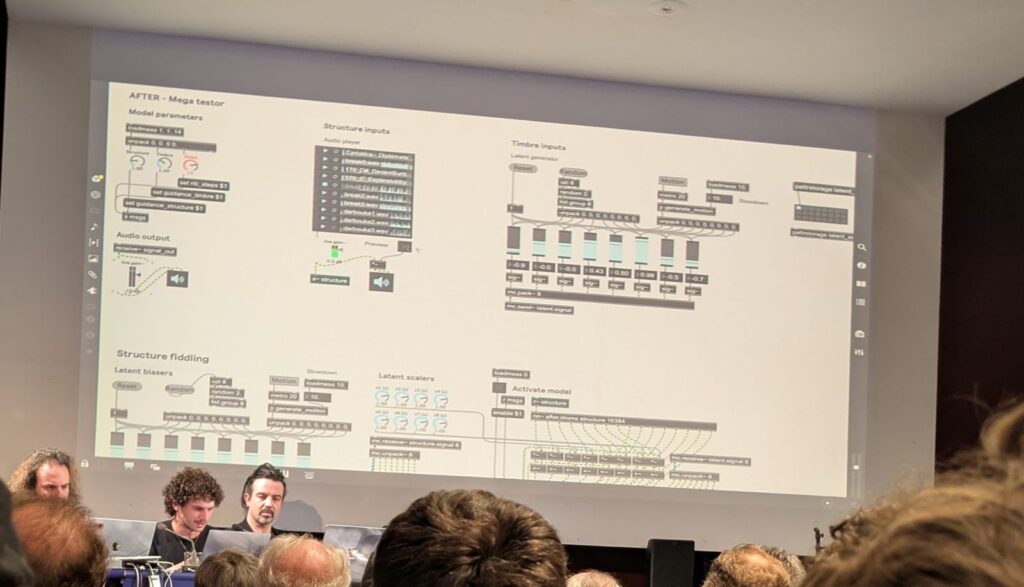
From 26 to 28th of March, we (the sound design master, second semester) had the incredible opportunity to visit IRCAM (Institut de Recherche et Coordination Acoustique/Musique) in Paris as part of a student excursion. For anyone passionate about sound, music technology, and AI, IRCAM is like stepping into new fields of research, discussion and seeing prototypes in action. One of my personal highlights was learning about the ACIDS team (Artificial Creatiive Intelligence and Data Science) and their research projects—RAVE (Real-time Audio Variational autoEncoder) and AFTER (Audio Features Transfer and Exploration in Real-time

ACIDS – Team

The ACIDS team is a multidisciplinary group of researchers working at the intersection of machine learning, sound synthesis, and real-time audio processing. Their name stands for Audio, Communication, Information, Data, and Sound, reflecting their broad focus on computational audio research. During our visit, they gave us an inside look at their latest developments, including demonstrations from the IRCAM Forum Workshop (March 26–28, 2025), where they showcased some of their most exciting advancements. Beside their really good and catchy (also a bit funny) presentation I want to showcase two projects.

RAVE (Real-Time Neural Audio Synthesis)

One of the most impressive projects we explored was RAVE (Real-time Audio Variational autoEncoder), a deep learning model for high-quality audio synthesis and transformation. Unlike traditional digital signal processing, RAVE uses a latent space representation of sound, allowing for intuitive and expressive real-time manipulation.

Overall architecture of the proposed approach. Blocks in blue are the only ones optimized,
while blocks in grey are fixed or frozen operations.

Key Innovations

  1. Two-Stage Training:
    • Stage 1: Learns compact latent representations using a spectral loss.
    • Stage 2: Fine-tunes the decoder with adversarial training for ultra-realistic audio.
  2. Blazing Speed:
    • Runs 20× faster than real-time on a laptop CPU, thanks to a multi-band decomposition technique.
  3. Precision Control:
    • Post-training latent space analysis balances reconstruction quality vs. compactness.
    • Enables timbre transfer and signal compression (2048:1 ratio).

Performance

  • Outperforms NSynth and SING in audio quality (MOS: 3.01 vs. 2.68/1.15) with fewer parameters (17.6M).
  • Handles polyphonic music and speech, unlike many restricted models.

You can explore RAVE’s code and research on their GitHub repository and learn more about its applications on the IRCAM website.

AFTER

While many AI audio tools focus on raw sound generation, what sets AFTER (Audio Foundation Transformer) apart is its sophisticated control mechanisms—a priority highlighted in recent research from the ACIDS team. As their paper states:

“Deep generative models now synthesize high-quality audio signals, shifting the critical challenge from audio quality to control capabilities. While text-to-music generation is popular, explicit control and example-based style transfer better capture the intents of artists.”

How AFTER Achieves Precision

The team’s breakthrough lies in separating local and global audio information:

  • Global (timbre/style): Captured from a reference sound (e.g., a vintage synth’s character).
  • Local (structure): Controlled via MIDI, text prompts, or another audio’s rhythm/melody.

This is enabled by a diffusion autoencoder that builds two disentangled representation spaces, enforced through:

  1. Adversarial training to prevent overlap between timbre and structure.
  2. A two-stage training strategy for stability.
Detailed overview of our method. Input signal(s) are passed to structure and timbre encoders, which provides
semantic encodings that are further disentangled through confusion maximization. These are used to condition a latent
diffusion model to generate the output signal. Input signals are identical during training and but distinct at inference.

Why Musicians Care

In tests, AFTER outperformed existing models in:

  • One-shot timbre transfer (e.g., making a piano piece sound like a harp).
  • MIDI-to-audio generation with precise stylistic control.
  • Full “cover version” generation—transforming a classical piece into jazz while preserving its melody.

Check out AFTER’s progress on GitHub and stay updated via IRCAM’s research page.

References

Caillon, Antoine, and Philippe Esling. “RAVE: A Variational Autoencoder for Fast and High-Quality Neural Audio Synthesis.” arXiv preprint arXiv:2111.05011 (2021). https://arxiv.org/abs/2111.05011.

Demerle, Nils, Philippe Esling, Guillaume Doras, and David Genova. “Combining Audio Control and Style Transfer Using Latent Diffusion.” 

Prototyping III: Image Extender – Image sonification tool for immersive perception of sounds from images and new creation possibilities

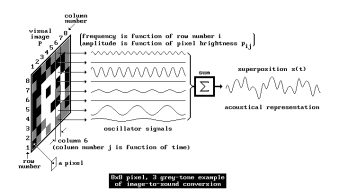
Research on sonification of images / video material and different approaches – focus on RGB

The paper by Kopecek and Ošlejšek presents a system that enables visually impaired users to perceive color images through sound using a semantic color model. Each primary color (such as red, green, or blue) is assigned a unique sound, and colors in an image are approximated by the two closest primary colors. These are represented through two simultaneous tones, with volume indicating the proportion of each color. Users can explore images by selecting pixels or regions using input devices like a touchscreen or mouse. The system calculates the average color of the selected area and plays the corresponding sounds. Distinct audio cues indicate image boundaries, and sounds can be either synthetic or instrument-based, with timbre and pitch helping to differentiate them. Users can customize colors and sounds for a more personalized experience. This approach allows for dynamic, efficient exploration of images and supports navigation via annotated SVG formats.

image seperation by Kopecek and Ošlejšek

The review by Sarkar, Bakshi, and Sa offers an overview of various image sonification methods designed to help visually impaired users interpret visual scenes through sound. It covers techniques such as raster scanning, query-based, and path-based approaches, where visual data like pixel intensity and position are mapped to auditory cues. Systems like vOICe and NAVI use high and low-frequency tones to represent image regions vertically. The paper emphasizes the importance of transfer functions, which link image properties to sound attributes such as pitch, volume, and frequency. Different rendering methods—like audification, earcons, and parameter mapping—are discussed in relation to human auditory perception. Special attention is given to color sonification, including the semantic color model introduced by Kopecek and Ošlejšek, which improves usability through clearly distinguishable tones. The paper also explores applications in fields such as medical imaging, algorithm visualization, and network analysis, and briefly touches on sound-to-image conversions.

Principles of the image-to-sound mapping

Matta, Rudolph, and Kumar propose the theoretical system “Auditory Eyes,” which converts visual data into auditory and tactile signals to support blind users. The system comprises three main components: an image encoder that uses edge detection and triangulation to estimate object location and distance; a mapper that translates features like motion, brightness, and proximity into corresponding sound and vibration cues; and output generators that produce sound using tools like Csound and tactile feedback via vibrations. Motion is represented using effects like Doppler shift and interaural time difference, while spatial positioning is conveyed through head-related transfer functions. Brightness is mapped to pitch, and edges are conveyed through tone duration. The authors emphasize that combining auditory and tactile information can create a richer and more intuitive understanding of the environment, making the system potentially very useful for real-world navigation and object recognition.

References

Kopecek, Ivan, and Radek Ošlejšek. 2008. “Hybrid Approach to Sonification of Color Images.” In Third 2008 International Conference on Convergence and Hybrid Information Technology, 721–726. IEEE. https://doi.org/10.1109/ICCIT.2008.152.

Sarkar, Rajib, Sambit Bakshi, and Pankaj K Sa. 2012. “Review on Image Sonification: A Non-visual Scene Representation.” In 1st International Conference on Recent Advances in Information Technology (RAIT-2012), 1–5. IEEE. https://doi.org/10.1109/RAIT.2012.6194495.

Matta, Suresh, Heiko Rudolph, and Dinesh K Kumar. 2005. “Auditory Eyes: Representing Visual Information in Sound and Tactile Cues.” In Proceedings of the 13th European Signal Processing Conference (EUSIPCO 2005), 1–5. Antalya, Turkey. https://www.researchgate.net/publication/241256962.

Vergleich verschiedener KI-Video-Tools

Im ersten Schritt meiner Recherche zu KI und KI-gestützten Video-Tools habe ich mir einen umfassenden Überblick über die gängigen Anbieter verschafft und die verschiedenen Tools einem ersten Test unterzogen.

Nachfolgend findest du eine detaillierte Auflistung der wichtigsten Funktionen, Preisstrukturen sowie meiner persönlichen Erfahrungen mit den jeweiligen Tools. Abschließend ziehe ich ein Fazit, welches meine bisherigen Erkenntnisse zusammenfasst und eine erste Einschätzung zu den besten Anwendungen für unterschiedliche Anforderungen gibt.

Adobe Firefly Video Model

Adobe Firefly Video Model richtet sich primär an professionelle Anwender aus der Film- und Medienbranche, die hochwertige KI-generierte Clips benötigen. Die Integration in Adobe Premiere Pro macht es besonders attraktiv für bestehende Adobe-Nutzer. In der Anwendung überzeugt Firefly mit einer hohen Qualität der generierten 5-Sekunden-Clips, jedoch sind die aktuellen Funktionen im Vergleich zu anderen KI-Video-Tools noch recht limitiert.

Hauptfunktionen:

  • Generierung von 5-Sekunden-Clips in 1080p​
  • Integration in Adobe Premiere Pro​
  • Fokus auf Qualität und realistische Darstellung​

Preismodell:

Gratis/in der Creative Cloud enthalten: 1.000 Generative Credits für Bild- und Vektorgrafik-Standardfunktionen wie „Text zu Bild“ und „Generatives Füllen“+ 2 KI-Videos

  • Basis: 11,08€ pro Monat für 20 Clips​ à 5 Sekunden
  • Erweitert: 33,26€ pro Monat für 70 Clips​ à 5 Sekunden
  • Premium: Preis auf Anfrage für Studios und hohe Volumen

Fazit:

+ Funktioniert an sich sehr gut, einfaches und logisches Interface, generierte Videos sehr gut (mehr dazu im 2. Blogpost „erste Anwendung“), 

+ unter Bewegungen hat man eine Auswahl an den gängigsten Kamerabewegungen wie (Zoom in/out, Schwenk links/rechts/oben/unten, statisch oder Handheld)

– leider nur 2 Probevideos möglich, auf 5 Sekunden begrenzt

–> werde für das Projekt eventuell für 1-2 Monate Adobe Firefly Standard kaufen (je nach Intensivität der Nutzung und Länge des Endprodukts vllt sogar die Erweiterte Version)

(Quelle: https://firefly.adobe.com/?media=video )

RunwayML

RunwayML ist eine vielseitige KI-Plattform, die sich auf die Erstellung und Bearbeitung von Videos spezialisiert hat. Mit einer benutzerfreundlichen Oberfläche ermöglicht sie es, Videos aus Texten, Bildern oder Videoclips zu generieren. Besonders hervorzuheben ist die Text-zu-Video-Funktion, die es ermöglicht, aus einfachen Texteingaben realistische Videosequenzen zu erstellen. Zudem bietet RunwayML die Möglichkeit, erstellte Videos direkt zu exportieren, was den Workflow erheblich erleichtert.​

Preismodelle:

  • Basic: Kostenlos, 125 einmalige Credits, bis zu 3 Videoprojekte, 5 GB Speicher.
  • Standard: $15 pro Benutzer/Monat (monatliche Abrechnung), 625 Credits/Monat, unbegrenzte Videoprojekte, 100 GB Speicher.​
  • Pro: $35 pro Benutzer/Monat (monatliche Abrechnung), 2250 Credits/Monat, erweiterte Funktionen, 500 GB Speicher.​
  • Unlimited: $95 pro Benutzer/Monat (monatliche Abrechnung), unbegrenzte Videogenerierungen, alle Funktionen enthalten.​
  • Quelle: https://runwayml.com/pricing

Aber auch die Möglichkeit „Runway for Educators“. Kann man sich anmelden, werde ich definitiv versuchen (man bekommt einmal 5.000 Credits)

Side note: Runway is incorporated into the design and filmmaking curriculums at UCLA, NYU, RISD, Harvard and countless other universities around the world. Request discounted resources to support your students.

Fazit: sieht an sich sehr vielversprechend aus, werde ich defintiv noch genauer testen,

werde eine Anfrage für Runway for Educators stellen

–> ebenfalls eine Überlegung wert ein Abo abzuschließen für den Zeitraum des Projekts, wird aber je nach Anwendung und nach Ergebnissen noch entschieden

(Quelle: https://runwayml.com )

Midjourney

Midjourney ist ein KI-gestützter Bildgenerator, der durch die Eingabe von Textbeschreibungen hochwertige und künstlerische Bilder erzeugt. Die Plattform ist bekannt für ihre Fähigkeit, lebendige und detaillierte Bilder zu erstellen, die den Nutzervorgaben entsprechen. Allerdings liegt der Fokus von Midjourney hauptsächlich auf der Bildgenerierung, und es bietet keine dedizierten Text-zu-Video-Funktionen.​

Preismodelle:

  • Basis: $10 pro Monat, begrenzte Nutzung.​
  • Standard: $30 pro Monat, erweiterte Nutzung.​
  • Pro: $60 pro Monat, unbegrenzte Nutzung.​

Fazit:

Kann allerdings gut mit den anderen beiden KI-Tools kombiniert werden, z.B. Bilderstellung mit Midjourney und „Animation/Bewegung“ in den anderen Programmen

+ an sich ein tolles KI-Tool, vor allem das feature, dass 4 Bilder generiert werden und man sich mit den Verweisen auf die Bilder beziehen kann, liefert tolle Ergebnisse

– an sich „komplizierter“ als andere KI-Tools dadurch, dass eine „gewisse Sprache“ bei den Prompts verwendet werden muss, macht aber sobald man es einmal verstanden hat keine großen Unterschied

(Quelle: https://www.midjourney.com/home https://www.victoriaweber.de/blog/midjourney )

Sora

Sora ist ein von OpenAI entwickeltes KI-Modell, das es ermöglicht, realistische Videos basierend auf Texteingaben zu erstellen.

–  Text-zu-Video-Generierung: Sora kann kurze Videoclips von bis zu 20 Sekunden Länge in verschiedenen Seitenverhältnissen (Querformat, Hochformat, quadratisch) erstellen. Nutzer können durch Texteingaben Szenen beschreiben, die dann von der KI in bewegte Bilder umgesetzt werden. ​OpenAI

–  Remix: Mit dieser Funktion können Elemente in bestehenden Videos ersetzt, entfernt oder neu interpretiert werden, um kreative Anpassungen vorzunehmen. ​

–  Re-Cut: Sora ermöglicht es, Videos neu zu schneiden und zu arrangieren, um alternative Versionen oder verbesserte Sequenzen zu erstellen. ​

Preismodell:

– Plus:
20$/Monat
includes the ability to explore your creativity through video
Up to 50 videos (1.000 credits)
Limited relaxed videos
Up to 720p resolution and 10s duration videos

– Pro
200$/Monat
includes unlimited generations and the highest resolution for high volume workflows
Up to 500 videos (10.000 credits)
Unlimited relaxed videos
Up to 1080p resolution and 20s duration videos

Fazit:

+ tolles Tool, intuitiveres Interface, vor allem sehr attraktiv, da ich bereits ein ChatGPT Plus Abo haben und im Vergleich zu Adobe kein zusätzliches Abo für die Grundfunktionen notwendig ist

+ ebenfalls inspirierend ist die Startseite, auf der viel Inspo und andere Videos zu sehen sind. Keines der anderes Tools war so aufgebaut und förderte so stark und schnell die Kreativität, vor allem sehr gut, da die Prompts immer angeben sind und einen Einblick geben, wie Prompts formuliert werden müssen um gute Ergebnisse zu erhalten

+ ebenfalls sehr gut gelöst, ist die Tutorial Section

(Quelle: https://sora.com/subscription )

GESAMTFAZIT:

Für meinen weiteren Forschungs- und Projektprozess werde ich die verschiedenen KI-gestützten Videotools weiterhin intensiv testen und ausgiebige Experimente durchführen.

Besonders positiv überrascht hat mich bisher Sora, da der Einstieg dank meines ChatGPT Plus-Abos äußerst unkompliziert war. Bei den anderen KI-Tools prüfe ich derzeit noch, welche Anbieter für meine Anforderungen am besten geeignet sind und ob sich ein Abonnement lohnt. Adobe und Runway stehen dabei aktuell ganz oben auf meiner Liste. Besonders bei Runway hoffe ich, ein Educator-Abo erhalten zu können, um das Tool im vollen Umfang nutzen zu können.

Prototyping II: Image Extender – Image sonification tool for immersive perception of sounds from images and new creation possibilities

Expanded research on sonification of images / video material and different approaches:

Yeo and Berger (2005) write in “A Framework for Designing Image Sonification Methods” about the challenge of mapping static, time-independent data like images into the time-dependent auditory domain. They introduce two main concepts: scanning and probing. Scanning follows a fixed, pre-determined order of sonification, whereas probing allows for arbitrary, user-controlled exploration. The paper also discusses the importance of pointers and paths in defining how data is mapped to sound. Several sonification techniques are analyzed, including inverse spectrogram mapping and the method of raster scanning (which already was explained in the Prototyping I – Blog entry), with examples illustrating their effectiveness. The authors suggest that combining scanning and probing offers a more comprehensive approach to image sonification, allowing for both global context and local feature exploration. Future work includes extending the framework to model human image perception for more intuitive sonification methods.

Sharma et al. (2017) explore action recognition in still images using Natural Language Processing (NLP) techniques in “Action Recognition in Still Images Using Word Embeddings from Natural Language Descriptions.” Rather than training visual action detectors, they propose detecting prominent objects in an image and inferring actions based on object relationships. The Object-Verb-Object (OVO) triplet model predicts verbs using object co-occurrence, while word2vec captures semantic relationships between objects and actions. Experimental results show that this approach reliably detects actions without computationally intensive visual action detectors. The authors highlight the potential of this method in resource-constrained environments, such as mobile devices, and suggest future work incorporating spatial relationships and global scene context.

Iovino et al. (1997) discuss developments in Modalys, a physical modeling synthesizer based on modal synthesis, in “Recent Work Around Modalys and Modal Synthesis.” Modalys allows users to create virtual instruments by defining physical structures (objects), their interactions (connections), and control parameters (controllers). The authors explore the musical possibilities of Modalys, emphasizing its flexibility and the challenges of controlling complex synthesis parameters. They propose applications such as virtual instrument construction, simulation of instrumental gestures, and convergence of signal and physical modeling synthesis. The paper also introduces single-point objects, which allow for spectral control of sound, bridging the gap between signal synthesis and physical modeling. Real-time control and expressivity are emphasized, with future work focused on integrating Modalys with real-time platforms.

McGee et al. (2012) describe Voice of Sisyphus, a multimedia installation that sonifies a black-and-white image using raster scanning and frequency domain filtering in “Voice of Sisyphus: An Image Sonification Multimedia Installation.” Unlike traditional spectrograph-based sonification methods, this project focuses on probing different image regions to create a dynamic audio-visual composition. Custom software enables real-time manipulation of image regions, polyphonic sound generation, and spatialization. The installation cycles through eight phrases, each with distinct visual and auditory characteristics, creating a continuous, evolving experience. The authors discuss balancing visual and auditory aesthetics, noting that visually coherent images often produce noisy sounds, while abstract images yield clearer tones. The project draws inspiration from early experiments in image sonification and aims to create a synchronized audio-visual experience engaging viewers on multiple levels.

Software Interface for Voice of Sisyphus (McGee et al., 2012)

Roodaki et al. (2017) introduce SonifEye, a system that uses physical modeling sound synthesis to convey visual information in high-precision tasks, in “SonifEye: Sonification of Visual Information Using Physical Modeling Sound Synthesis.” They propose three sonification mechanisms: touch, pressure, and angle of approach, each mapped to sounds generated by physical models (e.g., tapping on a wooden plate or plucking a string). The system aims to reduce cognitive load and avoid alarm fatigue by using intuitive, natural sounds. Two experiments compare the effectiveness of visual, auditory, and combined feedback in high-precision tasks. Results show that auditory feedback alone can improve task performance, particularly in scenarios where visual feedback may be distracting. The authors suggest applications in medical procedures and other fields requiring precise manual tasks.

Dubus and Bresin review mapping strategies for the sonification of physical quantities in “A Systematic Review of Mapping Strategies for the Sonification of Physical Quantities.” Their study analyzes 179 publications to identify trends and best practices in sonification. The authors find that pitch is the most commonly used auditory dimension, while spatial auditory mapping is primarily applied to kinematic data. They also highlight the lack of standardized evaluation methods for sonification efficiency. The paper proposes a mapping-based framework for characterizing sonification and suggests future work in refining mapping strategies to enhance usability.

References

Yeo, Woon Seung, and Jonathan Berger. 2005. “A Framework for Designing Image Sonification Methods.” In Proceedings of ICAD 05-Eleventh Meeting of the International Conference on Auditory Display, Limerick, Ireland, July 6-9, 2005.

Sharma, Karan, Arun CS Kumar, and Suchendra M. Bhandarkar. 2017. “Action Recognition in Still Images Using Word Embeddings from Natural Language Descriptions.” In 2017 IEEE Winter Conference on Applications of Computer Vision (WACV), 978-1-5090-4941-7/17. DOI: 10.1109/WACVW.2017.17.

Iovino, Francisco, Rene Causse, and Richard Dudas. 1997. “Recent Work Around Modalys and Modal Synthesis.” In Proceedings of the International Computer Music Conference (ICMC).

McGee, Ryan, Joshua Dickinson, and George Legrady. 2012. “Voice of Sisyphus: An Image Sonification Multimedia Installation.” In Proceedings of the 18th International Conference on Auditory Display (ICAD-2012), Atlanta, USA, June 18–22, 2012.

Roodaki, Hessam, Navid Navab, Abouzar Eslami, Christopher Stapleton, and Nassir Navab. 2017. “SonifEye: Sonification of Visual Information Using Physical Modeling Sound Synthesis.” IEEE Transactions on Visualization and Computer Graphics 23, no. 11: 2366–2371. DOI: 10.1109/TVCG.2017.2734320.

Dubus, Gaël, and Roberto Bresin. 2013. “A Systematic Review of Mapping Strategies for the Sonification of Physical Quantities.” PLoS ONE 8(12): e82491. DOI: 10.1371/journal.pone.0082491.