In my last post, I unveiled the blueprint for my smart retail system—the three core pillars of the AR Application, the Cloud Platform, and the In-Store IoT Network. Today, I’m putting that blueprint into motion. I’ll follow my case study shopper, Alex, through the IKEA store and analyze the precise sequence of data “handshakes” that make his journey possible. Additionally this blog post is super technical due to my personal interest and it’s help to be able to further develop the technology
While this experience is designed to be accessible on any modern smartphone, it is primarily envisioned for the next generation of consumer Smart AR Glasses. The goal is a truly heads-up, hands-free experience where digital information is seamlessly woven into the user’s field of view.
Let’s dive into the technical specifics that happen on Alex’s chosen AR device.
1. The Task: High-Precision In-Store Navigation
The Scenario: Alex arrives at the store, puts on his smart glasses, and wants to find the “BILLY bookshelf.” He needs a clear, stable AR path to appear in front of him.
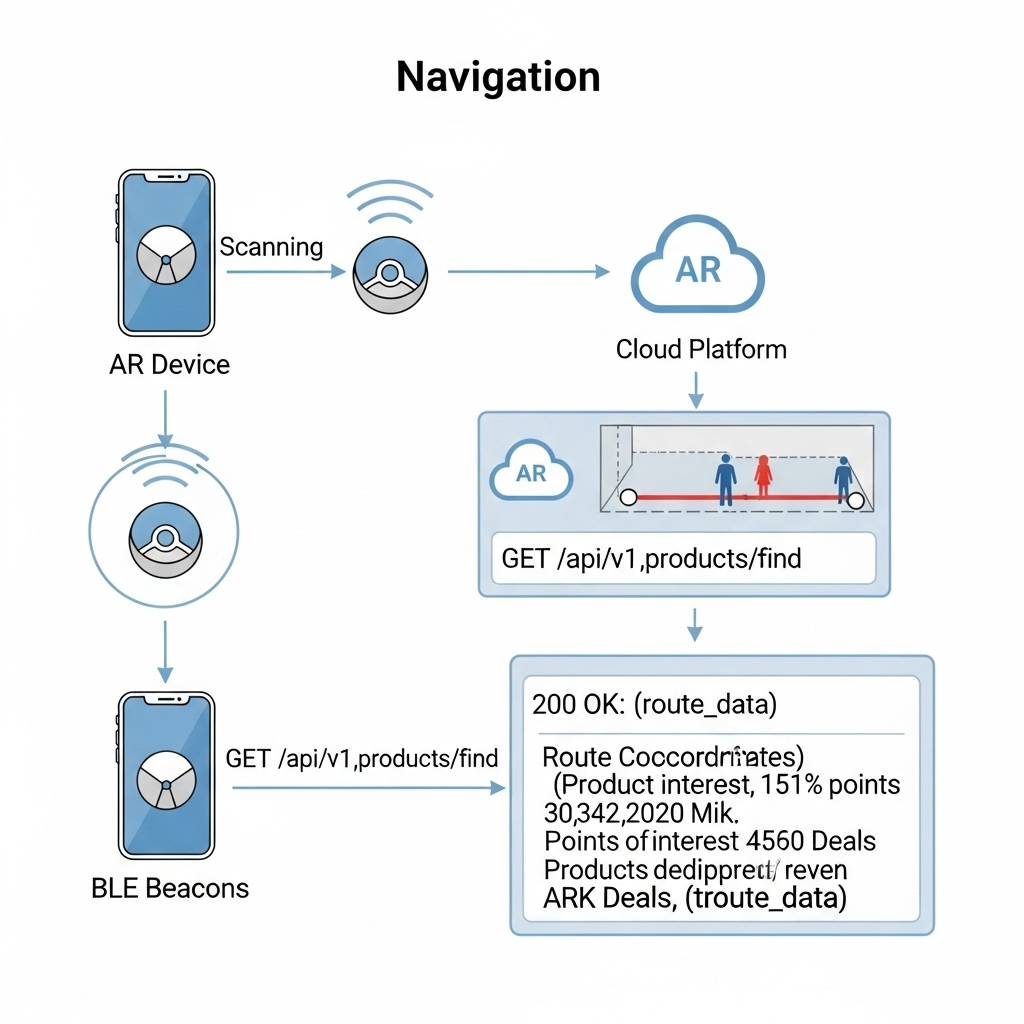
The Data Flow: The immediate challenge is knowing Alex’s precise location, as GPS is notoriously unreliable indoors. To solve this, I’ve designed a hybrid indoor positioning system:
- Bluetooth Low Energy (BLE) Beacons: These are placed throughout the store. The AR device detects the signal strength (RSSI) from multiple beacons to triangulate a coarse position—getting Alex into the correct aisle.
- Visual Positioning System (VPS): This provides the critical high-precision lock. A pre-built 3D “feature map” of the store is hosted on my cloud platform. The software on the AR device matches what its camera sees in real-time against this map. By recognizing unique features—the corner of a shelf, a specific sign—it can determine its position and orientation with centimeter-level accuracy.
Here’s how they work together:
- The AR device uses BLE Beacons to get a general location.
- This coarse location is used to efficiently load the relevant section of the VPS feature map from the cloud.
- The device’s computer vision module then gets a high-precision coordinate from the VPS.
- Now, the application makes its
API call: aGETrequest to/api/v1/products/find. Therequest payloadincludes the high-precision VPS data, like{"productName": "BILLY", "location": {"x": 22.4, "y": 45.1, "orientation": {...}}}. - Backend calculates a route and returns a
JSON responsewith the path coordinates. - The application
parsesthis response and, using the continuous stream of data from the VPS,anchorsthe AR navigation path firmly onto the real-world floor, making it appear as a stable hologram in Alex’s field of view.
2. The Task: Real-Time Inventory Check
The Scenario: Alex arrives at the BILLY bookshelf. A subtle icon hovers over the shelf in his vision, indicating he can get more information.
The Data Flow:
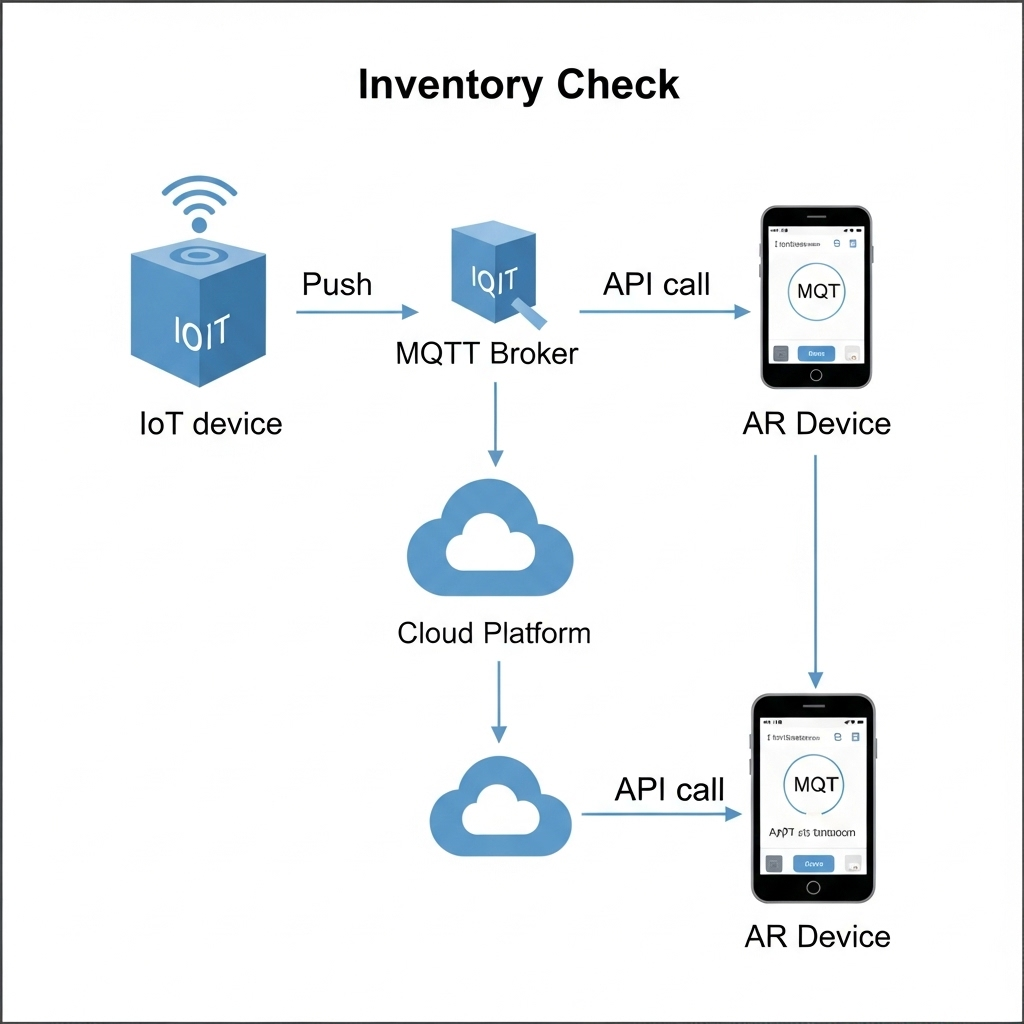
- The IoT Push: A smart shelf maintains a persistent connection to my cloud’s
MQTTbroker. When stock changes, itpublishesa data packet to an MQTT topic with a payload like{"stock": 2}. - The App Pull: When Alex’s device confirms he is looking at the shelf (via VPS and object recognition), the app makes a
GETrequest to/api/v1/inventory/shelf_B3. - My Cloud backend retrieves the latest stock value from its
Redis cache. - The app receives the
JSON responseand displays “2 In Stock” as a clean, non-intrusive overlay in Alex’s glasses.
3. The Task: AR Product Visualization in Alex’s Room
The Scenario: Alex sees a POÄNG armchair he likes. With a simple gesture or voice command, he wants to see if it will fit in his living room at home.
The Data Flow:
- Alex looks at the armchair’s tag. The device recognizes the product ID and calls the
GET /api/v1/products/poang_armchairendpoint. - My Cloud Platform responds with metadata, including a URL to its 3D model hosted on a
CDN (Content Delivery Network). - The AR device asynchronously downloads the 3D model (
.glbor.usdzformat) and loads Alex’s saved 3D room scan. - Using the device’s specialized hardware, the application
rendersthe 3D armchair model as a stable, full-scale hologram in his physical space, allowing him to walk around it as if it were really there.
This intricate dance of data is what enables a truly seamless and futuristic retail experience.
In my next post, I will finally move from the backend blueprint to the user-facing design. I’ll explore the prototyping and UI/UX Design and the design process for the interface that Alex would see and interact with through his AR device.
